You're viewing **Apigee Edge** documentation.
[Go to the
**Apigee X** documentation](http://cloud.google.com/apigee/docs/api-platform/develop/adding-cors-support-api-proxy). info
> [!WARNING]
> **WARNING** : The examples provided in this section allow access to your API proxy by any origin and should be secured **before they are used in a production environment**. For example, you might allow the domains that can access the API proxy.
CORS (Cross-origin resource sharing) is a standard mechanism that allows JavaScript
XMLHttpRequest (XHR) calls executed in a web page to interact with resources from non-origin
domains. CORS is a commonly implemented solution to the "[same-origin policy](https://en.wikipedia.org/wiki/Same-origin_policy)" that is enforced by
all browsers. For example, if you make an XHR call to the Twitter API from JavaScript code
executing in your browser, the call will fail. This is because the domain serving the page to
your browser is not the same as the domain serving the Twitter API. CORS provides a solution to
this problem by allowing servers to "opt-in" if they wish to provide cross-origin resource
sharing.
> [!NOTE]
> **Note:** Most modern browsers support CORS. View a comprehensive list of [supported browsers](https://caniuse.com/cors). For an in-depth description of CORS, see the [Cross-Origin Resource Sharing W3C
> Recommendation](https://www.w3.org/TR/cors/).
>
> If you are using a [cache
> policy](https://docs.apigee.com/api-platform/cache/persistence-tools) on your API proxy, you must ensure that the response of the CORS policy is not
> cached.
**Video:** Watch a short video to learn how to enable CORS on an API proxy.
## Typical use case for CORS
The following JQuery code calls a fictitious target service. If executed from within the
context of a browser (a web page), the call will fail because of the same-origin policy:
```
```
One solution to this problem is to create an Apigee API proxy that calls the service API on
the back end. Remember that Edge sits between the client (a browser in this case) and the backend
API (the service). Because the API proxy executes on the server, not in a browser, it
***is*** able to call the service successfully. Then, all you need to do
is attach CORS headers to the TargetEndpoint response. As long as the browser supports CORS,
these headers signal to the browser that it's okay to "relax" its same-origin policy, allowing
the cross-origin API call to succeed.
Once the proxy with CORS support is created, you can call the API proxy URL instead of the
backend service in your client-side code. For example:
```
```
> [!NOTE]
> **Note:** In the simplest case, you can return CORS headers to the client and the cross-origin request will work. More complicated cases exist where a "preflight" request is required. You can read about preflight CORS requests in [Cross-Origin Resource Sharing W3C Recommendation](https://www.w3.org/TR/cors/), as well as in numerous articles and blogs. See also "[Handling CORS preflight requests](https://docs.apigee.com/api-platform/develop/adding-cors-support-api-proxy#Preflight)" below.
## Attaching an Add CORS policy to a new API
proxy
You can add CORS support to an API proxy by attaching an "Add CORS" policy to the API proxy
when you create it. To add this policy, select the **Add CORS headers** checkbox in
the Security page of the Build a Proxy wizard.
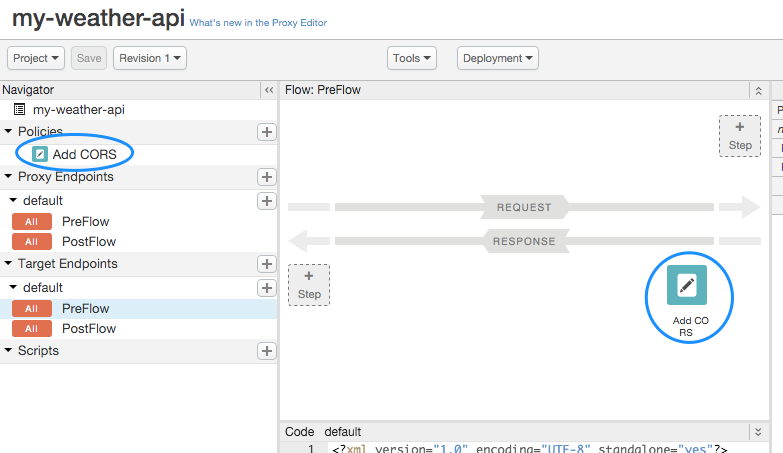
When you select this checkbox, a policy called Add CORS is automatically added to the system
and attached to the TargetEndpoint response preflow, as shown in the following figure:
The Add CORS policy is implemented as an [AssignMessage policy](https://docs.apigee.com/api-platform/reference/policies/assign-message-policy), which
adds the appropriate headers to the response.
Basically, the headers let the browser know which origins it will share its resources with,
which methods it accepts, and so on. You can read more about these CORS headers in the
[Cross-Origin Resource Sharing W3C Recommendation](https://www.w3.org/TR/cors/).
You should modify the policy, as follows:
- Add the `content-type` and `authorization` headers (required to support basic authentication or OAuth2) to the `Access-Control-Allow-Headers` header, as shown in the code excerpt below.
- For OAuth2 authentication, you may need to take steps to correct [non-RFC-compliant behavior](https://docs.apigee.com/api-platform/reference/policies/oauthv2-policy#non-rfc-compliant-behavior).
- It is recommended that you use `` to set the CORS headers instead of ``, as shown in the excerpt below. When using ``, if the `Access-Control-Allow-Origin` header already exists, you will receive the following error:
`The 'Access-Control-Allow-Origin' header contains multiple values '*, *', but only one is allowed.`
For more information, see [CORS Error : header contains multiple values '\*, \*', but only one is allowed](https://discuss.google.dev/t/cors-error-header-contains-multiple-values-but-only-one-is-allowed/9334).
```
Add CORS{request.header.origin}origin, x-requested-with, accept, content-type, authorization3628800GET, PUT, POST, DELETEtrue
```
## Adding CORS headers to an existing proxy
You need to manually create a new Assign Message policy and copy the code for the Add CORS
policy listed in the previous section into it. Then, attach the policy to the response preflow of
the TargetEndpoint of the API proxy. You can modify the header values as needed. For more
information on creating and attaching policies, see [What's a policy?](https://docs.apigee.com/api-platform/develop/policy-attachment-and-enforcement).
## Handling CORS
preflight requests
**CORS preflight** refers to sending a request to a server to verify if it
supports CORS. Typical preflight responses include which origins the server will accept CORS
requests from, a list of HTTP methods that are supported for CORS requests, headers that can be
used as part of the resource request, the maximum time preflight response will be cached, and
others. If the service does not indicate CORS support or does not wish to accept cross-origin
requests from the client's origin, the cross-origin policy of the browser will be enforced and
any cross-domain requests made from the client to interact with resources hosted on that server
will fail.
Typically, CORS preflight requests are made with the HTTP OPTIONS method. When a server that
supports CORS receives an OPTIONS request, it returns a set of CORS headers to the client that
indicate its level of CORS support. As a result of this handshake, the client knows what it is
allowed to request from the non-origin domain.
> [!NOTE]
> **Note:** If you have a Verify API key policy in the proxy endpoint PreFlow, it is applied to all the incoming requests. If you don't want to apply the policy for CORS preflight requests, add a condition to skip when the method is OPTIONS. For example, use the following API proxy configuration:
>
> ```
>
>
>
> verify-api-key
> request.verb != "OPTIONS"
>
>
>
>
> ```
For more information on preflight, refer to the [Cross-Origin Resource Sharing W3C Recommendation](https://www.w3.org/TR/cors/). There are in
addition numerous blogs and articles on CORS that you can refer to.
Apigee does not include a CORS preflight solution out of the box, but it is possible to
implement, as described in this section. The objective is for the proxy to evaluate an OPTIONS
request in a conditional flow. The proxy can then send an appropriate response back to the
client.
Let's look at a sample flow, and then discuss the parts that handle the preflight request:
```
add-corsrequest.verb == "OPTIONS" AND request.header.origin != null AND request.header.Access-Control-Request-Method != null/v1/cncdefaultsecurerequest.verb == "OPTIONS" AND request.header.origin != null AND request.header.Access-Control-Request-Method != nulldefault
```
The key parts of this ProxyEndpoint are as follows:
- A RouteRule is created to a NULL target with a condition for the OPTIONS request. Note that there is no TargetEndpoint specified. If the OPTIONS request is received and the Origin and Access-Control-Request-Method request headers are not null, the proxy immediately returns the CORS headers in a response to the client (bypassing the actual default "backend" target). For details on flow conditions and RouteRule, see [Conditions with flow variables](https://docs.apigee.com/api-platform/fundamentals/flow-variables-and-conditions).
```
request.verb == "OPTIONS" AND request.header.origin != null AND request.header.Access-Control-Request-Method != null
```
- An OptionsPreFlight flow is created that adds an Add CORS policy, containing the CORS headers, to the flow if an OPTIONS request is received and the Origin and Access-Control-Request-Method request headers are not null.
```
add-corsrequest.verb == "OPTIONS" AND request.header.origin != null AND request.header.Access-Control-Request-Method != null
```
> [!NOTE]
> **Note:** RouteRules are evaluated in the order specified in the ProxyEndpoint configuration. You should always have the default (no condition) Route at the end. Otherwise, if at the top, it will always match and never evaluate the other Route possibilities.
## Using the sample CORS solution
A sample CORS solution, implemented as a shared flow, is available on [GitHub](https://github.com/kurtkanaskie/CORS-Shared-Flow).
Import the shared flow bundle to your environment and attach it using flow hooks or directly to the API proxy flows. For details, see the
[CORS-Shared-FLow README](https://github.com/kurtkanaskie/CORS-Shared-Flow) file provided with the sample.