You're viewing **Apigee Edge** documentation.
[Go to the
**Apigee X** documentation](http://cloud.google.com/apigee/docs/api-platform/fundamentals/organization-structure). info
An organization is the top-level container in Apigee Edge. It contains all your API proxies
and related resources. While the rest of this topic goes into more depth about organizations,
here are a few practical points:
- By default, your organization name is in the URL used to call your API proxies, as described in [About virtual hosts](https://docs.apigee.com/api-platform/fundamentals/virtual-hosts). For example:
```
http(s)://your_org_name-environment.apigee.net/proxy_base_path/...
```
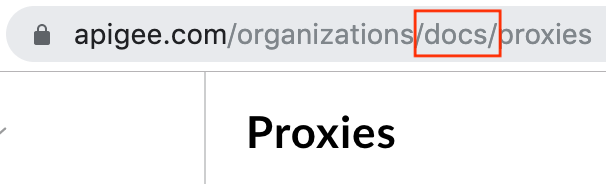
- Your organization name is in the URL of the Edge management UI. For example, the following URL displays the API proxies for the `docs` organization:
- While you may have created only one organization, you can belong to other organizations as a user or administrator with specific permissions. In the Edge management UI, if you belong to more than one organization, you can switch to a different organization as described in [Switching between your organizations](https://docs.apigee.com/api-platform/get-started/switch-org).
- When you make calls with the management API as a user in the Organization Administrator role, the organization is a required part of the path in most calls. For example, the following management API cURL request returns a list of all API proxies in an organization:
```
curl https://api.enterprise.apigee.com/v1/organizations/your_org_name/apis -u org_admin_email_address
```
**Video:** Watch a short video to learn how organizations support a
multi-tenancy architecture for API management.
## Organization components
When you create an Edge account, Edge automatically creates an organization for you. Once
created, you can add users to your organization, create API proxies and API products, and
register developers and apps.
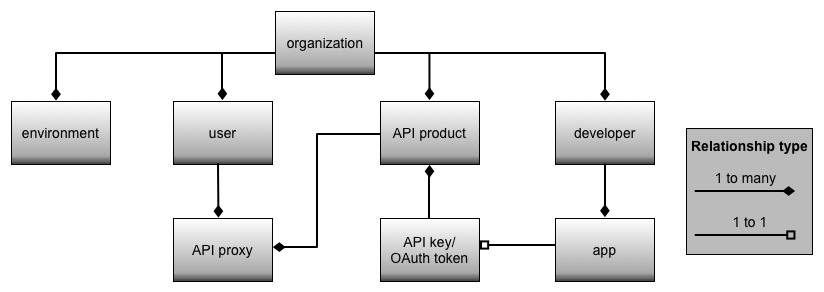
The following image shows the major components of the Edge organizational model. This
model defines how your APIs, API products, apps, and app developers are all related within
Edge.
This model does not show all of the features of Apigee Edge. If you use monetization,
then the model would have additional components. For more information, see
[Monetization overview](https://docs.apigee.com/api-platform/monetization/basics-monetization). See
[Manage companies and developers](https://docs.apigee.com/api-platform/monetization/manage-companies-developers)
for information on managing companies and developers with monetization.
> [!NOTE]
> **Note:** For Cloud customers, you must contact [Apigee Edge Support](https://docs.apigee.com/api-platform/troubleshoot/support) to add additional organizations to your account, or to delete an organization.
>
> For Edge for Private Cloud customers, the system administrator can add or delete an
> organization. See the Edge *Operations Guide* , available on the Apigee ftp site:
> , for more information.
### Organization names
The name of the organization is:
- **Evaluation org:** `username-eval`
- **Paid org:** User-defined at the time of initial provisioning
Once created, you cannot rename an organization.
The organization name becomes part of the URL to your API proxies and part of the URL when
making a request to the Edge management API. For example, a typical URL used to access an API
proxy has the form:
```
http://org-name-env.apigee.net/v1/weather/forecastrss
```
where:
- org-name is the name of your organization.
- env is the deployment environment of the API proxy, which is either test or prod.
For example:
```
http://myorg-test.apigee.net/v1/weather/forecastrss
```
### Organization components
The following table describes the components of the organizational model in more detail:
| Component | Description |
|---|---|
| Organization | Every Apigee account maps to one or more organizations on Apigee Edge. The organization contains a representation of all components including API proxies, API products, API packages, apps, and developers. Account holders are not limited to a single organization. Some account holders might define or be a member of multiple organizations that support different app developer communities. > [!NOTE] > **Note:** Free Edge accounts are limited to *creating* only a single organization---though a free account holder can be a member of multiple existing organizations. |
| Environment | A runtime execution context for the API proxies in an organization. See the section below for more on environments. |
| User | Within an organization, where the person creating the account is automatically an administrator, you can create more users. Users make up the organization's API team, which can include people such as administrators, API proxy and API product creators, users monitoring analytics and other statistics, and any others. Different users can have different roles and access privileges. For example, define some users as Organization Administrators and Operations Administrators with privileges to modify the organization and its components. Define other users with permissions to create API proxies and API products, but without the privileges to modify other users. Users can be members of multiple organizations. For example, your company might define multiple organizations on Apigee Edge to support different developer communities. Internally though, the same people build all of the API proxies and API products and are therefore members of all of your organizations. You don't have to create an Apigee account---that is, create an Apigee organization---to be a user. An administrator can add you to an existing organization. All users log in to Apigee Edge here: . |
| API proxy | The users in an organization create one or more API proxies. An API proxy defines a mapping of a publicly available HTTP endpoint to a backend service. API proxies can also be configured to include security (such as OAuth), perform message transformation (such as XML to JSON), limit traffic to backend services, and perform other valuable operations on the request, the response, and with service callouts. Edge collects data for analytics on API proxies. |
| API product | The users in an organization create one or more API products, where an API product is a bundle of API proxies combined with a service plan. That service plan can set access limits on API proxies, provide security, allow monitoring and analytics, and provide additional features. Edge collects data for analytics on API products. |
| Developer | An organization contains one or more developers who build the apps that consume the APIs (assembled into API products) defined by your organization. Developers consume APIs but cannot create APIs or perform any other actions in the organization. Developers can be internal to your company, they can be partners, or they can be external developers who pay for access to your APIs. Developers must be registered in your organization before they can register an app and receive an API key to access your APIs. As an API provider, it is up to you to determine how to add, update, or remove developers in your organization. You can manually add them through the Edge management UI, create a developer portal to register them through a website, or define your own registration mechanism by using the Edge management API. A developer is not required to have an account on Edge, and most developers will not need to know anything about Edge. If the developer does have an account on Edge, it is typically as a user in a different organization, or to use the Edge API Services. |
| App | Developers create one or more client apps that consume your APIs. Developers must register their apps with your organization. An App in Edge is a representation of a developer's actual app that provides the developer with an API key to pass in with every request to your APIs. Because all apps are registered in your organization, you can use Edge to monitor and collect analytic information on the app and on its use of your APIs. |
| API key/OAuth token | Depending on the authorization mechanism you define for your APIs, the app passes an API key along with every request to your APIs. If that key is valid, the request is allowed. Edge supports different types of authentication, such as a simple API key, two-legged OAuth, three-legged OAuth, and others. As an API provider, you must define a way for developers to register their apps. It is by registering their app that you return to the developer the key required to access your APIs. At the time of app registration, the developer can choose to access a single API product or multiple API products. The developer's actual app uses the same key to access all API products associated with the app (the registered representation of the developer's app in Edge). At any time, you can revoke the key so that the developer's app no longer has access to your APIs (even though the registered representation of the developer's app still exists in your organization). Or, you can define a time limit on a key so that the developer must refresh the key after a specific time. |
## About environments
An *environment* is a runtime execution context for the API proxies in an organization.
You must deploy an API proxy to an environment before it can be accessed. You can deploy an API
proxy to a single environment or to multiple environments.
An organization can contain multiple environments. For example, you might define a `dev`,
`test`, and `prod` environment in an organization.
> [!NOTE]
> **Note:** When you first create your organization in a Cloud-based deployment of Edge, Apigee automatically creates two environments in your organization: `prod` and `test`. To create additional environments, contact [Apigee Edge Support](https://docs.apigee.com/api-platform/troubleshoot/support).
>
> For an Edge for Private Cloud installation, no organization or environments are created by
> default. You have to create them as part of the installation process. See the Edge
> *Installation Guide* for more, which is available from your private FTP account or on
> the [Apigee Support
> Portal](https://apigee.com/about/support/portal) under **Libraries**.
Organization provides scope for some Apigee capabilities. For example, key-value-map (KVM)
data can be made available at the organization level, meaning that API Proxies deployed to any
environment would get the same data from KVM. Some capabilities, such as caching, can be scoped
to the organization, or to a specific environment within the organization.
Apigee analytics data is partitioned by a combination of organization and environment.
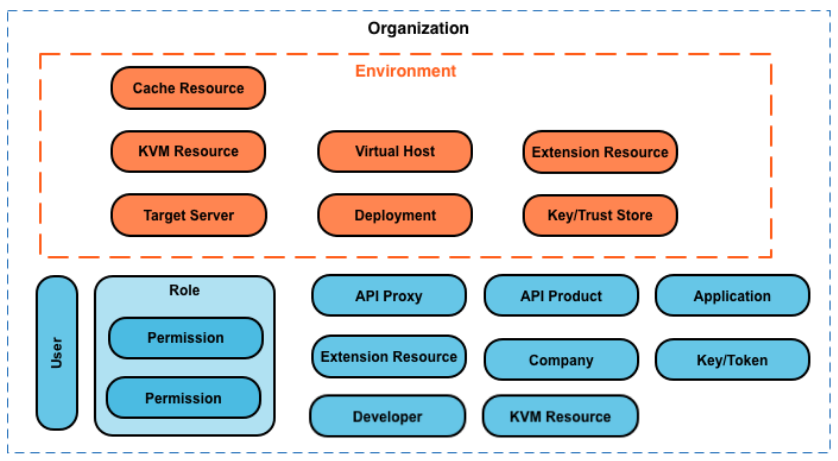
Shown below are the major entities you manage within an organization, including those defined
globally in the organization, and those defined specifically to an environment: