You're viewing **Apigee Edge** documentation.
[Go to the
**Apigee X** documentation](http://cloud.google.com/apigee/docs/api-platform/fundamentals/connecting-proxies-other-proxies). info
You can specify that one proxy is the target endpoint of another, effectively connecting the
two proxies in a proxy chain. Chaining proxies in this way can help you avoid a network hop, and
so improve overall performance.
> [!NOTE]
> **Note:** Each proxy in the chain counts as one call against quota.
> [!NOTE]
> **Note:** Proxy chaining provides one way to reuse proxies. For another way, in which you develop components that are expressly designed to be reused, be sure to see [Reusable shared flows](https://docs.apigee.com/api-platform/fundamentals/shared-flows).
With proxy chaining, you specify that one proxy is the local target endpoint of the other.
Rather than using the `HTTPTargetConnection` element to make a call to the second
proxy, you use the `LocalTargetConnection` element.
```
myproxy2default
```
You might find proxy chaining useful when you have a proxy that offers some discrete low-level
functionality that other proxies will consume. For example, a proxy that exposes
create/read/update/delete operations with a backend data store could be the target proxy for
multiple other proxies that expose the data to clients.
> [!NOTE]
> **Note:** Proxies you want to connect in this way must be in the same organization and environment. When the proxy you're connecting with is outside this scope, consider connecting to it as an external resource using the `HTTPTargetConnection` element (as described in [API proxy configuration reference](https://docs.apigee.com/api-platform/reference/api-proxy-configuration-reference)).
**Video:** Watch a short video to learn more about API proxy chaining.
## How proxy chaining works
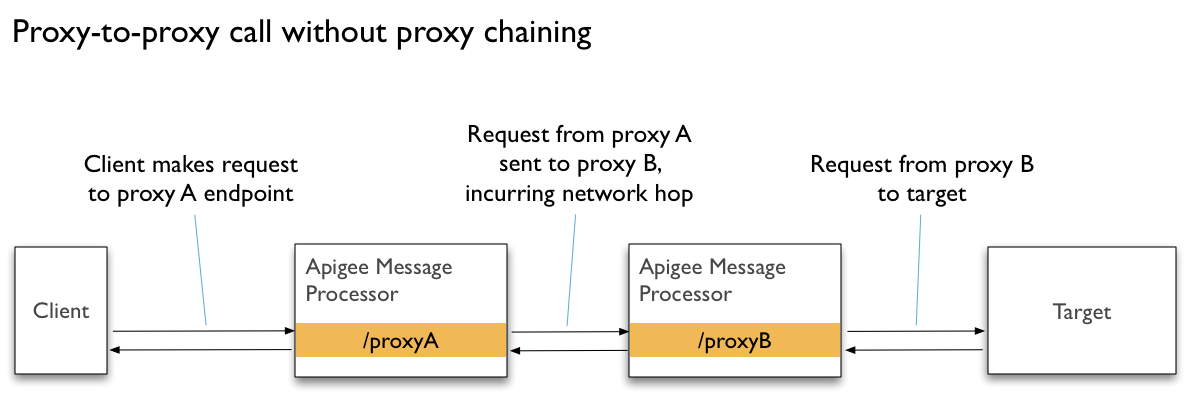
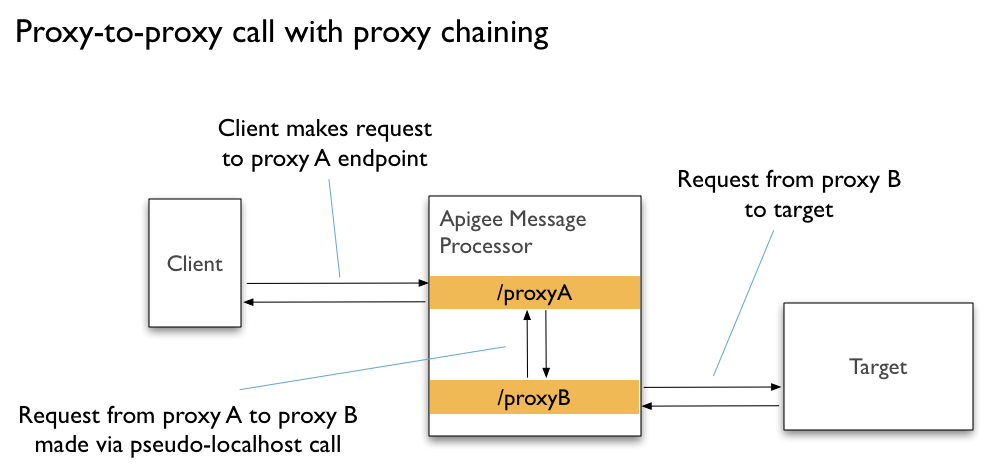
Proxy chaining uses a local connection to minimize network overhead when calling one proxy
from another. This local connection is more efficient because it bypasses network features such
as load balancers, routers, and message processors.
The following illustrates the difference between connecting proxies using `HTTPTargetConnection`
and `LocalTargetConnection` (proxy chaining):
You connect proxies by specifying that one is a local target endpoint of the other. You can
create a local connection between proxies in two ways:
- By specifying the name of the target proxy and a `ProxyEndpoint` name
- By specifying a path to the target proxy endpoint
You connect target proxies within a `TargetEndpoint` configuration, using a
`LocalTargetConnection` element, as described below.
> [!WARNING]
> **Warning:** When chaining API proxies, take care to avoid *infinite loop* recursive callouts back into the same API proxy, which could result in system overload.
## Connecting proxies by proxy name
You can specify the target proxy by name. You might find that this is most useful when you're
creating the connection from the start and developing the proxies together. If you don't know the
name (or the name might change), consider connecting with the target proxy's endpoint path, as
described below.
When you connect to a target proxy by name, you specify the proxy's name and the name of its
`ProxyEndpoint`.
The following example specifies a target proxy called `data-manager`, along with
the `ProxyEndpoint` name exposed by `data-manager`. For reference
information, see [API proxy configuration reference](https://docs.apigee.com/api-platform/reference/api-proxy-configuration-reference).
> [!NOTE]
> The `` and `` elements support the dynamic string substitution feature called [message templating](https://docs.apigee.com/api-platform/reference/message-template-intro).
```
data-managerdefault
```
## Connecting proxies by path
You can specify the target proxy by its endpoint path. You might want to do it this way when
you don't know the proxy name, or when the name might change.
If your proxy is simply the consumer of the target proxy---such as when you're not developing
both---the path might be the most reliable way to connect. For example, if the proxy you're
connecting to is developed and maintained by another team, you might want to connect using a
reliable endpoint path.
The following example specifies a target proxy at
`/v1/streetcarts/foodcarts/data-manager`, where the host is assumed to be the same as
the current proxy. For reference information, see [API proxy configuration reference](https://docs.apigee.com/api-platform/reference/api-proxy-configuration-reference).
```
/v1/streetcarts/foodcarts/data-manager
```
## Connecting proxies with the management
console
You can create proxy chaining connections using the Edge management console.
1. Open the proxy that will be consuming the target proxy.
2. In the **Navigator** , click the plus sign next to **Target Endpoints**.
3. In the **New Target Endpoint** dialog, enter the name of the target endpoint.
4. Beneath the **Target Endpoint Name** box, select one of the following:
- **Proxy Chaining** to select from a list of proxies already in the organization and environment.
1. In the **Proxy Name** dropdown, select the target proxy.
2. In the **Proxy Endpoint** box, enter the target proxy endpoint path you want to connect to.
- **Path Chaining** to enter the target proxy base path, such a `/mypath/myproxy/myendpoint`.
5. Click **Add**.
## Chained proxies, API products, and security
Proxy chaining is best for cases where both proxies are in the same API product. By default,
both are available to clients. Apigee currently doesn't support bundling the second proxy in a
separate API product that clients shouldn't have access to.
If your second proxy must be secured against direct client requests, consider adding logic to
have your second proxy examine the IP address of the client. In the case of a call made via
chaining, the IP address will be local. Your code can validate that it is local before allowing
processing to continue. See the [Access Control policy](https://docs.apigee.com/api-platform/reference/policies/access-control-policy) for one
way to do this.