You're viewing **Apigee Edge** documentation.
[Go to the
**Apigee X** documentation](http://cloud.google.com/apigee/docs/api-platform/reference/flow-configuration-reference). info
Flows are the basic building blocks of API proxies. Flows enable you to program the behavior
of an API by letting you configure the sequence in which policies and code are executed by an API
proxy.
For a conceptual overview of flows, see [Controlling how a proxy executes with
flows](https://docs.apigee.com/api-platform/fundamentals/what-are-flows).
This topic describes how to create conditional flows and add logic (policies) to flows at a
high level. The art of creating conditions involves more detail than what's covered in this
topic. For that detail, see [Overview of flow
variables](https://docs.apigee.com/api-platform/fundamentals/introduction-flow-variables) and [Conditions
with flow variables](https://docs.apigee.com/api-platform/fundamentals/flow-variables-and-conditions).
## Attaching policies to flows
Edge comes with many different types of predefined policies to implement security, manage
traffic, and manipulate messages. In addition, policies let you add your own custom code to
completely customize message processing.
For example:
- Attach an **OAuth security** policy to the **request PreFlow of the ProxyEndpoint**. Because the ProxyEndpoint's request PreFlow is the first flow in the pipeline, you can immediately reject a request if it violates your security policies.
- Attach a **JSON to XML conversion** policy to the **response PostFlow of the TargetEndpoint** to convert a response from JSON to XML.
- Attach a **JavaScript** policy to a **Conditional
Flow of the ProxyEndpoint**to execute JavaScript code to process the request
Once you have created a conditional flow, it is available for policy attachment. With the flow
selected, click the **+ Step** icon in the request or response diagram to add a
new or existing policy to the flow.
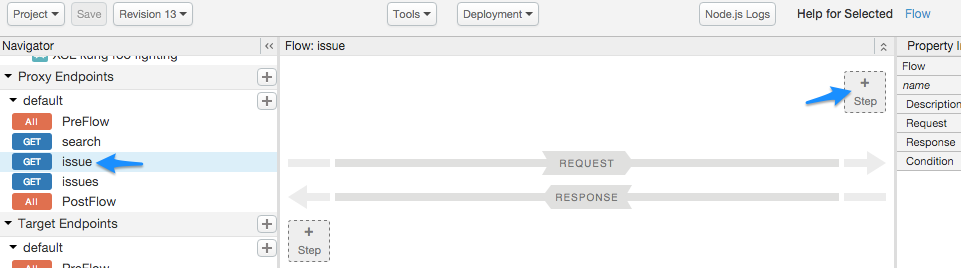
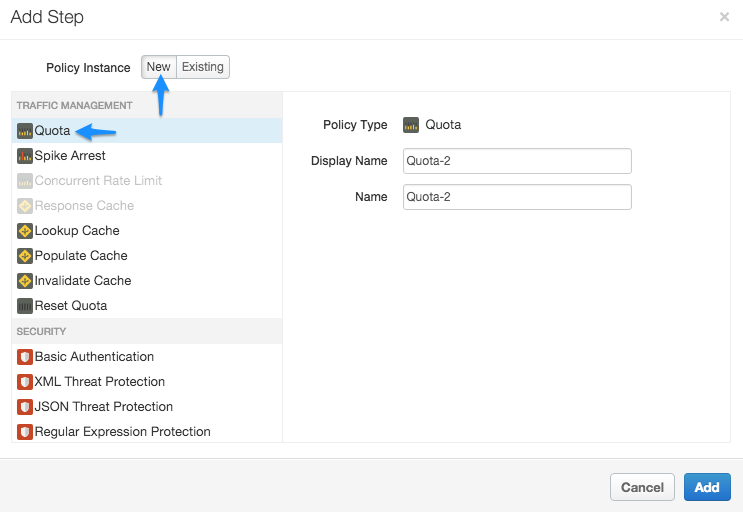
By attaching the policy to the selected flow, you are configuring the API proxy to enforce the
Quota policy only for requests made to that flow URI and verb combination. For example, if you
attach the policy to the **learn** flow in the request, the following XML is
generated in the code view of the proxy editor:
```
...
Quota-2(proxy.pathsuffix MatchesPath "/issue/**") and (request.verb = "GET")
...
```
In this configuration, if a **GET** request comes in on the API proxy with a URI
pattern of ...**/issue/\*\*** (/issue/ with anything in the URI after the last forward
slash), quota is enforced on that API call.
## About conditional flows
Any policies attached to the PreFlow or PostFlow are always executed. However, the
policies in a conditional flow are executed only if the flow's condition evaluates to true.
During the processing of a request and response, only one conditional flow is executed per
segment--the first flow whose condition evaluates to true. That means you can have one
conditional flow executed as part of each of the:
- ProxyEndpoint's request pipeline
- TargetEndpoint's request pipeline
- ProxyEndpoint's response pipeline
- TargetEndpoint's response pipeline
**Video:** Watch a short video to learn more about conditional flows.
For example, the following ProxyEndpoint definition shows a conditional flow that is executed
by the ProxyEndpoint on any `HTTP GET` request to the API proxy:
```
request.verb="GET"
...
```
Notice that the condition references the request.verb *flow
variable*. A flow variable is named references that hold state information associated
with an API transaction processed by Edge. Edge defines many state variables that you can
reference.
RESTful services are collections of API resources. An API resource is a URI path fragment
that identifies some entity that developers can access by calling your API. For example, if your
service backend provides weather reports and weather forecasts, your API might define two
conditional flows that map to those API
resources: `/reports` and `/forecasts`. When an API call
includes one of those resources in the URL, the condition evaluates to true and the logic
attached to the conditional flow is executed.
App developers then access your resources by making requests to a URL in the form:
```
http://myAPIs.myCo.com/weather/reports
```
or:
```
http://myAPIs.myCo.com/weather/forecasts
```
In an API proxy, you can define a conditional flow that corresponds to a specific
resource:
```
(proxy.pathsuffix MatchesPath "/reports")(proxy.pathsuffix MatchesPath "/forecasts")
...
```
In this example, you reference the `proxy.pathsuffix` flow variable,
which contains the suffix portion of the URL used to access the API proxy. You can then attach
different policies to the conditional flow for each resource.
## Adding a conditional flow
In this brief example, you set up a flow that executes only when the request message is an
HTTP GET.
To add a conditional flow, select the **Develop** tab in the API proxy builder.
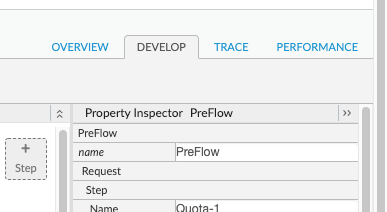
Click the **+ icon** in the desired endpoint.
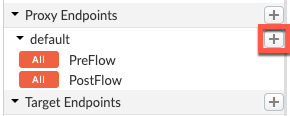
The **New Conditional Flow** form lets you name the flow and configure a condition. In the
following example, you add a simple condition that evaluates the HTTP of the request message for
a `GET` verb (as opposed to `PUT`, `POST`, etc.) on any URI after the base path.
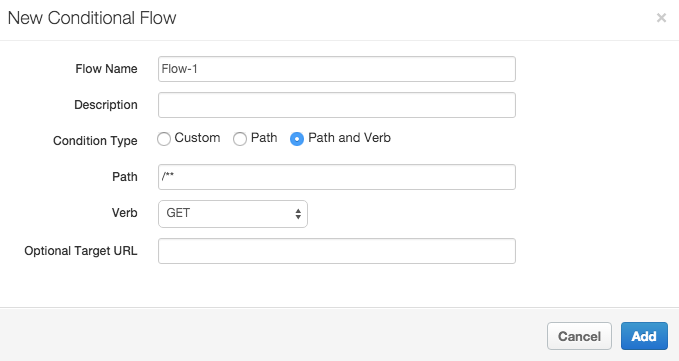
(Learn how to construct conditional statements in [Flow variables and
conditions](https://docs.apigee.com/api-platform/fundamentals/flow-variables-and-conditions).)
The new flow, called **Flow-1**, now appears in the Navigator menu.
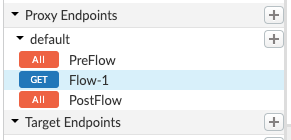
Now observe the XML configuration for the ProxyEndpoint. Select **Flow-1** in the
**Navigator** menu.
You will see the following configuration.
```
(proxy.pathsuffix MatchesPath "/**") and (request.verb = "GET")
```
## Next steps
The following topics provide more detail about constructing conditions and using
variables:
- [Using flow variables](https://docs.apigee.com/api-platform/fundamentals/introduction-flow-variables)
- [Conditions with flow variables](https://docs.apigee.com/api-platform/fundamentals/flow-variables-and-conditions)