You're viewing **Apigee Edge** documentation.
[Go to the
**Apigee X** documentation](http://cloud.google.com/apigee/docs/api-platform/fundamentals/what-are-flows). info
Any application programming model includes a way to control the flow of processing. In an API
proxy, that's done with flows. To flows you add logic, condition statements, error handling, and
so on. You use flows to control what happens, and when.
Flows are sequential stages along the API request processing path. When you add proxy logic,
such as to verify an API key, you add the logic as a step in the sequence specified by a flow.
When you define a condition to specify whether and when logic executes, you add the condition to
a flow.
The following flow configuration example defines a flow in which the VerifyAPIKey policy
executes *if* the incoming request path ends with `/` and the request's HTTP
verb is GET.
```
Get Food CartsVerify-API-Key(proxy.pathsuffix MatchesPath "/") and (request.verb = "GET")
```
The `Verify-API-Key` value in the flow's `` element serves
to include a policy configured elsewhere in the proxy with XML such as the following:
```
Verify API Key
```
## Designing flow execution sequence
You structure flows so that you can have logic execute in the right sequence along the
processing path.
> [!NOTE]
> **Note:** See [Build your first API proxy](https://docs.apigee.com/api-platform/get-started/get-started) for a simple tutorial on creating a flow. For specifics on configuring flows, see [Configuring flows](https://docs.apigee.com/api-platform/fundamentals/flow-configurations).
When deciding where to add logic, you'll first choose whether to add it to a proxy endpoint or
target endpoint. An API proxy divides its code between code that interacts with the proxy's
client (proxy endpoint) and optional code that interacts with the proxy's backend target, if any
(target endpoint).
Both endpoints contain flows, as described here:
| Endpoint type | Description | Flows supported |
|---|---|---|
| ProxyEndpoint | Contains the API proxy flows closest to the client. Provides places for logic to act first on the request from the client, then last on the response to the client. | PreFlow, conditional flows, PostFlow, PostClientFlow |
| TargetEndpoint | Contains the API proxy flows closest to the backend resource. Provides places for logic to prepare a request for, then handle the response from, a backend resource. | PreFlow, conditional flows, PostFlow |
You configure flow with XML that specifies what should happen and in what order. The following
illustration shows how flows are ordered sequentially within a proxy endpoint and target
endpoint:
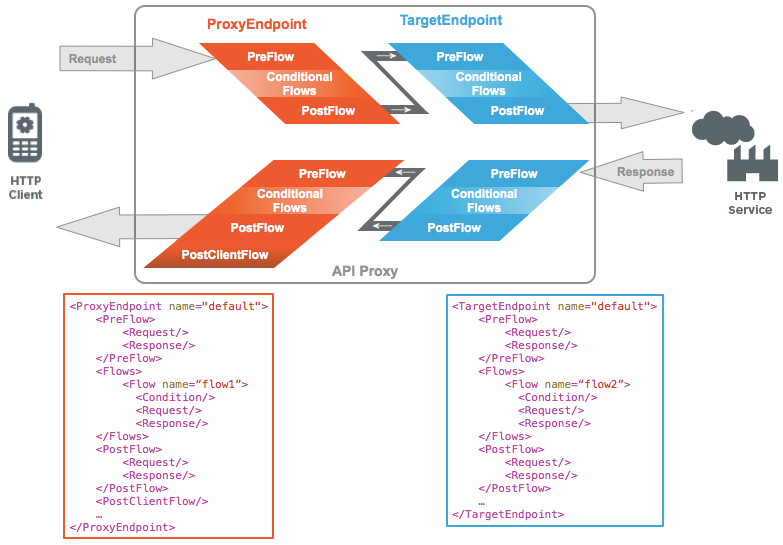
The proxy endpoint and target endpoint each contain flows that you can arrange in the
following sequence:
| Position | Flow type | Description |
|---|---|---|
| 1 | PreFlow | Useful when you need to make sure that certain code executes before anything else happens. If the PreFlow is in a target endpoint, it executes after the proxy endpoint's PostFlow. |
| 2 | Conditional Flow | The place for conditional logic. Executes after the PreFlow and before the PostFlow. Only one conditional flow is executed per segment--the first flow whose condition evaluates to true. That means you can have one conditional flow executed as part of each of the: - ProxyEndpoint's request pipeline - TargetEndpoint's request pipeline - ProxyEndpoint's response pipeline - TargetEndpoint's response pipeline |
| 3 | PostFlow | A good place to need to log data, send a notification that something happened while processing the request, and so on. Executes after conditional flows and PreFlow. If the PostFlow is in a proxy endpoint, and there's a target endpoint, the proxy endpoint PostFlow executes before the target endpoint PreFlow. |
| 4 | PostClientFlow (proxy flow only) | A flow for logging messages after a response is returned to the client. |
### Having code execute
first with a PreFlow
A PreFlow is useful when you need to make sure that certain code executes before anything else
happens.
In a proxy endpoint, a PreFlow is a great place for code that authenticates a client and
limits traffic from clients. In a target endpoint, where it begins preparing to send a request to
a backend target, a PreFlow is good for first steps in preparing to send the request.
For example, you usually don't want to service a client that has exceeded its quota. To
support these requirements, you put security and quota policies in the PreFlow segment. That way,
you don't need to worry about a condition failing to evaluate in a later conditional flow. The
policies in this flow will always execute before any other processing takes place.
In the following example, SpikeArrest and Quota policies execute before processing passes to
conditional flows.
```
Spike-ArrestQuota
```
### Having
code execute conditionally with a conditional flow
Between a PreFlow and a PostFlow, you can have flows that execute conditionally. This gives
you an opportunity to configure multiple sequences of logic, but have only one execute based on
your proxy's state. A conditional flow is optional if you can execute all logic in PreFlow or
PostFlow and no conditions are required (in other words, only one path through the endpoint is
supported).
Each flow specifies a condition that tests for different state values. This effectively
branches execution based on conditions. For example, you might want to convert XML to JSON only
when the requesting app is running on a mobile device.
> [!NOTE]
> **Note:** In a conditional flow, the condition is evaluated in both the request and response. You cannot have separate conditions for request and response. Only one conditional flow is executed--the first flow whose condition evaluates to true.
Here, quota constraints are enforced only if the request is a `GET` request with a
URI pattern of `/issue/**` (/issue/ with anything in the URI after the last forward
slash).
```
Quota(proxy.pathsuffix MatchesPath "/issue/**") and (request.verb = "GET")
```
You use flow variables to specify conditions. For more about using variables in conditions,
see [Conditions with flow variables](https://docs.apigee.com/api-platform/fundamentals/flow-variables-and-conditions).
For examples of using pattern matching in conditions, see [Pattern matching](https://docs.apigee.com/api-platform/fundamentals/flow-variables-and-conditions#patternmatching).
### Having code
execute after core logic with a PostFlow
A PostFlow is a great place to perform actions after your endpoint's core logic, and before
endpoint processing finishes. A PostFlow executes after conditional flows and PreFlow.
A PostFlow is a good place to log some data, send a notification that something happened,
transform the response message format, and so on.
In the following example, an AssignMessage policy called SetResponseHeaders sets headers of
the response message before Apigee Edge sends the response back to the client.
```
SetResponseHeaders
```
### Having code execute after the client receives your proxy's response with a PostClientFlow
A PostClientFlow can include the following policies:
- [ExtensionCallout policy](https://docs.apigee.com/api-platform/reference/policies/extension-callout-policy)
- [FlowCallout policy](https://docs.apigee.com/api-platform/reference/policies/flow-callout-policy)^\*^
- [MessageLogging policy](https://docs.apigee.com/api-platform/reference/policies/message-logging-policy)
- [ServiceCallout policy](https://docs.apigee.com/api-platform/reference/policies/service-callout-policy)
^\*^ The FlowCallout policy can only call shared flows which themselves meet the
criteria for being in the PostClientFlow (ie, only contain compatible policies).
If you include one, a PostClientFlow would be the last flow to execute, executing after a
response is sent to the client.
> [!NOTE]
> **Note:** The [ExtensionCallout policy](https://docs.apigee.com/api-platform/reference/policies/extension-callout-policy) supports only the [Google Cloud Logging Extension Version 1.3.7 and later](https://docs.apigee.com/api-platform/reference/extensions/google-cloud-logging/google-cloud-logging-extension-changelog) in the PostClientFlow. It does not support any other type of extension.
A PostClientFlow is good for final logging. Also, you can log the start and end timestamps for the response message.
Here's an example of a PostClientFlow with a MessageLogging policy attached.
```
...
Message-Logging-1
...
```
**Video:** Check out this short video showing you how to create a PostClientFlow
using the MessageLogging policy from the Four Minute Video For Developers (4MV4D) series.
For more information, see:
- [API proxy configuration reference](https://docs.apigee.com/api-platform/reference/api-proxy-configuration-reference)
- [Tutorial : Apigee Edge - Post Client Flow](https://discuss.google.dev/t/tutorial-apigee-edge-post-client-flow/17538) community article
## Adding logic to flows
When you add logic to your proxy, you do it by adding policies to your proxy's flows. Just as
flows execute in a sequence (PreFlow then Flow then PostFlow, as described in this topic), the
contents of a flow execute in a sequence.
> [!NOTE]
> **Note:** For more about policies, including how to add them with the console and in code, see [What's a policy?](https://docs.apigee.com/api-platform/develop/policy-attachment-and-enforcement) For details about attaching policies to flows, see [Configuring flows](https://docs.apigee.com/api-platform/fundamentals/flow-configurations).
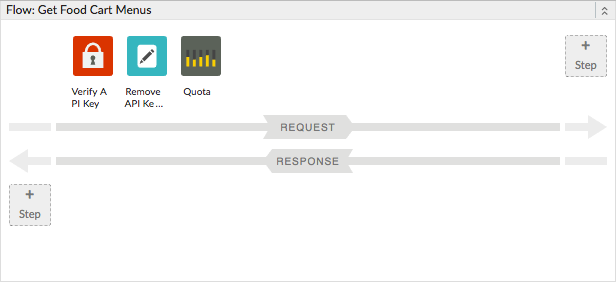
The following example flow configuration references three policies (configured elsewhere in
their own XML files). The policy referenced by `Verify-API-Key` executes before the
policy referenced by `Remove-API-Key`; both are followed by the policy represented by
`Quota`.
```
Get Food Cart MenusVerify-API-KeyRemove-API-KeyQuota(proxy.pathsuffix MatchesPath "/") and (request.verb = "GET")
```
The Apigee Edge console presents this sequence of policies as a row of icons where each icon
represents the policy.
## Debugging flows
The Apigee Edge Trace tool provides a graphical way to see how the logic in your API proxy
executes following a request. The tool illustrates processing between request and response. It
doesn't specifically illustrate the separation between PreFlow, conditional flows, and
PostFlow.
For more about tracing proxies, see [Using the Trace tool](https://docs.apigee.com/api-platform/debug/using-trace-tool-0).
## Handling errors in flows
You can raise faults from various places in an API proxy, including from flows.
The following example is the response stanza from a PreFlow in a target endpoint -- in other
words, it's the code that executes immediately upon receiving the response from a backend target.
In the example, a fault is raised if the response from the target isn't 200 (success).
```
RaiseFault(response.status.code GreaterThan "200")
```
For more about error handling, see [Handling faults](https://docs.apigee.com/api-platform/fundamentals/fault-handling).