You're viewing **Apigee Edge** documentation.
[Go to the
**Apigee X** documentation](http://cloud.google.com/apigee/docs/api-platform/get-started/apigee-feature-summary). info
Apigee Edge is a platform for developing and managing APIs. By fronting services with a
proxy layer, Edge provides an abstraction or facade for your backend service APIs and provides
security, rate limiting, quotas, analytics, and more.
For example, you can [view a webcast about how Walgreens uses APIs and Apigee Edge](https://www.youtube.com/watch?v=_Bb7UXb7ds4) to provide a rich app ecosystem
around photo printing, prescriptions, and other services that they provide.
[Build your first proxy!](https://docs.apigee.com/api-platform/get-started/get-started)
## Digital acceleration
This video gives you a quick view of how Apigee helps you evolve into a digital
business.
## Choosing between service management and API management
This video helps you understand the important differences between service management and
API management.
business.
## Making your services available on the web
Companies today want to make their backend services available on the web so that these
services can be consumed by apps running on mobile devices and desktops. A company might want to
expose services that provide product pricing and availability information, sales and ordering
services, order tracking services, and any other services required by client apps.
Companies often expose services as a set of HTTP endpoints. Client app developers then make
HTTP requests to these endpoints. Depending on the endpoint, the service might then return
data, formatted as XML or JSON, back to the client app.
The client apps that consume these services can be implemented as standalone apps for a mobile
device or tablet, as HTML5 apps running in a browser, or as any other type of app that can make a
request to an HTTP endpoint and consume any response data. These apps might be developed and
released by the same company that exposed the services, or by third-party app developers who make
use of publicly available services.
The following image shows this type of model:
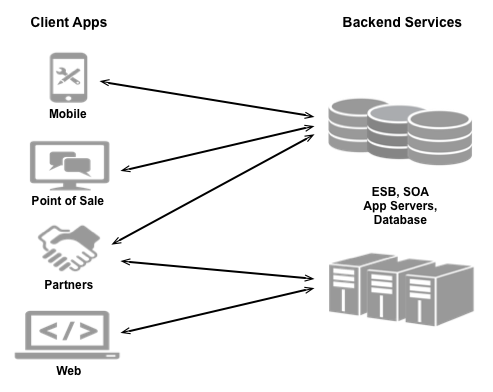
Because providers make their services available over the web, they must ensure that they have
taken all necessary steps to secure and protect their services from unauthorized access. As a
service provider, consider:
- **Security:** How will you control access to your services to prevent unauthorized access?
- **Compatibility:** Will your services work across different platforms and devices?
- **Measurability:** How can you monitor your services to make sure they are available?
- **Monetization:** How can you track and bill customers for access to your services?
- And many other considerations
After a client app has been released that accesses any services, the service provider is then
required to make sure that those services continue to work over time as they add, modify, or
delete those services. The service provider must also have a way to keep app developers aware of
any changes to the services to ensure that client apps stay in sync with those services.
Client app developers face challenges when trying to consume services from different
providers. There are many technologies available today for use by a service provider to expose
its services. The same client app might have to use one mechanism to consume a service from one
provider, and a different mechanism to consume a service from a different provider. App
developers can even face the situation where they have to use different mechanisms to consume
services from the same provider.
## Make services available through Apigee Edge
Apigee Edge enables you to provide secure access to your services
with a well-defined API that is consistent across all of your services, regardless of service
implementation. A consistent API:
- Makes it easy for app developers to consume your services.
- Enables you to change the backend service implementation without affecting the public API.
- Enables you to take advantage of the analytics, monetization, developer portal, and other features built into Edge.
The following image shows an architecture with Edge handling the requests from client apps to
your backend services:
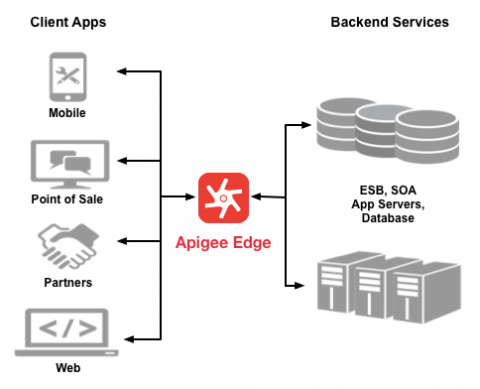
Rather than having app developers consume your services directly, they access an API proxy
created on Edge. The API proxy functions as a mapping of a publicly available HTTP endpoint to
your backend service. By creating an API proxy you let Edge handle the security and
authorization tasks required to protect your services, as well as to analyze, monitor, and
monetize those services.
Because app developers make HTTP requests to an API proxy, rather than directly to your
services, developers do not need to know anything about the implementation of your
services. All the developer needs to know is:
- The URL of the API proxy endpoint.
- Any query parameters, headers, or body parameters passed in a request.
- Any required authentication and authorization credentials.
- The format of the response, including the response data format, such as XML or JSON.
The API proxy isolates the app developer from your backend service. Therefore you are free to
change the service implementation as long as the public API remains consistent. By maintaining a
consistent frontend API, existing client apps will continue to work regardless of changes on the
backend.
You can use policies on the API proxy to add functionality to a service without having to make
any changes to the backend service. For example, you can add policies to your proxy to perform
data transformations and filtering, add security, execute conditional logic or custom code, and
to perform many other actions. The important thing to remember is you implement policies on Edge,
not on your backend server.
For more information, see [Understanding APIs and API
proxies](https://docs.apigee.com/api-platform/fundamentals/understanding-apis-and-api-proxies).
## Create an API product
An API proxy is the HTTP endpoint on Apigee Edge that developers use to access your backend
services. While it is possible, you typically do not make individual API proxies available.
Instead, you group one or more API proxies into an API product.
An API product is a bundle of API proxies combined with a service plan. That service plan can
set access limits on API proxies, provide security, allow monitoring and analytics, and provide
additional features. API products are also the central mechanism that Edge uses for authorization
and access control to your APIs.
You have a great deal of flexibility when creating API products. For example, multiple API
products can share the same API proxy. The following figure shows three API products. Notice that
all products allow access to API proxy 3, but only product A allows access to API proxy 1.
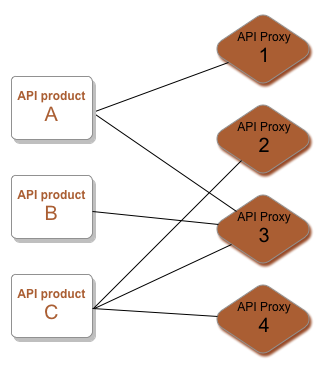
You can set different properties on each API product. For example, you might make available
one API product with a low access limit, such as 1000 requests per day, for a bargain price. You
then release another API product that provides access to the same API proxy, but with a much
higher access limit, for a higher price. Or, you might create a free API product that allows
read-only access to your services, and then sell an API product to the same API proxies that
allows read/write access.
For more information, see [Manage API
products](https://docs.apigee.com/api-platform/publish/create-api-products).
### Allow a client-side app to access your API product
When app developers decide that they want to access your services, they must first register
their client app with your API product.
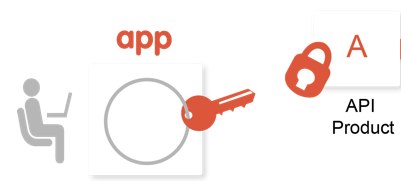
Upon registration, an app developer receives an API key
that they must then include in every request to an API proxy included in the API product. That
key is authenticated and, if authentication is successful, the request is allowed to access your
backend service.
At any time, you can revoke the key so that the client app no longer has access to your
services. Or, you can define a time limit on a key so that the developer must refresh the key
after a specific time.
You decide how to handle registration requests from developers to access your API products. By
using Apigee Edge Developer Services, you can automate the registration process; or you can use a
manual process to control access.
### Create API products and make them available to developers
1. Create one or more API proxies that map publicly available URLs to your backend services.
2. Create an API product that bundles your API proxies.
3. Deploy your API proxies and API product.
4. Let your developers know that the API product is available.
Once app developers know about the availability of your API product, they:
1. Register their client apps with your API product.
2. Receive an API key for the API product.
3. Make requests to your services through API proxies (which are bundled in the API product) and pass the API key with each request.
## Components of Apigee Edge
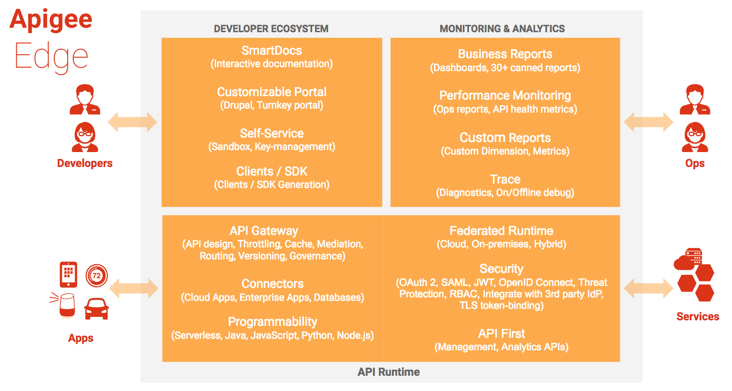
Apigee Edge consists of API runtime, monitoring and analytics, and developer services that
together provide a comprehensive infrastructure for API creation, security, management,
and operations.
The following figure shows Edge services:
### Edge API runtime
Apigee Edge API Services are all about creating and consuming APIs, whether you're building
API proxies as a service provider or using APIs, SDKs, and other convenience services as an app
developer.
The API management server provides tools for adding and configuring
your API proxies, setting up API products, and managing app developers and client apps. It
offloads many common management concerns from your backend services. When you add an API proxy,
you can apply policies to the API proxy for adding security, rate-limiting, mediation, caching,
and so on. You can also customize the behavior of your API proxy by applying custom scripts,
making calls out to third-party APIs and services, and so on. See [Understanding APIs and API
proxies](https://docs.apigee.com/api-platform/fundamentals/understanding-apis-and-api-proxies) for more.
If you're a Node.js developer, you can seamlessly add your Node.js modules to Edge to create
APIs and API mashups, all the while leveraging the benefits Edge provides, from message
transformation to security to analytics.
### Edge monitoring \& analytics
Apigee Edge API Analytics provides powerful tools to see short- and long-term usage
trends of your APIs. You can segment your audience by top developers and apps, understand usage
by API method to know where to invest, and create custom reports on business- or
operational-level information.
As data passes through Edge, several default types of information are collected including URL,
IP, user ID for API call information, latency, error data, and so on. You can create policies to
add other information, such as headers, query parameters, and portions of a request or response
extracted from XML or JSON. This information is collected asynchronously from the actual
request/response flow and therefore has no effect on API performance.
The management UI lets you view multiple metrics and dimensions in a browser, as shown in the
following figure:
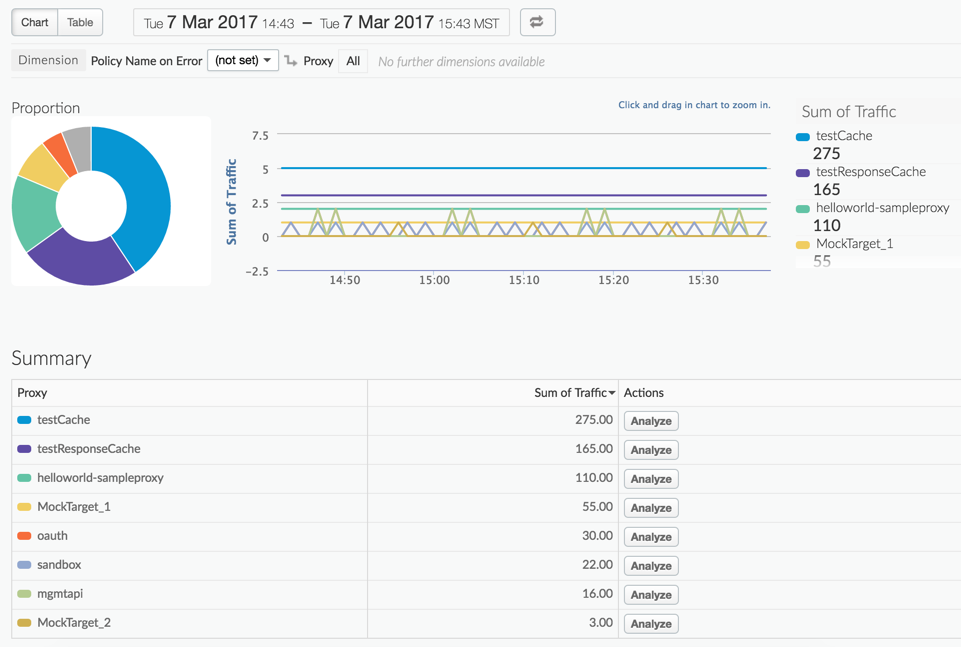
However, you can also access and control the Analytics Service by a command-line interface or
through RESTful APIs. See [API Analytics overview](https://docs.apigee.com/api-platform/analytics/analytics-services-overview) for
more.
### Edge developer ecosystem
Apigee Edge provides developer services that enable you to:
- Manage the community of app developers that are using your services.
- Work with internal and external developers and formalize the relationships with financial models.
- Onboard developers and create a developer portal. App developers connect to your portal to access API documentation to learn more about your publicly available API products and manage API keys.
Every Edge customer can create their own developer portal, either in the cloud or on-premises with Apigee Edge for Private Cloud.
Apigee Edge enables you to create two types of portals:
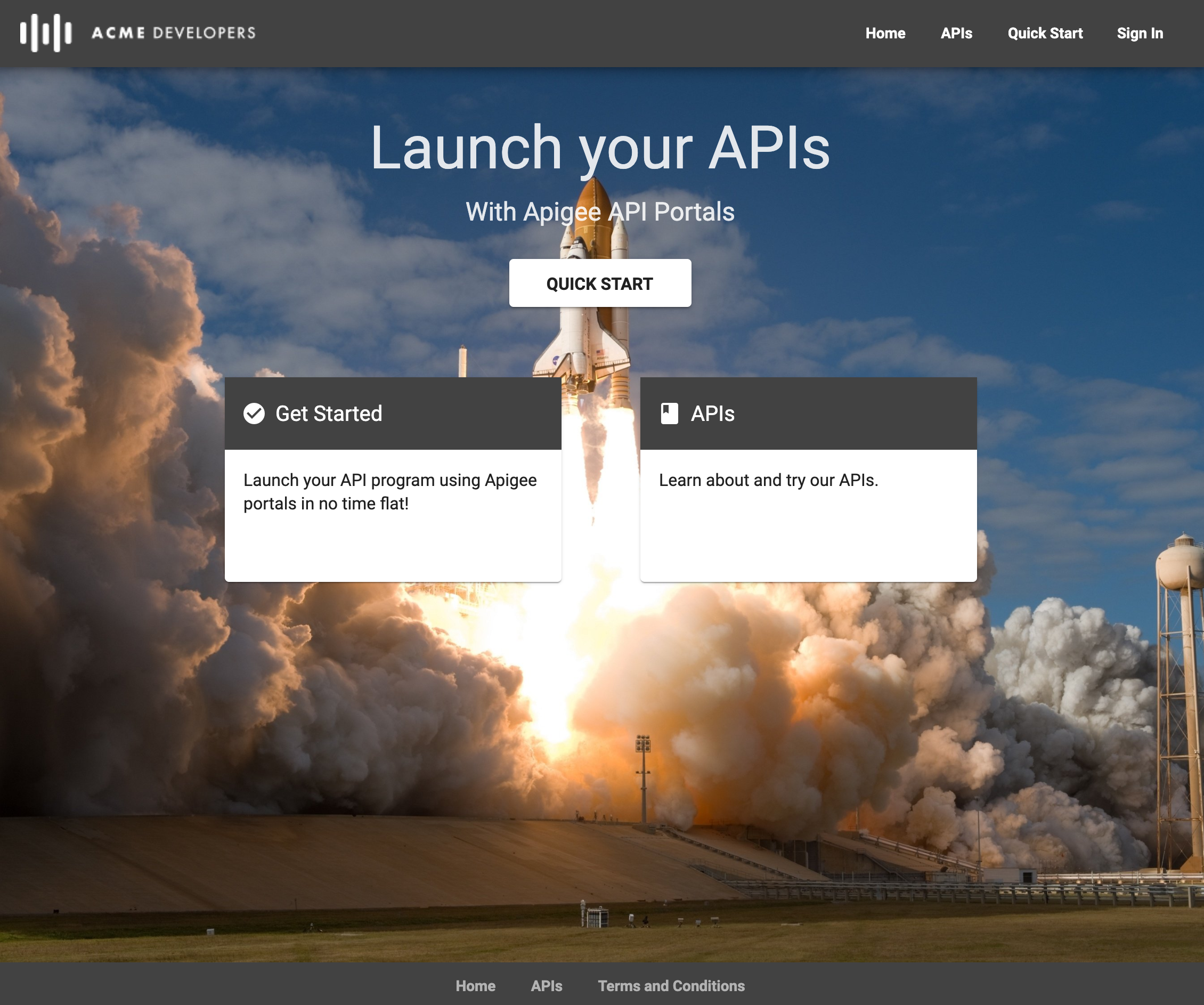
- **Integrated portal** which can be instantly provisioned. See [Build your integrated portal](https://docs.apigee.com/api-platform/publish/portal/build-integrated-portal).
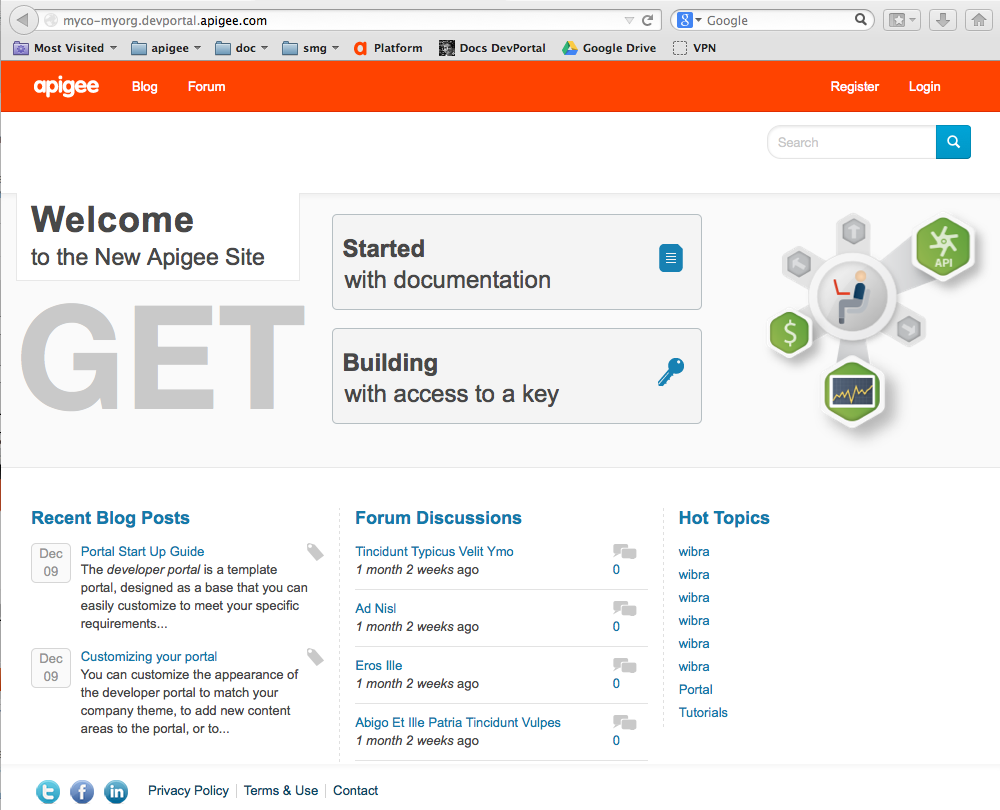
- **Drupal-based portal** . See [Build a Drupal-based portal](https://docs.apigee.com/api-platform/publish/portal/developer-services-portal#drupal).
## Monetization
Monetization capabilities provide the financial infrastructure and relationships to turn your
Developer community into an actual channel for your digital assets. With monetization, you can
create a variety of *rate plans* that charge developers for the use of your API products or
let you pay developers in revenue-sharing scenarios.
Plans include pre-paid plans, post-paid plans,
fixed-fee plans, variable rate plans, "freemium" plans, plans tailored to specific developers,
plans covering groups of developers, and more. In addition, monetization includes reporting and
billing facilities.
For more information, see [Monetization overview](https://docs.apigee.com/api-platform/monetization/basics-monetization).
## Flavors of Edge
Apigee Edge comes in the following flavors:
- **Public Cloud:** A hosted SAAS version in which Apigee maintains the environment, allowing you to concentrate on building your services and defining the APIs to those services.
- **Private Cloud:** An on-premises installation in which you control the hardware environment and are responsible for the installation, upgrade, maintenance, and other administrative processes.
If you are interested in our Apigee hybrid version, see the following
Apigee X topics:
- [Flavors of Apigee](https://cloud.google.com/apigee/docs/api-platform/get-started/what-apigee#flavors)
- [What is Apigee hybrid?](https://cloud.google.com/apigee/docs/hybrid/latest/what-is-hybrid)
Functionally, the Public Cloud and Private Cloud versions are very similar. However,
the Private Cloud version does *not* support all features of the Public Cloud version.
Features not supported by Private Cloud include:
- Hosted targets
- Extensions
- Integrated developer portals (**Note**: Drupal-based developer portals are supported)
- API monitoring
- Sense
For a list of differences among the flavors, see
[Compare Apigee products](https://cloud.google.com/apigee/docs/api-platform/get-started/compare-apigee-products).
There are also minor differences between the APIs, as described in
[Differences between
the Edge for Public Cloud API and Private Cloud API](https://docs.apigee.com/api-platform/reference/api-differences-public-private).
Public Cloud supports both free and paid accounts. Private Cloud
requires paid accounts.
To fully support an on-premises installation, the Private Cloud version includes components
such as the Apigee management server, an Apache Cassandra NoSQL database, an OpenLDAP server, a
message Router, and a Message Processor.