You're viewing **Apigee Edge** documentation.
[Go to the
**Apigee X** documentation](http://cloud.google.com/apigee/docs). info
> [!NOTE]
> Apigee Hosted Targets are available to Apigee Edge Cloud Enterprise customers in the Edge UI. Hosted Targets are not available in the Classic Edge UI.
Hosted Targets lets you run Node.js applications in a native runtime
environment hosted by Apigee. The goal of Hosted Targets is simple: allow you to deploy
applications in a native, secure, scalable, and isolated environment where Edge API proxies can call them as target services.
As the following figure illustrates, an Edge API proxy calls a Node.js application that is
deployed to the Hosted Targets environment. Note that the Hosted Targets environment is scoped
within an Apigee organization:environment.
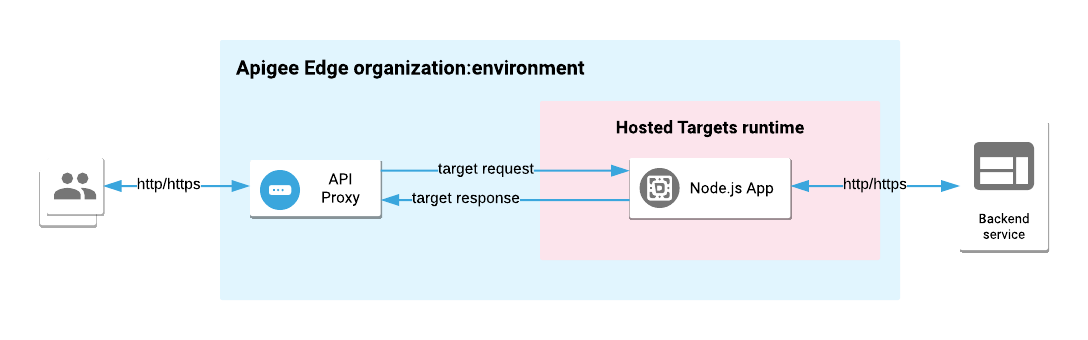
Getting an Edge API proxy to talk to a properly built and deployed Hosted Targets application
requires a simple configuration in the proxy's Target Endpoint. To get started, go to the [Hosted Targets tutorials](https://docs.apigee.com/api-platform/hosted-targets/hosted-targets-tutorials).
## What application runtimes does Hosted Targets support?
Currently, you can only deploy Node.js apps to Hosted Targets.
## Installing Hosted Targets
Hosted Targets is available in all Edge Public Cloud orgs. You do not need to install
anything to use Hosted Targets.
## Verifying that Hosted Targets is enabled
If you would like to verify that your organization has
Hosted Targets enabled, [get
your organization details](https://docs.apigee.com/management/apis/get/organizations/%257Borg_name%257D) and ensure that the `features.isEdgeFunctionsEnabled`
property is set to true. The property is read-only.
For example:
`https://api.enterprise.apigee.com/v1/organizations/myorg`
```
{
"createdAt":1507572884047,
"createdBy":"jdoe@apigee.com",
"displayName":"myorg",
"environments":[
"prod",
"dev",
"test",
"portal"
],
"lastModifiedAt":1507578673194,
"lastModifiedBy":"jdoe@apigee.com",
"name":"jdoe",
"properties":{
"property":[
{
"name":"features.isSmbOrganization",
"value":"false"
},
{
"name":"self.service.virtual.host.enabled",
"value":"true"
},
{
"name":"features.isCpsEnabled",
"value":"true"
},
{
"name":"features.isEdgeFunctionsEnabled",
"value":"true"
}
]
},
"type":"paid"
}
```
## What you need to know about Hosted Targets
Hosted Targets allows Node.js applications to run in a native environment
that does not depend on any Apigee-specific run-time technology. You can debug and test your
app locally before deploying it and be assured that the deployed version will work exactly
as it does locally. At deployment time, you can choose any application runtime version for
running your application in Hosted Targets. For example, you might specifically choose to
run a Node.js app in a v8.10.0 environment.
### Limits
For usage limits on Hosted Targets, see [Apigee product
limits](https://docs.apigee.com/api-platform/reference/limits).
### Basic steps to follow
If you are familiar with Edge proxy development, you only need to learn a few simple steps
to use Hosted Targets successfully. Essentially, you create, deploy, and manage Edge proxies
for Hosted Targets **just as you do for any other Apigee Edge proxy**.
To use Hosted Targets, you need to do the following tasks. The [tutorials](https://docs.apigee.com/api-platform/hosted-targets/hosted-targets-tutorials)
walk through each of these tasks in detail.
- Develop and test your Node.js application locally.
> [!NOTE]
> An Edge proxy must be able to call your app's HTTP endpoint; therefore, the app you develop must expose an HTTP API.
- Create a [manifest file](https://docs.apigee.com/api-platform/hosted-targets/hosted-targets-reference#about-the-manifest-file) in the root directory of your application project. The manifest is a YAML file that specifies information needed to build and deploy the application.
- Add your application to the Edge proxy as a [hosted](https://docs.apigee.com/api-platform/develop/resource-files#resourcetypes) resource type.
- In the proxy's Target Endpoint, add an empty `` tag. This tag tells Edge to deploy the Node.js application to the Hosted Targets environment. For example:
```
```
### Scope of Hosted Targets applications
Hosted Targets applications are scoped to an Edge organization-environment. This scoping is
the same as for any Edge proxy.
### Can Hosted Targets applications access proxy data?
Hosted Targets apps do not
currently have access to the proxy runtime environment. This means that you can't access flow
variables, caches, and other entities directly from Hosted Targets applications.
With embedded Node.js (the traditional, Trireme-based Node.js support in Edge), you can use
[apigee-access](https://docs.apigee.com/api-services/content/using-apigee-access) to
access flow variables and other entities in Edge. However, Hosted Targets does not
support the `apigee-access` module for Node.js deployments.
See also
[Is it possible to work around the lack of apigee-access?](https://docs.apigee.com/api-platform/hosted-targets/hosted-targets-faq#is-it-possible-to-work-around-the-lack-of-apigee-access)
### Migrating existing application code to Hosted Targets
There is currently no automated migration path from a traditional
[Trireme-based embedded Node.js application](https://docs.apigee.com/api-platform/nodejs/node-overview#about_embedded_nodejs) to Hosted Targets.
However, you can convert existing application code to Hosted Targets manually. For an example,
see [Migrating
an existing Node.js proxy to a Hosted Targets proxy](https://docs.apigee.com/api-platform/hosted-targets/hosted-targets-tutorials#migrating-an-existing-nodejs-proxy-to-a-hosted-targets-proxy).