You're viewing **Apigee Edge** documentation.
[Go to the
**Apigee X** documentation](http://cloud.google.com/apigee/docs/api-platform/tutorials/create-api-proxy-openapi-spec). info
> [!NOTE]
> **Note:** The features described in this topic are not applicable to Classic Edge.
Create and validate OpenAPI Specifications without writing any code using the spec editor.
> [!IMPORTANT]
> Apigee Edge supports **OpenAPI Specification 3.0** when you create OpenAPI Specifications using the spec editor (described below) and [generate interactive API reference documentation](https://docs.apigee.com/api-platform/publish/portal/publish-apis) using SmartDocs on your portal, though a [subset of features](https://docs.apigee.com/release/known-issues#portal) are not yet supported.
## Access the spec editor
Open an OpenAPI Specification in the spec editor, as described in the following sections:
- [Create a new OpenAPI Specification](https://docs.apigee.com/api-platform/publish/specs/manage-specs#create-spec)
- [Import an OpenAPI Specification](https://docs.apigee.com/api-platform/publish/specs/manage-specs#import-spec)
- [Edit an existing OpenAPI Specification](https://docs.apigee.com/api-platform/publish/specs/manage-specs#edit-spec)
The following figure shows the specification for the Petstore API open in the spec editor:
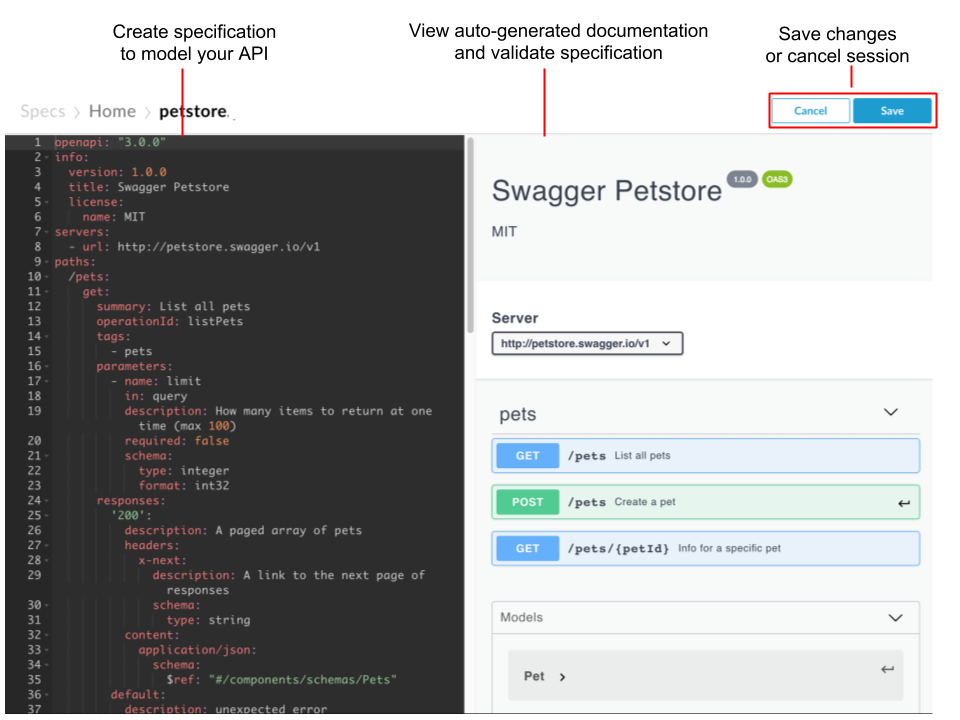
As highlighted in the previous figure, the spec editor enables you to:
- Create your OpenAPI Specification to model your API using [JSON or YAML](https://docs.apigee.com/api-platform/publish/specs/spec-editor#jsonyaml) format in the left pane.
- View auto-generated API documentation in the right pane.
- [Validate your specification](https://docs.apigee.com/api-platform/publish/specs/spec-editor#validate-spec) against the OpenAPI Specification standard, as you type.
- [Save](https://docs.apigee.com/api-platform/publish/specs/spec-editor#save-spec) your OpenAPI Specification or [close](https://docs.apigee.com/api-platform/publish/specs/spec-editor#cancel-spec) the spec and cancel your edits.
## Help me with JSON and YAML
**JSON** (JavaScript Object Notation) is a lightweight data interchange format used for representing simple data structures and associative arrays. To learn more, see .
**YAML** (YAML Ain't Markup Language) is a data serialization/representation standard that provides a syntax that also provides a syntax that can be mapped to data structures, such as lists, associative arrays, and scalars. To learn more, see [https://yaml.org](https://yaml.org/).
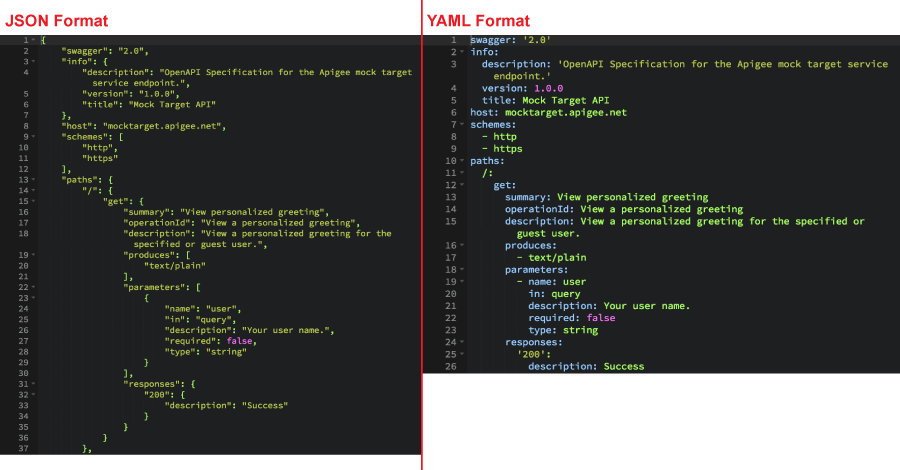
Both JSON and YAML are machine readable, but are also easy for humans to read and understand. The following figure compares two short excerpts from the same OpenAPI Specification written using JSON and YAML:
## Validate a specification
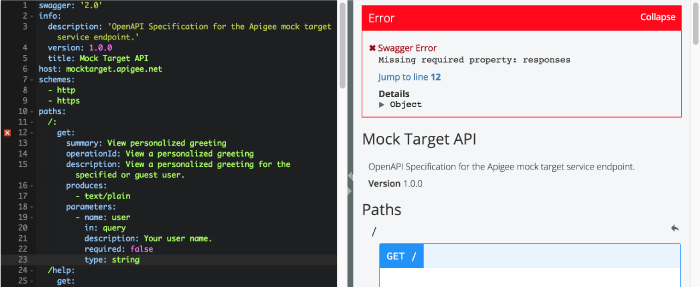
The spec editor validates your OpenAPI Specification against the
OpenAPI Specification standard. As you type, if there are errors in your OpenAPI Specification, the spec editor displays the Error dialog at the top of the right pane and provides more information about the errors and their associated line numbers so you can easily correct them.
## Save a specification
To save an OpenAPI Specification, click **Save** in the top navigation bar.
If this is the first time that you are saving the specification, you are prompted to enter a filename. If you do not specify a filename, it defaults to Untitled. You can [rename](https://docs.apigee.com/api-platform/publish/specs/manage-specs#rename-spec) it later.
## Close a specification
To close an OpenAPI Specification without saving your edits, click **Cancel** in the top navigation bar. You are returned to the specification list.