You're viewing **Apigee Edge** documentation.
[Go to the
**Apigee X** documentation](http://cloud.google.com/apigee/docs/api-platform/reference/api-proxy-configuration-reference). info
As a developer working with the Apigee Edge, your primary development activities involve
configuring API proxies that function as proxies for APIs or backend services. This document is a
reference of all configuration elements available to you when building API proxies.
If you are learning how to build API proxies, it is recommended that you begin with the topic
[Build a simple API
proxy](https://docs.apigee.com/api-platform/fundamentals/build-simple-api-proxy).
The most common ways to edit proxy configurations are:
- [Using
the XML editor](https://docs.apigee.com/api-platform/fundamentals/developing-apigee-edge#usingthemanagementui) within the Edge UI
- Download the configuration and edit it locally, as described in [Local
development of proxy configurations](https://docs.apigee.com/api-platform/reference/api-proxy-configuration-reference#local).
## Local development of proxy configurations
You can download your proxy configurations so that you can edit them on a local machine. When
you're done, you then upload the results to Edge. This approach lets you integrate the proxy
configurations into your source control, versioning, and other shared workflows. In addition, by
working on a proxy configuration locally, you can use your own XML editor and validation
tools.
This section describes how to use the UI to download an existing proxy confuration, edit it,
and then upload it back to Edge for deployment. You can also use
[apigeetool](https://www.npmjs.com/package/apigeetool)
to download and deploy a new proxy configuration (by using the `fetchproxy` and
`deployproxy` commands, respectively.)
**To edit a proxy configuration locally using the UI:**
1. Download the current proxy configuration in the Edge UI. (In the API Proxies view, select **Project \> Download Revision**.)
2. On your local machine, create a new directory and expand the downloaded ZIP file into it. To expand the ZIP file, you can use a utility such as `unzip`, as the following
example shows:
mkdir myappdir
unzip ./my-app_app_rev3_2019_04_20.zip -d myappdir
The expanded contents of the ZIP file should be similar to the structure described in
[API proxy structure](https://docs.apigee.com/api-platform/reference/apiproxystructure).
3. Edit the source files as necessary. For a description of the source files in a proxy configuration, see [Configuration files and
directory structure of an API proxy](https://docs.apigee.com/api-platform/reference/api-proxy-configuration-reference#configurationfilesanddirectorystructureofanapiproxy).
For example, to enable
[health monitoring](https://docs.apigee.com/api-platform/deploy/load-balancing-across-backend-servers#healthmonitoring) in
your API proxy, edit the TargetEndpoint configuration file in the
`/apiproxy/targets/` directory. The default file in this directory is
`default.xml`, although there might be files with different names if you use
[conditional targets](https://docs.apigee.com/api-platform/fundamentals/understanding-routes#determiningtheurlofthetargetendpoint-conditionaltargets).
In this case, if the TargetEndpoint configuration file and its directory do not exist,
create them.
4. After you finish editing the proxy configuration files, be sure to save your changes.
5. Change to the new directory that you created when you expanded the ZIP files (the root of the expanded configuration files). For example, if you expanded the files into the `/myappdir` directory, change to
that directory, as the following example shows:
```
cd myappdir
```
You should change to this directory before you re-archive your proxy configuration files
because you do not want the `/myappdir` directory to be included in the ZIP file.
The top-level directory in the ZIP file must be `/apiproxy`.
6. Re-archive the proxy configuration files, including the new or changed files. You can use a utility such as `zip`, as the following example shows:
```
zip my-new-proxy.zip -r .
```
The top-level directory in the ZIP file must be `/apiproxy`.
There are no special requirements for the ZIP file name. For example, you do not need to
increment the revision number or specify the date in the file name, but doing this can be
useful for debugging or source control.
Edge increments the revision number of the new proxy configuration for you when you upload
it.
7. Upload the new proxy configuration using the Edge UI. (In the **API Proxies** view, select **Project \> Upload a New Revision** .)
If you get an error such as Bundle is invalid. Empty bundle., then make sure
your ZIP file's top-level directory is `/apiproxy`. If it isn't, re-archive your
proxy configuration files from the root of the expanded directory.
After uploading your new proxy configuration, Edge increments the revision number and
displays it in the **Revision Summary** view.
Edge does not deploy the new revision for you after you upload it with the UI.
8. Deploy your new revision.
For more information see
[Tutorial: How to download a proxy using the UI and the management API](https://discuss.google.dev/t/tutorial-how-to-download-a-proxy-using-the-ui-and-the-management-api/17518) in the
[Apigee Community](https://discuss.google.dev/c/google-cloud/cloud-apigee/104).
## API proxy structure
An API proxy consists of the following configuration:
|---|---|
| **Base Configuration** | Primary configuration settings for an API proxy. See [Base Configuration.](https://docs.apigee.com/api-platform/reference/api-proxy-configuration-reference#baseconfig) |
| **ProxyEndpoint Configuration** | Settings for the inbound HTTP connection (from requesting apps to Apigee Edge), request and response flows, and policy attachments. See [ProxyEndpoint](https://docs.apigee.com/api-platform/reference/api-proxy-configuration-reference#proxyendpoint). |
| **TargetEndpoint Configuration** | Settings for the outbound HTTP connection (from Apigee Edge to the backend service), request and response flows, and policy attachments. See [TargetEndpoint.](https://docs.apigee.com/api-platform/reference/api-proxy-configuration-reference#targetendpoint) |
| **Flows** | ProxyEndpoint and TargetEndpoint request and response pipelines to which policies can be attached. See [Flows](https://docs.apigee.com/api-platform/reference/api-proxy-configuration-reference#flows). |
| **Policies** | XML-formatted configuration files that conform to the Apigee Edge policy schemas. See [Policies](https://docs.apigee.com/api-platform/reference/api-proxy-configuration-reference#policies). |
| **Resources** | Scripts, JAR files, and XSLT files referenced by policies to execute custom logic. See [Resources](https://docs.apigee.com/api-platform/reference/api-proxy-configuration-reference#resources). |
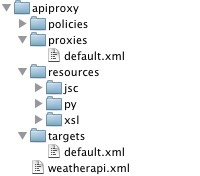
### API proxy directory structure
and contents
The components in the table above are defined by configuration files in the following
directory structure:
## Configuration files and directory
structure of an API proxy
This section explain the configuration files and directory structure of an API proxy.
- [Base Configuration](https://docs.apigee.com/api-platform/reference/api-proxy-configuration-reference#baseconfig)
- [ProxyEndpoint](https://docs.apigee.com/api-platform/reference/api-proxy-configuration-reference#proxyendpoint)
- [TargetEndpoint](https://docs.apigee.com/api-platform/reference/api-proxy-configuration-reference#targetendpoint)
- [TLS/SSL TargetEndpoint Configuration](https://docs.apigee.com/api-platform/reference/api-proxy-configuration-reference#advancedtargetendpoint)
- [Policies](https://docs.apigee.com/api-platform/reference/api-proxy-configuration-reference#policies)
- [Flows](https://docs.apigee.com/api-platform/reference/api-proxy-configuration-reference#flows)
- [Resources](https://docs.apigee.com/api-platform/reference/api-proxy-configuration-reference#resources)
## Base Configuration
### `/apiproxy/weatherapi.xml`
The base configuration for an API proxy, which defines the name of the API proxy. The name
must be unique within an organization.
Sample configuration:
```
```
### Base Configuration Elements
| Name | Description | Default | Required? |
|---|---|---|---|
| **`APIProxy`** | |||
| `name` | The name of the API proxy, which must be unique within an organization. The characters you are allowed to use in the name are restricted to the following: `A-Za-z0-9_-` | N/A | Yes |
| `revision` | The revision number of the API proxy configuration. You do not need to explicitly set the revision number, since Apigee Edge automatically tracks the current revision of the API proxy. | N/A | No |
| `ConfigurationVersion` | The version of the API proxy configuration schema to which this API proxy conforms. The only supported value currently is majorVersion 4 and minorVersion 0. This setting may be used in the future to enable evolution of the API proxy format. | 4.0 | No |
| `Description` | A textual description of the API proxy. If provided, the description will display in the Edge management UI. | N/A | No |
| `DisplayName` | A user-friendly name that may be different from the `name` attribute of the API proxy configuration. | N/A | No |
| `Policies` | A list of policies in the `/policies` directory of this API proxy. You will normally only see this element when the API proxy was created using the Edge management UI. This is simply a 'manifest' setting, designed to provide visibility into the contents of the API proxy. | N/A | No |
| `ProxyEndpoints` | A list of ProxyEndpoints in the `/proxies` directory of this API proxy. You will normally only see this element when the API proxy was created using the Edge management UI. This is simply a 'manifest' setting, designed to provide visibility into the contents of the API proxy. | N/A | No |
| `Resources` | A list of resources (JavaScript, Python, Java, XSLT) in the `/resources` directory of this API proxy. You will normally only see this element when the API proxy was created using the Edge management UI. This is simply a 'manifest' setting, designed to provide visibility into the contents of the API proxy. | N/A | No |
| `Spec` | Identifies the OpenAPI Specification that is associated with the API proxy. The value is set to a URL or to a path in the specification store. **Note** : The specification store is available in the New Edge experience only. For more information about the specification store, see [Managing and sharing specifications](https://docs-new.apigee.com/manage-share-specs). | N/A | No |
| `TargetServers` | A list of TargetServers referenced in any TargetEndpoints of this API proxy. You will normally only see this element when the API proxy was created using the Edge management UI. This is simply a 'manifest' setting, designed to provide visibility into the contents of the API proxy. | N/A | No |
| `TargetEndpoints` | A list of TargetEndpoints in the `/targets` directory of this API proxy. You will normally only see this element when the API proxy was created using the Edge management UI. This is simply a 'manifest' setting, designed to provide visibility into the contents of the API proxy. | N/A | No |
## ProxyEndpoint
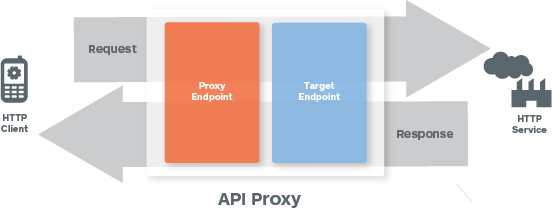
The following image shows the request/response flow:
### `/apiproxy/proxies/default.xml`
The ProxyEndpoint configuration defines the inbound (client-facing) interface for an API
proxy. When you configure a ProxyEndpoint, you are setting up a network configuration that
defines how client applications ('apps') should invoke the proxied API.
The following sample ProxyEndpoint configuration would be stored under
`/apiproxy/proxies`:
```
/weatherdefaultdefault
```
The required configuration elements in a basic ProxyEndpoint are:
### ProxyEndpoint Configuration
Elements
| Name | Description | Default | Required? |
|---|---|---|---|
| **`ProxyEndpoint`** | |||
| `name` | The name of the ProxyEndpoint. Must be unique within the API proxy configuration, when (in rare cases) multiple ProxyEndpoints are defined. The characters you are allowed to use in the name are restricted to the following: `A-Za-z0-9._\-$ %`. | N/A | Yes |
| **`PreFlow`** | Defines the policies in the PreFlow flow of a request or response. | N/A | Yes |
| **`Flows`** | Defines the policies in the conditional flows of a request or response. | N/A | Yes |
| **`PostFlow`** | Defines the policies in the PostFlow flow of a request or response. | N/A | Yes |
| **`HTTPProxyConnection`** | Defines the network address and URI path associated with the API proxy |||
| `BasePath` | A required string that uniquely identifies the URI path used by Apigee Edge to route incoming messages to the proper API proxy. The BasePath is a URI fragment (for example `/weather`) appended to the base URL of an API proxy (for example, `http://apifactory-test.apigee.net`). BasePath must be unique within an environment. Uniqueness is validated when an API proxy is generated or imported. **Using a wildcard in base paths** You can use one or more "\*" wildcards in API proxy base paths. For example, a base path of `/team/*/members` allows clients to call `https://[host]/team/blue/members` and `https://[host]/team/green/members` without you needing to create new API proxies to support new teams. Note that /\*\*/ is not supported. **Important:** Apigee does NOT support using a wildcard "\*" as the first element of a base path. For example, this is NOT supported: `/*/search`. Starting the base path with a "\*" can lead to unexpected errors because of the way Edge identifies valid paths. | / | Yes |
| `VirtualHost` | Associates an API proxy with specific base URLs for an environment. A VirtualHost is a named configuration that defines one or more URLs for an environment. The named VirtualHosts defined for a ProxyEndpoint determine the domains and ports on which an API proxy is exposed, and, by extension, the URL that apps use to invoke an API proxy. By default, two named VirtualHosts are defined for an environment: `default` and `secure`. An organization may also define custom domains. To ensure that an API proxy is available only over HTTPS, for example, set the VirtualHost in the HTTPProxyConnection to `secure`. | default | No |
| `Properties` | A set of optional HTTP configuration settings can be defined as properties of a ``. | N/A | No |
| **`FaultRules`** | Defines how the ProxyEndpoint reacts to an error. A fault rule specifies two items: - A Condition that specifies the fault to be handled based on the pre-defined category, subcategory, or name of the fault - One or more policies that define the behavior of the fault rule for the corresponding Condition See [Handling faults](https://docs.apigee.com/api-platform/fundamentals/fault-handling). | N/A | No |
| **`DefaultFaultRule`** | Handles any errors (system, transport, messaging or policy) that are not explicitly handled by another fault rule. See [Handling faults](https://docs.apigee.com/api-platform/fundamentals/fault-handling). | N/A | No |
| **`RouteRule`** | Defines the destination of inbound request messages after processing by the ProxyEndpoint request pipeline. Usually, the RouteRule points to a named TargetEndpoint configuration, but it can also point directly to a URL. |||
| `Name` | Required attribute, which provides a name for the RouteRule. The characters you are allowed to use in the name are restricted to the following: `A-Za-z0-9._\-$ %`. For example, `Cat2 %_` is a legal name. | N/A | Yes |
| `Condition` | An optional conditional statement used for dynamic routing at runtime. Conditional RouteRules are useful, for example, to enable content-based routing to support backend versioning. | N/A | No |
| `TargetEndpoint` | An optional string that identifies a named TargetEndpoint configuration. A named TargetEndpoint is any TargetEndpoint defined in the same API proxy under the`/targets` directory). By naming a TargetEndpoint, you indicate where request messages should be forwarded after processing by the ProxyEndpoint request pipeline. Note that this is an optional setting. A ProxyEndpoint may call a URL directly. For example, a JavaScript or Java resource, functioning in the role of an HTTP client, may perform the basic duty of a TargetEndpoint, which is to forward requests to a backend service. | N/A | No |
| URL | An optional string that defines an outbound network address called by the ProxyEndpoint, bypassing any TargetEndpoint configurations that might be stored under `/targets` | N/A | No |
### How to configure RouteRules
A named TargetEndpoint refers to a configuration file under `/apiproxy/targets` to
which the RouteRule forwards a request after processing by the ProxyEndpoint.
For example, the following RouteRule refers to the configuration
`/apiproxy/targets/myTarget.xml`:
```
myTarget
```
### Direct URL Invocation
A ProxyEndpoint can also directly invoke a backend service. Direct URL invocation bypasses any
named TargetEndpoints configuration under `/apiproxy/targets`). For this reason,
TargetEndpoint is an optional API proxy configuration, although, in practice, direct invocation
from the ProxyEndpoint is not recommended.
For example, the following RouteRule makes an HTTP call to
`http://api.mycompany.com/v2`.
```
http://api.mycompany.com/v2
```
### Conditional Routes
RouteRules can be chained to support dynamic routing at runtime. Inbound requests can be
routed to named TargetEndpoint configurations, directly to URLs, or to a combination of the two,
based on HTTP headers, message content, query parameters, or contextual information such time of
day, locale, etc.
Conditional RouteRules work like other conditional statements on Apigee Edge. See [Conditions reference](https://docs.apigee.com/api-platform/reference/conditions-reference) and [Variables reference](https://docs.apigee.com/api-platform/reference/variables-reference).
For example, the following RouteRule combination first evaluates the inbound request to verify
the value of an HTTP header. If the HTTP header `routeTo` has the value
`TargetEndpoint1`, then the request is forwarded to the TargetEndpoint named
`TargetEndpoint1`. If not, then the inbound request is forwarded to
`http://api.mycompany.com/v2`.
```
request.header.routeTo = "TargetEndpoint1"TargetEndpoint1http://api.mycompany.com/v2
```
> [!NOTE]
> **Note:** **More dynamic routing**
>
> [Specifying Proxy Endpoint](https://discuss.google.dev/t/specifying-proxy-endpoint/6700)
>
>
> shows dynamic routing to different world regions based on variables extracted from the request
> URI.
### Null Routes
A null RouteRule can be defined to support scenarios in which the request message does not
need to be forwarded to the TargetEndpoint. This is useful when the ProxyEndpoint performs all of
the necessary processing, for example by using JavaScript to call an external service or
retrieving data from a lookup to the API Services' key/value store.
For example, the following defines a null Route:
```
```
Conditional null Routes can be useful. In the following example, a null Route is configured to
execute when an HTTP header `request.header.X-DoNothing` have a value other than
`null`.
```
request.header.X-DoNothing != null
```
Remember, RouteRules can be chained, so a conditional null Route would typically be one
component of a set of RouteRules designed to support conditional routing.
A practical use of a conditional null Route would be in support of caching. By using the value
of the variable that is set by the Cache policy, you can configure an API proxy to execute the
null Route when an entry is served from the cache.
```
lookupcache.LookupCache-1.cachehit is true
```
## TargetEndpoint

A TargetEndpoint is the outbound equivalent of a ProxyEndpoint. A TargetEndpoint functions as
client to a backend service or API -- it sends requests and receives responses.
An API proxy needn't have any TargetEndpoints. ProxyEndpoints can be configured to call URLs
directly. An API proxy with no TargetEndpoints usually contains a ProxyEndpoint that either
directly calls a backend service, or that is configured to call a service using Java or
JavaScript.
### TargetEndpoint Configuration
### `/targets/default.xml`
The TargetEndpoint defines the outbound connection from Apigee Edge to another service or
resource.
Here's a sample TargetEndpoint configuration:
```
http://mocktarget.apigee.net
```
### TargetEndpoint Configuration
Elements
A TargetEndpoint can call a target in one of the following ways:
- HTTPTargetConnection for HTTP(S) calls
- LocalTargetConnection for local proxy-to-proxy [chaining](https://docs.apigee.com/api-platform/fundamentals/connecting-proxies-other-proxies)
- ScriptTarget for calls to an Edge-hosted [Node.js script](https://docs.apigee.com/api-platform/nodejs/overview-nodejs-apigee-edge)
Configure only one of these in a TargetEndpoint.
| Name | Description | Default | Required? |
|---|---|---|---|
| **`TargetEndpoint`** | |||
| `name` | The name of the TargetEndpoint, which must be unique within the API proxy configuration. The name of the TargetEndPoint is used in the ProxyEndpoint RouteRule to direct requests for outbound processing. The characters you are allowed to use in the name are restricted to the following: `A-Za-z0-9._\-$ %`. | N/A | Yes |
| **`PreFlow`** | Defines the policies in the PreFlow flow of a request or response. | N/A | Yes |
| **`Flows`** | Defines the policies in the conditional flows of a request or response. | N/A | Yes |
| **`PostFlow`** | Defines the policies in the PostFlow flow of a request or response. | N/A | Yes |
| **`HTTPTargetConnection`** | With its child elements, specifies a backend resource reach via HTTP. If you use HTTPTargetConnection, don't configure other types of target connections (ScriptTarget or LocalTargetConnection). > [!NOTE] > The `` elements support the dynamic string substitution feature called [message templating](https://docs.apigee.com/api-platform/reference/message-template-intro). |||
| `URL` | Defines the network address of the backend service to which the TargetEndpoint forwards request messages. | N/A | No |
| `LoadBalancer` | Defines one or more named TargetServer configurations. Named TargetServer configurations can be used for load balancing defining 2 or more endpoint configuration connections. You can also use TargetServers to decouple API proxy configurations from concrete backend service endpoints URLs. See [Load balancing across backend servers](https://docs.apigee.com/api-platform/deploy/load-balancing-across-backend-servers). | N/A | No |
| `Properties` | A set of optional HTTP configuration settings can be defined as properties of a ``. | N/A | No |
| `SSLInfo` | Optionally define TLS/SSL settings on a TargetEndpoint to control the TLS/SSL connection between the API proxy and the target service. See [TLS/SSL TargetEndpoint Configuration](https://docs.apigee.com/api-platform/reference/api-proxy-configuration-reference#advancedtargetendpoint). > [!NOTE] > The `` element supports the dynamic string substitution feature called [message templating](https://docs.apigee.com/api-platform/reference/message-template-intro). | N/A | No |
| **`LocalTargetConnection`** | With its child elements, specifies a resource to be reached locally, bypassing network characteristics such as load balancing and message processors. To specify the target resource, include either the APIProxy child element (with the ProxyEndpoint element) or the Path child element. For more information, see [Chaining API proxies together](https://docs.apigee.com/api-platform/fundamentals/connecting-proxies-other-proxies). If you use LocalTargetConnection, don't configure other types of target connections (HTTPTargetConnection or ScriptTarget). |||
| `APIProxy` | Specifies the name of an API proxy to use as a target for requests. The target proxy must be in the same organization and environment as the proxy sending requests. This is an alternative to using the Path element. | N/A | No |
| `ProxyEndpoint` | Used with APIProxy to specify the name of the target proxy's ProxyEndpoint. | N/A | No |
| `Path` | Specifies the endpoint path of an API proxy to use as a target for requests. The target proxy must be in the same organization and environment as the proxy sending requests. This is an alternative to using APIProxy. | N/A | No |
| **`FaultRules`** | Defines how the TargetEndpoint reacts to an error. A fault rule specifies two items: - A Condition that specifies the fault to be handled based on the pre-defined category, subcategory, or name of the fault - One or more policies that define the behavior of the fault rule for the corresponding Condition See [Handling faults](https://docs.apigee.com/api-platform/fundamentals/fault-handling). | N/A | No |
| **`DefaultFaultRule`** | Handles any errors (system, transport, messaging or policy) that are not explicitly handled by another FaultRule. See [Handling faults](https://docs.apigee.com/api-platform/fundamentals/fault-handling). | N/A | No |
| **`ScriptTarget`** | |||
| `ResourceURL` | Defines the resource type (node) and the name of the main Node.js script that implements TargetEndpoint functionality. `node://server.js` The script needs to be included with your API proxy's resource files. See [Adding Node.js to an existing API proxy](https://docs.apigee.com/api-platform/nodejs/adding-nodejs-existing-api-proxy). If you use ScriptTarget, don't configure other types of target connections (HTTPTargetConnection or LocalTargetConnection). | N/A | Yes |
| `EnvironmentVariable` | Optionally pass environment variables to the main Node.js script. See [Understanding Edge support for Node.js modules](https://docs.apigee.com/api-platform/nodejs/understanding-edge-support-nodejs-modules). | N/A | No |
| `Arguments` | Optionally pass arguments to the main Node.js script. See [Understanding Edge support for Node.js modules](https://docs.apigee.com/api-platform/nodejs/understanding-edge-support-nodejs-modules). | N/A | No |
## TLS/SSL TargetEndpoint Configuration
TargetEndpoints often need to manage HTTPS connections with heterogeneous backend
infrastructure. For this reason, a number of TLS/SSL configuration settings are supported.
> [!NOTE]
> **Note:** Because Edge originally supported SSL, you will see some instances in the Edge UI and in the Edge XML that use the term "SSL". For example, the menu entry in the Edge UI that you use to view certs is called **SSL Certificates** . The XML tag that you use to configure a virtual host to use TLS is named ``.
> [!IMPORTANT]
> **Important:** Public Certificate Authorities (CAs) are discontinuing the inclusion of the `clientAuth` Extended Key Usage (EKU) in latest publicly-trusted SSL/TLS certificates. This industry-wide change affects Apigee mutual TLS (mTLS) configurations in [Apigee platform](https://login.apigee.com/login).
>
>
> Apigee requires the `clientAuth` EKU to be present in client certificates for mTLS handshakes. Without this EKU, mTLS connections will fail for both northbound (client to Apigee) and southbound (Apigee to backend) traffic. For a detailed explanation of the issue, timelines, and recommended solutions, refer to this [blog post](https://discuss.google.dev/t/navigating-the-industry-shift-in-client-authentication-for-apigee-mtls/289627).
> [!CAUTION]
> **Caution:** When an API proxy in Apigee Edge for Public or Private Cloud connects to a target endpoint or target server, Apigee does not by default perform hostname validation for the certificate presented by the target endpoint or target server. To enforce hostname validation, you have the option of applying a configuration at the individual proxy level or setting a flag to enable enforcement for your entire organization. For more information these configuration changes, see [Security Bulletin: GCP-2024-006](https://cloud.google.com/apigee/docs/security-bulletins/security-bulletins).
### TLS/SSL
TargetEndpoint Configuration Elements
| Name | Description | Default | Required? |
|---|---|---|---|
| **`SSLInfo`** | |||
| `Enabled` | Indicates whether TLS/SSL is enabled for the endpoint. The default value is `true` if `` specifies the HTTPS protocol, and `false` if `` specifies HTTP. | true if `` specifies HTTPS | No |
| `TrustStore` | A keystore containing trusted server certificates. | N/A | No |
| `ClientAuthEnabled` | A setting that turns on outbound client authentication (2-way TLS/SSL) | false | No |
| `KeyStore` | A keystore containing private keys used for outbound client authentication | N/A | Yes (if ClientAuthEnabled is true) |
| `KeyAlias` | The key alias of the private key used for outbound client authentication | N/A | Yes (if ClientAuthEnabled is true) |
| `Ciphers` | Supported ciphers for outbound TLS/SSL. If no ciphers are specified, then all ciphers available for the JVM will be permitted. To restrict ciphers, add the following elements listing the supported ciphers: ``` TLS_RSA_WITH_3DES_EDE_CBC_SHATLS_RSA_WITH_DES_CBC_SHA ``` | N/A | No |
| `Protocols` | Supported protocols for outbound TLS/SSL. If no protocols are specified, then all protocols available for the JVM will be permitted. To restrict protocols, add the following elements listing the supported protocols: ``` TLSv1.1TLSv1.2 ``` | N/A | No |
| `CommonName` | If specified, a value against which the common name of the target certificate is validated. This value is only valid for TargetEndpoint and TargetServer configurations. It is not valid for VirtualHost configurations. By default, the value specified is matched *exactly* with the common name of the target certificate. For example, using `*.myhost.com` as the value for \ will only match and validate the target hostname if the exact value `*.myhost.com` is specified as the common name in the target certificate. Optionally, Apigee can perform the match with wildcards using the `wildcardMatch` attribute. > [!NOTE] > **Note:** The wildcard character matches any number of subdomains (not limited to a single level like in RFC 9525). For example, a common name specified as `abc.myhost.com` in a target certificate would be matched and validated if the \ element is specified as follows: ``` *.myhost.com ``` | N/A | No |
### Sample TargetEndpoint with outbound client authentication enabled
```
https://myservice.comtruetruemyKeystoremyKeymyTruststore
```
For detailed instructions, see [Configuring TLS
from Edge to the backend (Cloud and Private Cloud)](https://docs.apigee.com/api-platform/system-administration/configuring-ssl-edge-backend-service).
### Using
flow variables to set TLS/SSL values dynamically
You can also dynamically set TLS/SSL details to support flexible runtime requirements.
For example, if your proxy connects to two potentially different targets (a test target and a
production target), you can have your API proxy programmatically detect which environment it's
calling and dynamically set references to the appropriate keystore and truststore. The following
Apigee Community article explains this scenario in more detail and provides deployable API
proxy examples: [Dynamic SSLInfo for TargetEndpoint using variable reference](https://discuss.google.dev/t/dynamic-sslinfo-for-targetendpoint-using-variable-reference/17544).
In the following example of how the `` tag would be set in a
TargetEndpoint configuration, the values can be supplied at runtime, for example, by a Java
Callout, a JavaScript policy, or an Assign Message policy. Use whichever message variables
contain the values you want to set.
Variables are allowed in only the following elements.
> [!NOTE]
> These elements support the dynamic string substitution feature called [message templating](https://docs.apigee.com/api-platform/reference/message-template-intro).
```
{myvars.ssl.enabled}{myvars.ssl.client.auth.enabled}{myvars.ssl.keystore}{myvars.ssl.keyAlias}{myvars.ssl.trustStore}
```
> [!NOTE]
> **Note:** Variable replacement of TLS/SSL values can only be used for a TargetEndpoint. Any attempt to use variables in any other context, such as virtual host configuration or message logging, will cause validation failures.
### Using
references to set TLS/SSL values dynamically
When configuring a TargetEndpoint that uses HTTPS, you have to consider the case when the
TLS/SSL cert expires, or a change to the system configuration requires you to update the cert. In
an Edge for Private Cloud installation, when configuring TLS/SSL by using static values or by
using flow variables, there is a chance that you will have to restart the Message Processors.
For more, see [Update a TLS
certificate](https://docs.apigee.com/api-platform/system-administration/update-or-replace-ssl-certificate).
However, you can optionally configure the TargetEndpoint to use a *reference* to the
keystore or truststore instead. The advantage to using a reference is that you can update the
reference to point to a different keystore or truststore to update the TLS/SSL cert without
having to restart Message Processors.
> [!NOTE]
> **Note:** You can only use a reference to the keystore and truststore; you cannot use a reference to the alias. When you change the reference to a keystore, ensure that the alias name of the cert is the same as in the old keystore.
For example, shown below is a TargetEndpoint that uses a reference to the keystore:
```
truefalseref://keystorerefmyKeyAlias
```
Use the following POST API call to create the reference named
**keystoreref**:
```
curl -X POST -H "Content-Type:application/xml" https://api.enterprise.apigee.com/v1/o/{org_name}/e/{env_name}/references \
-d 'myTestKeystoreKeyStore' -u email:password
```
The reference specifies the name of the keystore and its type.
Use the following GET API call to view the reference:
```
curl -X GET https://api.enterprise.apigee.com/v1/o/[org_name}/e/{env_name}/references/keystoreref -u uname:password
```
To later change the reference to point to a different keystore, ensuring that the alias has
the same name, use the following PUT call:
```
curl -X PUT -H "Content-Type:application/xml" https://api.enterprise.apigee.com/v1/o/{org_name}/e/{env_name}/references/keystoreref \
-d 'myNewKeystoreKeyStore' -u email:password
```
### TargetEndpoint
with target load balancing
TargetEndpoints support load balancing across multiple named TargetServers using three load
balancing algorithms.
For detailed instructions, refer to [Load balancing across backend
servers](https://docs.apigee.com/api-platform/deploy/load-balancing-across-backend-servers).
## Policies
The `/policies` directory in an API proxy contains all policies available to be
attached to Flows in the API proxy.
### Policy Configuration Elements
| Name | Description | Default | Required? |
|---|---|---|---|
| **`Policy`** | |||
| `name` | The internal name of the policy. Characters you can use in the name are restricted to: `A-Za-z0-9._\-$ %`. However, the Edge management UI enforces additional restrictions, such as automatically removing characters that are not alphanumeric. Optionally, use the `` element to label the policy in the management UI proxy editor with a different, natural-language name. | N/A | Yes |
| `enabled` | Set to `true` to enforce the policy. Set to `false` to "turn off" the policy. The policy will not be enforced even if it remains attached to a flow. | true | No |
| `continueOnError` | Set to `false` to return an error when a policy fails. This is expected behavior for most policies. Set to `true` to have flow execution continue even after a policy fails. | false | No |
| `async` | **Note** : This attribute does not make the policy execute asynchronously. In most cases, leave this with the default of `false`. When set to `true`, policy execution is offloaded to a different thread, leaving the main thread free to handle additional requests. When the offline processing is complete, the main thread comes back and finishes handling the message flow. In some cases, setting async to `true` improves API proxy performance. However, overusing async can hurt performance with too much thread switching. To use asynchronous behavior in API proxies, see [JavaScript object model](https://docs.apigee.com/api-platform/reference/javascript-object-model). | false | No |
### Policy Attachment
The following image shows the API proxy flows execution sequence:
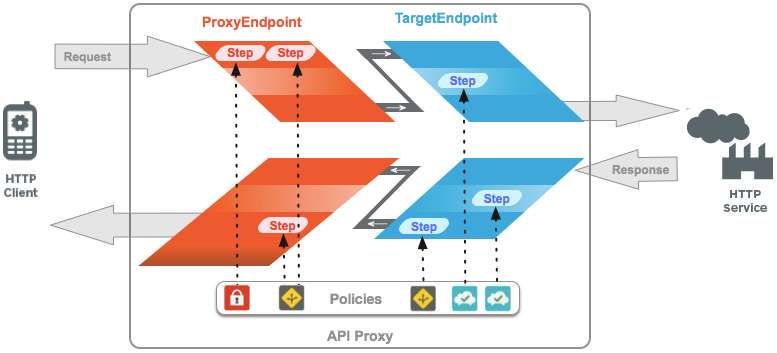
As shown above:
Policies are attached as processing steps to *Flows*. The policy's name is used to
reference the policy to be enforced as a processing Step. The format of a policy attachment is
the following:
```
MyPolicy
```
Policies are enforced in the order in which they are attached to a Flow. For example:
```
FirstPolicySecondPolicy
```
### Policy Attachment Configuration
Elements
| Name | Description | Default | Required? |
|---|---|---|---|
| **`Step`** | |||
| `Name` | The name of the policy to be executed by this Step definition. | N/A | Yes |
| `Condition` | A conditional statement that determines whether the policy is enforced or not. If a policy has an associated condition, then the policy only executes if the conditional statement evaluates to true. | N/A | No |
## Flows
ProxyEndpoint and TargetEndpoint define a pipeline for request and response message
processing. A processing pipeline consists of a request flow and a response flow. Each request
flow and response flow is subdivided into a PreFlow, one or more optional 'conditional' or
'named' flows, and a PostFlow.
- PreFlow: Always executes. Executes before any conditional Flows.
- PostFlow: Always executes. Executes after any conditional Flows.
Additionally, you can add a PostClientFlow to the ProxyEndpoint, which executes after the
response is returned to the requesting client app. Only the [MessageLogging policy](https://docs.apigee.com/api-platform/reference/policies/message-logging-policy) and the
[Google Stackdriver Logging Extension](https://docs.apigee.com/api-platform/reference/extensions/google-stackdriver-logging/google-stackdriver-logging-extension-137) can be attached
to this flow. PostClientFlow reduces API proxy latency and makes information available for
logging that is not calculated until after the response is returned to the client, such as the
`client.sent.start.timestamp` and `client.sent.end.timestamp`.The flow is used
primarily for measuring the time interval between the start and end timestamps for the response
message.
## Watch a quick how-to video
**Video:** Check out this short video on using a Message Logging in the
PostClientFlow.
Here's an example of a PostClientFlow with a message logging policy attached.
```
...
Message-Logging-1
...
```
The API proxy processing pipeline executes Flows in the following sequence:
Request Pipeline:
1. Proxy Request PreFlow
2. Proxy Request Conditional Flows (Optional)
3. Proxy Request PostFlow
4. Target Request PreFlow
5. Target Request Conditional Flows (Optional)
6. Target Request PostFlow
Response Pipeline:
1. Target Response PreFlow
2. Target Response Conditional Flows (Optional)
3. Target Response PostFlow
4. Proxy Response PreFlow
5. Proxy Response Conditional Flows (Optional)
6. Proxy Response PostFlow
7. PostClientFlow Response (Optional)
Only those Flows with policy attachments need to be configured in ProxyEndpoint or
TargetEndpoint configurations. PreFlow and PostFlow need only be specified in a ProxyEndpoint or
TargetEndpoint configuration when a policy needs to be enforced during PreFlow or PostFlow
processing.
In contrast to conditional flows, the ordering of PreFlow and PostFlow elements is not
important--the API proxy will always execute each at the appropriate point in the pipeline,
regardless of where they appear in the Endpoint configuration.
### Conditional Flows
ProxyEndpoints and TargetEndpoints support an unlimited number of conditional flows (also
known as 'named flows').
The API proxy tests for the condition specified in the conditional flow and, if the condition
is met, the processing steps in the conditional flow are executed by the API proxy. If the
condition is not met, then the processing steps in the conditional flow are bypassed. Conditional
flows are evaluated in the order defined in the API proxy and the first one whose condition is
met is executed.
By defining conditional flows, you gain the ability to apply processing steps in an API proxy
based on:
- Request URI
- HTTP verb (GET/PUT/POST/DELETE)
- Value of a query param, header, and form param
- Many other types of conditions
For example, the following conditional flow specifies that it is executed only when the
request resource path is `/accesstoken`. Any inbound request with the
path `/accesstoken` causes this flow to be executed, along with any policies
that are attached to the flow. If the request path does not include the suffix
`/accesstoken`, then the flow does not execute (although another conditional flow
might).
```
proxy.pathsuffix MatchesPath "/accesstoken"GenerateAccessToken
```
### Flow Configuration Elements
| Name | Description | Default | Required? |
|---|---|---|---|
| **`Flow`** | A request or response processing pipeline defined by A ProxyEndpoint or TargetEndpoint |||
| `Name` | The unique name of the Flow. | N/A | Yes |
| `Condition` | A conditional statement that evaluates on or more variables to evaluate to true or false. All Flows other than the predefined PreFlow and PostFlow types must define a condition for their execution. | N/A | Yes |
| `Request` | The pipeline associated with Request message processing | N/A | No |
| `Response` | The pipeline associated with Response message processing | N/A | No |
### Step processing
The sequential ordering of conditional Flows is enforced by Apigee Edge. Conditional Flows
execute from top to bottom. The first conditional Flow whose condition evaluates to
`true` is executed, and only one conditional Flow is executed.
For example, in the following Flow configuration, any inbound request that does not include
the path suffix `/first` or `/second` will cause the `ThirdFlow`
to execute, enforcing the policy called `Return404`.
```
proxy.pathsuffix MatchesPath "/first"FirstPolicyproxy.pathsuffix MatchesPath "/second"FirstPolicySecondPolicyReturn404
```
## Resources
"Resources" (resource files for use in API proxies) are scripts, code, and XSL transformations
that can be attached to Flows using policies. These appear in the "Scripts" section of the API
proxy editor in the management UI.
See [Resource files](https://docs.apigee.com/api-platform/develop/resource-files) for the supported
resource types.
Resources can be stored in an API proxy, an environment, or an organization. In each case, a
resource is referenced by name in a Policy. API Services resolves the name by moving from the API
proxy, to environment, to organization level.
A resource stored at the organization level can be referenced by Policies in any environment.
A resource stored at the environment level can be referenced by Policies in that environment. A
resource stored at the API proxy level can be referenced only by Policies in that API proxy.