You're viewing **Apigee Edge** documentation.
[Go to the
**Apigee X** documentation](http://cloud.google.com/apigee/docs/api-platform/reference/javascript-object-model). info
This topic discusses the Apigee Edge JavaScript Object Model. It's important you understand
this model if you intend to use the JavaScript policy to add custom JavaScript to an API
proxy.
## About the Edge JavaScript object model
The Apigee Edge JavaScript object model defines objects with associated properties that are
available to JavaScript code executing within an Apigee Edge proxy flow. You use the JavaScript
policy to attach this custom code to an API proxy flow.
The objects defined by this model have *scope* within the API proxy flow, which means
that certain objects and properties are available only at specific points in the flow. When your
JavaScript is executed, a scope is created for the execution. In that scope, these
object references are created:
- **[context](https://docs.apigee.com/api-platform/reference/javascript-object-model#contextobjectreference):** An object that provides access to message context
- **[request](https://docs.apigee.com/api-platform/reference/javascript-object-model#request-response-objects):** A shorthand that allows access to the request object
- **[response](https://docs.apigee.com/api-platform/reference/javascript-object-model#request-response-objects):** A shorthand that allows access to the request object
- **[crypto](https://docs.apigee.com/api-platform/reference/javascript-object-model#crypto-object-reference):** Provides various hash functions
- **[print](https://docs.apigee.com/api-platform/reference/javascript-object-model#print-function):** A function to emit output
- **[properties](https://docs.apigee.com/api-platform/reference/javascript-object-model#properties-object):** Allows read access to the configuration properties on the policy
### The context object
The `context` object has global scope. It is available everywhere within the API
proxy flow. It has four child objects: `proxyRequest`, `proxyResponse`,
`targetRequest`, `targetResponse`. These child objects are scoped to the
ambient request and response, either the proxy request and response or the target request and
response. For example, if the JavaScript policy executes in the proxy endpoint part of the flow,
then the `context.proxyRequest` and `context.proxyResponse` objects are in
scope. If the JavaScript runs in a target flow, then the `context.targetRequest` and
`context.targetResponse` objects are in scope.
The `context` object also has properties and methods, which are described in detail
in this topic. For example, the following JavaScript code example uses the
`context.flow` property and calls the `get/setVariable()` methods on
`context`.
```javascript
if (context.flow=="PROXY_REQ_FLOW") {
var username = context.getVariable("request.formparam.user");
context.setVariable("USER.name", username);
}
```
These methods interact directly with [flow variables](https://docs.apigee.com/api-platform/reference/variables-reference).
The `context.flow` property value is the current flow scope. In the proxy
request flow, it's set to the constant `PROXY_REQ_FLOW`. If in the target
response flow, it's set to `TARGET_RESP_FLOW`. This constant is handy for
executing scope-specific code. The getter lets you get flow variables and the setter lets you set
flow variables. These variables are generally available in the proxy flow and can be consumed by
other policies.
See [context object reference](https://docs.apigee.com/api-platform/reference/javascript-object-model#contextObj) below for more details and
examples.
### The crypto object
The crypto object adds basic, high performance cryptographic support to the JavaScript Object
Model. See [crypto object reference](https://docs.apigee.com/api-platform/reference/javascript-object-model#crypto) below for more details and examples.
### The request and response
objects
The `request` and `response` objects are *shorthand* references to the
ambient request and response, either the proxy request and response or the target request and
response. The objects these variables refer to depend upon the context in which the JavaScript
policy executes. If the JavaScript runs in the flow of a proxy endpoint, then the request and
response variables refer to `context.proxyRequest` and
`context.proxyResponse`. If the JavaScript runs in a target flow, then the variables
refer to the `context.targetRequest` and `context.targetResponse`.
### The print() function
The JavaScript object model includes a `print()` function that you can use to output debug
information to the Edge Trace tool. See [Debug with JavaScript print()
statements](https://docs.apigee.com/api-platform/reference/javascript-object-model#debug).
### The properties object
When using a element in the policy configuration, the JavaScript code can access the values of those properties using the `properties` variable.
For example, if your JavaScript configuration contains:
```javascript
8675309
Jenny
jsc://my-code.js
```
Then in `my-code.js`, you can:
```javascript
print(properties.firstname); // prints Jenny
print(properties.number); // 8675309
```
More practically, configuration can allow the code to behave differently
when run in different environments, at different moments, or for any
reason.
For example, the following specifies the "variable name" and the style of
output that the JavaScript should emit information into:
```javascript
my_output_variable
true
jsc://emit-results.js
```
Then in `emit-results.js`, the code could do this:
```javascript
var result = { prop1: "something", prop2 : "something else" } ;
if (properties.prettyPrint == "true") {
context.setVariable(properties.output, JSON.stringify(result, null, 2));
}
else {
context.setVariable(properties.output, JSON.stringify(result));
}
```
## crypto object reference
The crypto object lets you perform basic cryptographic hashing functions in JavaScript.
> [!NOTE]
> **Note:** The crypto functions support hashing only---there is no support for two-way encryption.
The crypto object has global scope. It is available everywhere within the API proxy flow.
Crypto lets you work with these hash objects:
- SHA-1
- SHA256
- SHA512
- MD5
> [!IMPORTANT]
> **Tip:** Apigee recommends that you use the crypto object to perform basic cryptographic functions in your JavaScript programs running on Edge.
### Working with SHA-1 objects
You can create SHA-1 objects, update them, and convert them to hex and base64 values.
**Create a new SHA-1 object**
```javascript
var _sha1 = crypto.getSHA1();
```
**Update an SHA-1 object**
***Syntax***
```javascript
_sha1.update(value);
```
***Parameters***
- **value** - (String) Any string value.
***Example***
Update an SHA-1 object:
```javascript
_sha1.update("salt_value");
_sha1.update("some text");
```
**Return the SHA-1 object as a hex string**
```javascript
var _hashed_token = _sha1.digest();
```
**Return the SHA-1 object as a base64 string**
```javascript
var _hashed_token = _sha1.digest64();
```
### Working with SHA-256 objects
You can create SHA-256 objects, update them, and convert them to hex and base64 values.
**Create a new SHA-256 object**
```javascript
var _sha256 = crypto.getSHA256();
```
**Update an SHA-256 object**
***Syntax***
```javascript
_sha256.update(value);
```
***Parameters***
- **value** - (String) Any string value.
***Example***
Update an SHA-256 object:
```javascript
_sha256.update("salt_value");
_sha256.update("some text");
```
**Return the SHA-256 object as a hex string**
```javascript
var _hashed_token = _sha256.digest();
```
**Return the SHA-256 object as a base64 string**
```javascript
var _hashed_token = _sha256.digest64();
```
### Working with SHA-512 objects
You can create SHA-512 objects, update them, and convert them to hex and base64 values.
**Create a new SHA-512 object**
```javascript
var _sha512 = crypto.getSHA512();
```
**Update an SHA-512 object**
***Syntax***
```javascript
_sha512.update(value);
```
***Parameters***
- **value** - (String) Any string value.
***Example***
Update an SHA-512 object:
```javascript
_sha512.update("salt_value");
_sha512.update("some text");
```
**Return the SHA-512 object as a hex string**
```javascript
var _hashed_token = _sha512.digest();
```
**Return the SHA-512 object as a base64 string**
```javascript
var _hashed_token = _sha512.digest64();
```
### Working with MD5 objects
You can create MD5 objects, update them, and convert them to hex and base64 values.
**Create a new MD5 object**
```javascript
var _md5 = crypto.getMD5();
```
**Update an MD5 object**
***Syntax***
```javascript
_md5.update(value);
```
***Parameters***
- **value** - (String) Any string value.
***Example***
Update an MD5 object:
```javascript
_md5.update("salt_value");
_md5.update("some text");
```
**Return the MD5 object as a hex string**
```javascript
var _hashed_token = _md5.digest();
```
**Return the MD5 object as a base64 string**
```javascript
var _hashed_token = _md5.digest64();
```
### Crypto date/time support
The crypto object supports date/time formatting patterns.
**crypto.dateFormat()**
Returns a date in string format.
***Syntax***
```javascript
crypto.dateFormat(format, [timezone], [time])
```
***Parameters***
- **format** - (String) The underlying implementation for this parameter is [java.text.SimpleDateFormat](https://docs.oracle.com/javase/7/docs/api/java/text/SimpleDateFormat.html). For example: 'yyyy-MM-DD HH:mm:ss.SSS'
- **timezone** - (String, optional) The underlying implementation for this parameter is [java.util.TimeZone](https://docs.oracle.com/javase/7/docs/api/java/util/TimeZone.html). This parameter is the sameDefault: UTC
- **time** - (Number, optional) A Unix timestamp value to format. Default: current time
***Examples***
> [!NOTE]
> **Note:** The [java.text.SimpleDateFormat](https://docs.oracle.com/javase/7/docs/api/java/text/SimpleDateFormat.html) documentation provides a complete list of all of the date/time formatting characters and character combinations, as well as detailed examples.
Get the current time, down to milliseconds:
```javascript
var _now = crypto.dateFormat('yyyy-MM-DD HH:mm:ss.SSS');
```
Get the current time for the Pacific Time Zone:
```javascript
var _pst = crypto.dateFormat('yyyy-MM-DD HH:mm:ss.SSS','PST');
```
Get the value of ten seconds from now:
```javascript
var _timeNow = Number(context.getVariable('system.timestamp'));
var ten_seconds = crypto.dateFormat('yyyy-MM-DD HH:mm:ss.SSS','PST', _timeNow + 10 * 1000);
```
Additional examples. See also the [java.text.SimpleDateFormat](https://docs.oracle.com/javase/7/docs/api/java/text/SimpleDateFormat.html) documentation.
```javascript
var _pst = crypto.dateFormat('M');
```
```javascript
var _pst = crypto.dateFormat('EEE, d MMM yyyy HH:mm:ss Z');
```
```javascript
var _pst = crypto.dateFormat("yyyy-MM-dd'T'HH:mm:ss.SSSZ");
```
### Use getHash() to get
any of the supported hash objects
***Examples***
```javascript
var _hash1 = crypto.getHash('MD5');
var _hash2 = crypto.getHash('SHA-1');
var _hash3 = crypto.getHash('SHA-256');
var _hash4 = crypto.getHash('SHA-512');
```
### Sample with crypto
```javascript
try {
// get values to use with hash functions
var salt = context.getVariable("salt") || 'SomeHardCodedSalt';
var host = context.getVariable("request.header.Host");
var unhashed_token = "";
var _timeNow = Number(context.getVariable('system.timestamp'));
var now = crypto.dateFormat('yyyy-MM-DD HH:mm:ss.SSS','PST', _timeNow);
unhashed_token = "|" + now + "|" + host
// generate a hash with the unhashedToken:
var sha512 = crypto.getSHA512();
sha512.update(salt);
sha512.update(unhashed_token);
// convert to base64
var base64_token = sha512.digest64();
// set headers
context.setVariable("request.header.now", now);
context.setVariable("request.header.token", base64_token);
} catch(e) {
throw 'Error in Javascript';
}
```
## context object
reference
- [context object summary](https://docs.apigee.com/api-platform/reference/javascript-object-model#summary)
- [context object methods](https://docs.apigee.com/api-platform/reference/javascript-object-model#methods)
- [context object properties](https://docs.apigee.com/api-platform/reference/javascript-object-model#properties)
- [context object children](https://docs.apigee.com/api-platform/reference/javascript-object-model#children)
A `context` object is created for each request/response transaction executed by an
API proxy. The `context` object exposes methods to get, set, and remove variables
related to each transaction.
Variables define properties specific to a transaction. The time of day, the locale of the
requesting client, the user-agent of the requesting client, and the URL of the target service are
all examples of variables that are available in the `context`. Therefore,
`context` is useful for building logic that relies on these properties to execute
custom behavior.
See [Flow variables reference](https://docs.apigee.com/api-platform/reference/variables-reference) and
[Extract Variables
policy](https://docs.apigee.com/api-platform/reference/policies/extract-variables-policy).
### context
object summary
This table briefly describes the context object and its children, and lists the properties
that are bound to each.
| Name | Description | Properties |
|---|---|---|
| `context` | A wrapper for the message processing pipeline context and the request and response Flows that are executed by the ProxyEndpoint and TargetEndpoint. | flow, session |
| `context.``proxyRequest` | An object that represents the inbound request message to the ProxyEndpoint (from the requesting app to the API proxy) | headers, query parameters, method, body, url |
| `context.``targetRequest` | An object that represents the outbound request message from the TargetEndpoint (from the API proxy to the backend service). | headers, query parameters, method, body, url |
| `context.``targetResponse` | An object that represents the inbound target response message (from the backend service to the API proxy) | headers, content, status |
| `context.``proxyResponse` | An object that represents the outbound proxy response message (from the API proxy to the requesting app) | headers, content, status |
| `context.flow` | The name of the current flow. | See [context.flow](https://docs.apigee.com/api-platform/reference/javascript-object-model#flow) below. |
| `context.session` | A map of name/value pairs that you can use to pass objects between two different steps executing in the same context. For example: `context.session['key'] = 123`. | For more information on when and when not to use this object, see this [Apigee Community discussion](https://discuss.google.dev/t/what-is-the-difference-between-context-session-hello-and-context-setvaraible-hello/11150). |
### context
object methods
**context.getVariable()**
Retrieves the value of a pre-defined or custom variable.
***Syntax***
```javascript
context.getVariable("variable-name");
```
***Example***
To get the value for the current year:
```javascript
var year = context.getVariable('system.time.year');
```
**context.setVariable()**
Sets the value for a custom variable or for any *writable* [pre-defined variables](https://docs.apigee.com/api-platform/reference/variables-reference).
***Syntax***
```javascript
context.setVariable("variable-name", value);
```
***Example***
A common scenario for setting a variable is when an API proxy must dynamically write the
target URL. The following JavaScript obtains the value of a variable called `USER.name`,
appends that value as a query parameter to the URL
`http://mocktarget.apigee.net?user=`, and then sets the pre-defined
`target.url` to that value.
```javascript
context.setVariable("target.url", "http://mocktarget.apigee.net/user?user="+context.getVariable("USER.name"));
```
> [!IMPORTANT]
> **Tip:** Any writable pre-defined variable and any custom variable can be dynamically set from JavaScript. For a complete list of pre-defined variables, see [Flow variables reference](https://docs.apigee.com/api-platform/reference/variables-reference).
**context.removeVariable()**
Removes a variable from the context.
***Syntax***
```javascript
context.removeVariable('variable-name');
```
### context object properties
**context.flow**
The `flow` property is a string that identifies the current API proxy flow. This
property is used to indicate the Flow to which the JavaScript is attached. Supported values
are:
- `PROXY_REQ_FLOW`
- `PROXY_RESP_FLOW`
- `TARGET_REQ_FLOW`
- `TARGET_RESP_FLOW`
Each Flow name encompasses the PreFlow, PostFlow, and any conditional Flows defined in the
ProxyEndpoints or TargetEndpoints.
This optional property is useful when common JavaScript is executed in more than one Flow,
but might vary its behavior depending on the Flow in which it executes. Use the Flow property
for JavaScript modules intended to be reused in multiple API proxies, in which the code is
required to check the current Flow before executing logic.
**Example**
Set an HTTP header only on the targetRequest Flow:
```javascript
if (context.flow=="TARGET_REQ_FLOW") {
context.targetRequest.headers['TARGET-HEADER-X']='foo';
}
```
Set the content only on the proxyResponse Flow:
```javascript
if (context.flow=="PROXY_RESP_FLOW") {
context.proxyResponse.content='bar';
}
```
**context.session**
A map of name/value pairs that can be used to pass objects between two policies executing
within the same message context.
> [!NOTE]
> **Note:** It is important to understand the difference between using `context.session` to get/set variables versus using `context.getVariable()` and `context.setVariable()`. See [What is the difference between context.session\['hello'\] = {} and context.setVariable("hello", {})](https://discuss.google.dev/t/what-is-the-difference-between-context-session-hello-and-context-setvaraible-hello/11150) for more details.
**Example**
Set a value in the session:
```javascript
context.session['key'] = 123;
```
Get the value from the session:
```javascript
var value = context.session['key']; // 123
```
> [!NOTE]
> **Sample:** For a working example that uses the `context.sessio`n object see the [Asynchronous
> callout](https://github.com/apigee/api-platform-samples/tree/master/sample-proxies/async-callout) sample API proxy.
### context object children
As shown below, a complete API proxy Flow encompasses four distinct phases, each of which has
an associated message object that is a child of the context object:
- `context.proxyRequest`: The inbound request message received from the requesting client.
- `context.targetRequest`: The outbound request message sent to the backend service.
- `context.proxyResponse`: The outbound response message returned to the requesting client.
- `context.targetResponse`: The inbound request message received from the backend service.
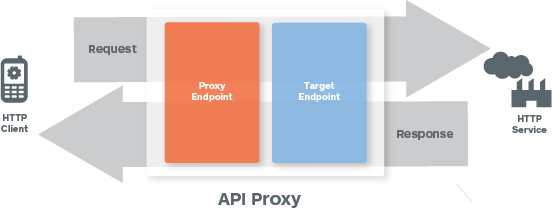
The following sections describe the methods and properties of these objects:
- [context.\*Request child objects](https://docs.apigee.com/api-platform/reference/javascript-object-model#Request)
- [context.\*Response child objects](https://docs.apigee.com/api-platform/reference/javascript-object-model#Response)
### context.\*Request child objects
For each HTTP transaction the executes in an API proxy, two request message objects are
created: one *inbound* (the request from the client) and one *outbound* (the request generated by
the API proxy and submitted to the backend target.)
The `context` object has child objects that represent these request messages:
`context.proxyRequest` and `context.targetRequest`. These objects let you
access properties within the request flow that is in scope when your JavaScript code
executes.
**Note:** You can also use the *shorthand* object `request` to access
these properties in a request flow. The `request` object refers to either
`context.proxyRequest` or `context.targetRequest`, depending on where in
the flow your JavaScript code executes.
#### context.\*Request child object properties
| Property name | Description |
|---|---|
| `url` | The `url` property is a read/write convenience property that combines scheme, host, port, path and query parameters for the targetRequest. The complete URL of the request is composed of the following properties: - protocol: The protocol of the URL (for example, HTTP, HTTPS) - port: The port (for example, :80, :443) - host: The host of the URL (for example, www.example.com) - path: The path of the URI (for example, /v1/mocktarget) When getting `url`, a URL is returned in the following format: `protocol://host:port/path?queryParams` |
| `url` | Examples: ```javascript context.targetRequest.url = 'http://www.example.com/path?q1=1' context.targetRequest.protocol ='https'; ``` |
| `headers` | HTTP request headers as a mapping of `String => List` |
| `headers` | Examples: For this HTTP request: ```javascript POST /v1/blogs HTTP/1.1 Host: api.example.com Content-Type: application/json Authorization: Bearer ylSkZIjbdWybfs4fUQe9BqP0LH5Z ``` The following JavaScript: ```javascript context.proxyRequest.headers['Content-Type']; context.proxyRequest.headers['Authorization']; ``` will return the following values ```javascript application/json Bearer ylSkZIjbdWybfs4fUQe9BqP0LH5Z ``` |
| `queryParams` | The request message query parameters as a mapping of `String => List`. |
| `queryParams` | Examples: ```javascript "?city=PaloAlto&city=NewYork" ``` can be accessed as: ```javascript context.proxyRequest.queryParams['city']; // == 'PaloAlto' context.proxyRequest.queryParams['city'][0] // == 'PaloAlto' context.proxyRequest.queryParams['city'][1]; // == 'NewYork' context.proxyRequest.queryParams['city'].length(); // == 2 ``` |
| `method` | The HTTP verb (`GET`, `POST`, `PUT`, `DELETE`, `PATCH`, and so on) associated with the request |
| `method` | Examples: For this request: ```javascript POST /v1/blogs HTTP/1.1 Host: api.example.com Content-Type: application/json Authorization: Bearer ylSkZIjbdWybfs4fUQe9BqP0LH5Z ``` The following JavaScript: ```javascript context.proxyRequest.method; ``` will return the following value ```javascript POST ``` |
| `body` | The message body (payload) of the HTTP request. The request body has the following members: - `context.targetRequest.body.asXML;` - `context.targetRequest.body.asJSON;` - `context.targetRequest.body.asForm;` |
| `body` | Examples: For an XML body: ```javascript Fred ``` To access the elements of the XML object as follows: ```javascript var name = context.targetRequest.body.asXML.name; ``` To access XML attributes attributes, use the `@` notation. ```javascript var number = context.targetRequest.body.asXML.@number; ``` For a JSON request body: ```javascript { "a": 1 , "b" : "2" } ``` ```javascript var a = context.proxyRequest.body.asJSON.a; // == 1 var b = context.proxyRequest.body.asJSON.b; // == 2 ``` To read form parameters: ```javascript "vehicle=Car&vehicle=Truck" ``` ```javascript v0 = context.proxyRequest.body.asForm['vehicle'][0]; v1 = context.proxyRequest.body.asForm['vehicle'][1]; ``` |
### context.\*Response child objects
For each HTTP transaction the executes in an API proxy, two response message objects are
created: one *inbound* (the response from the backend service) and one *outbound* (the response
sent back to the client.)
The context object has child objects that represent these response messages:
`context.proxyResponse` and `context.targetResponse`. These objects let you
access properties within the response flow that is in scope when your JavaScript code
executes.
**Note:** You can also use the *shorthand* object `response` to access
these properties from a response flow. The `response` object refers to either
`context.proxyResponse` or `context.targetResponse`, depending on where in
the flow your JavaScript code executes.
#### context.\*Response object properties
| Property name | Description |
|---|---|
| `headers` | The HTTP headers of the response message as a mapping of `String => List`. |
| `headers` | Example: ```javascript var cookie = context.targetResponse.headers['Set-Cookie']; ``` |
| `status` | The status code with status message as a property. Both status code and status message are available as properties. |
| `status` | Example: ```javascript var status = context.targetResponse.status.code; // 200 var msg = context.targetResponse.status.message; // "OK" ``` |
| `content` | The HTTP body (payload content) of the response message. Response content has the following members: ```javascript context.targetResponse.content.asXML; context.targetResponse.content.asJSON; ``` |
| `content` | |
## Using .asXML notation
There is a handy way to walk through an XML document using the `.asXML` notation.
This section describes how to use this notation, and how it differs from
`request.content` and `context.proxyRequest.content`.
For example:
`request.content.asXML`
or
`context.proxyRequest.content.asXML`
Both the `*.content` and `*.content.asXML` forms can be used in a string
context, and JavaScript will coerce them to become strings. In the former case
(`*.content`), the string includes all declarations as well as XML comments. In the
latter case (`*.content.asXML`), the string value of the result is cleaned of
declarations and comments.
### Example
**msg.content:**
```javascript
Please provide valid credentials. OAuth oauth_problem="unable_to_determine_oauth_type", realm="yahooapis.com"
```
**msg.content.asXML:**
```javascript
Please provide valid credentials. OAuth oauth_problem="unable_to_determine_oauth_type", realm="yahooapis.com"
```
Furthermore, you can use the `.asXML` form to traverse the XML hierarchy, by
specifying the names of elements and attributes. It is not possible to traverse the hierarchy
using the other syntax.
## Debug with JavaScript
print() statements
If you're using the JavaScript policy to execute custom JavaScript code, note that you can use
the print() function to output debug information to the [Trace tool](https://docs.apigee.com/api-platform/debug/using-trace-tool-0). This function is available directly
through the JavaScript object model. For example:
```javascript
if (context.flow=="PROXY_REQ_FLOW") {
print("In proxy request flow");
var username = context.getVariable("request.queryparam.user");
print("Got query param: " + username);
context.setVariable("USER.name", username);
print("Set query param: " + context.getVariable("USER.name"));
}
if (context.flow=="TARGET_REQ_FLOW") {
print("In target request flow");
var username = context.getVariable("USER.name");
var url = "http://mocktarget.apigee.net/user?"
context.setVariable("target.url", url + "user=" + username);
print("callout to URL: ", context.getVariable("target.url"));
}
```
To see the output, select **Output from all transactions** at the bottom of the
Trace window. You can also find output in the Trace property called `stepExecution-stdout`.
## Making JavaScript callouts with httpClient
Use `httpClient` to make multiple, parallel, asynchronous HTTP requests to any URL
from within custom JavaScript code executing in an API proxy flow.
The `httpClient` object is exposed by the [Apigee Edge Javascript object
model](https://docs.apigee.com/api-platform/reference/javascript-object-model).
### About httpClient
The `httpClient` object is exposed to custom JavaScript code running on Apigee Edge
through the JavaScript object model. To attach custom JavaScript to an API proxy, you use the
[JavaScript policy](https://docs.apigee.com/api-platform/reference/policies/javascript-policy). When the
policy runs, the custom JavaScript code executes.
The `httpClient` object is useful for developing composite services or
mashups. For example, you can consolidate multiple backend calls into a single API method.
This object is commonly used as an alternative to the ServiceCallout policy.
> [!NOTE]
> **Note:** One use case we don't recommend for the JavaScript policy is logging. The [Message
> Logging policy](https://docs.apigee.com/api-platform/reference/policies/message-logging-policy) is much better suited for logging to third-party logging platforms such as Splunk, Sumo, and Loggly, and you improve API proxy performance by executing the Message Logging policy in the PostClientFlow, which executes after the response has been sent back to the client.
Here's a basic usage pattern. Instantiate a Request object, assign to it a URL (for example, to a
backend service you wish to call), and call `httpClient.send` with that request
object.
```javascript
var myRequest = new Request();
myRequest.url = "http://www.example.com";
var exchangeObj = httpClient.send(myRequest);
```
### httpClient Reference
The HTTP Client exposes two methods: `get()` and `send()`.
#### **httpClient.get()**
A convenience method for simple HTTP `GET` requests, with no support for HTTP headers.
**Usage**
```javascript
var exchangeObj = httpClient.get(url);
```
**Returns**
The method returns an `exchange` object. This object has no properties, and it
exposes the following methods:
- `isError()`: (boolean) Returns `true` if the httpClient was unable to connect to the server. HTTP status codes `4xx` and `5xx` result in `isError()` `false`, as the connection completed and a valid response code was returned. If `isError()` returns `true`, then a call to `getResponse()` returns the JavaScript `undefined`.
- `isSuccess()`: (boolean) Returns `true` if the send was complete and successful.
- `isComplete()`: (boolean) Returns `true` if the request is complete.
- `waitForComplete()`: Pauses the thread until the request is complete (by success or error).
> [!WARNING]
> **Antipattern:** Use of `waitForComplete` is not recommended and is considered to be an antipattern. We recommend using callbacks instead. For details, see [Antipattern: Use waitForComplete() in JavaScript code](https://docs.apigee.com/api-platform/antipatterns/wait-for-complete).
- `getResponse()`: (object) Returns the response object if the `httpClient.send()` was complete and successful. The returned object has the identical methods and properties as the context.proxyResponse object. See [context object summary](https://docs.apigee.com/api-platform/reference/javascript-object-model#summary).
- `getError()`: (string) If the call to `httpClient.send()` resulted in an error, returns the error message as a string.
### **Example**
Send a fully configured Request object containing the properties of the HTTP
request. Use a non-blocking callback to process the response.
> [!NOTE]
> **Note:** Use of callbacks to asynchronously process responses is a recommended best practice. The use of the `waitForComplete()` function is not recommended and is considered an antipattern. See also [Antipattern: Use waitForComplete() in JavaScript code](https://docs.apigee.com/api-platform/antipatterns/wait-for-complete).
```javascript
// Add the required the headers for making a specific API request
var headers = {'X-SOME-HEADER' : 'some value' };
// Make a GET API request along with headers
var myRequest = new Request("http://www.example.com","GET",headers);
// Define the callback function and process the response from the GET API request
function onComplete(response,error) {
// Check if the HTTP request was successful
if (response) {
context.setVariable('example.status', response.status);
} else {
context.setVariable('example.error', 'Woops: ' + error);
}
}
// Specify the callback Function as an argument
httpClient.get(myRequest, onComplete);
```
## Using the JavaScript policy
Use the JavaScript policy to attach custom JavaScript code to a proxy flow. See [JavaScript policy](https://docs.apigee.com/api-platform/reference/policies/javascript-policy).
## Related topics
- [JavaScript
policy](https://docs.apigee.com/api-platform/reference/policies/javascript-policy)
- [JavaScript object
model](https://docs.apigee.com/api-platform/reference/javascript-object-model)
- For basic samples and instructions, see [Programming API
proxies with JavaScript](https://docs.apigee.com/api-platform/samples/cookbook/programming-api-proxies-javascript).
- For working JavaScript code samples, see the [Apigee Edge samples](https://github.com/apigee/api-platform-samples) on GitHub.
## Apigee Community articles
You can find these related articles on the [Apigee
Community](https://discuss.google.dev/c/google-cloud/cloud-apigee/104):
- [How to handle multi-value headers in Javascript](https://discuss.google.dev/t/how-to-handle-multi-value-headers-in-javascript/17458)?
- [The Book of Apigee Edge Antipatterns](https://discuss.google.dev/t/the-book-of-apigee-edge-antipatterns-version-2-0/17348)