You're viewing **Apigee Edge** documentation.
[Go to the
**Apigee X** documentation](http://cloud.google.com/apigee/docs/api-platform/security/oauth/implementing-password-grant-type). info
The resource owner password (or "password") grant type is mostly used in cases where the app
is highly trusted. In this configuration, the user provides their resource server credentials
(username/password) to the client app, which sends them in an access token request to Apigee
Edge. An identity server validates the credentials, and if they are valid, Edge proceeds to mint
an access token and returns it to the app.
## About this topic
This topic offers a general description and overview of the OAuth 2.0 resource owner password
grant type flow and discusses how to implement this flow on Apigee Edge.
## Examples you might find useful
- [Requesting
an accesstoken: Password grant type](https://docs.apigee.com/api-platform/security/oauth/access-tokens#requestinganaccesstokenpasswordgranttype): Shows you how to form a token request, configure the OAuthV2 policy for password grant type, and how to configure an endpoint for the policy in Edge.
- [oauth-validate-key-secret](https://github.com/apigee/api-platform-samples/tree/master/sample-proxies/oauth-validate-key-secret): A sample proxy in GitHub that you can deploy to Edge and try out. It is an end-to-end example featuring the password grant type. It demonstrates a best practice, which is to authenticate the client app's credentials (key/secret) before sending the user's credentials to an identity provider.
## Video
**Video:**Check out this video on implementing the password grant
type.
## Use cases
This grant type is intended for highly trusted or privileged apps because the user is required
to give their resource server credentials to the app. Typically, the app provides a login screen
where the user enters their credentials.
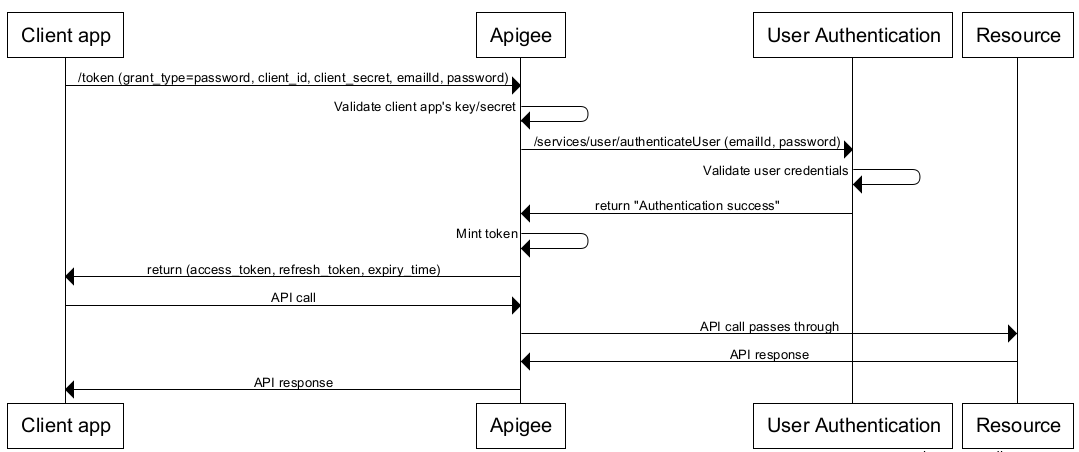
## Flow diagram
The following flow diagram illustrates the resource owner password grant type flow with Apigee
Edge serving as the authorization server.
**Tip:** To see a larger version of this diagram, right-click it and open it in a
new tab, or save it and open it in an image viewer.
## Steps in the password grant type flow
Here is a summary of the steps required to implement the password grant type where Apigee Edge
serves as the authorization server.
**Prerequisite:** The client app must be registered with Apigee Edge to
obtain the client ID and client secret keys. See [Registering client apps](https://docs.apigee.com/api-platform/security/registering-client-apps.md.txt) for
details.
### 1. User
initiates the flow and enters credentials
When the app needs to access the user's protected resources (for example, the user clicks a
button in the app), the user is redirected to a login form.
### 2. App requests
an access token from Apigee Edge
The app sends an access token request, including the user's credentials, to a
GenerateAccessToken endpoint on Apigee Edge.
> [!NOTE]
> **Note:** For information on configuring endpoints, including the default OAuth endpoints, see [Understanding OAuth
> endpoints](https://docs.apigee.com/api-platform/security/oauth/configuring-oauth-endpoints-and-policies).
Here is a sample POST request, which includes the required parameters for this grant type:
```
$ curl -i \
-X POST \
-H 'Content-Type: application/x-www-form-urlencoded' \
-H 'Authorization: Basic c3FIOG9vSGV4VHo4QzAySVg5T1JvNnJoZ3ExaVNyQWw6WjRsanRKZG5lQk9qUE1BVQ' \
-d 'grant_type=password&username=the-user-name&password=the-users-password' \
https://docs-test.apigee.net/oauth/token
```
Alternatively, that command could be performed as the following, using the -u option to curl
to create the base64-encoded Basic Authentication header for you.
```
$ curl -i \
-X POST \
-H 'Content-Type: application/x-www-form-urlencoded' \
-u sqH8ooHexTz8C02IX9ORo6rhgq1iSrAl:Z4ljtJdneBOjPMAU \
-d 'grant_type=password&username=the-user-name&password=the-users-password' \
https://docs-test.apigee.net/oauth/token
```
(Each of those commands should be all on one line.)
The user credentials are contained in the form parameters, while the client credentials are
encoded in the HTTP basic authentication header. For a detailed description of this API call,
including details about the required Basic Auth header, see the password grant section of
"[Requesting
access tokens and authorization codes](https://docs.apigee.com/api-platform/security/oauth/access-tokens#requestinganaccesstokenpasswordgranttype)".
### 3. Edge validates the client
app
Before sending the user's username and password to an identity provider, Edge needs to know
that the client app making the request is a valid, trusted app. One way to do this is to use API
key authentication on the API call. In some cases, you might wish to validate both the client key
and secret. There's a sample proxy that illustrates this allternate technique in the [api-platform-samples repository on GitHub](https://github.com/apigee/api-platform-samples/tree/master/sample-proxies/oauth-validate-key-secret).
### 4. Edge processes the
login credentials
After the client app is validated, you can use a Service Callout or JavaScript policy to call
the identity service, sending in the user's credentials. For example, it could be an LDAP service
or any service that you wish to use to validate the credentials. For details on these policies,
see [Extract Variables
policy](https://docs.apigee.com/api-platform/reference/policies/extract-variables-policy) and [JavaScript
policy](https://docs.apigee.com/api-platform/reference/policies/javascript-policy).
> [!NOTE]
> **Note:** The Apigee Learn example gives a good demonstration of this pattern. For more, see [Samples
> list](https://docs.apigee.com/api-platform/samples/samples-reference).
If the identity service validates the credentials, and returns a 200 response, then Edge will
continue processing the request; otherwise, Edge stops processing and returns an error to the
client app.
### 5. The OAuthV2 policy
executes
If the credentials are valid, the next processing step is to execute an OAuthV2 policy
configured for the password grant type. Here is an example. The \ and
\ elements are required, and you can retrieve them from the flow variables that
were saved with the ExtractVariables policy. For detailed reference information on this policy,
see [OAuthV2 policy](https://docs.apigee.com/api-platform/reference/policies/oauthv2-policy.md.txt).
```
GenerateAccessToken360000000passwordrequest.queryparam.grant_typeloginpassword
```
If this policy succeeds, a response is generated back to the client containing an access
token. The response is in JSON format. Here's an example. Note that access_token is one of the
elements:
```
{
"issued_at": "1420258685042",
"scope": "READ",
"application_name": "ce1e94a2-9c3e-42fa-a2c6-1ee01815476b",
"refresh_token_issued_at": "1420258685042",
"status": "approved",
"refresh_token_status": "approved",
"api_product_list": "[PremiumWeatherAPI]",
"expires_in": "1799",
"developer.email": "tesla@weathersample.com",
"organization_id": "0",
"token_type": "BearerToken",
"refresh_token": "IFl7jlijYuexu6XVSSjLMJq8SVXGOAAq",
"client_id": "5jUAdGv9pBouF0wOH5keAVI35GBtx3dT",
"access_token": "I6daIgMSiUgYX1K2qgQWPi37ztS6",
"organization_name": "docs",
"refresh_token_expires_in": "0",
"refresh_count": "0"
}
```
### 6. The client calls the
protected API
Now, with a valid access code, the client can make calls to the protected API. In this
scenario, requests are made to Apigee Edge (the proxy), and Edge is responsible for validating
the access token before passing the API call along to the target resource server. Access tokens
are passed in an Authorization header. For example:
```
$ curl -H "Authorization: Bearer I6daIgMSiUgYX1K2qgQWPi37ztS6
" http://{org_name}-test.apigee.net/weather/forecastrss?w=12797282
```