You're viewing **Apigee Edge** documentation.
[Go to the
**Apigee X** documentation](http://cloud.google.com/apigee/docs/api-platform/security/oauth/oauth-20-client-credentials-grant-type). info
With the client credentials grant type, an app sends its own credentials (the Client ID and
Client Secret) to an endpoint on Apigee Edge that is set up to generate an access token. If the
credentials are valid, Edge returns an access token to the client app.
## About this topic
This topic offers a general description of the OAuth 2.0 client credentials grant type and
discusses how to implement this flow on Apigee Edge.
## Use cases
Most typically, this grant type is used when the app is also the resource owner. For example,
an app may need to access a backend cloud-based storage service to store and retrieve data that
it uses to perform its work, rather than data specifically owned by the end user. This grant type
flow occurs strictly between a client app and the authorization server. An end user does not
participate in this grant type flow.
## Roles
Roles specify the "actors" that participate in the OAuth flow. Let's do a quick overview of
the client credentials roles to help illustrate where Apigee Edge fits in. For a complete
discussion of OAuth 2.0 roles, see the [IETF OAuth 2.0 specification](https://tools.ietf.org/html/draft-ietf-oauth-v2-31).
- **Client App** -- The app that needs access to the user's protected resources. Typically, with this flow, the app runs on server rather than locally on the user's laptop or device.
- **Apigee Edge** -- In this flow, Apigee Edge is the OAuth authorization server. Its role is to generate access tokens, validate access tokens, and pass authorized requests for protected resources on to the resource server.
- **Resource Server** -- The backend service that stores the protected data that the client app needs permission to access. If you are protecting API proxies hosted on Apigee Edge, then Apigee Edge is also the resource server.
## Code sample
You can find a complete, working [sample implementation of the client credentials grant type](https://github.com/apigee/api-platform-samples/tree/master/sample-proxies/oauth-client-credentials) on GitHub. See [Additional resources](https://docs.apigee.com/api-platform/security/oauth/oauth-20-client-credentials-grant-type#additionalresources) below for links to more examples.
## Flow diagram
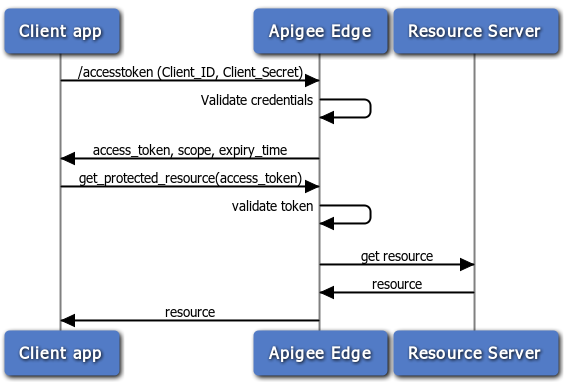
The following flow diagram illustrates the client credentials flow with Apigee Edge serving as
the authorization server. In general, Edge is also the resource server in this flow -- that is,
API proxies are the protected resources.
## Steps in the client credentials flow
Here is a summary of the steps required to implement the client credentials code grant type
where Apigee Edge serves as the authorization server. Remember, with this flow, the client app
simply presents its client ID and client secret, and if they are valid, Apigee Edge returns an
access token.
**Prerequisite:** The client app must be registered with Apigee Edge to obtain
the client ID and client secret keys. See [Registering client apps](https://docs.apigee.com/api-platform/security/registering-client-apps) for
details.
### 1. Client requests an
access token
To receive an access token, the client POSTs an API call to Edge with the values for client ID
and client secret obtained from a registered developer app. In addition, the parameter
grant_type=client_credentials must be passed as a query parameter. (However, you can configure
the OAuthV2 policy to accept this parameter in the request header or body -- see [OAuthV2 policy](https://docs.apigee.com/api-platform/reference/policies/oauthv2-policy) for details).
For example:
```
$ curl -i -H 'Content-Type: application/x-www-form-urlencoded' -X POST 'https://docs-test.apigee.net/oauth/accesstoken' -d 'grant_type=client_credentials&client_id=ns4fQc14Zg4hKFCNaSzArVuwszX95X&client_secret=ZIjFyTsNgQNyxI'
```
**Note:** Although you can pass the client_id and client_secret values as query
parameters as shown above, it's a good practice to pass them as a base64 URL encoded string in
the Authorization header. To do this, you need to use a base64 encoding tool or utility to encode
the two values together with colon separating them. Like this:
aBase64EncodeFunction(clientidvalue:clientsecret). So, the example above would be encoded like
this:
result = aBase64EncodeFunction(ns4fQc14Zg4hKFCNaSzArVuwszX95X:ZIjFyTsNgQNyxI) // Note the
colon separating the two values.
The result of base64 encoding the above string is:
bnM0ZlFjMTRaZzRoS0ZDTmFTekFyVnV3c3pYOTVYOlpJakZ5VHNOZ1FOeXhJOg==
Then, make the token request like this:
```
$ curl -i -H 'Content-Type: application/x-www-form-urlencoded' -X POST 'https://docs-test.apigee.net/oauth/accesstoken' -d 'grant_type=client_credentials' -H 'Authorization: Basic bnM0ZlFjMTRaZzRoS0ZDTmFTekFyVnV3c3pYOTVYOlpJakZ5VHNOZ1FOeXhJOg=='
```
### 2. Edge validates the
credentials
Note that the API call is sent to the /accesstoken endpoint. This endpoint has a policy
attached to it that validates the app's credentials. That is, the policy compares the submitted
keys with the ones that Apigee Edge created when the app was registered. If you'd like to
learn more about OAuth endpoints on Edge, see [Configuring OAuth
endpoints and policies](https://docs.apigee.com/api-platform/security/oauth/configuring-oauth-endpoints-and-policies).
### 3. Edge returns a response
If the credentials are okay, Edge returns an access token to the client. If not, an error is
returned.
### 4. The client calls the
protected API
Now, with a valid access token, the client can make calls to the protected API. In this
scenario, requests are made to Apigee Edge (the proxy), and Edge is responsible for validating
the access token before passing the API call along to the target resource server. For an example,
see [Calling the protected API](https://docs.apigee.com/api-platform/security/oauth/oauth-20-client-credentials-grant-type#calling) below.
## Configuring flows and policies
As the authorization server, Edge processes requests for access tokens. As the API developer,
you need to create a proxy with a custom flow to handle token requests and add and configure an
OAuthV2 policy. This section explains how to configure that endpoint.
### Custom flow configuration
The easiest way to show how the API proxy flow is configured is to show the XML flow
definition. Here's an example API proxy flow designed to process an access token request. For
example, when a request comes in and the path suffix matches /accesstoken, the GetAccessToken
policy is triggered. See [Configuring OAuth
endpoints and policies](https://docs.apigee.com/api-platform/security/oauth/configuring-oauth-endpoints-and-policies) for a quick overview of the steps needed to create a custom flow
like this.
```
proxy.pathsuffix == "/oauth/accesstoken"
GetAccessToken
```
### Configure the flow with a policy
You need to attach a policy to the endpoint, as follows. See [Configuring OAuth
endpoints and policies](https://docs.apigee.com/api-platform/security/oauth/configuring-oauth-endpoints-and-policies) for a quick overview of the steps needed to add an OAuthV2 policy
to a proxy endpoint.
#### Get access token
This policy is attached to the `/accesstoken` path. It uses the OAuthV2
policy with the GenerateAccessToken operation specified.
```
GenerateAccessToken
3600000
client_credentials
```
The API call to obtain the access token is a POST and includes an Authorization header with
the base64 encoded client_id + client+secret and the query parameter
grant_type=client_credentials. It can also include optional parameters for scope and state. For
example:
```
$ curl -i -H 'Content-Type: application/x-www-form-urlencoded' -X POST 'https://docs-test.apigee.net/oauth/accesstoken' -d 'grant_type=client_credentials' -H 'Authorization: Basic c3FIOG9vSGV4VHo4QzAySVgT1JvNnJoZ3ExaVNyQWw6WjRsanRKZG5lQk9qUE1BVQ'
```
## Attaching the verify access token policy
To protect your API with OAuth 2.0 security, you need to add an OAuthV2 policy with the
VerifyAccessToken operation. This policy checks that incoming requests have a valid access token.
If the token is valid, Edge processes the request. If it is not valid, Edge returns an error. For
the basic steps, see [Verifying
access tokens](https://docs.apigee.com/api-platform/security/oauth/using-access-tokens).
```
VerifyAccessToken
false
VerifyAccessToken
```
## Calling the protected API
To call an API that is protected with OAuth 2.0 security, you need to present a valid access
token. The correct pattern is to include the token in an Authorization header, as follows: Note
that the access token is also referred to as a "bearer token".
```
$ curl -H "Authorization: Bearer UAj2yiGAcMZGxfN2DhcUbl9v8WsR" \
http://myorg-test.apigee.net/v0/weather/forecastrss?w=12797282
```
See also [Sending an access
token](https://docs.apigee.com/api-platform/security/oauth/sending-access-token).
## Additional resources
- Apigee offers online training for API developers, including a course on [API
security](https://www.coursera.org/learn/api-security-apigee-gcp), which includes OAuth.
- [OAuthV2 policy](https://docs.apigee.com/api-platform/reference/policies/oauthv2-policy) -- Has lots of examples showing how to make requests to the authorization server and how to configure the OAuthV2 policy.