You're viewing **Apigee Edge** documentation.
[Go to the
**Apigee X** documentation](http://cloud.google.com/apigee/docs/api-platform/system-administration/options-configuring-tls). info
This document contains an overview of how you configure TLS on Edge for two functional
areas:
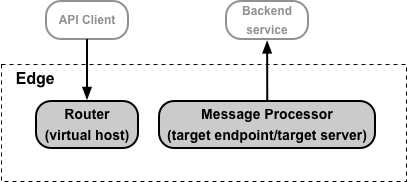
1. Access to your API proxies by API clients. Use **virtual hosts** on the Edge Router to configure TLS.
2. Access to your backend services by Edge. Use **target endpoints and target
servers** on the Edge Message Processor to configure TLS.
Both of these access types are shown below:
> [!NOTE]
> **Note:** For TLS configuration information for all other areas of the Private Cloud, see [Configuring TLS/SSL](https://docs.apigee.com/private-cloud/latest/configuring-ssl-edge-premises) for Edge for the Private Cloud.
## About
setting TLS options in a virtual host or target endpoint/target server
A virtual host can be represented by an XML object, in the form:
```
...
true
true
ref://myKeystoreRef
myKeyAlias
ref://myTruststoreRef
false
```
The area of the virtual host that a you modify to configure TLS is defined by the \ tag. You use the
same \ tag to configure a
target endpoint or target server.
The following table describes the TLS configuration elements used by the \ tag:
| **Element** | **Description** |
|---|---|
| \ | Enables one-way TLS between Edge and the API client, or between Edge and the target backend. For a virtual host, you must define a keystore containing the cert and private key. |
| \ | Enables two-way TLS between Edge and the API client, or between Edge and the target backend. Enabling two-way TLS typically requires that you set up a truststore on Edge. |
| \ | The keystore. |
| \ | The alias specified when you uploaded a cert and private key to the keystore. |
| \ | The truststore. |
| \ | If true, Edge ignores TLS certificate errors. Valid when configuring TLS for target servers and target endpoints, and when configuring virtual hosts that use 2-way TLS. The default value is false. When used with a target endpoint/target server, if the backend system uses SNI and returns a cert with a subject Distinguished Name (DN) that does not match the hostname, there is no way to ignore the error and the connection fails. |
| \ | If specified, a value against which the common name of the target certificate is validated. This value is only valid for TargetEndpoint and TargetServer configurations. It is not valid for VirtualHost configurations. By default, the value specified is matched *exactly* with the common name of the target certificate. For example, using `*.myhost.com` as the value for \ will only match and validate the target hostname if the exact value `*.myhost.com` is specified as the common name in the target certificate. Optionally, Apigee can perform the match with wildcards using the `wildcardMatch` attribute. For example, a common name specified as `abc.myhost.com` in a target certificate would be matched and validated if the \ element is specified as follows: ``` *.myhost.com ``` |
## About setting the
\ and \ elements
In the virtual host example above, the keystore and truststore are specified by using
**references**, in the form:
```
ref://myKeystoreRef
ref://myTruststoreRef
```
Apigee strongly recommends that you always use references to the keystore and truststore. A
reference is a variable that contains the name of the keystore or truststore, rather than
specifying the keystore name directly. In this example:
- **`myKeystoreRef`** is a reference that contains the name of the keystore. In this example, the name of the keystore is **myKeystore**.
- **`myTruststoreRef`** is a reference that contains the name of the truststore. In this example, the name of the truststore is **myTruststore**.
When a cert expires, you have to update the virtual host or target endpoint/target server to
specify the keystore or truststore containing the new cert. The advantage of a reference is that
you can modify the value of the reference to change the keystore or truststore without having to
modify the virtual host or target endpoint/target server itself:
- **For Cloud customers** : Changing the value of the reference does not require you to contact [Apigee Edge Support](https://docs.apigee.com/api-platform/troubleshoot/support).
- **For Private Cloud customers**: Changing the value of the reference does not require you to restart Edge components, such as Routers and Message Processors.
Alternatively, you can specify the keystore name and truststore name directly:
```
myKeystore
myTruststore
```
If you directly specify the name of the keystore or truststore, then Cloud customers must
contact [Apigee Edge Support](https://docs.apigee.com/api-platform/troubleshoot/support)
and Private Cloud customers must restart certain Edge components to update the cert.
A third option, for target endpoints/target server only, is to use flow variables:
```
{ssl.keystore}
{ssl.truststore}
```
Flow variables work for target endpoints/target servers and let you update the keystore or
truststore like references. However, they do not work with virtual hosts, and require you to pass
information about the keystore, alias, and truststore on every request.
### Restrictions in using
references to keystores and truststore
Paid Cloud customers and all Private Cloud customers configuring TLS must take into account
the following restriction when using references to keystores and truststores:
- You can only use keystore and truststore references in virtual hosts if you terminate TLS on the Apigee Routers.
- If you have a load balancer in front of the Apigee Routers, and you terminate TLS on the load balancer, then you cannot use keystore and truststore references in virtual hosts.
### If your existing virtual host uses a literal keystore or truststore name
Existing virtual hosts on Edge might not be configured to use references for keystores and
truststores. In this case, you can update the virtual host to use a reference.
1. **Edge for the Cloud**
To change the virtual host to use a reference to the keystore you must work with
[Apigee Edge Support](https://docs.apigee.com/api-platform/troubleshoot/support).
2. **Edge for the Private Cloud**
To convert the virtual host to use a reference:
1. Update the virtual host to use a reference.
2. Restart the Routers.
See "Modifying a virtual host to use references to the keystore and truststore" in [Configuring TLS access to an
API for the Private Cloud](https://docs.apigee.com/api-platform/system-administration/creating-virtual-host) for more.
### About using the Apigee free trial cert and key
If you have a paid Edge for Cloud account and do not yet have a TLS cert and key, you can create
a virtual host that uses the Apigee free trial cert and key. That means you can create the virtual host
without first creating a keystore.
An XML object that defines the virtual host using the Apigee free trial cert and key omits the
`` and `` elements, and replaces them with the
`` element, as shown below:
```
myapi.apigee.net
443
true
false
true
```
If you are performing two-way TLS, you must still set the `` element to
`true`, and specify a truststore by using a *reference* with the `` element.
See [Configuring virtual hosts for the Cloud](https://docs.apigee.com/api-platform/fundamentals/configuring-virtual-hosts-cloud)
for more.
## About configuring TLS
Two main factors determine how you perform TLS configuration:
- Are you an Edge Cloud or Private Cloud customer?
- How are you going to update expired or expiring certs?
### Cloud and Private Cloud configuration
options
The following table shows the different configuration options for Cloud and Private Cloud
customers:
| | **Private Cloud** | **Cloud** |
|---|---|---|
| **Virtual host** | Complete control | Complete control for paid accounts only |
| **Target endpoint/target server** | Complete control | Complete control |
Private Cloud customers have complete control over the configuration of both virtual hosts and
target endpoints/target servers. That control includes the ability to create and delete virtual
hosts, and set all properties on a virtual host.
All Cloud customers, both paid and evaluation, have complete control over the configuration of
target endpoints/target servers. In addition, paid Cloud customers have complete control of
virtual hosts, including TLS properties.
> [!NOTE]
> **Note:** Evaluation customers do not have the ability to configure a virtual host. Instead, Apigee automatically provides a TLS certificate and private key to support HTTPS on a secure virtual host so that evaluation customers can get started developing and testing APIs.
### Handling expired certificates
If a TLS certificate expires, or if your system configuration changes such that the
certificate is no longer valid, then you need to update the certificate. When configuring TLS for
a virtual host or target endpoint/target server, you should decide how you are going to perform
that update before you perform any configuration.
> [!NOTE]
> **Note:** You cannot update an existing keystore or truststore to add a new certificate. You must create a new keystore/truststore when updating a certificate. Typically, you create the new keystore/truststore and upload the new cert before the cert in the old keystore/truststore expires. This lets you test the new keystore/truststore and rollback to the old keystore/truststore if there are any issues.
### When a cert expires
On Edge, you store certs in one of two places:
- **Keystore** - Contains the TLS certificate and private key used to identify the entity during TLS handshaking.
- **Truststore** - Contains trusted certificates on a TLS client used to validate a TLS server's certificate presented to the client. These certificates are typically self-signed certificates, certificates signed by a trusted CA, or certs used as part of two-way TLS.
**When a cert in a keystore expires, and you are using a reference to the
keystore**, you cannot upload a new cert to the keystore. Instead, you:
1. Create a new keystore.
2. Upload the new cert to the new keystore **using the same alias name** as in the old keystore.
3. Update the reference in your virtual host or target server/target endpoint to use the new keystore.
**When a cert in a truststore expires, and you are using a reference to the
truststore**, you:
1. Create a new truststore.
2. Upload the new cert to the new truststore. The alias name does not matter for truststores. **Note**: If a cert is part of a chain, then you must either create a single file containing all the certs and upload that file to a single alias, or upload all certs in the chain separately to the truststore using a different alias for each cert.
3. Update the reference in your virtual host or target server/target endpoint to use the new truststore.
### Summary of methods of updating an expired
cert
The method that you use to specify the name of the keystore and truststore in the virtual host
or target endpoint/target server determines how you perform the cert update. You can use:
- References
- Direct names
- Flow variables
Each of these methods has different repercussions on the update process, as described in the
following table. As you can see, references provide the greatest flexibility for both Cloud and
Private Cloud customers:
| **Config type** | **How to update/replace cert** | **Private Cloud** | **Cloud** |
|---|---|---|---|
| Reference (Recommended) | For a keystore, create new keystore with a **new name** and an alias with **same name** as the old alias. For a truststore, create a truststore with a **new name**. | Update the reference to the keystore or truststore. No Router or Message Processor restart is necessary. | Update the reference to the keystore or truststore. No need to contact Apigee Support. |
| Flow vars (target endpoint only) | For a keystore, create new keystore with a **new name** and an alias with the same name or with a new name. For a truststore, create a truststore with a **new name**. | Pass updated flow var on each request with the name of the new keystore, alias, or truststore. No Router or Message Processor restart is necessary. | Pass updated flow var on each request with the name of the new keystore, alias, or truststore. No need to contact Apigee Support. |
| Direct | Create a new keystore, alias, truststore. | Update the virtual host and restart the Routers. If the truststore is used by a target endpoint/target server, redeploy the proxy. | For virtual hosts, **contact [Apigee Edge Support](https://docs.apigee.com/api-platform/troubleshoot/support)** to restart the Routers. If the truststore is used by a target endpoint/target server, redeploy the proxy. |
| Direct | Delete the keystore or truststore and recreate it with same name. | No virtual host update required, no Router restart necessary. However, API requests fail until the new keystore and alias are set. If the keystore is used for two-way TLS between Edge and the backend service, restart the Message Processors. | No virtual host update required. However, API requests fail until the new keystore and alias are set. If the keystore is used for two-way TLS between Edge and the backend service, **contact [Apigee Edge Support](https://docs.apigee.com/api-platform/troubleshoot/support)** to restart the Message Processors. |
| Direct | For truststore only, upload a new cert to the truststore. | If the truststore is used by a virtual host, restart the Routers. If the truststore is used by a target endpoint/target server, restart the Message Processors. | For virtual hosts, **contact [Apigee Edge Support](https://docs.apigee.com/api-platform/troubleshoot/support)** to restart the Edge Routers. If the truststore is used by a target endpoint/target server, **contact [Apigee Edge Support](https://docs.apigee.com/api-platform/troubleshoot/support)** to restart the Message Processors. |