You're viewing **Apigee Edge** documentation.
[Go to the
**Apigee X** documentation](http://cloud.google.com/apigee/docs/api-platform/system-administration/users-roles-overview). info
This topic discusses role-based access control for Apigee Edge organizations and explains how
to create roles and assign users to them. You must be an organization administrator to perform
the tasks described here.
**Video:** Watch a short video to learn about Apigee Edge built-in and custom
roles.
## What are roles?
Roles are essentially CRUD-based permission sets. CRUD means "create, read, update, delete".
For example, a user may be given a role that permits her to read or "get" details about a
protected entity, but not permission to update or delete it. The organization administrator is
the highest-level role, and has permissions to perform any operation on protected entities, which
include:
- API proxies
- Trace sessions
- API products
- Developer apps
- Developers
- Environments (Trace tool sessions and deployments)
- Custom reports (Analytics)
## Getting started
You must be an Apigee Edge **organization administrator** to create users and assign roles. Only
organization administrators can see and use the menu items for managing users and roles. See
also [Managing
organization users](https://docs.apigee.com/api-platform/system-administration/managing-organization-users).
## What you need to know
about user roles
In Apigee Edge, user roles form the basis of role-based access, meaning that you can control
what functions a person can access by assigning them a role (or roles). Here are a few things you
need to know about roles:
- When you create your own Apigee Edge account, your role is set automatically to **organization administrator** in your organization. If you add users to your organization, you set the user role (or roles) at the time that you add them.
- When an organization administrator adds **you** to an organization, your role (or roles) are determined by the administrator. The organization administrator can later change your role(s) if necessary. See [Assigning roles to a user](https://docs.apigee.com/api-platform/system-administration/understanding-roles#AddMultipleRoles) below.
- Users can be assigned more than one role. If a user has multiple roles assigned, the greater permission takes precedence. For example, if one role doesn't allow the user to create API proxies, but another role does, then the user can create API proxies. In general, it is not a common use case to assign users multiple roles. See [Assigning
roles to a user](https://docs.apigee.com/api-platform/system-administration/understanding-roles#AddMultipleRoles) below.
- By default, all users associated with an organization can view details about other organization users, such as email address, first name, and last name.
It's important to understand that user roles are specific to the organization in which they
were assigned. An Apigee Edge user can belong to multiple organizations, but roles are
organization-specific. For example, a user can be have the organization administrator role in one
organization and only the user role in another.
## Assigning
roles to a user
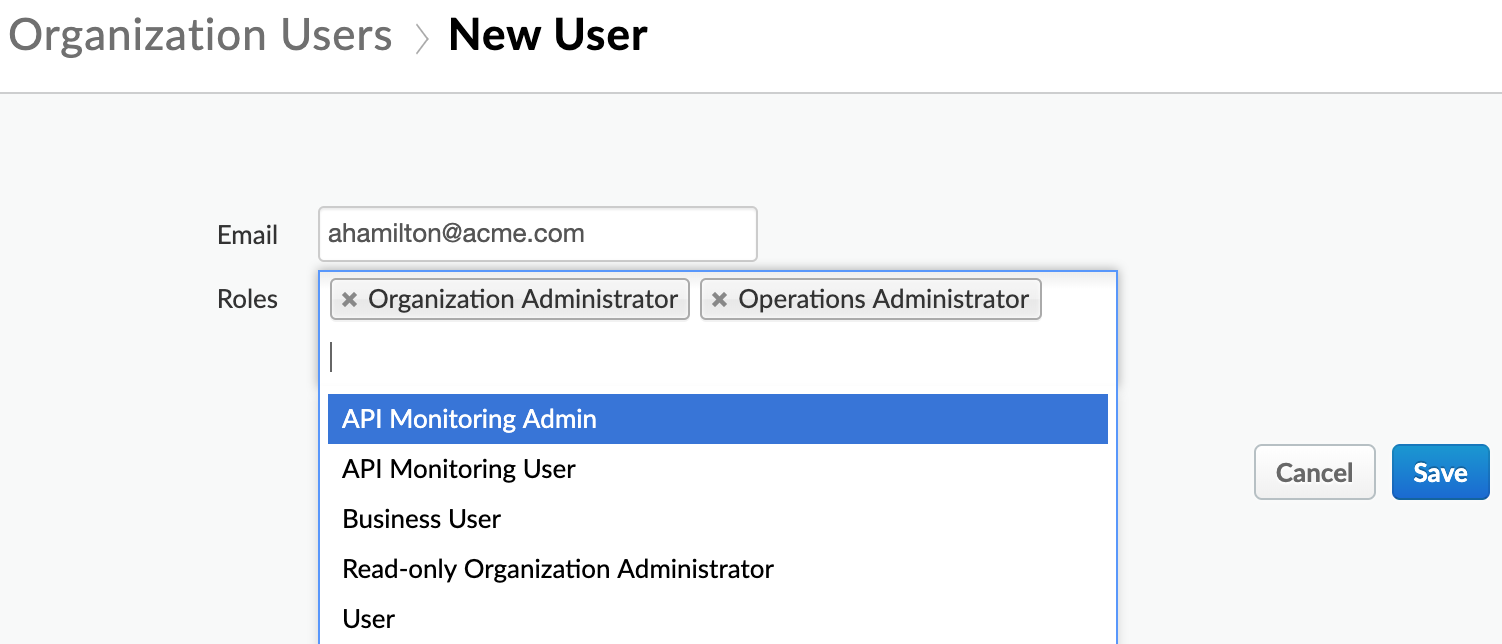
You can add one or more roles to a user when you [add a new user](https://docs.apigee.com/api-platform/system-administration/managing-organization-users?hl=en#addingusers) or [edit an existing
user](https://docs.apigee.com/api-platform/system-administration/managing-organization-users?hl=en#editingauserprofileandassignedroles). Details about each role are explained in [Default role
permissions](https://docs.apigee.com/api-platform/system-administration/understanding-roles#defaultroles).
> [!NOTE]
> **Note:** If a user has multiple roles assigned, the greater permission takes precedence. For example, if one role doesn't allow the user to create API proxies, but another role does, then the user can create API proxies. In general, it is not a common use case to assign users multiple roles.
### Assigning roles to users with
the Edge API
You can use the Edge API to assign users to a role. The following example uses the [Add a user to a
role](https://docs.apigee.com/management/apis/post/organizations/{org_name}/userroles/{role_name}/users-0) API to add the user to the Operations Administrator role:
```
curl https://api.enterprise.apigee.com/v1/o/org_name/userroles/opsadmin/users \
-X POST \
-H "Content-Type:application/x-www-form-urlencoded" \
-d 'id=jdoe@example.com'
-u orgAdminEmail:pword
```
Where org_name is the name of your organization.
## Default role permissions
Apigee Edge provides a set of default roles, out-of-the-box. For more information, see
[Edge built-in roles](https://docs.apigee.com/api-platform/system-administration/edge-built-roles).
### If you are an organization admin
Organization admins can see the entire list of permissions for each type of user. Just go to
**Admin \> Organization Roles**. When you click on a role, it takes you to a table
that looks like this:
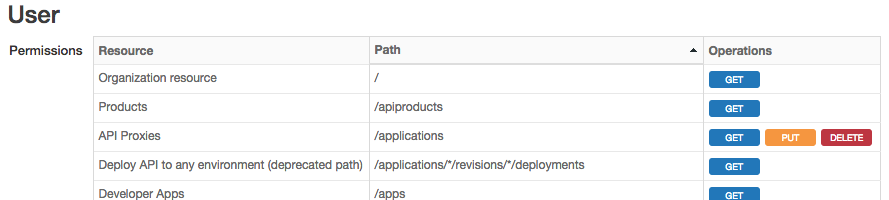
The table shows you the levels of protection for **resources** . In this context,
resources refer to "entities" that users can interact with through the Edge management UI
**and** API.
- The first column lists the **general names of resources** that users interact with. It also includes some other things like API Proxies, Products, Deployments, etc. This column reflects the names of things as you see them in the management UI.
- The second column lists the **paths used to access resources** through the management API.
- The third column lists the **operations the role can perform** on each resource and path. The operations are GET, PUT, and DELETE. In the UI, these same operations are referred to as View, Edit, and Delete. Just keep in mind that the UI and API uses different terms for these operations.
### If you are not an organization administrator
You are not permitted to add or change a user's roles or view the role properties in the UI.
See [Edge built in roles](https://docs.apigee.com/api-platform/system-administration/edge-built-roles) for
information about the permissions granted to each role.
## Role operations
You can assign roles through management APIs or through the management UI. Either way, you're
working with CRUD permissions, although the API and UI use slightly different terminology.
The Edge **management APIs** allow these CRUD operations:
- `GET:` Enables a user to view a list of protected resources or to view a singleton RBAC resource
- `PUT:` Enables a user to create or update a protected resource (encompassing both `PUT` and `POST` HTTP methods)
- `DELETE:` Enables a user to delete an instance of a protected resource.
> [!NOTE]
> **Note:** You can only delete a specific instance of a resource. You cannot, for example, delete *all* API proxies, only a specific one.
The Edge **management UI** refers to the same CRUD operations, but with
different wording:
- **View:** Enables a user to view protected resources. Typically, you can view resources one at a time, or view a list of resources.
- **Edit:** Enables a user to update a protected resource.
- **Create:** Enables a user to create a protected resource.
- **Delete:** Enables a user to delete an instance of a protected resource.
> [!NOTE]
> **Note:** You can only delete a specific instance of a resource. You cannot, for example, delete ALL API proxies, only a specific one.
## Creating custom roles
Custom roles let you apply fine-grained permissions to these Apigee Edge entities such as API
proxies, products, developer apps, developers, and custom reports.
You can create and configure custom roles either through the UI or using APIs. See [Creating custom roles in the
UI](https://docs.apigee.com/api-platform/system-administration/creating-custom-roles) and [Creating roles
with the API](https://docs.apigee.com/api-platform/system-administration/managing-roles-api).