You're viewing **Apigee Edge** documentation.
[Go to the
**Apigee X** documentation](http://cloud.google.com/apigee/docs/api-platform/publish/portal/portal-identity-provider). info
The Edge SSO Service Provider (SP) uses an x509 certificate to sign authentication requests and
decrypt SAML assertions. As part of Apigee's security process, we update our SP certificate annually,
typically in January of each year. Apigee will contact you when the certificate is due to expire.
If you are using SAML with an Identity Provider (IDP) that is not configured to refresh the
certificate metadata automatically, you will not be able to access the Apigee Management Console UI
until after you update the certificate. This change will not impact your runtime API traffic.
> [!NOTE]
> **Note:** If you configured your IDP to use the metadata URL to pull certificate metadata automatically, you will not be impacted by the certificate update. No action is required on your part.
## Download the certificate metadata file
If you configured your SAML IDP by manually adding metadata containing the certificate, or you uploaded
the certificate from a static file, your users will not be able to login the Apigee Management Console UI
after Apigee updates the certificate. You must download the latest certificate metadata after the January
release and replace your current certificate metadata on the IDP.
You can download the latest certificate metadata from the following location:
```
https://zoneName.login.apigee.com/saml/metadata/alias/zoneName.apigee-saml-login
```
where zoneName corresponds to the zone name you received from Apigee.
For example, if your zone name is 'myzone', then the URL is:
```
https://myzone.login.apigee.com/saml/metadata/alias/myzone.apigee-saml-login
```
## Updating the certificate metadata for ADFS
This section describes how to update the metadata for Microsoft Active Directory Federation Services (ADFS).
For all other IDPs, please see the IDP documentation on metadata refresh.
> [!NOTE]
> **Note:**If ADFS is configured to auto refresh the certificate, no action is needed.
The way you update the certificate metadata depends on how you configured ADFS:
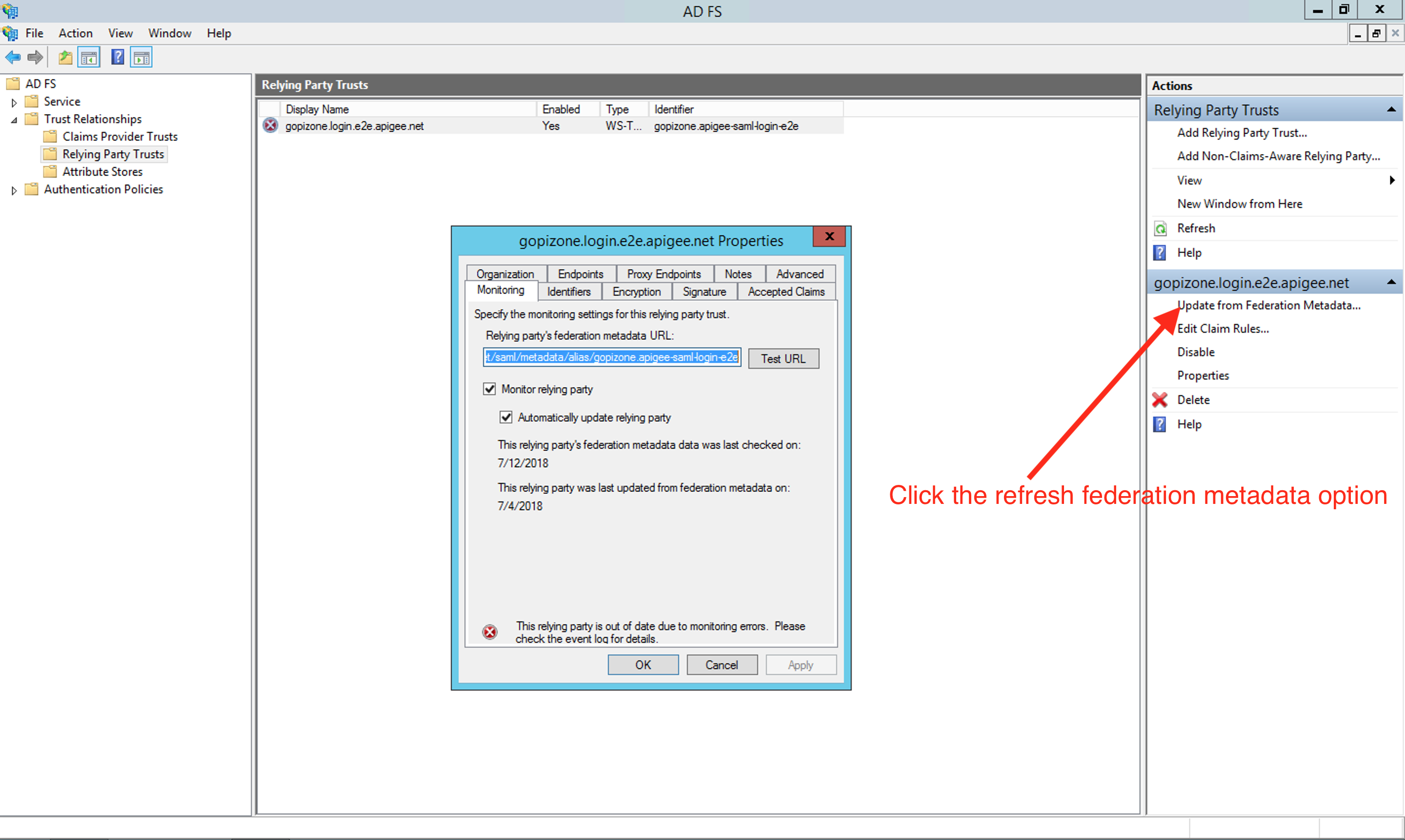
1. **If you have setup your ADFS instance to monitor relying party** (Apigee in this case),
then refresh the metadata after the January release by clicking the option **Update from Federation metadata**
available within ADFS management tool:
2. **If you use file based metadata**:
1. Download the new metadata from the below location after the January release from:
```
https://zoneName.login.apigee.com/saml/metadata/alias/zoneName.apigee-saml-login
```
where zoneName corresponds to the zone name you received from Apigee.
2. Recreate the relying party trust by deleting the existing one. See [Configuring Edge as a Relying Party in ADFS IDP](https://docs.apigee.com/api-platform/system-administration/configuring-edge-relying-party-adfs-idp) doc for more information.
If you have any questions or require assistance, please contact [Apigee Edge Support](https://docs.apigee.com/api-platform/troubleshoot/support).