You're viewing **Apigee Edge** documentation.
[Go to the
**Apigee X** documentation](http://cloud.google.com/apigee/docs/api-platform/security/saml). info
SAML supports a single sign-on (SSO) environment. By using SAML with Edge, you can support SSO
for the Edge UI and API in addition to any other services that you provide and that also support
SAML.
**Prerequisite:** You must [enable SAML](https://docs.apigee.com/api-platform/system-administration/saml-overview) for at least
one organization before you can use it to access the Edge API.
## Differences between SAML and OAuth2
Once SAML is set up, using it is very similar to using [OAuth2 to access
the Edge API](https://docs.apigee.com/api-platform/system-administration/using-oauth2). When you call the Edge API, you include an OAuth2 access token in
your request.
The key difference between SAML and OAuth2 when accessing the Edge API is in the way
you get tokens. With SAML, you must include the following when getting your
token pair:
1. **Zones:** Edge for Public Cloud users must reference their zone name when getting tokens.
2. **Passcode:** Include a one-time passcode when requesting an access/refresh token pair.
SAML uses the same endpoints on the Edge OAuth2 service, with the addition of the appropriate zone name.
To get access tokens with SAML, you can use one of the following methods, described in this section:
- [`get_token` utility](https://docs.apigee.com/api-platform/system-administration/using-saml#get_token)
- [Edge OAuth2 service](https://docs.apigee.com/api-platform/system-administration/using-saml#api)
In addition, you can automate the token generation process for machine users, as described in [Automate the token generation process](https://docs.apigee.com/api-platform/system-administration/automating-tasks).
## Get access tokens with get_token
You can use the [`get_token`](https://docs.apigee.com/api-platform/system-administration/using-gettoken) utility to exchange your credentials for OAuth2 access and
refresh tokens that you use with SAML.
> [!NOTE]
>
> #### NOTE
>
> The examples in this section use `curl` to make API requests. You should consider using `acurl`, Apigee's utility that acts as a convenience wrapper around `curl`. `acurl` passes in the access tokens and refreshes them for you when the tokens expire.
**To get an access token with get_token:**
1. Set the `SSO_LOGIN_URL` environment variable to your login URL. The login URL has the following form:
```
https://zoneName.login.apigee.com
```
For example, for a zone named "acme", set `SSO_LOGIN_URL` to "https://acme.login.apigee.com",
as the following example shows:
```
export SSO_LOGIN_URL=https://acme.login.apigee.com
```
2. Call `get_token` to obtain the OAuth2 access token:
```
get_token -u me@example.com
```
You are prompted to visit the URL displayed to obtain a one-time passcode:
```
Get passcode from https://acme.login.apigee.com/passcode
[Note: Passcode can be used only time time and expires] Input passcode (no spaces) and then press ENTER:
```
If you have not recently signed in through your identity provider, you will be prompted to sign
in.
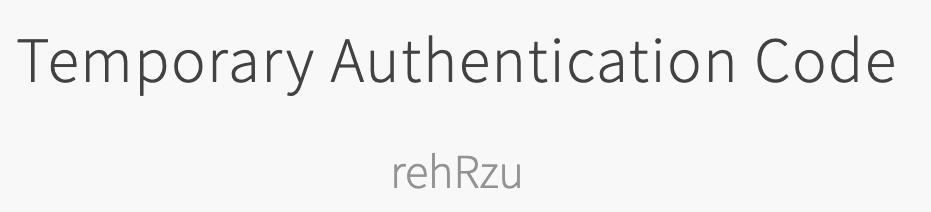
This URL returns a one-time passcode that remains valid until you refresh that URL to
obtain a new passcode, or you use the passcode with `get_token` to generate an
access token. For example:
3. Enter the passcode. The `get_token` utility obtains the OAuth2 tokens,
prints the access token to `stdout`, and writes the access and refresh tokens
to `~/.sso-cli`.
4. Call the Edge API and pass the access token in the `Authorization: Bearer` header, as the following example shows:
```
curl https://api.enterprise.apigee.com/v1/organizations/ahamilton-eval \
-H "Authorization: Bearer ACCESS_TOKEN"
```
The value of the access token can be copied from `stdout`.
This example gets details about the given organization. For a complete list of management
API endpoints, see [Apigee Edge API Reference](https://apidocs.apigee.com).
When your access token expires, you can call `get_token` again to get a new access
token. For example:
```
get_token -u me@example.com
```
You will not be prompted for a new passcode until the refresh token expires.
When the refresh token expires, `get_token` prompts you for a new passcode. You must
generate a new passcode before you can generate a new OAuth2 access token.
## Get access tokens with the Edge OAuth2 service
You can use the Edge OAuth2 service to get access tokens that you use with SAML. To authenticate
yourself with the Edge API, you use a passcode on your initial request to get an access/refresh
token pair, and again to get a fresh token pair.
To get a token pair with the Edge API:
1. In a browser, navigate to the following URL to obtain a one-time passcode:
```
https://zoneName.login.apigee.com/passcode
```
For example, for a zone named "acme", go to the following URL:
```
https://acme.login.apigee.com/passcode
```
If you have not recently signed in through your identity provider, you will be prompted to sign
in.
This URL returns a one-time passcode that acts as your credentials to get tokens and remains valid until you refresh the URL to
obtain a new passcode, or you can use the passcode with `get_token` to generate an
access token. For example:

2. Send a request to the Edge API, as the following example shows:
```
curl https://zoneName.login.apigee.com/oauth/token \
-s \
-H "Accept: application/json" \
-d 'grant_type=password&response_type=token&passcode=passcode'
```
The passcode acts as your credentials for authorization.
Where:
- The `Authorization` header is "Basic ZWRnZWNsaTplZGdlY2xpc2VjcmV0" (use this exact value).
- The request type is `POST`.
- The body of the request contains the following:
- `grant_type` is "password".
- `response_type` is "token".
- `passcode` where passcode is the passcode that was returned in the previous step.
The call prints the access and refresh tokens to the screen.
**To refresh your access token:**
Submit a request to `https://zoneName.login.apigee.com/oauth/token`,
as the following example shows:
```
curl https://zoneName.login.apigee.com/oauth/token \
-d 'grant_type=refresh_token&refresh_token=REFRESH_TOKEN'
```
Where:
- The body of the request contains the following:
- `grant_type` is "refresh_token".
- `refresh_token` is the value of the refresh token.
- The `Authorization` header is "Basic ZWRnZWNsaTplZGdlY2xpc2VjcmV0" (use this exact value).
- The request type is `POST`.
## Access the Edge API with SAML
You can use tools such as `curl` or the Apigee convenience utility [`acurl`](https://docs.apigee.com/api-platform/system-administration/using-acurl)
to
access the Edge API.
With `curl`, you call the Edge API and pass the access token in the
`Authorization: Bearer` header, as the following example shows:
```
curl https://api.enterprise.apigee.com/v1/organizations/ahamilton-eval \
-H "Authorization: Bearer ACCESS_TOKEN"
```
With `acurl`, you do not need to specify the `Authorization` header. For example:
```
acurl https://api.enterprise.apigee.com/v1/organizations/ahamilton-eval
```
These examples call a Edge API endpoint that gets details about the given organization.
For a complete list of Edge API endpoints, see [Apigee Edge API Reference](https://apidocs.apigee.com).
For additional methods of calling the API, including ways to ensure that your token remains
fresh, see [Access the Edge API with OAuth2](https://docs.apigee.com/api-platform/system-administration/using-oauth2#access-api).
## Machine users in SAML zones
You can use the `acurl` and `get_token` utilities to script automated access
to the Edge APIs for [machine users](https://docs.apigee.com/api-platform/system-administration/automating-tasks#get-the-machine-users-oauth2-tokens) in SAML zones.
The following example shows how to
use `get_token` to
request an access token and then add the token value to a `curl` call:
USER=me@example.com
PASS=not-that-secret
TOKEN=$(get_token -u $USER:$PASS -m '' --force-basic-auth)
curl -H "Authorization: Bearer $TOKEN" 'https://api.enterprise.apigee.com/v1/organizations/...'
In the example above, setting the value of `-m` to an empty string will prevent a machine user
from being prompted for an MFA code. Using the `--force-basic-auth` flag will override
the standard prompt for a passcode triggered by requests with SAML zones.
Alternatively, you can combine the token request and `curl` call using the `acurl` utility.
For example:
USER=me@example.com
PASS=not-that-secret
acurl -u $USER:$PASS -m '' --force-basic-auth 'https://api.enterprise.apigee.com/v1/organizations/...'