You're viewing **Apigee Edge** documentation.
[Go to the
**Apigee X** documentation](http://cloud.google.com/apigee/docs/api-platform/system-administration/working-references). info
When configuring a virtual host to support TLS, you specify a keystore or truststore by using
a reference. A reference is a variable that contains the name of the keystore or truststore,
rather than specifying the keystore or truststore name directly, as shown below:
```
true
false
ref://myTestKeystoreRef
myKeyAlias
```
The advantage to using a reference is that you can change the value of the reference to change
the keystore used by the virtual host, usually because the cert in the current keystore is
expiring in the near future. Changing the value of the reference does not require you to restart
the Edge Router.
You can only use a reference to the keystore and truststore; you cannot use a reference to the
alias. When you change the reference to a keystore, ensure that the alias name of the cert is the
same as in the old keystore.
> [!CAUTION]
> **Caution:** Alternatively, you can use a literal keystore name in the virtual host. However, if you ever modify the virtual host to change the keystore name, you have to restart the Edge Routers, meaning Cloud customers have to contact [Apigee Edge Support](https://docs.apigee.com/api-platform/troubleshoot/support). **Apigee
> strongly recommends that you use references to keystores and truststores in a virtual host and do
> not use names directly.**
#### Restrictions in using references to keystores and truststore
You must take into account the following restriction when using references to keystores and
truststores:
- You can only use keystore and truststore references in virtual hosts if you support SNI and you terminate SSL on the Apigee Routers.
- If you have a load balancer in front of the Apigee Routers, and you terminate TLS on the load balancer, then you cannot use keystore and truststore references in virtual hosts.
## Creating a reference
To create a reference in the Edge UI:
1. Login to the Edge management UI at [https://enterprise.apigee.com](https://enterprise.apigee.com/).
2. In the Edge management UI menu, select the name of your organization.
3. Depending on your version of the Edge UI:
1. If you are using the **Classic Edge UI** : Select **APIs \>
Environment Configuration**.
2. If you are using the **New Edge UI** : Select **Admin \>
Environments**.
4. Select the Environment (typically `prod` or `test`)
5. Select the **References** tab.
6. Select the **+ Reference** button. The following pop-up appears:
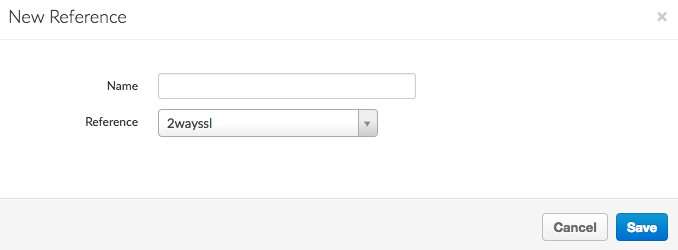
7. Specify the:
1. **Name** of the reference.
2. The entity referred to by the reference, meaning the keystore or truststore name.
3. Select **Save**.
Alternatively, use the [Create
Reference](https://docs.apigee.com/management/apis/post/organizations/%7Borg_name%7D/environments/%7Benv_name%7D/references) API call to create the reference named **keystoreref**:
```
curl -X POST -H "Content-Type:application/xml" https://api.enterprise.apigee.com/v1/o/{org_name}/e/{env_name}/references \
-d '
myTestKeystore
KeyStore
' -u orgAdminEmail:password
```
The reference specifies the name of the keystore and its type. Use the same API call to create
a reference to a truststore.
## Modifying a reference
To modify the value of a reference in the Edge UI:
1. Login to the Edge management UI at [https://enterprise.apigee.com](https://enterprise.apigee.com/).
2. In the Edge management UI menu, select the name of your organization.
3. Depending on your version of the Edge UI:
1. If you are using the **Classic Edge UI** : Select **APIs \>
Environment Configuration**.
2. If you are using the **New Edge UI** : Select **Admin \>
Environments**.
4. Select the Environment (typically `prod` or `test`)
5. Select the **References** tab.
6. In the **Reference** tab, select the **Edit** button for the reference.
7. Update the reference to specify the new keystore or truststore. **Caution**: Ensure that the alias in the new keystore has the same name as the alias in the old keystore.
8. Select **Save**.
To change the reference to point to a different keystore, ensuring that the alias in the new
keystore has the same name as the alias in the old keystore, use the [Update Reference](https://docs.apigee.com/management/apis/put/organizations/%7Borg_name%7D/environments/%7Benv_name%7D/references/%7Bref_name%7D) API:
```
curl -X PUT -H "Content-Type:application/xml" https://api.enterprise.apigee.com/v1/o/{org_name}/e/{env_name}/references/keystoreref \
-d '
myNewKeystore
KeyStore
' -u orgAdminEmail:password
```