You're viewing **Apigee Edge** documentation.
[Go to the
**Apigee X** documentation](http://cloud.google.com/apigee/docs/api-platform/errorcatalog/mp-runtime-errorcatalog). info
## Symptom
The client application gets an HTTP status code of `400 Bad Request` with error code
`messaging.adaptors.http.flow.DecompressionFailureAtRequest `as a response to API
calls.
## Error message
Client application gets the following response code:
```
HTTP/1.1 400 Bad Request
```
In addition, you may observe an error message similar to the one shown below:
```
{
"fault":{
"faultstring":"Decompression failure at request",
"detail":{
"errorcode":"messaging.adaptors.http.flow.DecompressionFailureAtRequest"
}
}
}
```
## Possible causes
This error occurs only if:
- The encoding specified in the **HTTP request** header `Content-Encoding` is valid and [supported by Apigee Edge](https://docs.apigee.com/api-platform/troubleshoot/runtime/415-unsupported-media-type-unsupported-encoding#supported-encoding),
- **BUT**
- The payload format sent by the client as part of the **HTTP request** does not match the encoding format specified in the `Content-Encoding `header
This is because Apigee Edge fails to decode the payload using the specified encoding since the
format of the payload is not in the same format as the encoding specified in the
`Content-Encoding` header.
> [!NOTE]
> **Note:** The `Content-Encoding` header indicates the encoding that has been applied on the message payload sent by the sender to the receiver, and in what order. Generally, this refers to compression types used to compress the payload. To learn more about the list of encoding formats supported by Apigee Edge, see [Supported encoding](https://docs.apigee.com/api-platform/troubleshoot/runtime/415-unsupported-media-type-unsupported-encoding#supported-encoding).
Here are few examples of supported` Content-Encoding` values and how Apigee Edge
expects the payload format to be in those cases:
| Scenario | Content-Encoding | Expected Payload format |
|---|---|---|
| Single Encoding | gzip | The Unix `gzip` format. See [RFC1952 GZIP Format](https://datatracker.ietf.org/doc/html/rfc1952#page-5). |
| Single Encoding | deflate | This format uses `zlib` structure with deflate compression algorithm. See [RFC1950](https://datatracker.ietf.org/doc/html/rfc1950) and [RFC1951](https://datatracker.ietf.org/doc/html/rfc1951)`.` |
| Multiple Encoding | Multiple Encoding For example, in cases when the encoding is done twice, it can be: - gzip, deflate - gzip, gzip - deflate, gzip - deflate, deflate | Multiple encoding applied to the payload in the given order as it appears in the header. |
The possible causes for this error are as follows:
| Cause | Description | Troubleshooting instructions applicable for |
|---|---|---|
| [Request payload format does not match the encoding specified in Content-Encoding header](https://docs.apigee.com/api-platform/troubleshoot/runtime/400-decompressionfailureatrequest#request-payload) | The format of the request payload sent by the client is either not encoded or does not match the encoding specified in the `Content-Encoding` header. | Edge Public and Private Cloud users |
## Common diagnosis steps
Use one of the following tools/techniques to diagnose this error:
### API Monitoring
> [!NOTE]
> **Note:** The instructions in this section are applicable for Public Cloud users only.
To diagnose the error using API Monitoring:
1. [Sign in to Apigee Edge UI](https://docs.apigee.com/api-platform/get-started/sign-in-manage-account#sign_in_to_your_apigee_edge_account) as a user with an [appropriate role](https://docs.apigee.com/api-monitoring/access#roles).
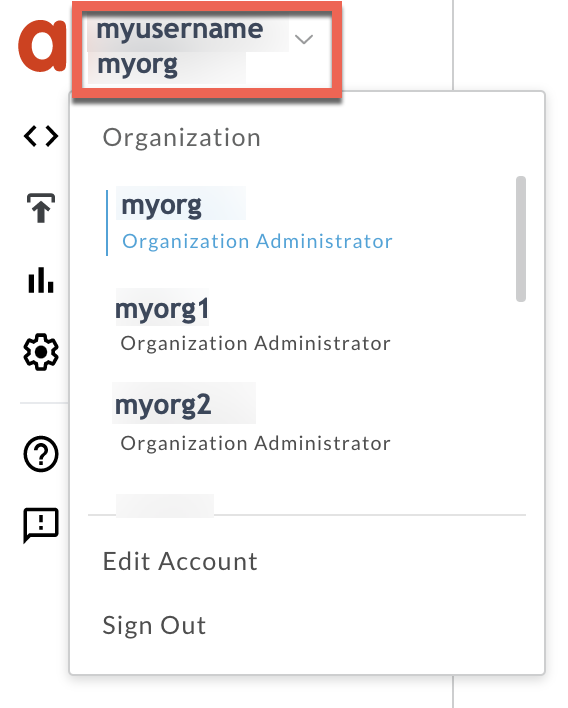
2. Switch to the organization in which you want to investigate the issue.
3. Navigate to the **Analyze \> API Monitoring \> Investigate** page.
4. Select the specific timeframe in which you observed the errors.
5. Ensure that the **Proxy** filter is set to **All**.
6. Plot **Fault Code** against **Time**.
7. Select a cell which has the fault code `messaging.adaptors.http.flow.DecompressionFailureAtRequest` as
shown below:
([view larger image](https://docs.apigee.com/static/api-platform/images/ts-400-decompressionfailure-fault-code-cell.png))

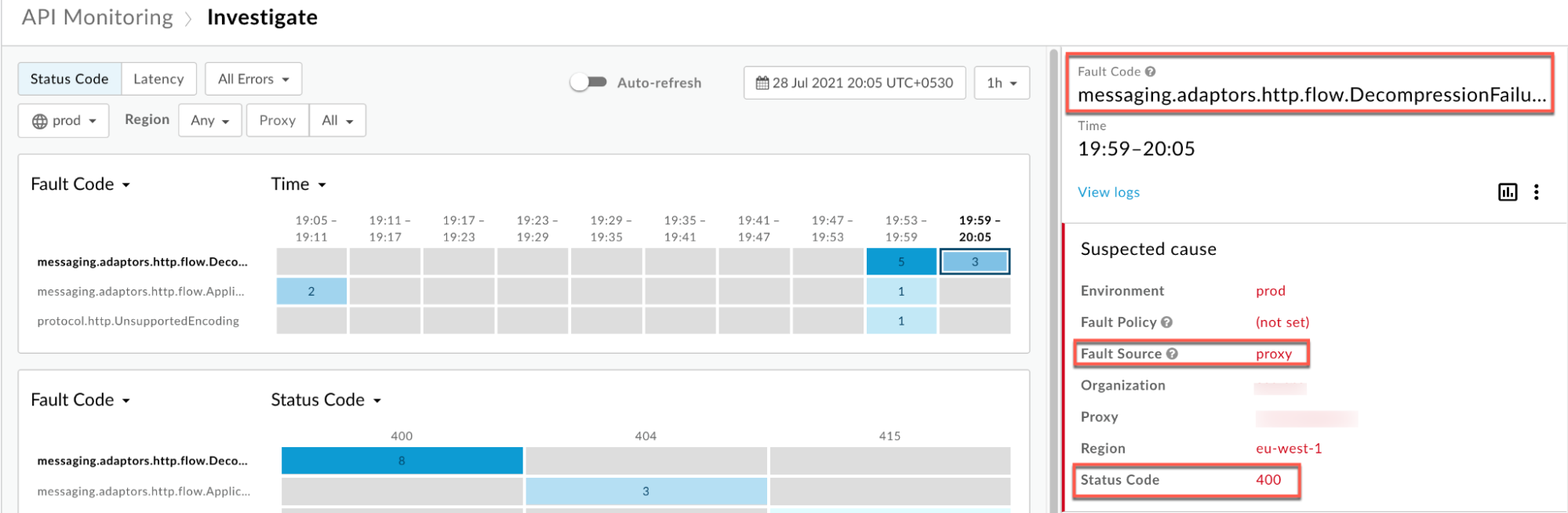
8. Information about the fault code
`messaging.adaptors.http.flow.DecompressionFailureAtRequest` is displayed as shown below:
([view larger image](https://docs.apigee.com/static/api-platform/images/ts-400-decompressionfailure-fault-code-info.png))
9. Click **View logs** and expand the row failing with the `400` error.
([view larger image](https://docs.apigee.com/static/api-platform/images/ts-400-decompressionfailure-logs.png))

10. From the **Logs** window, note the following details:
- **Status Code:** `400`
- **Fault Source:** `proxy`
- **Fault Code:** `messaging.adaptors.http.flow.DecompressionFailureAtRequest`.
11. If the **Fault Source** has the value `proxy`, then that indicates that the request payload format did not match the [supported encoding](https://docs.apigee.com/api-platform/troubleshoot/runtime/415-unsupported-media-type-unsupported-encoding#supported-encoding) specified in the `Content-Encoding` header.
### Trace tool
> [!NOTE]
> **Note:** The instructions in this section are applicable for Public and Private Cloud users.
To diagnose the error using the Trace tool:
1. Enable the [trace session](https://docs.apigee.com/api-platform/debug/using-trace-tool-0) and either:
1. Wait for the `400 Bad Request` error to occur, or
2. If you can reproduce the issue, make the API call and reproduce `400 Bad Request`.
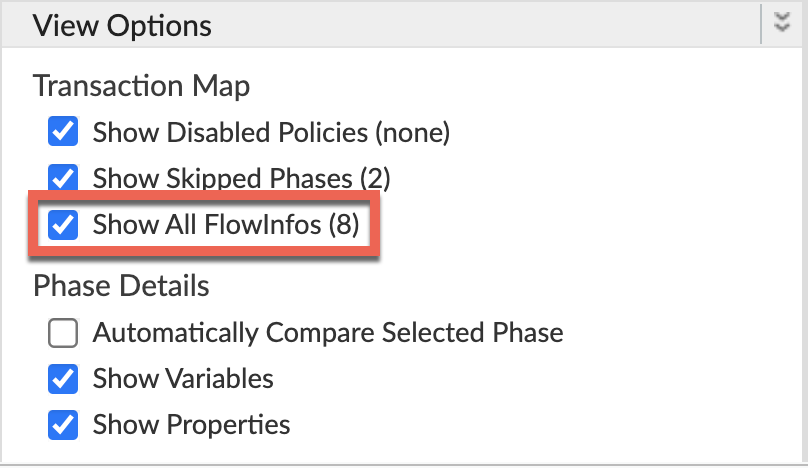
2. Ensure **Show all FlowInfos** is enabled:
3. Select one of the failing requests and examine the trace.
4. Navigate through different phases of the trace and locate where the failure occurred.
5. You will typically find the error in a flow right after the
**Request Received from Client** phase as shown below:
([view larger image](https://docs.apigee.com/static/api-platform/images/ts-400-decompressionfailure-request-received-1.png))
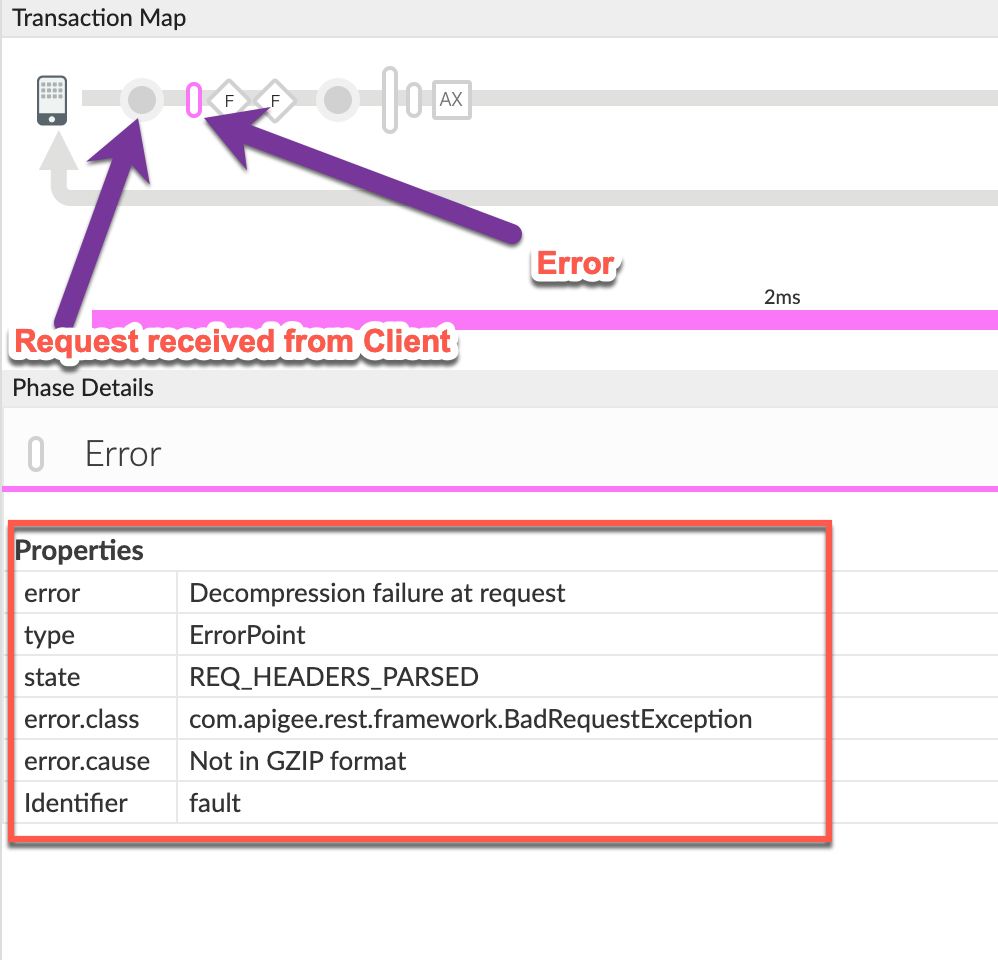
6. Note the values of the properties from the trace:
- **error:** `Decompression failure at request`
- **error.class** : `com.apigee.rest.framework.BadRequestException`
- **error.cause:** `Not in GZIP format`
The **error.cause** states that the request payload is NOT in GZIP format.
This means that Apigee Edge was expecting the request payload to be in GZIP format
as it would have been specified in the `Content-Encoding` header.
7. Determine the value of request header `Content-Encoding`.
For this, navigate to the phase **Request Received from Client** as shown below:
([view larger image](https://docs.apigee.com/static/api-platform/images/ts-400-decompressionfailure-request-received-2.png))
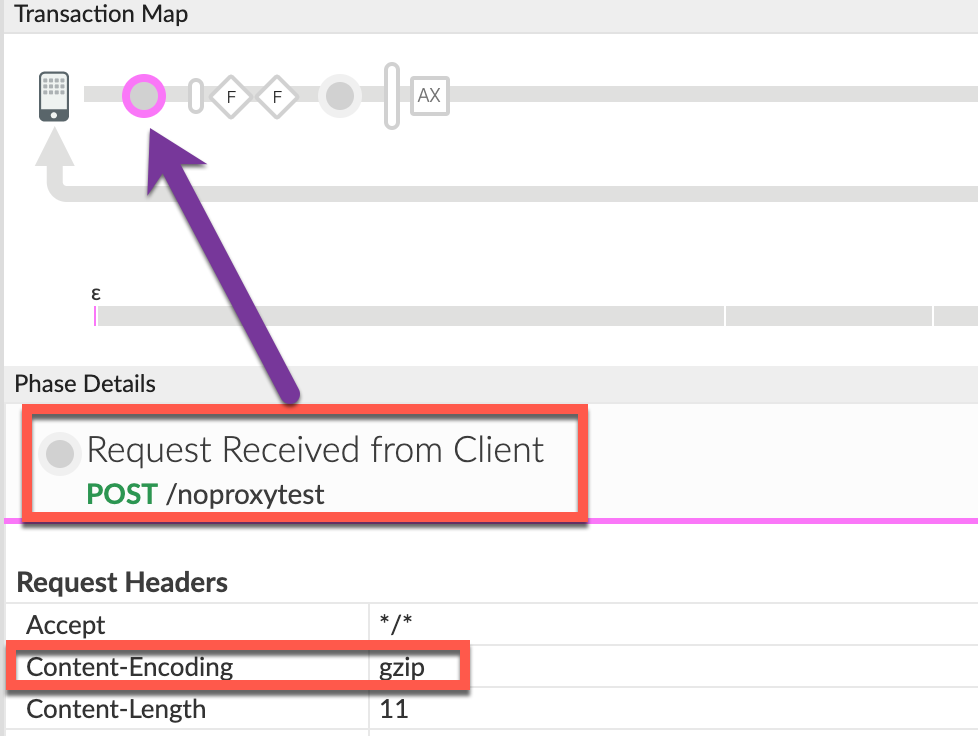
Note that the value of request header `Content-Encoding` is indeed
`gzip`.
The above sample trace shows that the encoding specified in the request header
`Content-Encoding` is `gzip`; however, the request payload
is not in GZIP format. Therefore, Apigee cannot decompress the payload using
gzip and returns the error `Decompression failure at request`.
8. Note the status code and the error message returned by Apigee Edge by navigating
to the **Response Sent to Client** phase in the trace as shown below:
([view larger image](https://docs.apigee.com/static/api-platform/images/ts-400-decompressionfailure-response-sent.png))
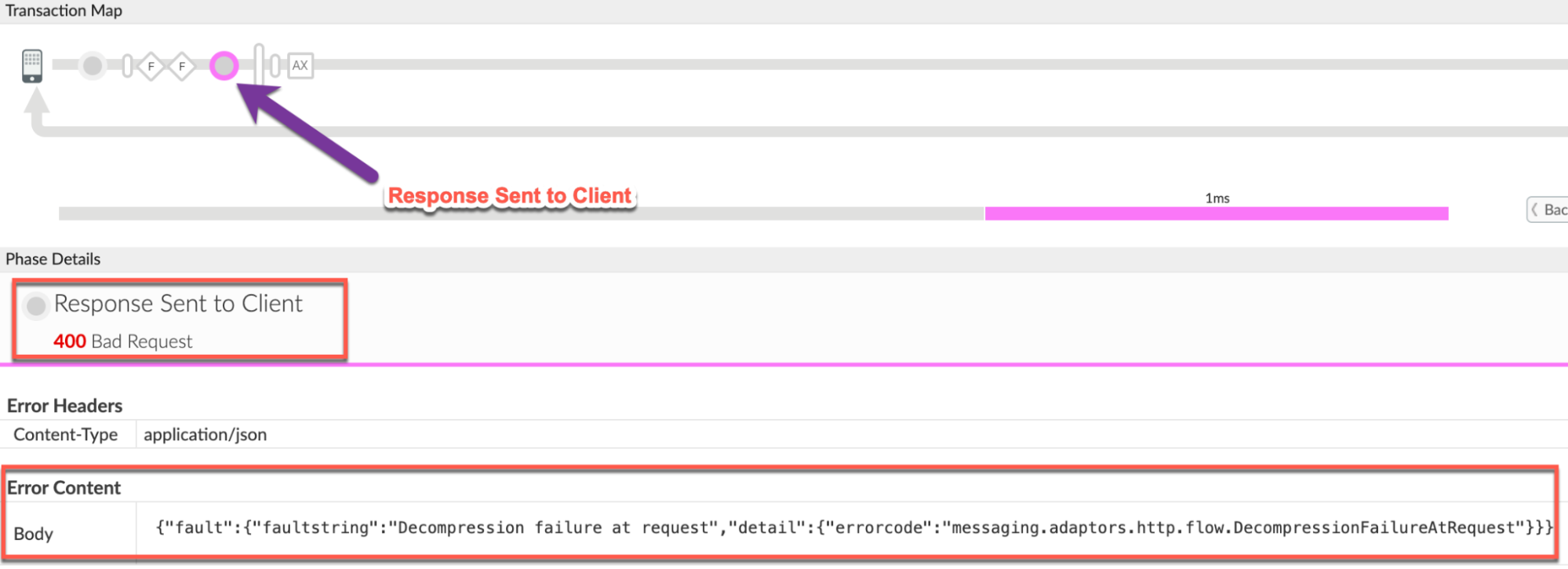
Note the following details from the trace:
- **Status code:** `400 Bad Request`.
- **Error Content:** `{"fault":{"faultstring":"Decompression failure at request","detail":{"errorcode":"messaging.adaptors.http.flow.DecompressionFailureAtRequest"}}}`
9. Navigate to the **AX** (Analytics Data Recorded) phase in the trace
and click it.
10. Scroll down to the **Phase Details** , **Error Headers** section and determine the values of **X-Apigee-fault-code** and **X-Apigee-fault-source** as shown below:
([view larger image](https://docs.apigee.com/static/api-platform/images/ts-400-decompressionfailure-ax.png))
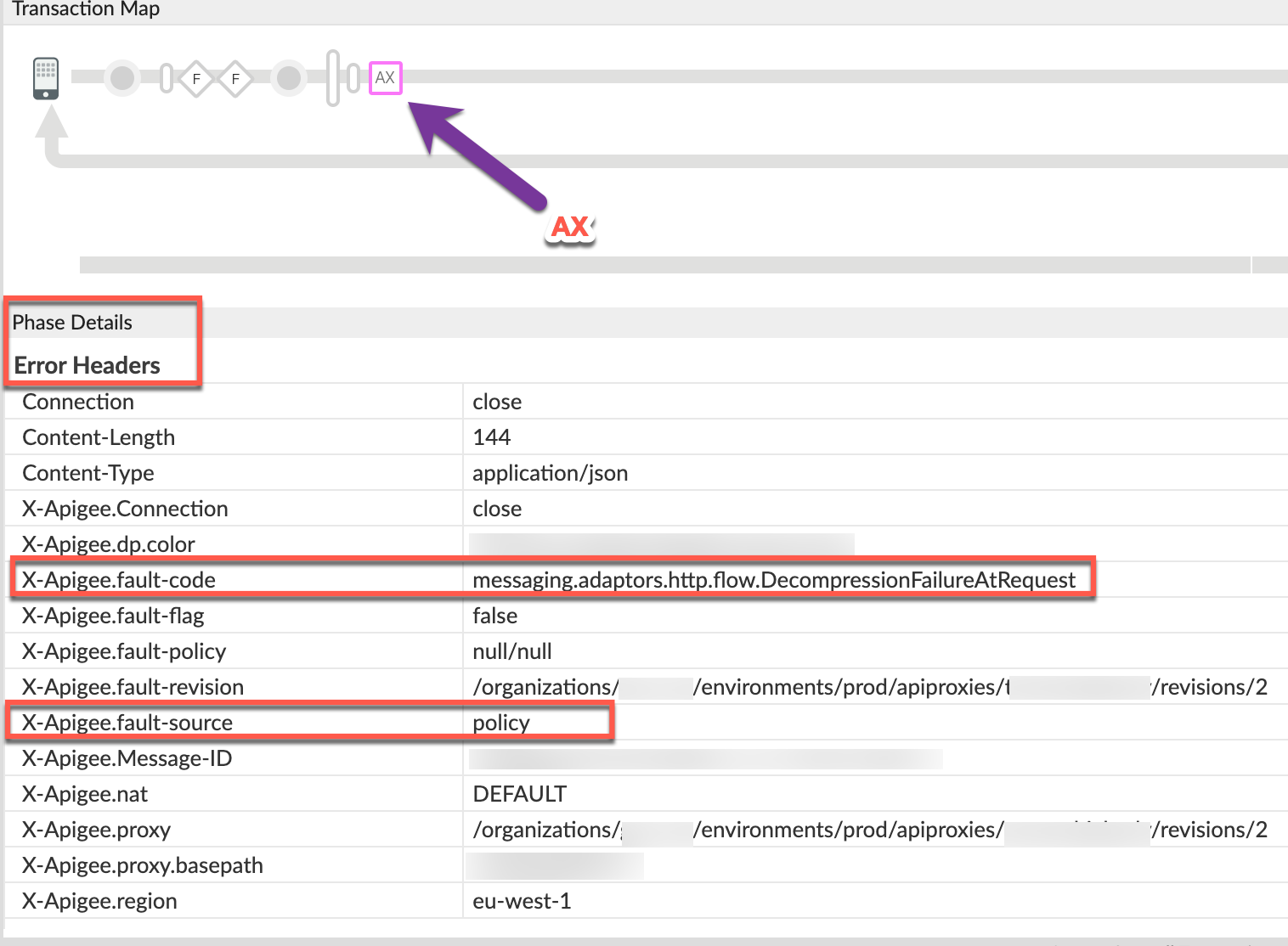
11. You will see the values of **X-Apigee-fault-code** and **X-Apigee-fault-source** as `messaging.adaptors.http.flow.DecompressionFailureAtRequest` and `policy`, indicating that the request payload format did not match the encoding specified in the `Content-Encoding` header.
| Response headers | Value |
|---|---|
| X-Apigee-fault-code | `messaging.adaptors.http.flow.DecompressionFailureAtRequest` |
| X-Apigee-fault-source | `policy` |
### NGINX
> [!NOTE]
> **Note:** The instructions in this section are for Edge Private Cloud users only.
To diagnose the error using NGINX access logs:
1. If you are a **Private Cloud user** , then you can use NGINX access logs to determine the key information about HTTP `400` errors.
2. Check the NGINX access logs:
`/opt/apigee/var/log/edge-router/nginx/ORG~ENV.PORT#_access_log`
**Where:** ORG, ENV, and PORT# are replaced with actual values.
3. Search to see if there are any `400` errors during a specific duration (if the problem happened in the past) or if there are any requests still failing with `400`.
4. If you do find any `400` errors with the **X-Apigee-fault-code**
matching the value of `messaging.adaptors.http.flow.DecompressionFailureAtRequest`,
then determine the value of the **X-Apigee-fault-source.**
**Sample 400 error from NGINX access log:**
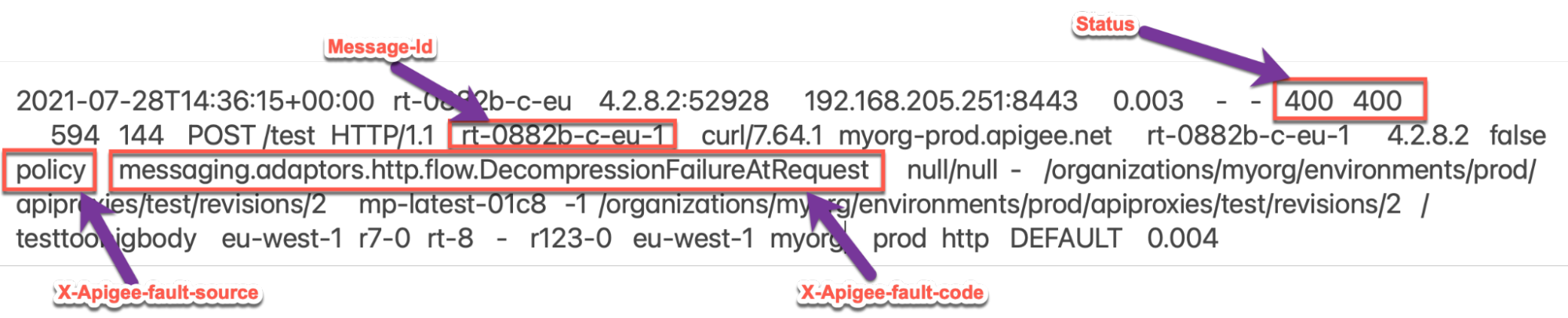
The above sample entry from the NGINX access log has the following values for
**X-Apigee-fault-code** and **X-Apigee-fault-source:**
| Response headers | Value |
|---|---|
| X-Apigee-fault-code | `messaging.adaptors.http.flow.DecompressionFailureAtRequest` |
| X-Apigee-fault-source | `policy` |
## Cause: Request payload format does not match the encoding specified
in Content-Encoding header
By default, Apigee Edge always decompresses the payload if the request header
`Content-Encoding` contains a valid and a
[supported encoding](https://docs.apigee.com/api-platform/troubleshoot/runtime/415-unsupported-media-type-unsupported-encoding#supported-encoding). Therefore, it is expected that the format of the request payload
**should match** the encoding specified in the request header `Content-Encoding`.
If there is a mismatch, then you get this error.
### Diagnosis
1. Determine the **Fault Code** and **Fault Source** for the error observed using API Monitoring, Trace tool or NGINX access logs as explained in [Common diagnosis steps](https://docs.apigee.com/api-platform/troubleshoot/runtime/400-decompressionfailureatrequest#common).
2. If the **Fault Code** is `messaging.adaptors.http.flow.DecompressionFailureAtRequest` and the **Fault Source** has the value `policy` or `proxy`, then this indicates that the request sent by the client application has payload which does not match the [supported encoding](https://docs.apigee.com/api-platform/troubleshoot/runtime/415-unsupported-media-type-unsupported-encoding#supported-encoding) specified in the request header `Content-Encoding`.
3. You can determine the mismatch as part of the HTTP request using one of the following
methods:
### Error message
To validate using the error message:
1. If you have access to the complete error message received from Apigee Edge, then
refer to the `faultstring`.
**Sample error message:**
```
"faultstring":"Decompression failure at request"
```
2. In the above error message, it displays `"Decompression failure at request"` which implies that the **request** could not be decompressed using the encoding specified in the `Content-Encoding` header.
### Trace
To validate using the Trace:
1. Determine the value of the request header **Content-Encoding** and the property **error.cause** using [Trace](https://docs.apigee.com/api-platform/troubleshoot/runtime/400-decompressionfailureatrequest#trace) as explained in [Common diagnosis steps](https://docs.apigee.com/api-platform/troubleshoot/runtime/400-decompressionfailureatrequest#common).
2. The values from the sample trace are as follows:
- **Content-Encoding:** `gzip`
- **error.cause:** `Not in GZIP format`
The value in the request header **Content-Encoding** is **gzip** ;
however, the request payload is **not in GZIP format**
(as indicated by **error.cause** ). Therefore, Apigee Edge responds with
`400 Bad Request` and error code
`messaging.adaptors.http.flow.DecompressionFailureAtRequest`.
### Actual request
To validate using the actual request:
If you have access to the actual request made by the client
application, then perform the following steps:
1. Determine the value passed to the request header `Content-Encoding`.
2. Determine the format of the payload sent as part of the request.
3. If the value of `Content-Encoding` header is in the list of
[supported encoding](https://docs.apigee.com/api-platform/troubleshoot/runtime/415-unsupported-media-type-unsupported-encoding#supported-encoding) but the format of the request payload does not
match with the encoding specified in `Content-Encoding` header,
then that is the cause of the issue.
**Sample request:**
curl -v "http://HOSTALIAS/v1/testgzip" -H "Content-Encoding: gzip" -X POST -d @request_payload.zip
The above sample request sends the value `gzip` to the
`Content-Encoding` header which is a
[supported encoding](https://docs.apigee.com/api-platform/troubleshoot/runtime/415-unsupported-media-type-unsupported-encoding#supported-encoding) in Apigee Edge. However, the request payload
`request_payload.zip` is in ZIP format. Therefore, this request
fails with a `400 Bad Request` status code and the error code:
`messaging.adaptors.http.flow.DecompressionFailureAtRequest`.
### Message Processor logs
> [!NOTE]
> **Note:** The instructions in this section are for Edge Private Cloud users only.
To validate using Message Processor logs:
If you are a **Private Cloud user** , then you can use Message Processor logs
to determine the key information about HTTP `400` errors.
1. Determine the message ID of the failing request using API Monitoring, Trace tool, or NGINX access logs as explained in [Common diagnosis steps](https://docs.apigee.com/api-platform/troubleshoot/runtime/400-decompressionfailureatrequest#common).
2. Search for the message ID in the Message Processor log:
`/opt/apigee/var/log/edge-message-processor/logs/system.log`
3. You will see one of the following exceptions:
### Scenario #1
**Scenario #1: When API request has the header Content-Encoding: gzip**
2021-07-28 10:21:16,861 NIOThread@0 ERROR HTTP.SERVER -
HTTPServer$Context.onInputException() : Message id:rt-57-1
SSLClientChannel[Accepted: Remote:192.168.199.8:8443
Local:192.168.80.234:44284]@28469 useCount=1 bytesRead=0
bytesWritten=28764 age=2739893ms lastIO=0ms
isOpen=true.onExceptionRead exception: {}
java.util.zip.ZipException: Not in GZIP format
2021-07-28 10:21:16,862 NIOThread@0 ERROR ADAPTORS.HTTP.FLOW -
AbstractRequestListener.onException() : Request:POST, uri:/test,
message Id:rt-57-1, exception:java.util.zip.ZipException: Not in GZIP format,
context:Context@71ea5ac input=ClientInputChannel(SSLClientChannel[Accepted:
Remote:192.168.199.8:8443 Local:192.168.80.234:44284]@28469 useCount=1
bytesRead=0 bytesWritten=28764 age=2739894ms lastIO=0ms isOpen=true)
2021-07-28 10:21:16,862 NIOThread@0 INFO HTTP.SERVICE -
ExceptionHandler.handleException() :
Exception java.util.zip.ZipException: Not in GZIP format occurred while writing
to channel null
2021-07-28 10:21:16,863 NIOThread@0 INFO HTTP.SERVICE -
ExceptionHandler.handleException() : Exception trace:
java.util.zip.ZipException: Not in GZIP format
The line `java.util.zip.ZipException: Not in
GZIP format` in the above error message indicates that the request
payload is not sent in GZIP format although the `Content-Encoding`
is specified as gzip. Therefore, Apigee Edge throws the exception and
returns a `400` status code with fault code
`messaging.adaptors.http.flow.DecompressionFailureAtRequest`
to client applications.
### Scenario #2
**Scenario #2: When API request has the header Content-Encoding: deflate**
2021-07-28 15:26:31,893 NIOThread@1 ERROR HTTP.SERVER -
HTTPServer$Context.onInputException() : Message id:rt-47875-1
SSLClientChannel[Accepted: Remote:192.168.199.8:8443
Local:192.168.81.72:45954]@29276 useCount=1 bytesRead=0
bytesWritten=37230 age=3498856ms lastIO=1ms
isOpen=true.onExceptionRead exception: {}
java.util.zip.ZipException: incorrect header check
….
Caused by: java.util.zip.DataFormatException: incorrect header check
..
2021-07-28 15:26:31,894 NIOThread@1 ERROR ADAPTORS.HTTP.FLOW -
AbstractRequestListener.onException() : Request:POST, uri:/test,
message Id:rrt-47875-1, exception:java.util.zip.ZipException:
incorrect header check, context:Context@69b3ac45
input=ClientInputChannel(SSLClientChannel[Accepted:
Remote:192.168.199.8:8443 Local:192.168.81.72:45954]@29276
useCount=1 byt esRead=0 bytesWritten=37230 age=3498856ms
lastIO=1ms isOpen=true)
The lines
`java.util.zip.ZipException: incorrect header check`
and
`Caused by: java.util.zip.DataFormatException: incorrect header check`
in the above error message indicate that the request payload is not sent in
deflate format and does not match the encoding specified in the
`Content-Encoding` header of deflate. Therefore, Apigee Edge
throws the exception and returns a `400` status code with
fault code `messaging.adaptors.http.flow.DecompressionFailureAtRequest`
to client applications.
### Resolution
1. If there's no need for the compressed request payload in the API proxy flow in Apigee Edge and in the backend server, then **do not** pass the header `Content-Encoding`. If there is a need to compress the request payload, go to step 2.
2. Ensure that the client application always sends the following:
- Any of the [supported encoding](https://docs.apigee.com/api-platform/troubleshoot/runtime/415-unsupported-media-type-unsupported-encoding#supported-encoding) as the value for the `Content-Encoding` header in the request
- The request payload in the supported format to Apigee Edge matches the encoding format specified in `Content-Encoding` header
3. In the example discussed above, the request payload is in ZIP format but the request header specifies `Content-Encoding: gzip`. You can fix the issue by sending the request header as `Content-Encoding: gzip` and the request payload also in `gzip` format:
```
curl -v "https://HOSTALIAS/v1/testgzip" -H "Content-Encoding: gzip" -X POST -d @request_payload.gz
```
> [!NOTE]
> **Note:** If multiple values are specified in `Content-Encoding` header, then make sure that multiple encodings are applied to the payload in the same order as it appears in the header.
## Specification
Apigee Edge responds with the status code `400 Bad Request` with error code
`messaging.adaptors.http.flow.DecompressionFailureAtRequest` as per the following RFC
specifications:
| Specification |
|---|
| [RFC 7231, section 6.5.1](https://datatracker.ietf.org/doc/html/rfc7231#section-6.5.1) |
| [RFC 7231, section 3.1.2.2](https://datatracker.ietf.org/doc/html/rfc7231#section-3.1.2.2) |
If you still need any assistance from Apigee Support, go to [Must gather diagnostic information](https://docs.apigee.com/api-platform/troubleshoot/runtime/400-decompressionfailureatrequest#must-gather).
## Must gather diagnostic information
Gather the following diagnostic information, and then contact [Apigee Edge Support](https://docs.apigee.com/api-platform/troubleshoot/support):
If you are a **Public Cloud user**, provide the following information:
- Organization name
- Environment name
- API Proxy name
- Complete `curl` command used to reproduce the `400` error
- Trace file for the API requests
If you are a **Private Cloud user**, provide the following information:
- Complete error message observed for the failing requests
- Environment name
- API Proxy bundle
- Trace file for the API requests
- NGINX access logs `/opt/apigee/var/log/edge-router/nginx/ORG~ENV.PORT#_access_log`
**Where:** ORG, ENV and PORT# are replaced with
actual values.
- Message Processor system logs `/opt/apigee/var/log/edge-message-processor/logs/system.log`