You're viewing **Apigee Edge** documentation.
[Go to the
**Apigee X** documentation](http://cloud.google.com/apigee/docs/api-platform/reference/api-proxy-configuration-reference). info
> [!NOTE]
> Was this troubleshooting playbook helpful? Please let us know by clicking [Send Feedback]().
## Symptom
The client application gets an HTTP status code of `404` with the message
`Not Found` and the error message
`Unable to identify proxy for host: VIRTUAL_HOST and url: PATH`
as a response to the API calls.
This error means that Edge could not find the API proxy for the specified virtual host and path.
## Error Message
You will get the following HTTP status code:
```
HTTP/1.1 404 Not Found
```
You will also observe an error message something similar to the one shown below:
```
{
"fault":{
"faultstring":"Unable to identify proxy for host: default and url: \/oauth2\/token",
"detail":{
"errorcode":"messaging.adaptors.http.flow.ApplicationNotFound"
}
}
}
```
The above error message indicates that Edge could not find the API proxy for the
`default` virtual host and `/oauth2/token` path.
## Possible Causes
Some of the possible causes for this error are listed below:
| Cause | Description | Troubleshooting instructions applicable for |
|---|---|---|
| [API proxy not associated with the specific virtual host](https://docs.apigee.com/api-platform/troubleshoot/runtime/404-unable-identify-proxy-host#cause-api-proxy-not-associated-with-the-specific-virtual-host) | The specific API proxy is not configured to accept requests on the virtual host specified in the error message. | Edge Public and Private Cloud users |
| [Virtual host removed in a newly deployed revision of API proxy](https://docs.apigee.com/api-platform/troubleshoot/runtime/404-unable-identify-proxy-host#virtual-host-removed-newly-deployed-revision) | Removing the virtual host from the newly deployed revision while the client is still using the specific virtual host can cause this issue. | Edge Public and Private Cloud users |
| [Path not associated with any API proxy](https://docs.apigee.com/api-platform/troubleshoot/runtime/404-unable-identify-proxy-host#cause-path-not-associated-with-any-api-proxy) | The specific API proxy is not configured to accept requests on the path specified in the error message. | Edge Public and Private Cloud users |
| [API proxy not deployed in an environment](https://docs.apigee.com/api-platform/troubleshoot/runtime/404-unable-identify-proxy-host#cause-api-proxy-not-deployed-in-an-environment) | The specific API proxy is not deployed in the specific environment in which you are trying to make the API requests. | Edge Public and Private Cloud users |
| [Environment not loaded on the Message Processor](https://docs.apigee.com/api-platform/troubleshoot/runtime/404-unable-identify-proxy-host#cause-environment-not-loaded-on-the-message-processors) | The specific environment (in which you are trying to make the API requests) has not been loaded on the Message Processors due to an error. | Edge Private Cloud users |
| [API proxy not deployed on one or more Message Processors](https://docs.apigee.com/api-platform/troubleshoot/runtime/404-unable-identify-proxy-host#cause-api-proxy-not-deployed-on-one-or-more-message-processors) | The API proxy may not be deployed on one or more Message Processors due to missing event notification during deployment. | Edge Private Cloud users |
## Common diagnosis steps
> [!NOTE]
> **Note:** This section applies to Private Cloud users only.
NGINX and Message Processor logs will be helpful in troubleshooting the `404` error.
Use the following steps to check the logs:
1. View the NGINX logs using the following command:
```
/opt/apigee/var/log/edge-router/nginx/ORG~ENV.PORT#_access_log
```
2. Check for the following fields in the log entries:
| Field | Value |
|---|---|
| `Upstream_status, status` | `404` |
| `X-Apigee-fault-code` | `messaging.adaptors.http.flow.ApplicationNotFound` |
Make a note of the message ID from the logs.
3. Check the Message Processor logs (`/opt/apigee/var/log/edge-message-processor/logs/system.log)` to see if you have `messaging.adaptors.http.flow.ApplicationNotFound` for the specific API or if you have the unique message ID from step 2 for the API request.
**Sample error message from Message Processor log**
```
NIOThread@1 ERROR ADAPTORS.HTTP.FLOW - AbstractRequestListener.onException() : Request:POST, uri:/weather, message Id:null, exception:com.apigee.rest.framework.ResourceNotFoundException{ code = messaging.adaptors.http.flow.ApplicationNotFound, message = Unable to identify proxy for host: vh1 and url: /weather, associated contexts = []}, context:Context@342ea86b input=ClientInputChannel(SSLClientChannel[Accepted: Remote:10.123.123.123:8443 Local:10.135.33.68:62092]@1206954 useCount=1 bytesRead=0 bytesWritten=0 age=1ms lastIO=0ms isOpen=true)
```
4. The log above shows the error code and error message is as follows:
```
code = messaging.adaptors.http.flow.ApplicationNotFound,
message = Unable to identify proxy for host: vh1 and url: /weather
```
> [!NOTE]
> **Note:** The `url` and `host` above may vary depending on the API proxy for which you are having the issue.
## Cause: API proxy not associated with the specific virtual host
If the API proxy is not configured to accept the requests for the specific virtual host, then
we can get a `404 Not Found` response with the error message
`Unable to identify proxy for host: VIRTUAL_HOST and url: PATH.`
### Diagnosis
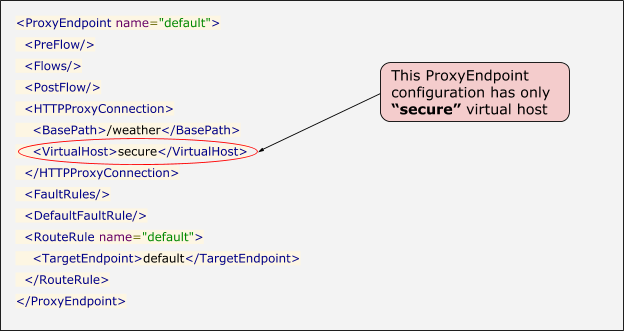
1. Check the **Proxy Endpoint** configuration for the API proxy and see if the API proxy is configured to accept the requests for the virtual host specified in the error. This is indicated by the `VirtualHost` element. Let's look at a sample `ProxyEndpoint` configuration to understand this.
**Sample Proxy Endpoint configuration showing that the API proxy accepts requests on a
secure virtual host**
2. Let's say the virtual hosts are defined in the specific environment as follows:
| Name | Port | Host Alias |
|---|---|---|
| `default` | `80` | `myorg-prod.apigee.net` |
| `secure` | `443` | `myorg-prod.apigee.net` |
3. You make an API request to the `default` `VirtualHost` using the URL `http://myorg-prod.apigee.net/weather`
4. Since the `ProxyEndpoint` does not have `default` `VirtualHost` as shown in the example above, you get the `404` response code with the following error message:
```
{"fault":{"faultstring":"Unable to identify proxy for host: default and url: \/weather","detail":{"errorcode":"messaging.adaptors.http.flow.ApplicationNotFound"}}}
```
5. Go to the [Resolution](https://docs.apigee.com/api-platform/troubleshoot/runtime/404-unable-identify-proxy-host#resolution-1) section below to address this issue.
6. If the `ProxyEndpoint` is configured to accept the requests on the `default` `VirtualHost`, go to the next cause - [Path not associated with any API proxy](https://docs.apigee.com/api-platform/troubleshoot/runtime/404-unable-identify-proxy-host#cause-path-not-associated-with-any-api-proxy).
### Resolution
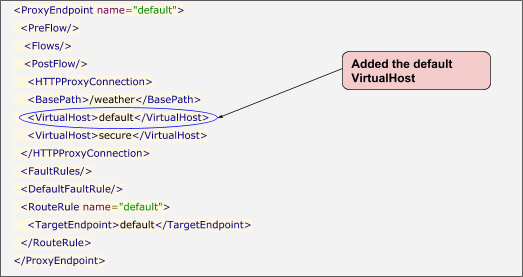
1. Add the missing `VirtualHost` to the `ProxyEndpoint` configuration to address the issue. For the example shown above, you can add the default `VirtualHost` to the `ProxyEndpoint` configuration as follows:
```
default
```
**Sample Proxy Endpoint configuration showing the default\> VirtualHost\> being added**
2. Alternatively, in the example referred to above, if you intended to use only the `secure` `VirtualHost` for this specific API proxy, then make the API requests only to the `secure` `VirtualHost` using the HTTPS protocol:
```
https://myorg-prod.apigee.net/weather
```
## Cause: Virtual host removed in a newly deployed revision of API proxy
If a new revision of an API proxy is deployed after removing a specific virtual host
(that was part of the previously deployed revision), that is still being used by the clients
for making API requests, then it can cause this issue.
### Diagnosis
> [!NOTE]
> **Note:** This section applies to both Public and Private Cloud users.
1. Check the **Proxy Endpoint** configuration for the API proxy to see if the API proxy is configured to accept the requests for the virtual host specified in the error. This is indicated by the `VirtualHost` element in the `ProxyEndpoint` configuration.
2. If the virtual host specified in the error doesn't exist in the `ProxyEndpoint` configuration, then perform the following steps. Otherwise, go to the next cause - [Path not associated with any API proxy](https://docs.apigee.com/api-platform/troubleshoot/runtime/404-unable-identify-proxy-host#cause-path-not-associated-with-any-api-proxy).
3. Compare the `ProxyEndpoint` configuration of the previously deployed revision with the currently deployed revision.
1. For example, let's say your previously deployed revision was `5` and your currently deployed revision is `6`:
- **Virtual Hosts configured in Proxy Endpoint in revision 5**
```
/weather
vh1
```
- **Virtual Hosts configured in Proxy Endpoint in revision 6**
```
/weather
secure
```
2. In the above example, `VirtualHost vh1` existed in `revision 5,` but is removed in `revision 6` and replaced with `VirtualHost secure`.
3. So if you or your clients are making the requests to this API proxy using `VirtualHost vh1` (that was part of `revision 5`), then you will get the `404` response code with the following error message:
```
{"fault":{"faultstring":"Unable to identify proxy for host: vh1 and url: \/weather","detail":{"errorcode":"messaging.adaptors.http.flow.ApplicationNotFound"}}}
```
4. Check to see if the virtual host change was made [intentionally](https://docs.apigee.com/api-platform/troubleshoot/runtime/404-unable-identify-proxy-host#intentional) or [unintentionally](https://docs.apigee.com/api-platform/troubleshoot/runtime/404-unable-identify-proxy-host#unintentional) in the currently deployed revision and take the appropriate measures as explained in the [Resolution](https://docs.apigee.com/api-platform/troubleshoot/runtime/404-unable-identify-proxy-host#resolution) section.
### Resolution
If you identify that the virtual host or hosts are removed in a new revision, it could have been intentional or it may be by
accident. For each case, perform the following resolution/recommended steps to resolve the issue.
#### Scenario #1: Intentional Change
In the case that the virtual host removal is intentional, then you can choose one of the following
options with the first option being the recommended approach:
1. Create a new proxy with a different base path and use a different virtual host (that does not exist in the previously deployed revision).
2. If you want to continue to use the existing API proxy but use a different virtual host,
then it is better to retain the existing virtual host and add the additional virtual host.
This will ensure that the users of this API proxy are unaffected by the change.
3. If you want to use the existing API proxy and have only a different virtual host, then
inform your users in advance and do this change during a maintenance period.
This will ensure that the users of this API proxy are aware of the change and they
can use a different virtual host to make the calls to this API proxy. Hence, they will
be unaffected by the change.
#### Scenario #2: Unintentional Change
In the case that the virtual host removal is done by mistake and not intentional,then do the following:
1. Update the `ProxyEndpoint` configuration in the currently deployed revision to use the same virtual hosts that were used in the previously deployed revision. In the above example, change the following section from:
```
/weather
secure
```
to
```
/weather
vh1
```
2. Redeploy the revision.
### Best practices
It is always advisable to deploy new proxies or new revisions during a maintenance period
or when the traffic is expected least so that any issue arising during deployment can be
avoided or the effect on traffic can be minimized.
## Cause: Path not associated with any API proxy
If the API proxy is not configured to accept the requests for the specific path used in the
API Request URL, then we can get a `404 Not Found` response with the error message
`Unable to identify proxy for host: VIRTUAL_HOST and url: PATH.`
### Diagnosis
1. Look at the `ProxyEndpoint` configuration for the specific API proxy for which you intended to make the API requests.
2. Check if the API proxy is configured to accept the requests for the specific path indicated in the error message. You can do this by performing the steps in [Scenario #1](https://docs.apigee.com/api-platform/troubleshoot/runtime/404-unable-identify-proxy-host#scenario-#1-path-does-not-match-the-basepath-of-the-api-proxy) and [Scenario #2](https://docs.apigee.com/api-platform/troubleshoot/runtime/404-unable-identify-proxy-host#scenario-#2-path-does-not-match-any-of-the-available-conditional-flows).
### Scenario #1: Path does not match the basepath of the API proxy
1. If the `path` indicated in the error message is not same as the `basepath` of the specific API proxy or it does not start with the `basepath`, then that could be the cause for the error.
2. Let's take an example to explain this:
1. The `basepath` of the intended API proxy is `/weather`
2. The API Request URL is `https://myorg-prod.apigee.net/climate`. This means that the path used in the API request URL is `/climate.`
3. In this example, the `path` is not the same as the `basepath` and it does not start with the `basepath`. Hence you get the following error:
```
{
"fault":{
"faultstring":"Unable to identify proxy for host: secure and url: \/climate",
"detail":{
"errorcode":"messaging.adaptors.http.flow.ApplicationNotFound"
}
}
}
```
### Resolution
1. Ensure the `path` used in your API request URL is same as the `basepath` of the specific API proxy.
2. In the example above, the API Request URL should be as follows:
```
{
https://myorg-prod.apigee.net/weather
```
### Scenario #2: Path does not match any of the available conditional flows
1. If the `path` used in the API Request URL starts with the `basepath`, then it's possible that the `path suffix` (the part that comes after the `basepath`) indicated in the error message does not match any of the conditional flows, then that could cause the `404` error.
2. Let's take an example to explain this:
1. The `basepath` of the intended API proxy is `/weather`
2. The API Request URL is `https://myorg-prod.apigee.net/weather/Delhi`. This means that path used in the API request URL is `/weather/Delhi.`
3. In this example, the `path` starts with the `basepath` `/weather`. In addition, it has a `path suffix` of `/Delhi`.
4. Now check to see if there are any conditional flows in the `ProxyEndpoint`.
5. If there are no conditional flows or there are a few non-conditional flows, then go to the next cause - [API proxy not deployed in an environment](https://docs.apigee.com/api-platform/troubleshoot/runtime/404-unable-identify-proxy-host#cause-api-proxy-not-deployed-in-an-environment).
6. If the `ProxyEndpoint` has only conditional flows, then check for the following:
1. If the conditions in all these conditional flows check for a specific `proxy.pathsuffix` (the path after the basepath).
2. And if the `path suffix` specified in the API Request URL does not match any of the conditions, then that's the cause for the error.
7. Let's say we have two flows in the `ProxyEndpoint` and both of them are conditional flows as shown below:
```
(proxy.pathsuffix MatchesPath "/Bangalore") and (request.verb = "GET")
(proxy.pathsuffix MatchesPath "/Chennai") and (request.verb = "GET")
```
1. In the example shown above, we have two conditional flows, one that matches `proxy.pathsuffix` (path after the basepath) to `/Bangalore` and the other one matches `/Chennai`. But there's none that matches `/Delhi` which is the `path suffix` passed in the API Request URL.
2. This is the cause for the `404` error. Hence you would get the following error:
```
{
"fault":{
"faultstring":"Unable to identify proxy for host: secure and url: \/weather\/Delhi",
"detail":{
"errorcode":"messaging.adaptors.http.flow.ApplicationNotFound"
}
}
}
```
### Resolution
1. Ensure the `path suffix` matches at least one of the conditional flows in your proxy endpoint.
2. In the example above, you can use of the following approaches to resolve the error:
1. If you want to execute any specific set of policies for the path `/Delhi`, then add a separate flow with the required set of policies and ensure there's a condition that matches the `/proxy.pathsuffix` `/Delhi` as shown below:
```
(proxy.pathsuffix MatchesPath "/Delhi") and (request.verb = "GET")
```
2. If you want to execute common set of policies for the path `/Delhi`, then in the common flow, ensure that there's a condition that allows a generic `/proxy.pathsuffix`. That is, it would allow any path after the `basepath` `/weather` as shown below:
```
(proxy.pathsuffix MatchesPath "/**") and (request.verb = "GET")
```
If the `ProxyEndpoint` has the correct `basepath` and the `path suffix` specified in the API URL
does match one of the conditional flows, then move to next cause -
[API proxy not deployed in an environment](https://docs.apigee.com/api-platform/troubleshoot/runtime/404-unable-identify-proxy-host#cause-api-proxy-not-deployed-in-an-environment).
## Cause: API proxy not deployed in an environment
### Diagnosis
1. Determine the environment to which the host alias used in your API request URL exists. This can be done by checking the details of all virtual hosts in each of the environments of your organization in the Edge UI. For example, assume the following configuration:
- If `http://myorg-test.apigee.net/weather` is your URL, then `myorg-prod.apigee.net` is the host alias.
- The host alias `myorg-prod.apigee.net` is configured as part of one of the virtual hosts in the `prod` environment of your organization.
2. Check to see if the specific API proxy is deployed in the specific environment determined in step 1 above.
3. If the API proxy is not deployed in the specific environment, then that's the cause for the `404` error.
1. So in the example used in step 1 above, let's say the API proxy is not deployed in the `prod` environment, then that's the cause for the error.
2. Go to the [Resolution](https://docs.apigee.com/api-platform/troubleshoot/runtime/404-unable-identify-proxy-host#resolution-4) section below.
4. If the API proxy is deployed in the specific environment, then go to next cause - [Environment not loaded on Message Processors](https://docs.apigee.com/api-platform/troubleshoot/runtime/404-unable-identify-proxy-host#cause-environment-not-loaded-on-the-message-processors).
### Resolution
Deploy the API proxy in the specific environment in which you intend to make API requests.
## Cause: Environment not loaded on the Message Processors
> [!NOTE]
> **Note:** This section applies to Edge Private Cloud users only.
### Diagnosis
1. Log in to each of the Message Processors and check if the specific environment in which you are making the API request is loaded on the Message Processor using the following command:
```
curl -v 0:8082/v1/runtime/organizations//environments
```
2. If the specific environment is listed as part of the above command, then go to next cause - [API proxy not deployed on one or more Message Processors](https://docs.apigee.com/api-platform/troubleshoot/runtime/404-unable-identify-proxy-host#cause-api-proxy-not-deployed-on-one-or-more-message-processors).
3. If the specific environment is not listed, then check `/opt/apigee/var/log/edge-message-processor/logs/system.log` and `/opt/apigee/var/log/edge-message-processor/logs/startupruntimeerrors.log` on the Message Processors for any errors during loading of environments.
4. There could be many different errors that could lead to failure of loading an environment on the Message Processor. [Resolution](https://docs.apigee.com/api-platform/troubleshoot/runtime/404-unable-identify-proxy-host#resolution-5) depends on the error that occurred.
### Resolution
The environment may not be loaded on the Message Processor due to many reasons. This section
illustrates a couple of possible reasons that can lead to this issue and explains how to resolve
the issue.
1. If you see one of the following errors in the Message Processor log, then it is caused by an
issue found with the certificates/keys that have been added to the specified keystore/truststore
in the specified environment.
**Error #1: java.security.KeyStoreException: Cannot overwrite own certificate**
```
2018-01-30 12:04:38,248 pool-47-thread-4 ERROR MESSAGING.RUNTIME - AbstractConfigurator.propagateEvent() : Error while handling the update for the Configurator
com.apigee.kernel.exceptions.spi.UncheckedException: Failed to add certificate : mycert in key store : mytruststore in environment : test
at com.apigee.entities.configurators.KeyStore.setCertificateEntry(KeyStore.java:156) ~[config-entities-1.0.0.jar:na]
at com.apigee.entities.configurators.KeyStore.handleUpdate(KeyStore.java:101) ~[config-entities-1.0.0.jar:na]
at com.apigee.entities.AbstractConfigurator.propagateEvent(AbstractConfigurator.java:85) ~[config-entities-1.0.0.jar:na]
at com.apigee.messaging.runtime.Environment.handleUpdate(Environment.java:238) [message-processor-1.0.0.jar:na]
...
Caused by: java.security.KeyStoreException: Cannot overwrite own certificate
at com.sun.crypto.provider.JceKeyStore.engineSetCertificateEntry(JceKeyStore.java:355) ~[sunjce_provider.jar:1.8.0_151]
at java.security.KeyStore.setCertificateEntry(KeyStore.java:1201) ~[na:1.8.0_151]
at com.apigee.entities.configurators.KeyStore.setCertificateEntry(KeyStore.java:153) ~[config-entities-1.0.0.jar:na]
```
`... 20 common frames omitted`
```
2018-01-30 12:04:38,250 pool-47-thread-4 ERROR MESSAGING.RUNTIME - AbstractConfigurator.rollbackTransaction() : Error in processing the changes : Unknown resource type cert
```
**Error #2: java.security.KeyStoreException: Cannot overwrite secret key**
```
2017-11-01 03:28:47,560 pool-21-thread-7 ERROR MESSAGING.RUNTIME - AbstractConfigurator.propagateEvent() : Error while handling the update for the Configurator
com.apigee.kernel.exceptions.spi.UncheckedException: Failed to add certificate : mstore in key store : myTruststore in environment : dev
at com.apigee.entities.configurators.KeyStore.setCertificateEntry(KeyStore.java:156) ~[config-entities-1.0.0.jar:na]
at com.apigee.entities.configurators.KeyStore.handleUpdate(KeyStore.java:101) ~[config-entities-1.0.0.jar:na]
...
Caused by: java.security.KeyStoreException: Cannot overwrite secret key
at com.sun.crypto.provider.JceKeyStore.engineSetCertificateEntry(JceKeyStore.java:354) ~[sunjce_provider.jar:1.8.0_144]
at java.security.KeyStore.setCertificateEntry(KeyStore.java:1201) ~[na:1.8.0_144]
at com.apigee.entities.configurators.KeyStore.setCertificateEntry(KeyStore.java:153) ~[config-entities-1.0.0.jar:na]
... 20 common frames omitted
2017-11-01 03:28:47,562 pool-21-thread-7 ERROR MESSAGING.RUNTIME - AbstractConfigurator.rollbackTransaction() : Error in processing the changes : Unknown resource type cert
```
2. Get the details of the keystore/truststore specified in the error message shown in the previous step by using the following management API call:
```
curl -v "http://:8080/v1/organizations//environments//keystores/myTruststore" -u
```
**Example output:**
```
{
"certs":[
"mycert",
"mycert-new"
],
"keys":[
"mycert"
],
"name":"myTruststore"
}
```
3. The example output shows that there are two certificates and a key in the truststore `myTruststore`. The truststore generally does not contain a key. If it does, it is better to have a single certificate and a single key.
4. Get the details about the two certificates using the following API:
```
curl -s http://:8080/v1/runtime/organizations//environments//keystores//certs/
```
5. Check the expiry date of each of the certificates and determine the expired/older certificate.
6. Delete the expired or unwanted certificate from the truststore `myTruststore`.
If the problem still persists or if you see any error other than the ones mentioned in step 1
above, go to [Must gather diagnostic information](https://docs.apigee.com/api-platform/troubleshoot/runtime/404-unable-identify-proxy-host#must-gather-diagnostic-information).
## Cause: API proxy not
deployed on one or more Message Processors
> [!NOTE]
> **Note:** This section applies to Edge Private Cloud users only.
The API proxy may not be deployed on one or more Message Processors. This issue occurs very
rarely and happens mostly due to a missing event notification from the Management Server to
Message Processor during the deployment of the specific API proxy. In this case also, you will
not be able to create the trace session in the Edge UI.
### Diagnosis
1. Login to each of the Message Processors and check to see if the specific revision of the API proxy is deployed or not using the following command:
```
curl -v 0:8082/v1/runtime/organizations//environments//apis//revisions
```
2. If the specific revision of the API proxy does not show up as the output of the command mentioned in step 1 above, then restart the specific Message Processor as explained in [Resolution](https://docs.apigee.com/api-platform/troubleshoot/runtime/404-unable-identify-proxy-host#resolution-6).
3. Repeat steps 1-2 for all the Message Processors.
4. If the specific revision of the API proxy is deployed on all the Message Processors, then this is not the cause for this issue. Go to [Must gather diagnostic information](https://docs.apigee.com/api-platform/troubleshoot/runtime/404-unable-identify-proxy-host#must-gather-diagnostic-information).
### Resolution
Restart the specific Message Processors on which the specific revision of the API proxy is
not deployed.
```
/opt/apigee/apigee-service/bin/apigee-service edge-message-processor restart
```
## Diagnose issues using API Monitoring
> [!NOTE]
> **Note:** This section applies to Public Cloud users only.
[API Monitoring](https://docs.apigee.com/api-monitoring) enables you to isolate problem areas quickly
to diagnose error, performance, and latency issues and their source, such as developer apps,
API proxies, backend targets, or the API platform.
For this issue, you can navigate to the **API Monitoring \> Investigate** page and
choose the appropriate date, proxy and so on, and you may see the following details:
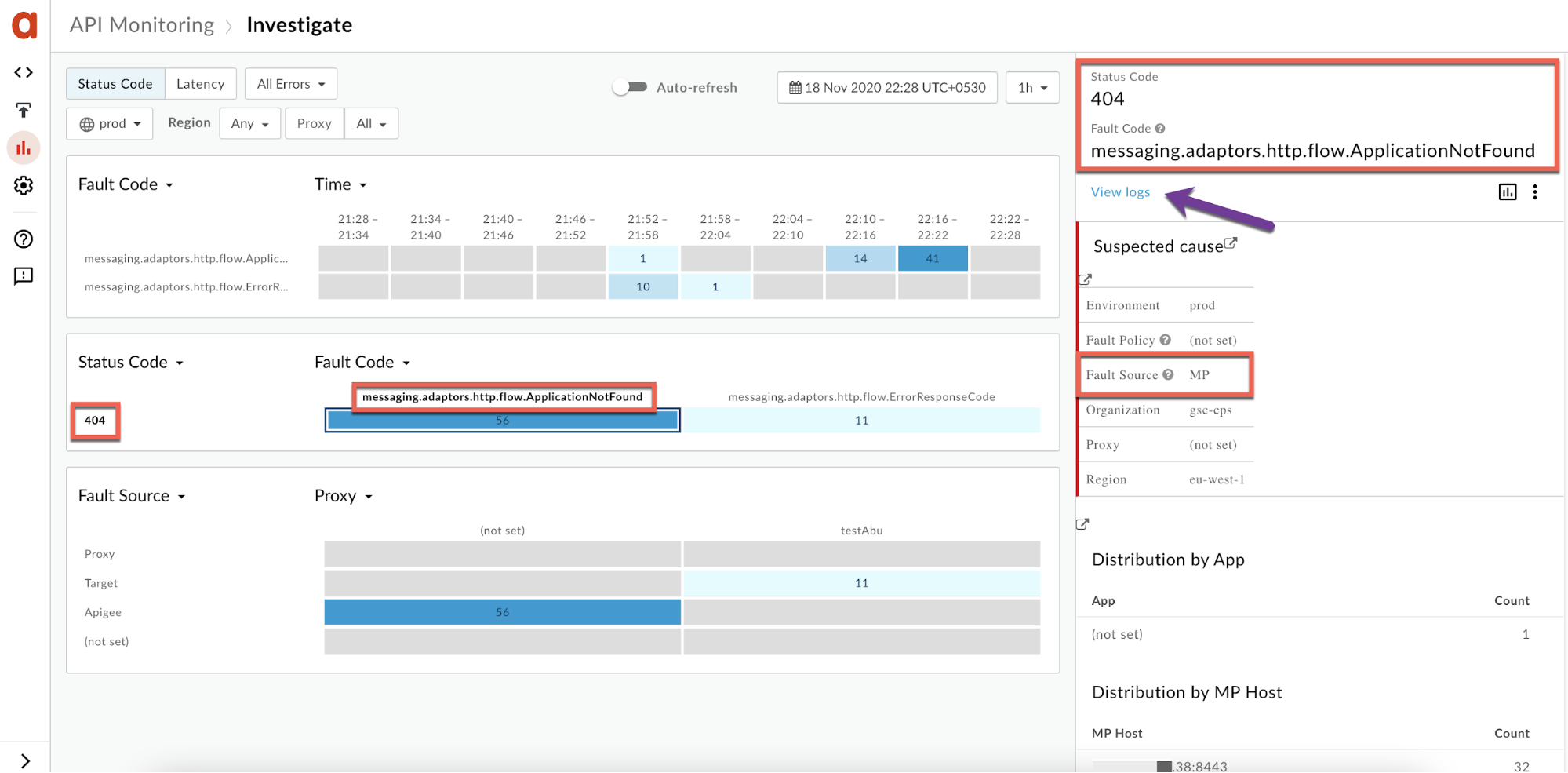
- **Fault Code:** `messaging.adaptors.http.flow.ApplicationNotFound`
- **Status Code:** `404`
- **Fault Source:** `Apigee` or `MP`
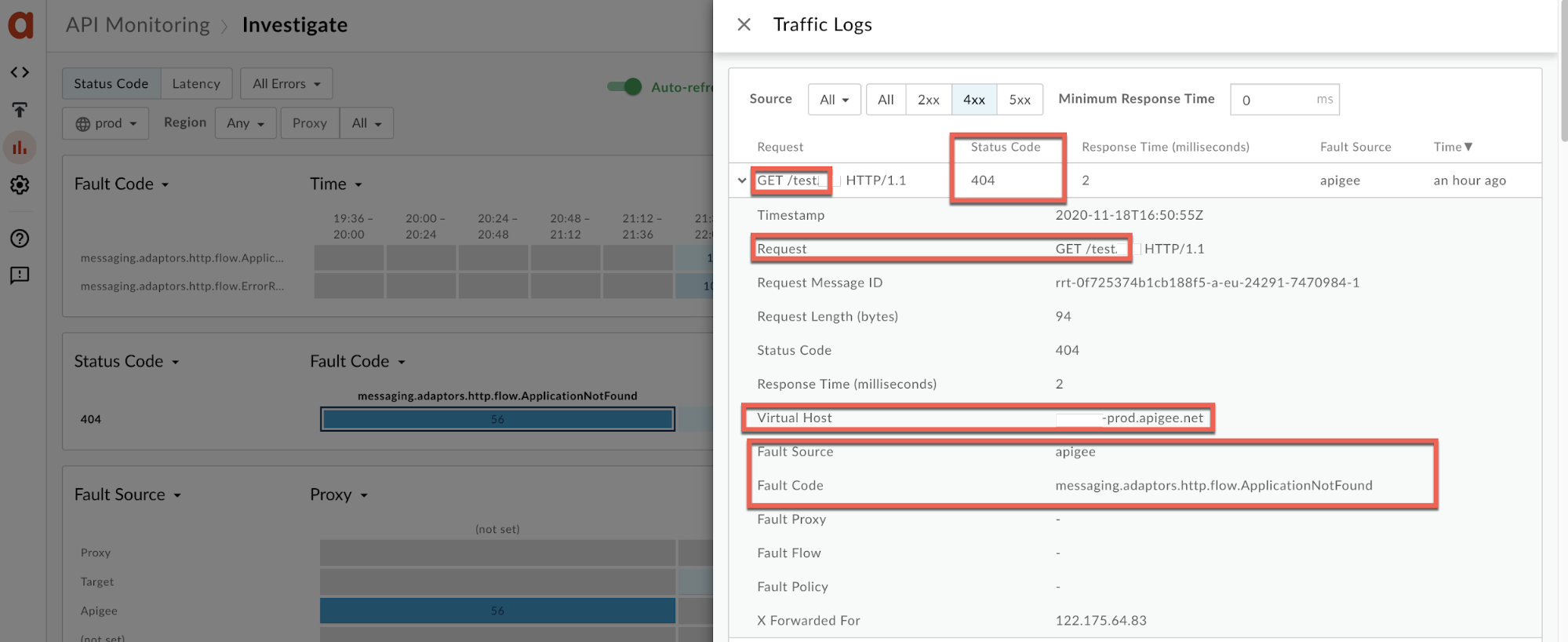
In addition, you can click **View logs** as shown in the screenshot above, and check further.
[Step through a sample scenario](https://docs.apigee.com/api-monitoring/sample-scenarios) demonstrates how to
troubleshoot `5xx` issues with your APIs using API Monitoring. For example, you may
want to set up an alert to be notified when the number of `404` status codes exceeds a
particular threshold.
## Must gather diagnostic information
If the problem persists even after following the above instructions, gather the
following diagnostic information. Contact and share this information with [Apigee Edge Support](https://docs.apigee.com/api-platform/troubleshoot/support).
1. If you are a Public Cloud user, provide the following information:
- Organization name
- Environment name
- API proxy name
- Complete curl command to reproduce the error
2. If you are a Private Cloud user, provide the following information:
- Complete error message observed
- Environment name
- API proxy bundle
- Message Processor logs `/opt/apigee/var/log/edge-message-processor/logs/system.log`
- Output of the following commands on each of the Message Processors.
```
curl -v 0:8082/v1/runtime/organizations//environments
```
```
curl -v 0:8082/v1/runtime/organizations//environments//apis//revisions
```
3. Details about what sections in this playbook you have tried and any other insights that will help us to fast track resolution of this issue.