You're viewing **Apigee Edge** documentation.
[Go to the
**Apigee X** documentation](http://cloud.google.com/apigee/docs/api-platform/errorcatalog/mp-runtime-errorcatalog). info
## Symptom
The client application gets an HTTP status code of `415 Unsupported Media Type` with
error code `protocol.http.UnsupportedEncoding `as a response to API calls.
## Error message
Client application gets the following response code:
```
HTTP/1.1 415 Unsupported Media Type
```
In addition, you may observe an error message similar to the one shown below:
```
{
"fault":{
"faultstring":"Unsupported Encoding \"UTF-8\"",
"detail":{
"errorcode":"protocol.http.UnsupportedEncoding"
}
}
}
```
## Possible causes
This error occurs if the value of the `Content-Encoding` header specified either in
the HTTP request sent by the client to Apigee or HTTP response sent by the backend server to
Apigee doesn't contain the
[encoding supported](https://docs.apigee.com/api-platform/troubleshoot/runtime/415-unsupported-media-type-unsupported-encoding.md.txt#supported-encoding) by Apigee, as per the specification
[RFC 7231, section 6.5.13: 415 Unsupported Media Type](https://datatracker.ietf.org/doc/html/rfc7231#section-6.5.13).
> [!NOTE]
> **Note:** The `Content-Encoding` header indicates the format of the payload being sent by the sender to the receiver.
The possible causes for this error are as follows:
| Cause | Description | Troubleshooting instructions applicable for |
|---|---|---|
| [Unsupported encoding used in request](https://docs.apigee.com/api-platform/troubleshoot/runtime/415-unsupported-media-type-unsupported-encoding.md.txt#unsupported-encoding-request) | The request header `Content-Encoding` contains encoding that is not supported by Apigee Edge. | Edge Public and Private Cloud users |
| [Unsupported encoding used in response](https://docs.apigee.com/api-platform/troubleshoot/runtime/415-unsupported-media-type-unsupported-encoding.md.txt#unsupported-encoding-response) | The backend server response header `Content-Encoding` contains encoding that is not supported by Apigee Edge. | Edge Public and Private Cloud users |
## Common diagnosis steps
To diagnose the error, you can use any of the following methods:
### API Monitoring
> [!NOTE]
> **Note:** The instructions in this section are applicable for Public Cloud users only.
To diagnose the error using API Monitoring:
1. [Sign in to your Apigee Edge account](https://docs.apigee.com/api-platform/get-started/sign-in-manage-account.md.txt#sign_in_to_your_apigee_edge_account).
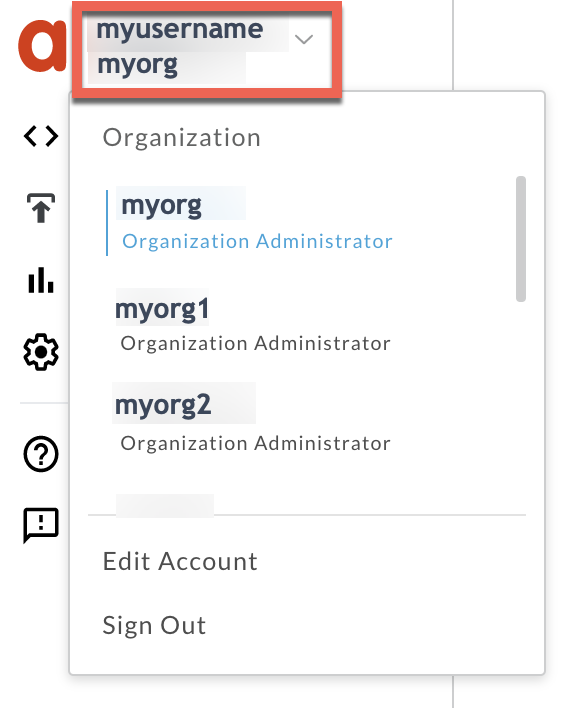
2. Switch to the organization in which you want to investigate the issue:
3. Navigate to the **Analyze \> API Monitoring \> Investigate** page.
4. Select the specific timeframe in which you observed the errors.
5. Ensure that the **Proxy** filter is set to **All**.
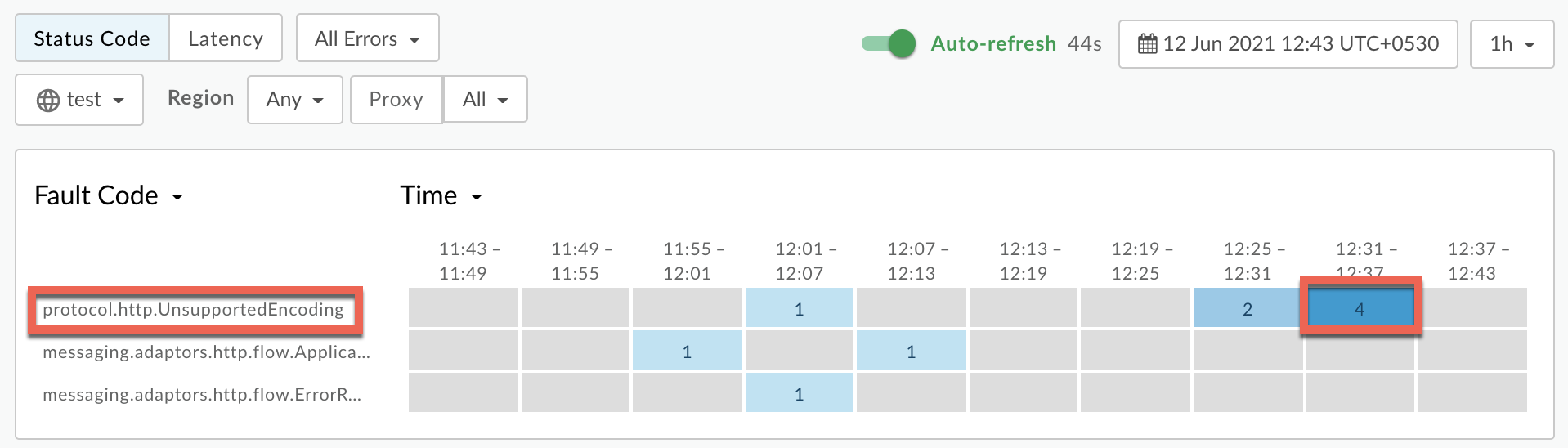
6. Plot **Fault Code** against **Time**.
7. Select a cell which has the fault code `protocol.http.UnsupportedEncoding` as shown below:
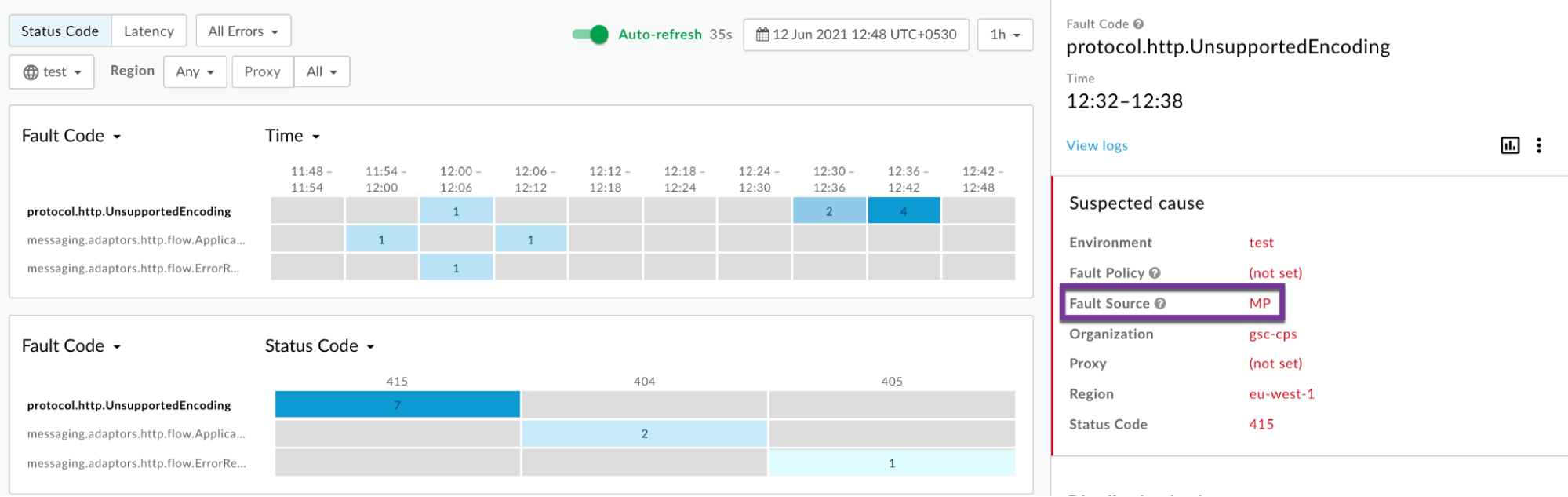
8. Information about the fault code `protocol.http.UnsupportedEncoding` is displayed as shown below:
9. Click **View logs** and expand one of the requests failing with `415`
error to view more information:
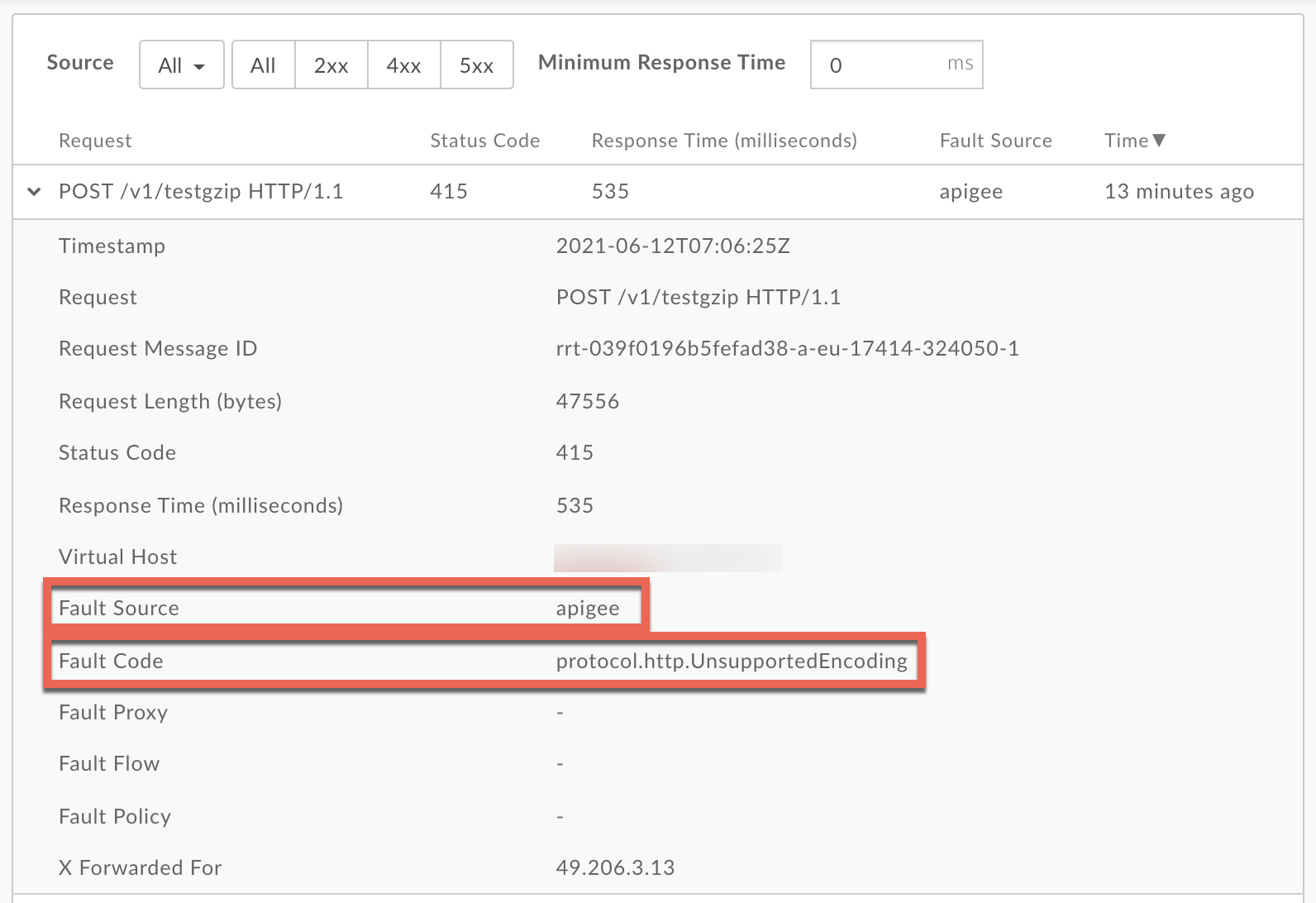
10. From the **Logs** window, note the following details:
- **Fault Source:** This displays that the error is returned by `apigee` or `target`.
- **Fault Code:** This should match `protocol.http.UnsupportedEncoding`.
11. If the **Fault Source** is `apigee`, then that indicates that the request contained unsupported encoding in the `Content-Encoding` header.
12. If the Fault Source is `target`, then that indicates that the backend server response contained unsupported encoding in the `Content-Encoding` header.
### Trace tool
> [!NOTE]
> **Note:**
>
> The instructions in this section are applicable for Public and Private Cloud users.
>
> 1. You WILL NOT be able to capture the trace if the `415 Unsupported Media Type` errors are caused due to unsupported encoding being passed as part of the API request.
> 2. You CAN capture the trace if the `415 Unsupported Media Type` errors are caused due to unsupported encoding being passed as part of the backend server response.
To diagnose the error using the Trace tool:
1. Enable the [trace session](https://docs.apigee.com/api-platform/debug/using-trace-tool-0.md.txt) and either:
- Wait for the `415 Unsupported Media Type` error to occur, or
- If you can reproduce the issue, make the API call to reproduce `415 Unsupported Media Type` error.
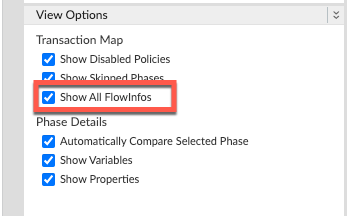
2. Ensure that **Show all FlowInfos** is enabled:
3. Select one of the failing requests and examine the trace.
4. Navigate through different phases of the trace and locate where the failure occurred.
5. You will find the error typically in a flow after the **Request sent to target
server** phase as shown below:
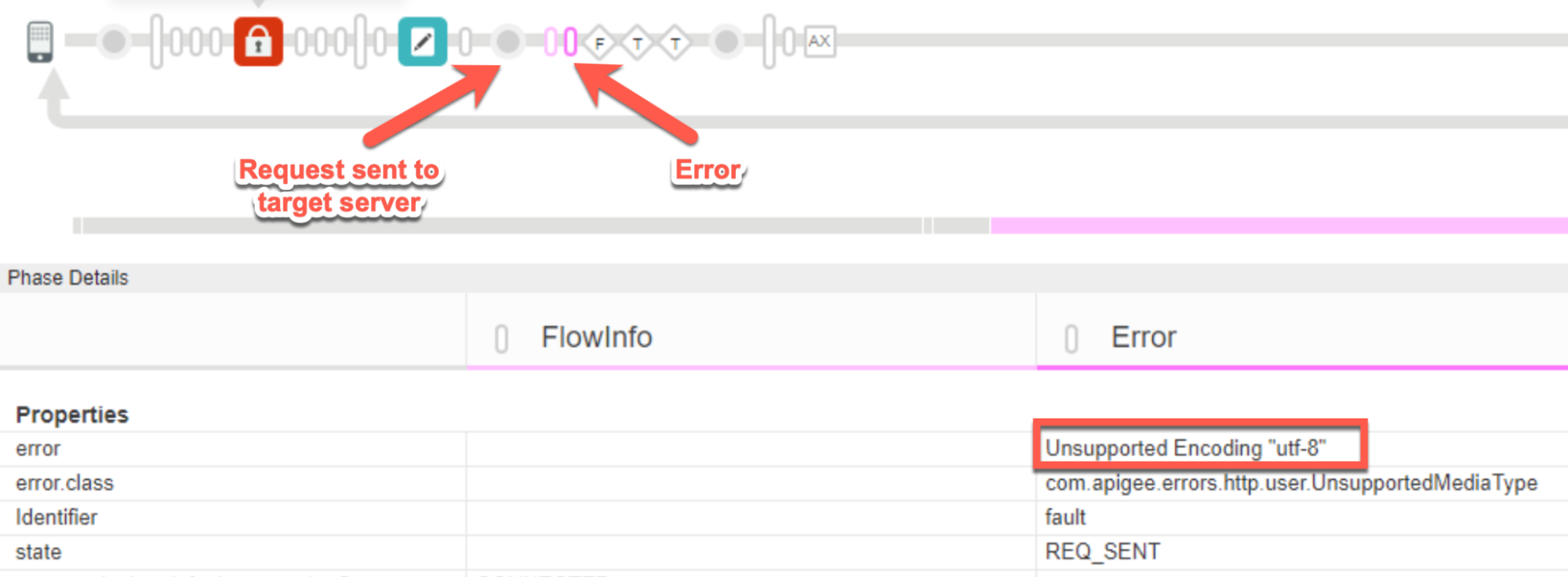
6. Note the value of the error from the trace.
The above sample trace shows the error as `Unsupported Encoding "utf-8"`. Since
the error is raised by Apigee after the request was sent to the backend server, it indicates
that the backend server sent the response header `Content-Encoding` with the value
of `"utf-8"`, which is not a
[supported encoding](https://docs.apigee.com/api-platform/troubleshoot/runtime/415-unsupported-media-type-unsupported-encoding.md.txt#supported-encoding) in Apigee.
7. Navigate to the **AX** (Analytics Data Recorded) Phase in the trace and click it.
8. Scroll down to the **Error / Response Headers** section in **Phase Details**
panel and determine
the values of **X-Apigee-fault-code** and **X-Apigee-fault-source** as shown below:
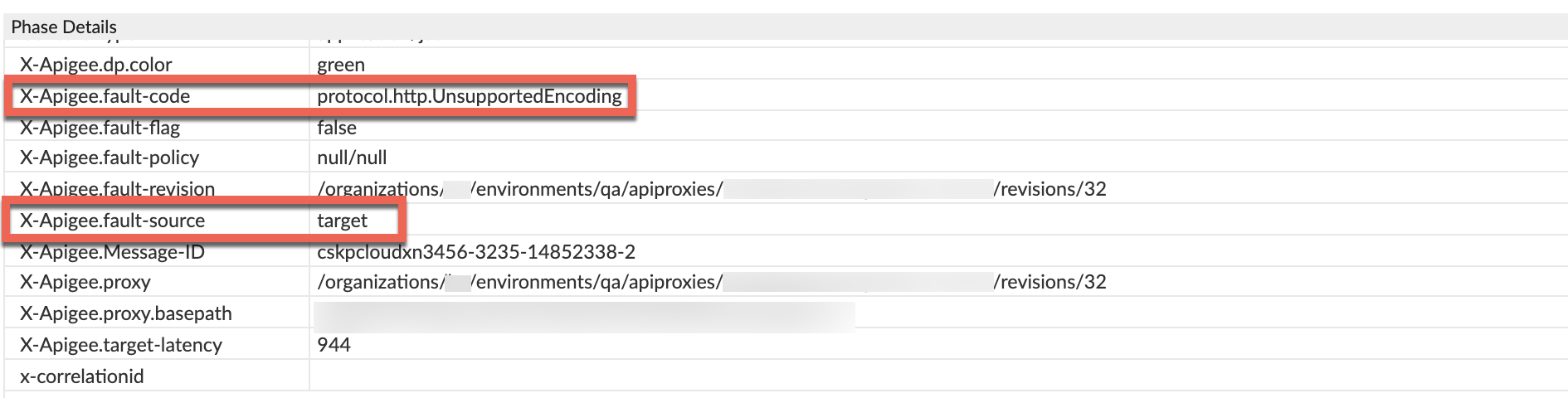
9. You will see the values of **X-Apigee-fault-code** and **X-Apigee-fault-source** as
`protocol.http.UnsupportedEncoding` and `target`, indicating that this
error is caused because the unsupported encoding value of `"utf-8"` was passed by the
backend server in the response header `Content-Encoding`.
| Response Headers | Value |
|---|---|
| X-Apigee-fault-code | `protocol.http.UnsupportedEncoding` |
| X-Apigee-fault-source | `target` |
10. Check to see if you are using [proxy chaining](https://docs.apigee.com/api-platform/fundamentals/connecting-proxies-other-proxies.md.txt); that is, if the target server/target endpoint is invoking another proxy in Apigee.
1. To determine this, navigate back to the **Request sent to target server** phase.
Click **Show Curl**.
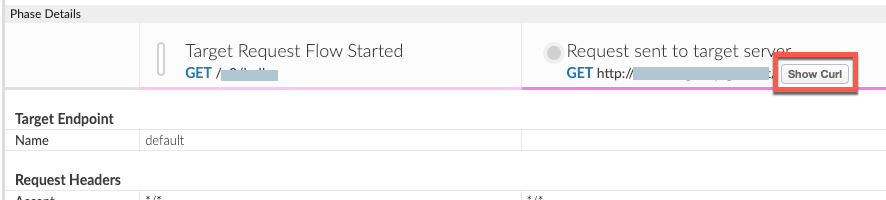
2. The **Curl for Request Sent to Target Server** window opens from which you can determine the target server host alias.
3. If the target server host alias is pointing to a virtual host alias, then it is proxy chaining. In this case, you need to repeat all the above steps for the chained proxy until you determine what is actually causing the `415 Unsupported Media Type` error.
4. If the target server host alias points to your backend server, then that indicates that your backend server is passing the unsupported encoding to Apigee.
### Nginix access logs
> [!NOTE]
> **Note:** The instructions in this section are for Edge Private Cloud users only.
To diagnose the error using NGINX access logs:
1. If you are a **Private Cloud user** , then you can use NGINX access logs to determine the key information about HTTP `415` errors.
2. Check the NGINX access logs:
`/opt/apigee/var/log/edge-router/nginx/ORG~ENV.PORT#_access_log`
> [!NOTE]
> **Note:** Replace ORG, ENV, and PORT# with actual values.
3. Search for any `415` Errors during a specific duration (if the problem happened in the past) or if there are any requests still failing with `415`.
4. If you do find any `415` errors with the **X-Apigee-fault-code** matching
the value of `protocol.http.UnsupportedEncoding`, then determine the value
of the **X-Apigee-fault-source.**
**Sample 415 error from NGINX access log:**
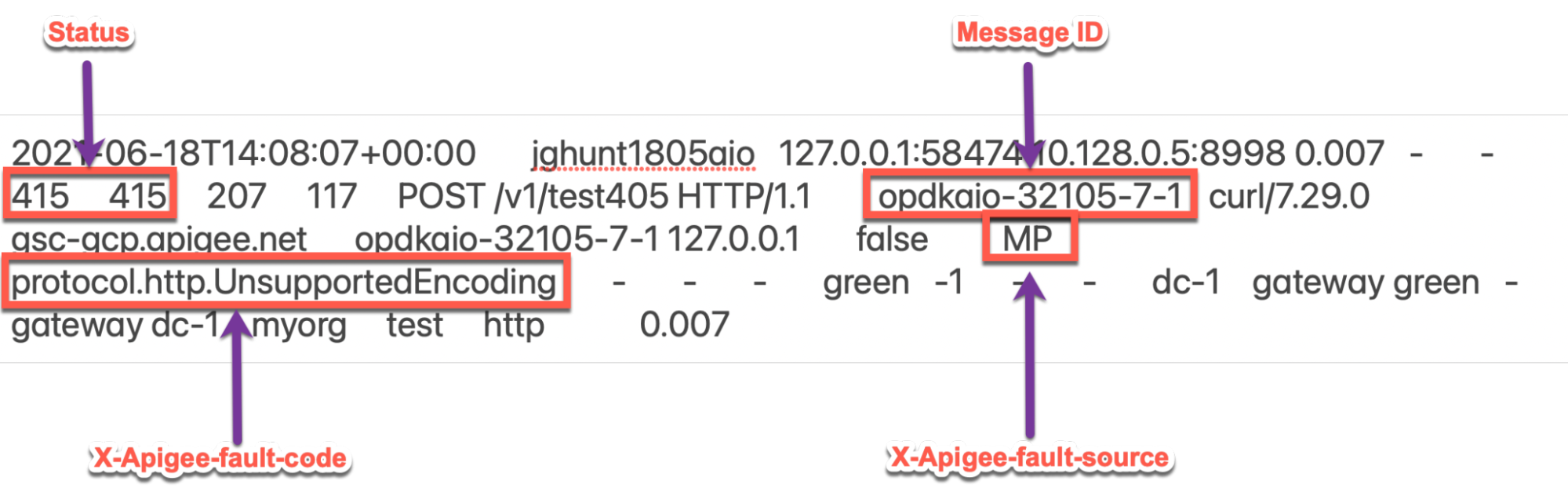
The above sample entry from the NGINX access log has the following values for **X-
Apigee-fault-code** and **X-Apigee-fault-source:**
| Response Headers | Value |
|---|---|
| X-Apigee-fault-code | `protocol.http.Response405WithoutAllowHeader` |
| X-Apigee-fault-source | `MP` |
The **X-Apigee-fault-source** could also have thevalue**`target`.**
## Cause: Unsupported encoding in request
### Diagnosis
1. Determine the **Fault Code** and **Fault Source** for the error observed using API Monitoring or NGINX access logs as explained in [Common diagnosis steps](https://docs.apigee.com/api-platform/troubleshoot/runtime/415-unsupported-media-type-unsupported-encoding.md.txt#common-diagnosis).
2. If the **Fault Code** is `protocol.http.UnsupportedEncoding` and the **Fault
Source** has the value `apigee` or `MP`, then this indicates that the request sent by the client application contains unsupported encoding in the request header `Content-Encoding`.
3. You can determine the value of unsupported encoding passed as part of the HTTP request using one of the following methods:
### Error message
**Using the error message:**
1. If you have access to the complete error message received from Apigee Edge, then refer
to the `faultstring`. The `faultstring` contains the value of the unsupported
endcoding.
**Sample Error Message:**
```
"faultstring":"Unsupported Encoding \"UTF-8\""
```
2. In the above error message, notice that the value of the unsupported encoding is
`"UTF-8"` as seen in the `faultstring`.
Since `"UTF-8"` is not a supported encoding in Apigee Edge, this request
fails with the `415 Unsupported Media Type` error with the error code:
`protocol.http.UnsupportedEncoding`.
### Actual request
**Using the actual request:**
1. If you don't have access to the actual request made by the client application, then go to [Resolution](https://docs.apigee.com/api-platform/troubleshoot/runtime/415-unsupported-media-type-unsupported-encoding.md.txt#resolution).
2. If you have access to the actual request made by the client application, then perform the following steps:
1. Determine the value passed to the request header `Content-Encoding.`
2. If the value passed to the request header `Content-Encoding` is not one of the values listed in [Supported encoding](https://docs.apigee.com/api-platform/troubleshoot/runtime/415-unsupported-media-type-unsupported-encoding.md.txt#supported-encoding), then that's the cause for this error.
**Sample request:**
```
curl -v "https://HOSTALIAS/v1/testgzip" -H "Content-Encoding: UTF-8" -X POST -d @request_payload.gz
```
The above sample request sends the value `"UTF-8"` to the `Content-
Encoding` header, which is not a [Supported Encoding](https://docs.apigee.com/api-platform/troubleshoot/runtime/415-unsupported-media-type-unsupported-encoding#supported-encoding) in Apigee Edge. Therefore, this request fails with `415
Unsupported Media Type` error with the error code:
`protocol.http.UnsupportedEncoding`.
### Resolution
1. Refer to the list of encoding supported by Apigee in [Supported encoding](https://docs.apigee.com/api-platform/troubleshoot/runtime/415-unsupported-media-type-unsupported-encoding.md.txt#supported-encoding).
2. Ensure that the client application always sends the following:
- Only the supported encoding as the value to the `Content-Encoding` header in the request
- The request payload in the supported format to Apigee Edge and matches the format specified in `Content-Encoding` header
3. In the above example, the request payload has a `gz` extension which indicates
that the content must be `gzip`. You can fix the issue by sending the request header
as `Content-Encoding: gzip` and the request payload in `gzip` format:
```
curl -v "https://HOSTALIAS/v1/testgzip" -H "Content-Encoding: gzip" -X POST -d @request_payload.gz
```
## Cause: Unsupported encoding in response
### Diagnosis
1. Determine the **Fault Code** and **Fault Source** for the error observed using API Monitoring, Trace Tool or NGINX access logs as explained in [Common diagnosis steps](https://docs.apigee.com/api-platform/troubleshoot/runtime/415-unsupported-media-type-unsupported-encoding.md.txt#common-diagnosis).
2. If the **Fault Source** has the value `target`, then this indicates that the response sent by the backend server contains unsupported encoding in the `Content-Encoding` header.
3. You can determine the value of unsupported encoding passed as part of the HTTP response from the backend server using one of the following methods:
### Error message
**Using the error message:**
1. If you have access to the complete error message received from Apigee Edge, then
refer to the `faultstring`. The `faultstring` contains the value of the
unsupported encoding.
**Sample error message:**
```
"faultstring":"Unsupported Encoding \"UTF-8\""
```
2. In the above error message, notice that the value of the unsupported encoding is
`"UTF-8"` as seen in the `faultstring`.
Since `"UTF-8"` is not a supported encoding in Apigee Edge, this
request fails with `415 Unsupported Media Type` error with the error code:
`protocol.http.UnsupportedEncoding`.
### Trace tool
**Using Trace:**
1. If you do not have the trace for the failing request, then go to [Resolution](https://docs.apigee.com/api-platform/troubleshoot/runtime/415-unsupported-media-type-unsupported-encoding.md.txt#resolution).
2. If you have captured a trace for the failure, then you can determine the unsupported encoding passed by the backend server as part of the `Content-Encoding` response header as explained in [Trace tool](https://docs.apigee.com/api-platform/troubleshoot/runtime/415-unsupported-media-type-unsupported-encoding.md.txt#trace).
### Resolution
1. Refer to the list of encoding supported by Apigee in [Supported encoding](https://docs.apigee.com/api-platform/troubleshoot/runtime/415-unsupported-media-type-unsupported-encoding.md.txt#supported-encoding)
2. Ensure that the backend server always sends the following:
- Only the [supported encoding](https://docs.apigee.com/api-platform/troubleshoot/runtime/415-unsupported-media-type-unsupported-encoding.md.txt#supported-encoding) as the value to the `Content-Encoding` header in the request
- The response payload in the supported format to Apigee Edge and matches the format specified in `Content-Encoding` header
## Supported encoding
The following table lists the encoding format supported by Apigee Edge:
| Header | Encoding | Description |
|---|---|---|
| `Content-Encoding` | `gzip` | The Unix `gzip` format |
| `Content-Encoding` | `deflate` | This format uses `zlib` structure with deflate compression algorithm. |
## Specification
Apigee responds with the `415 Unsupported Media Type` error response as per the
following RFC specification:
| Specification |
|---|
| [RFC 7231, section 6.5.13: 415 Unsupported Media Type](https://tools.ietf.org/html/rfc7231#section-6.5.13) |
## Key points to note
Note the following:
- If the `415` error is returned by Apigee due to unsupported encoding passed in the `Content-Encoding` header as part of the API request, then:
- You will not be able to capture the trace for such requests.
- You will not be able to modify the format or the content of the error response sent by
Apigee Edge using the policies such as RaiseFault, AssignMessage.
This is because this error occurs at an early phase in the Message Processor before any
policy can be executed.
- If the `415` error is returned by Apigee due to unsupported encoding passed in the response header from your backend server, then ***it has to be fixed*** in the backend server to avoid this error. Please work with your backend team as appropriate to fix this issue.
If you still need any assistance from [Apigee Edge Support](https://docs.apigee.com/api-platform/troubleshoot/support.md.txt),
go to [Must gather diagnostic information](https://docs.apigee.com/api-platform/troubleshoot/runtime/415-unsupported-media-type-unsupported-encoding.md.txt#must-gather).
## Must gather diagnostic information
If you still need any assistance from Apigee Support, gather the following
diagnostic information, and then contact [Apigee Edge Support](https://docs.apigee.com/api-platform/troubleshoot/support.md.txt):
If you are a **Public Cloud user**, provide the following information:
- Organization name
- Environment name
- API Proxy name
- Complete `curl` command used to reproduce the `415` error
- Trace file for the API requests
If you are a **Private Cloud user**, provide the following information:
- Complete error message observed for the failing requests
- Environment name
- API Proxy bundle
- Trace file for the API requests
- NGINX access logs `/opt/apigee/var/log/edge-router/nginx/ORG~ENV.PORT#_access_log`
**Where:** ORG, ENV and PORT# are replaced with
actual values.
- Message Processor system logs `/opt/apigee/var/log/edge-message-
processor/logs/system.log`