You're viewing **Apigee Edge** documentation.
[Go to the
**Apigee X** documentation](http://cloud.google.com/apigee/docs/api-platform/errorcatalog/mp-runtime-errorcatalog). info
## Symptom
The client application gets an HTTP status code of `500 Internal Server Error` with
the error code `protocol.http.EmptyPath` as a response for API calls.
## Error message
Client application gets the following response code:
```
HTTP/1.1 500 Internal Server Error
```
In addition, you may observe the following error message:
```
{
"fault":{
"faultstring":"Request path cannot be empty",
"detail":{
"errorcode":"protocol.http.EmptyPath"
}
}
}
```
## Possible causes
This error occurs if the request URL of the backend server, represented by the flow variable
[`target.url`](https://docs.apigee.com/api-platform/reference/variables-reference#target), contains an empty path.
As per the specifications
[RFC 3986, section 3: Syntax Components](https://datatracker.ietf.org/doc/html/rfc3986#section-3) and
[RFC 3986, section 3.3: Path](https://datatracker.ietf.org/doc/html/rfc3986#section-3.3):
1. The **URI syntax**has the following components:
```
foo://example.com:8042/over/there?name=ferret#nose
\_/ \______________/\_________/ \_________/ \__/
| | | | |
scheme authority path query fragment
```
2. The `path` component is **required** and it MUST always have a forward slash (`/`), even if there are no other characters as part of the path.
Therefore, if the request URL of the backend server does not have the `path`
component at all, that is, it does not even have a forward slash (`/`), then Apigee
Edge responds with `500 Internal Server Error` and error code
`protocol.http.EmptyPath`.
For example: If the `target.url` has the value
`https://www.mocktarget.apigee.net`, then this error occurs as the
`path`component is empty or missing.
| Cause | Description | Troubleshooting instructions applicable for |
|---|---|---|
| [Backend server URL (target.url) has empty path](https://docs.apigee.com/api-platform/troubleshoot/runtime/500-emptypath#backend) | The Backend server URL represented by flow variable `target.url` has an empty path. | Edge Public and Private Cloud users |
## Common diagnosis steps
Use one of the following tools/techniques to diagnose this error:
### API Monitoring
**Procedure #1: Using API Monitoring**
> [!NOTE]
> **Note:** The instructions in this section are applicable for Public Cloud users only.
To diagnose the error using API Monitoring:
1. [Sign in to the Apigee Edge UI](https://docs.apigee.com/api-platform/get-started/sign-in-manage-account#sign_in_to_your_apigee_edge_account) as a user with an [appropriate role](https://docs.apigee.com/api-monitoring/access#roles).
2. Switch to the organization in which you want to investigate the issue.
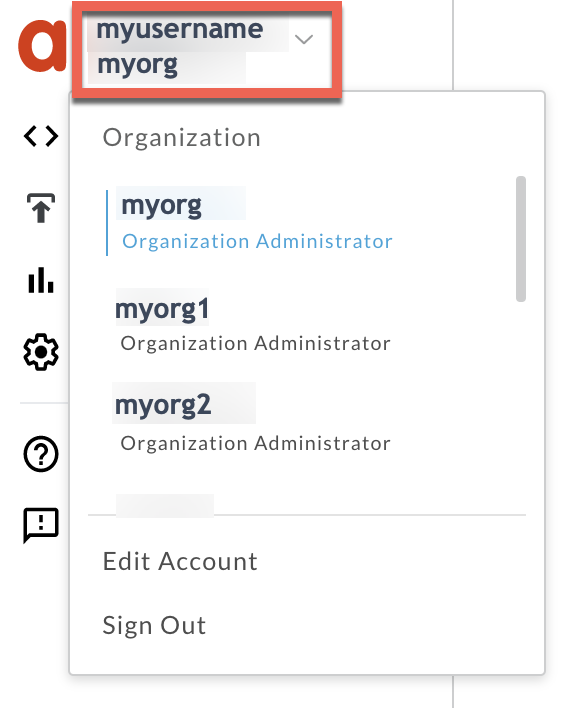
3. Navigate to the **Analyze \> API Monitoring \> Investigate** page.
4. Select the specific timeframe in which you observed the errors.
5. Plot **Fault Code** against **Time**.
> [!NOTE]
> **Note:** You can also plot **Status Code** against **Time**.
6. Select a cell which has the fault code `protocol.http.EmptyPath` as shown below:
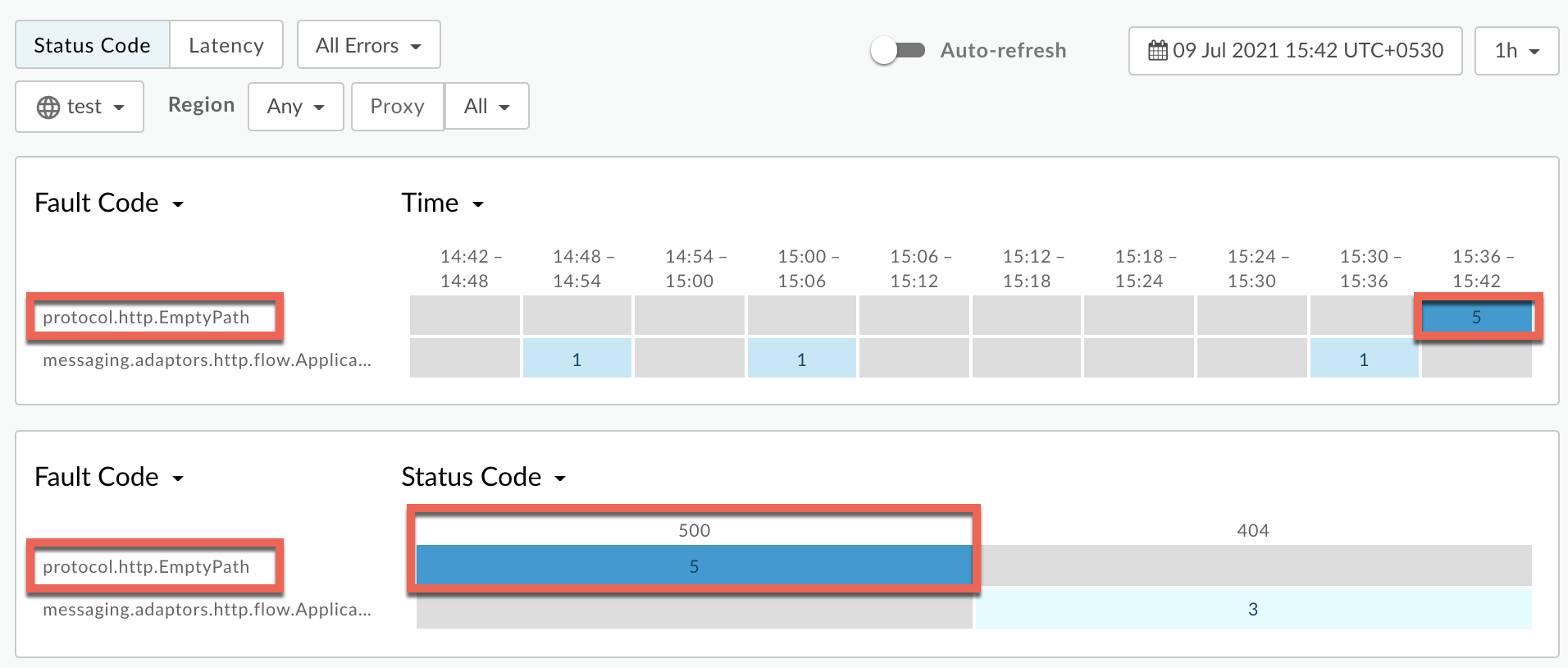
7. Information about the fault code `protocol.http.EmptyPath` is displayed as
shown below:
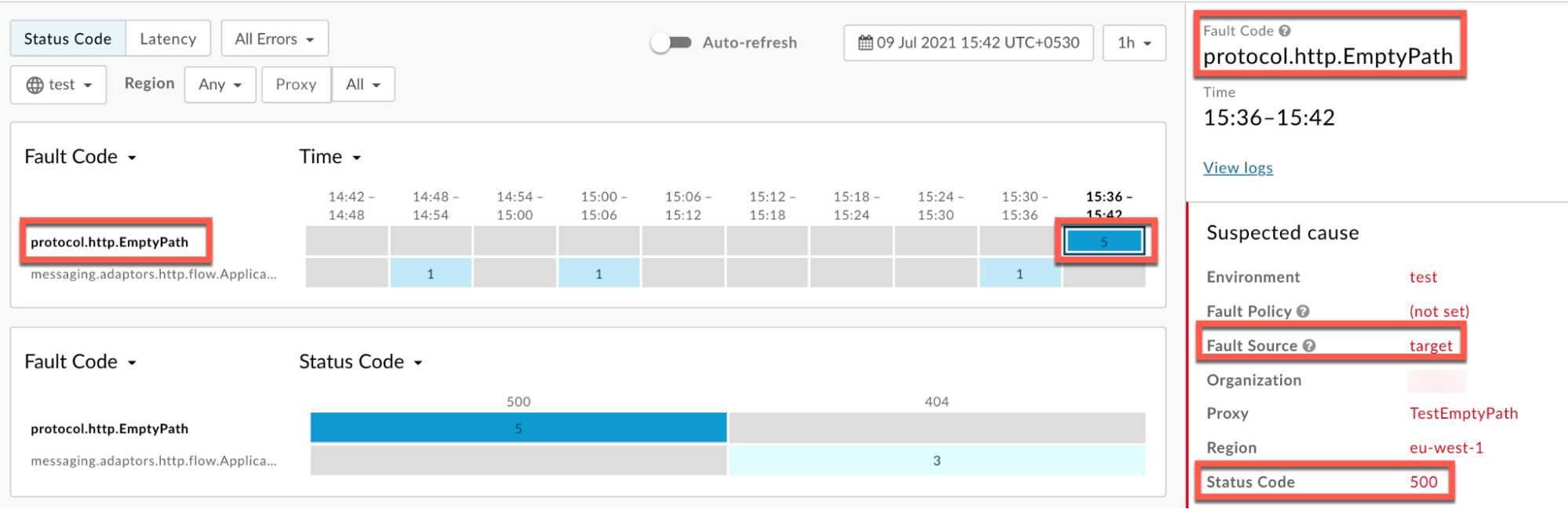
8. Click **View logs**to expand the row for the failed request.
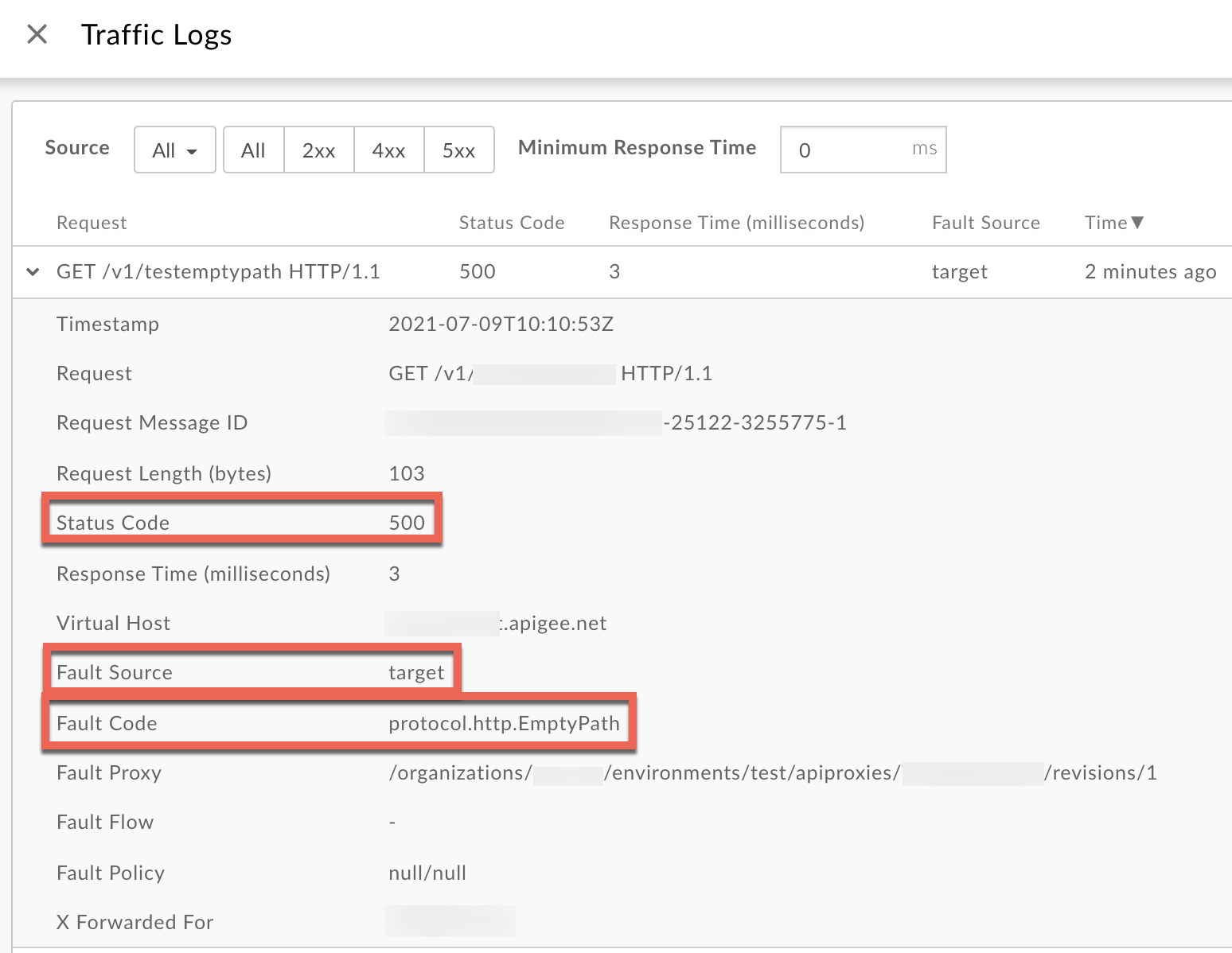
9. From the **Logs** window, note the following details:
- **Status Code:** `500`
- **Fault Source:** `target`
- **Fault Code:** `protocol.http.EmptyPath`
10. If the **Fault Source** is `target` and the **Fault Code** is `protocol.http.EmptyPath`, then that indicates that the backend server URL has an empty path.
### Trace
**Procedure #2: Using Trace tool**
> [!NOTE]
> **Note:** The instructions in this section are applicable for Public and Private Cloud users.
To diagnose the error using the Trace tool:
1. Enable the [trace session](https://docs.apigee.com/api-platform/debug/using-trace-tool-0) and either
- Wait for the `500 Internal Server Error` error to occur, or
- If you can reproduce the issue, make the API call to reproduce the issue `500 Internal Server Error`
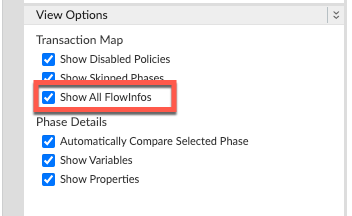
2. Ensure **Show all FlowInfos** is enabled:
3. Select one of the failing requests and examine the trace.
4. Navigate through different phases of the trace and locate where the failure occurred.
5. You will find the error typically in a flow after the **Target Request Flow Started**
phase as shown below:
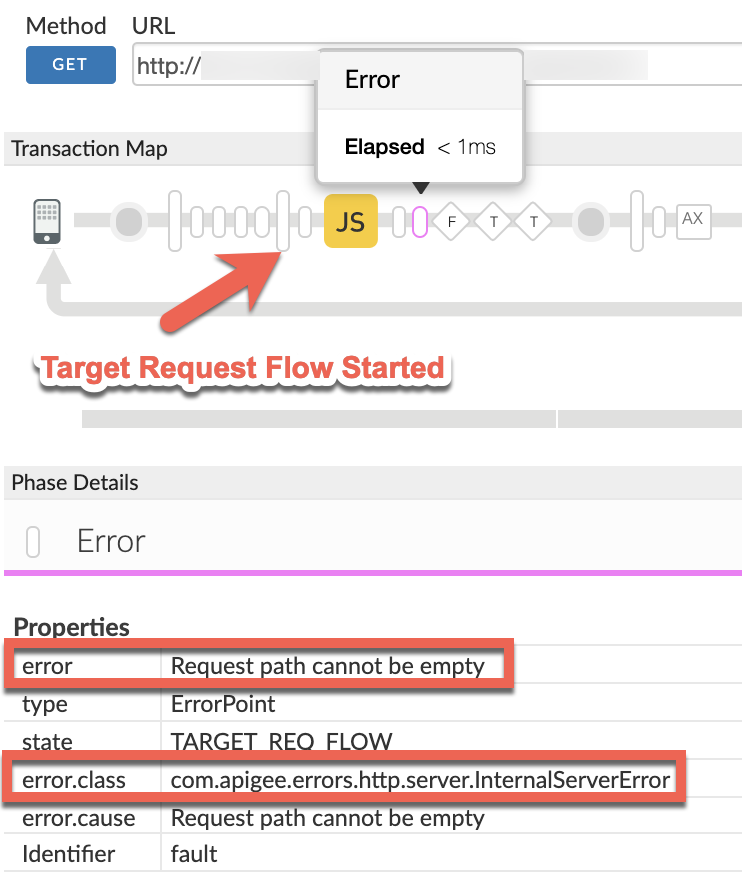
6. Note the value of the error from the trace.
**error: Request path cannot be empty**
Since the error is raised by Apigee Edge after the **Target Request Flow Started** phase,
it indicates that the `path` in the backend server URL is **empty** . This would
most likely happen if the flow variable `target.url` (which represents the URL for
backend server ) has been possibly updated with an empty path through one of the policies in the
request flow.
7. Examine the section **Variables Read and Assigned** in each of the flows backwards from the error point towards **Target Request Flow Started** phase.
8. Determine the policy where the flow variable `target.url`is updated.
**Sample trace showing JavaScript policy updated the flow variable `target.url`:**
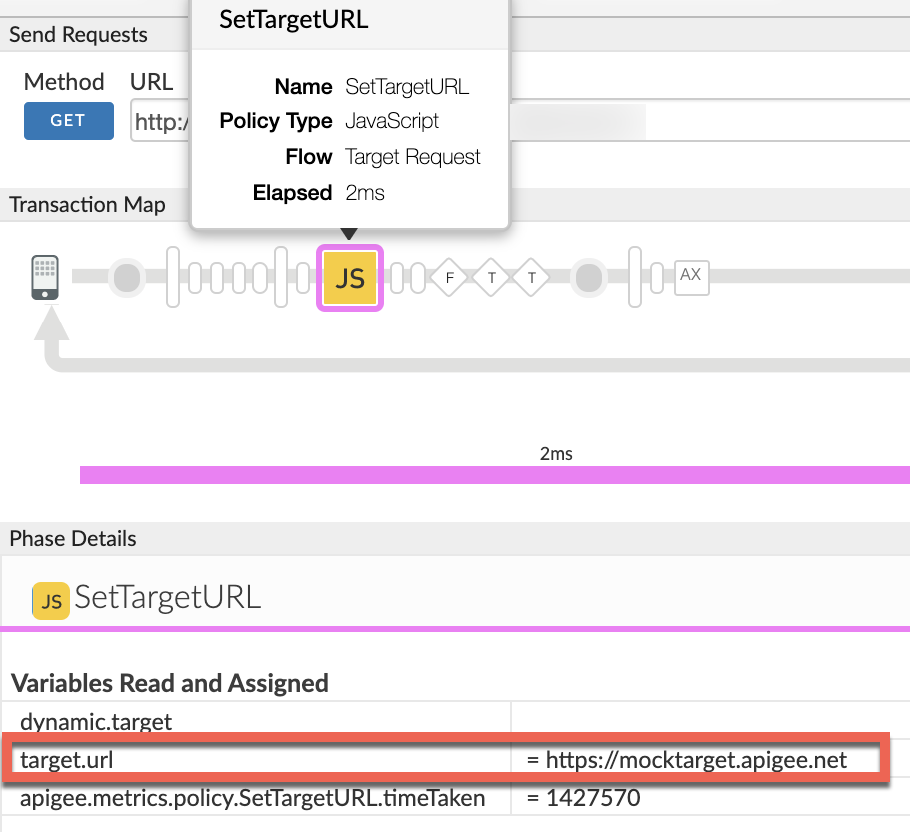
In the sample trace shown above, note the value of the flow variable variable
`target.url`is updated in a JavaScript policy named **SetTargetURL** as
follows:
```
target.url : https://mocktarget.apigee.net
```
9. Note that `target.url` has the following components:
- **scheme:** `https://mocktarget.apigee.net`
- **path:** empty
10. Therefore, you get the error `Request path cannot be empty`.
11. Navigate to the **AX** (Analytics Data Recorded) Phase in the trace and click it.
12. Scroll down to the **Phase Details** - **Error Headers** section and determine the
values of **X-Apigee-fault-code** and **X-Apigee-fault-source** as shown below:
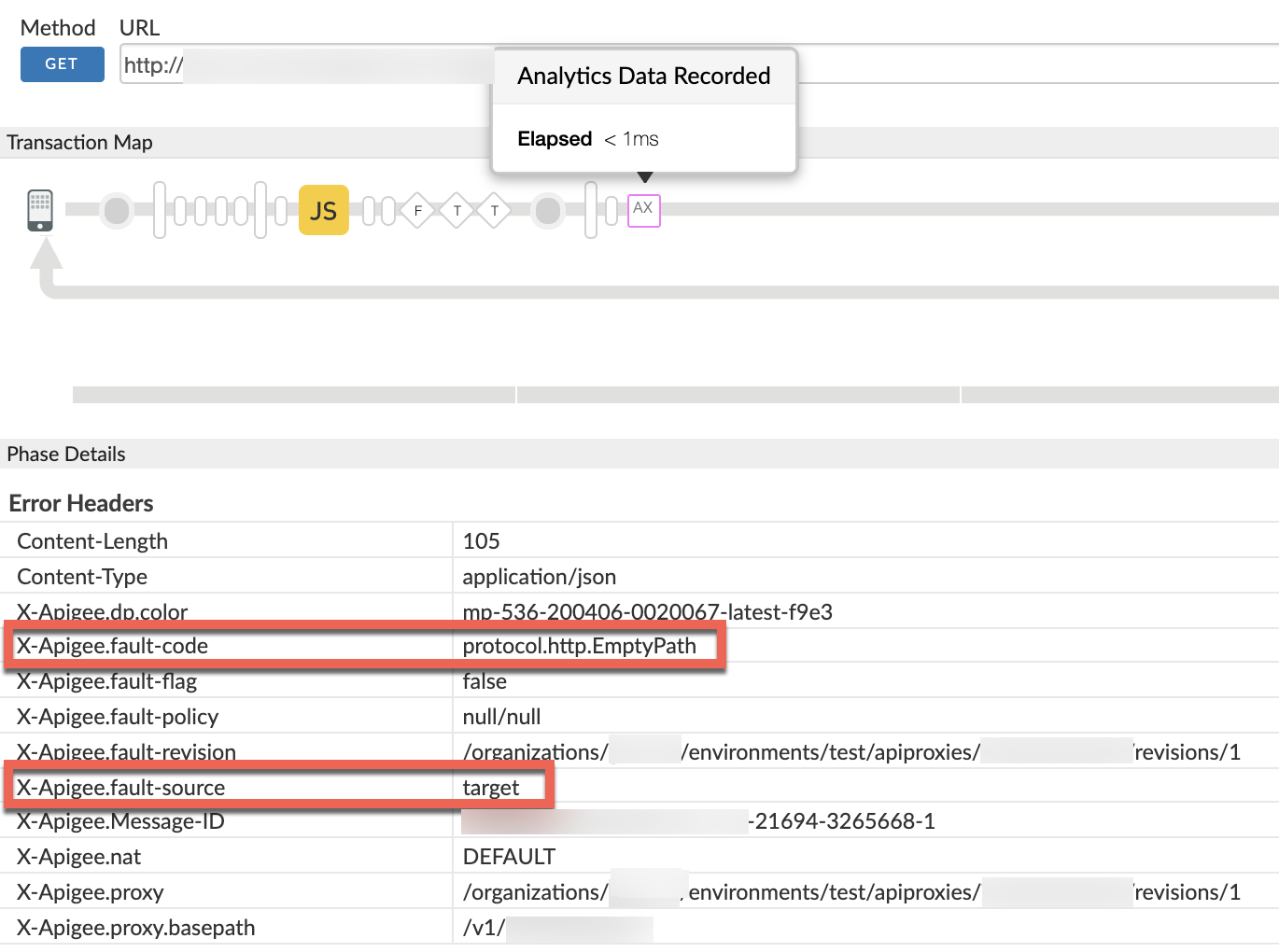
13. You will see the values of **X-Apigee-fault-code** and **X-Apigee-fault-source** as `protocol.http.EmptyPath` and `target`respectively, indicating that this error is caused because the backend server URL has an empty path.
| Response Headers | Value |
|---|---|
| X-Apigee-fault-code | `protocol.http.EmptyPath` |
| X-Apigee-fault-source | `target` |
### NGINX
**Procedure #3: Using NGINX Access Logs**
> [!NOTE]
> **Note:** The instructions in this section are for Edge Private Cloud users only.
To diagnose the error using NGINX access logs:
1. If you are a **Private Cloud user** , then you can use NGINX access logs to determine the key information about HTTP `500 Internal Server Error`.
2. Check the NGINX access logs:
`/opt/apigee/var/log/edge-router/nginx/ORG~ENV.PORT#_access_log`
> [!NOTE]
> **Note:** Replace ORG, ENV and, PORT# with actual values.
3. Search to see if there are any `500` errors with error code `protocol.http.EmptyPath` during a specific duration (if the problem happened in the past) or if there are any requests still failing with `500`.
4. If you do find any `500` errors with the **X-Apigee-fault-code** matching
the value of**`protocol.http.EmptyPath`** , then determine the value of the
**X-Apigee-fault-source.**
**Sample 500 error from NGINX access log:**
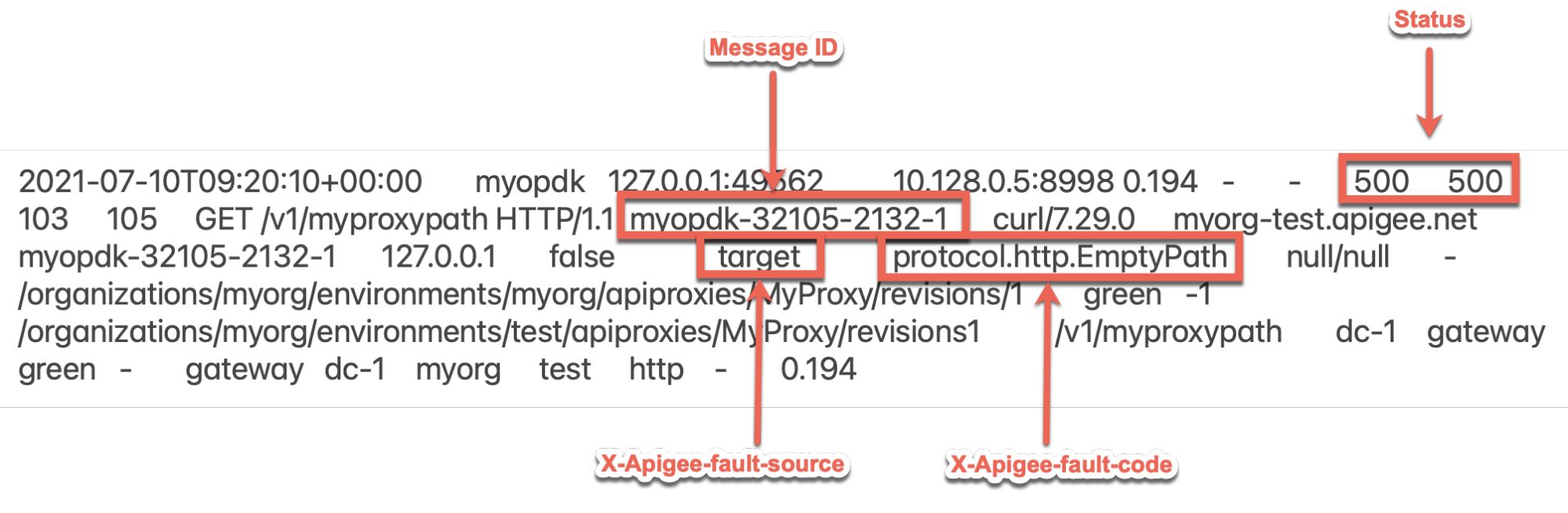
The above sample entry from the NGINX access log has the following values for **X-
Apigee-fault-code** and **X-Apigee-fault-source:**
| Headers | Value |
|---|---|
| X-Apigee-fault-code | `protocol.http.EmptyPath` |
| X-Apigee-fault-source | `target` |
Notice that the values of **X-Apigee-fault-code** and **X-Apigee-fault-source** are
`protocol.http.EmptyPath` and `target`respectively, indicating that
this error is caused because the backend server URL has an **empty path**.
## Cause: Backend server URL (target.url) has empty path
### Diagnosis
1. Determine the **Fault Code** and **Fault Source** for `500 Internal Server
Error` using API Monitoring, Trace Tool or NGINX access logs as explained in [Common diagnosis steps](https://docs.apigee.com/api-platform/troubleshoot/runtime/500-emptypath#common-diagnosis).
2. If the **Fault Code** is `protocol.http.EmptyPath` and **Fault Source** has the value `target`, then this indicates that the backend server URL has an **empty
path**.
3. The backend server URL is represented by the flow variable `target.url` in Apigee
Edge. This error typically happens if you try to update the backend server URL, that is,
`target.url` ***dynamically*** using any of the policies (within
Proxy/shared flow) in the Target request flow, such that it has an **empty path**.
> [!NOTE]
> **Note:** Apigee Edge expects the `path` in the backend server URL to be **non-empty,** that is the **path** should at least have a forward slash (`/`), as per the URL specification [RFC 3986, section 3: Syntax Components](https://datatracker.ietf.org/doc/html/rfc3986#section-3).
4. Determine if the flow variable `target.url` indeed has an empty path and the source for its value using one of the following steps:
### Trace
**Using the Trace tool**
If you have captured a trace for this error, then use the steps as explained in
[Using Trace Tool](https://docs.apigee.com/api-platform/troubleshoot/runtime/500-emptypath#trace)and:
1. Verify if `target.url` has an empty path.
2. If yes, then find out which policy modified or updated the value of
`target.url` to contain empty path.
**Sample trace showing JavaScript policy updated the flow variable
`target.url:`**

3. In the above sample trace, notice that the JavaScript policy has modified or updated the value of `target.url` to contain an empty path.
4. Note that **`target.url`** has the following components:
- **scheme:** `https://mocktarget.apigee.net`
- **path:** empty
### Logs
**Using logs in your log server**
1. If you don't have a trace for this error (an intermittent issue), then check to see if you have logged the information about the value of flow variable `target.url`, using policies such as [MessageLogging](https://docs.apigee.com/api-platform/reference/policies/message-logging-policy) or [ServiceCallout](https://docs.apigee.com/api-platform/reference/policies/service-callout-policy) to your log server.
2. If you have the logs, review them and:
1. Verify if `target.url` has an empty path, and
2. See if you can determine which policy modified `target.url` to contain an empty path
### API proxy
**Reviewing the failing API proxy**
If you don't have a trace or logs for this error, review the failing API
proxy to determine what modified or updated the flow variable `target.url`
to contain an **invalid path.** Check the following:
- The policy within API proxy
- Any shared flows invoked from the proxy
5. Examine the specific policy (For example, AssignMessage or JavaScript) that modifies or
updates the flow variable `target.url` carefully and determine the cause for updating
`target.url` to have an empty path.
Here are a few example policies that update the flow variable `target.url`
incorrectly to contain an empty path leading to this error.
### Sample #1
**Sample #1: JavaScript Policy updating `target.url` variable**
```
var url = "https://mocktarget.apigee.net"
context.setVariable("target.url", url);
```
In the above sample, notice that the flow variable `target.url` is updated
with the value `https://mocktarget.apigee.net` contained in another variable
`url`.
Note that **`target.url`** has the following components:
- **scheme:** `https://mocktarget.apigee.net`
- **path:** empty
Since the path is empty, Apigee Edge returns `500 Internal Server Error` with
error code `protocol.http.EmptyPath`.
### Sample #2
**Sample #2: JavaScript Policy updating `target.url` variable**
```
var path = context.getVariable("request.header.Path");
var url = "https://mocktarget.apigee.net" + path
context.setVariable("target.url", url);
```
In the above sample, notice that the flow variable `target.url` is updated by
concatenating the value `https://mocktarget.apigee.net` contained in a variable
`url`andthe value of another variable `path`, whose
value is retrieved from `request.header.Path.`
If you have access to the actual request or trace, then you can verify the actual value
passed to `request.header.Path`.
**Sample Request made by the user:**
```
curl -v https://HOST_ALIAS/v1/myproxy -H "Authorization: Bearer
```
In this example, the header path is not sent as part of the request. Therefore, the value
of the variable path in the JavaScript policy is `null`.
So:
- `url = https://mocktarget.apigee.net + path`
- `url = https://mocktarget.apigee.net + null`
- `target.url = https://mocktarget.apigee.netnull`
Note that `target.url` has the following components:
- **scheme:** `https://mocktarget.apigee.netnull`
- **path:** empty
### Sample #3
**Sample #3: AssignMessage Policy updating `target.url` variable through
another variable**
```
AM-SetTargetURL
target.url
https://mocktarget.apigee.net
true
```
Note that `target.url` has the following components:
- **scheme:** `https://mocktarget.apigee.net`
- **path:** empty
In all the above examples, the path in the backend server URL, that is
`target.url` is empty, therefore Apigee Edge returns
`500 Internal Server Error` with error code `protocol.http.EmptyPath`.
### Resolution
As per the specification
[RFC 3986, section 2: Syntax Components](https://datatracker.ietf.org/doc/html/rfc3986#section-2), the `path` component is
**required** and it MUST always have a forward slash (/), even if there are no
other characters as part of the `path`. Perform the following steps to
fix this issue:
1. Ensure that the backend server URL, represented by the flow variable **`target.url`** always has a **non-empty path** .
1. In some cases, you may not have a resource name in the path, then ensure that the path at least has a forward slash (`/`).
2. If you use any other variables to determine the value of the flow variable **`target.url`**, then ensure that other variables don't have an empty path.
3. If you perform any string operations to determine the value of the flow variable **`target.url`**, then ensure that the result or outcome of the string operations doesn't have an empty path.
2. In the samples discussed in [Diagnosis](https://docs.apigee.com/api-platform/troubleshoot/runtime/500-emptypath#diagnosis), you can fix this issue as explained below:
### Sample #1
**Sample #1: JavaScript Policy updating `target.url` variable**
Add a forward slash (`/`) to the variable `url` to fix this
issue as shown below:
```
var url = "https://mocktarget.apigee.net/"
context.setVariable("target.url", url);
```
### Sample #2
**Sample #2: JavaScript Policy updating `target.url` variable**
```
var path = context.getVariable("request.header.Path");
var url = "https://mocktarget.apigee.net" + path
context.setVariable("target.url", url);
```
Ensure that you pass a valid path, for example, `/iloveapis` as part of
request header `Path` to fix this issue as shown below:
**Sample request:**
```
curl -v https://HOST_ALIAS/v1/myproxy -H "Authorization: Bearer -H "Path: /iloveapis"
```
### Sample #3
**Sample #3: AssignMessage policy updating `target.url` variable through
another variable**
Add a valid path in the `` element of AssignMessage policy. For
example, you can have `/json`as the path for
[MockTarget API](https://docs.apigee.com/api-platform/samples/mock-target-api).
That is, modify the `` element to
`https://mocktarget.apigee.net/json` as shown below:
```
AM-SetTargetURL
target.url
https://mocktarget.apigee.net/json
true
```
## Specification
Apigee Edge expects that the **backend server URL** **does not have an empty path** as per
the following specifications:
| Specification |
|---|
| [RFC 3986, section 3: Syntax Components](https://datatracker.ietf.org/doc/html/rfc3986#section-3) |
| [RFC 3986, section 3.3: Path](https://datatracker.ietf.org/doc/html/rfc3986#section-3.3) |
If you still need any assistance from Apigee Support, go to
[Must gather diagnostic information](https://docs.apigee.com/api-platform/troubleshoot/runtime/500-emptypath#must-gather).
## **Must gather diagnostic information**
If the problem persists even after following the above instructions, gather the following
diagnostic information, and then contact [Apigee Edge Support](https://docs.apigee.com/api-platform/troubleshoot/support).
If you are a **Public Cloud user**, provide the following information:
- Organization name
- Environment name
- API Proxy name
- Complete `curl` command used to reproduce the `500 Internal Server
Error` with the error code `protocol.http.EmptyPath`
- Trace file for the API requests
If you are a **Private Cloud user**, provide the following information:
- Complete error message observed for the failing requests
- Environment name
- API proxy bundle
- Trace file for the API requests
- NGINX access logs:
`/opt/apigee/var/log/edge-router/nginx/ORG~ENV.PORT#_access_log`
**Where:** ORG, ENV and PORT# are replaced with
actual values.
- Message Processor system logs `/opt/apigee/var/log/edge-message-
processor/logs/system.log`
## References
[Flow Variables - target](https://docs.apigee.com/api-platform/reference/variables-reference#target)