You're viewing **Apigee Edge** documentation.
[Go to the
**Apigee X** documentation](http://cloud.google.com/apigee/docs). info
> [!NOTE]
> **Note:** Apigee Extensions are available in the Edge UI to Google Cloud Apigee customers with an Enterprise [support](https://cloud.google.com/apigee/pricing) plan.
In the [previous
step](https://docs.apigee.com/api-platform/tutorials/add-extension/extension-callout-policy), you added an [ExtensionCallout policy](https://docs.apigee.com/api-platform/reference/policies/extension-callout-policy) to your API proxy. Now, it's time to deploy
the proxy so that you can try it out.
**To deploy the proxy:**
1. Click the **Deployment** dropdown to deploy your API proxy to the "test" environment.
2. Click the **Trace** tab.
3. On the **Trace** tab, click **Start Trace Session**.
4. Next to the proxy URL, click **Send** to send a request to your API proxy.
5. Ensure that your test succeeded and that a 200 was received from the proxy.
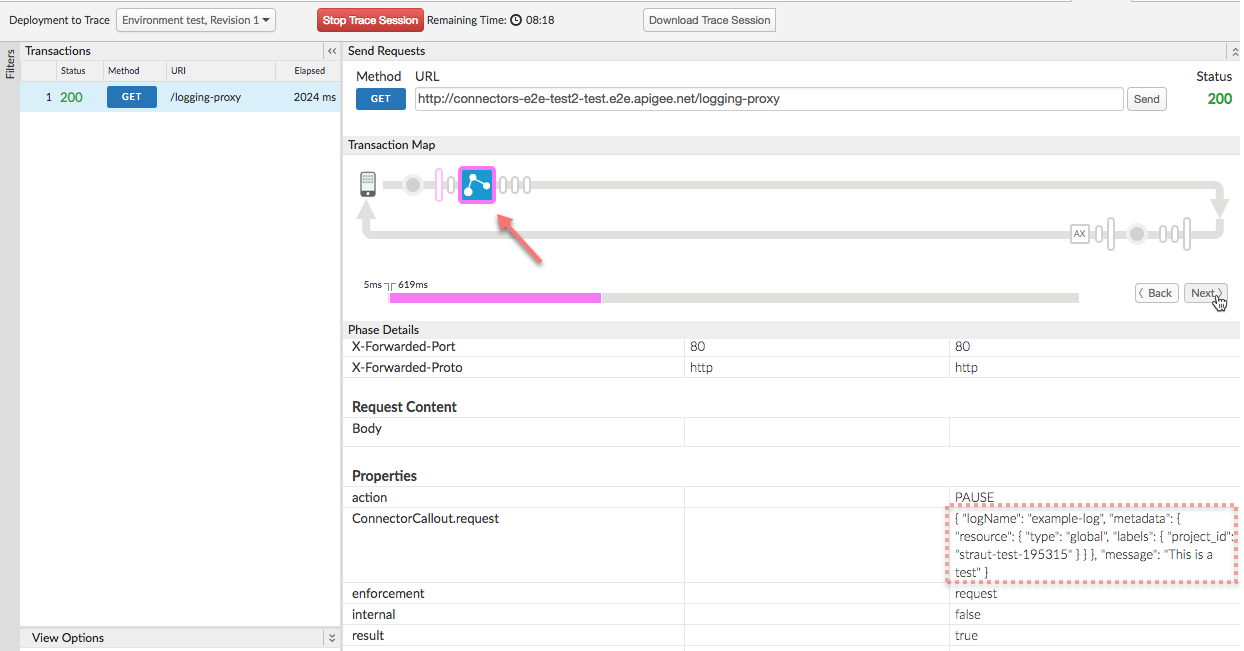
6. In **Trace**, step through until you reach the ExtensionCallout policy execution step.
7. Under **Phase Details** , locate the `ConnectorCallout.request` property and note that its value is the contents of your `` element.
8. Open the [GCP console](https://console.cloud.google.com/) and navigate to your GCP project.
9. From the main navigation menu, select **Stackdriver \> Logging \> Logs**.
10. On the logs page, select the Resource dropdown on the left, then click **Global**.
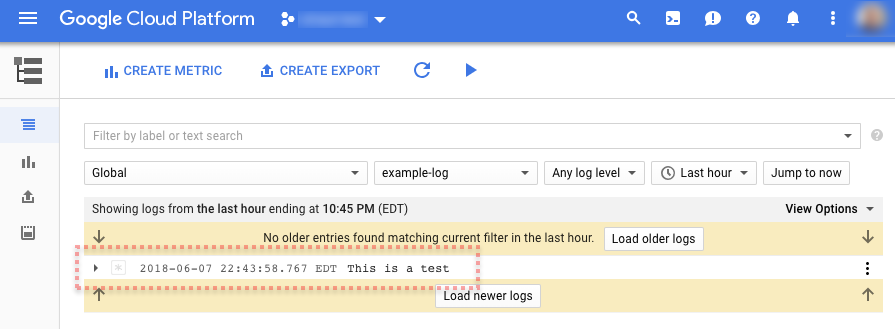
11. From the logs dropdown to the right, select "example-log".
12. Your log entry should appear in the log list, as the following example shows:
> [!TIP]
>
> ### Congratulations!
>
> You've deployed your API proxy with an extension. If you want extra credit, see how you can use the extension to log a message flow variable.
### Next step
[Step 1](https://docs.apigee.com/api-platform/tutorials/add-extension/add-new-extension)
[Step 2](https://docs.apigee.com/api-platform/tutorials/add-extension/configure-for-testing)
[Step 3](https://docs.apigee.com/api-platform/tutorials/add-extension/extension-callout-policy)
[Step 4](https://docs.apigee.com/api-platform/tutorials/add-extension/proxy-deployment)
[Step 5: Log a message flow variable](https://docs.apigee.com/api-platform/tutorials/add-extension/xtra-credit)