You're viewing **Apigee Edge** documentation.
[Go to the
**Apigee X** documentation](http://cloud.google.com/apigee/docs/hybrid/v1.9/install-create-cluster). info
First, you need to create a new portal:
1. Sign in to the [Apigee UI](https://apigee.com/edge).
> [!NOTE]
> **Note** : It may be helpful to position **this instructions page** and the **Apigee UI** side-by-side on your desktop to follow the steps more easily.
2. Select **Publish \> Portals** in the side navigation bar.
3. Perform one of the following:
- If no portals existing in the organization, click **Get started**.
- Otherwise, click **+ Portal** above the list of existing portals.
4. In the **Create a Portal** dialog:
- Enter **My first portal** in the **Name** field.
Notice as you enter the portal name, the default domain for the portal is displayed. For example: `orgname-portalname.apigee.io`, where orgname is the organization name and portalname is defined using the portal name converted to all lowercase and with spaces removed. For example: `myorg-myfirstporatal.apigee.io`
- Optionally enter a description in the **Description** field, such as **Stepping through the tutorial**.
5. Click **Create** to create the new portal.
Your new portal is created and the portal landing page displays, as shown:
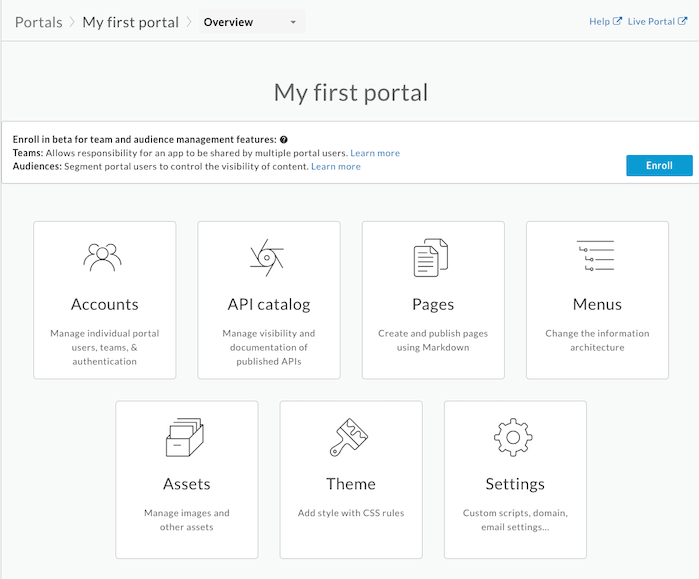
Next, you'll **customize** your new portal.
### Next step
[Step 1](https://docs.apigee.com/api-platform/tutorials/portal/create-portal)
[Step 2: Customize the color palette](https://docs.apigee.com/api-platform/tutorials/portal/customize-color-palette)
[Step 3](https://docs.apigee.com/api-platform/tutorials/portal/customize-logo)
[Step 4](https://docs.apigee.com/api-platform/tutorials/portal/edit-page)
[Step 5](https://docs.apigee.com/api-platform/tutorials/portal/set-up-navigation)
[Step 6](https://docs.apigee.com/api-platform/tutorials/portal/publish-api)