You're viewing **Apigee Edge** documentation.
[Go to the
**Apigee X** documentation](http://cloud.google.com/apigee/docs/api-platform/system-administration/options-configuring-tls). info
> [!NOTE]
> **Note:** This document is applicable for Edge Public and Private Cloud users.
This document explains how to validate a certificate chain before you upload the certificate to
a keystore or a truststore in Apigee Edge. The process relies on the
[OpenSSL](https://en.wikipedia.org/wiki/OpenSSL) toolkit to validate the certificate
chain and is applicable on any environment where OpenSSL is available.
## Before you begin
Before you use the steps in this document, be sure you understand the following topics:
- If you aren't familiar with a certificate chain, read [Chain of trust](https://en.wikipedia.org/wiki/Chain_of_trust).
- If you aren't familiar with the OpenSSL library, read [OpenSSL](https://en.wikipedia.org/wiki/OpenSSL).
- If you want to use the command-line examples in this guide, install or update to the latest version of OpenSSL client.
- Ensure the certificates are in PEM format. If the certificates are not in PEM format, use the instructions in [Converting certificates to supported format](https://docs.apigee.com/how-to-guides/converting-certificates-to-supported-format) to convert them into PEM format.
## Validating the certificate subject and issuer for the complete chain
To validate the certificate chain using OpenSSL commands, complete the steps described in the
following sections:
- [Splitting the certificate chain](https://docs.apigee.com/how-to-guides/validating-certificate-chain#splitcertchain)
- [Verifying the certificate subject and issuer](https://docs.apigee.com/how-to-guides/validating-certificate-chain#verifycertsubjissuer)
- [Verifying the certificate subject and issuer hash](https://docs.apigee.com/how-to-guides/validating-certificate-chain#verifycertsubjissuer-hash)
- [Verifying the certificate expiry](https://docs.apigee.com/how-to-guides/validating-certificate-chain#verifycertexpiry)
### Splitting the certificate chain
Before validating the certificate, you need to split the certificate chain into separate
certificates using the following steps:
1. Login to the server where the OpenSSL client exists.
2. Split the certificate chain into the following certificates (if not already done):
- **Entity certificate:** `entity.pem`
- **Intermediate certificate:** `intermediate.pem`
- **Root certificate:** `root.pem`
> [!NOTE]
> **Note:** In some certificate chains, there could be multiple intermediate certificates between the entity and root certificate. In such cases, name the intermediate certificates as: `intermediate1.pem`, `intermediate2.pem`, etc.
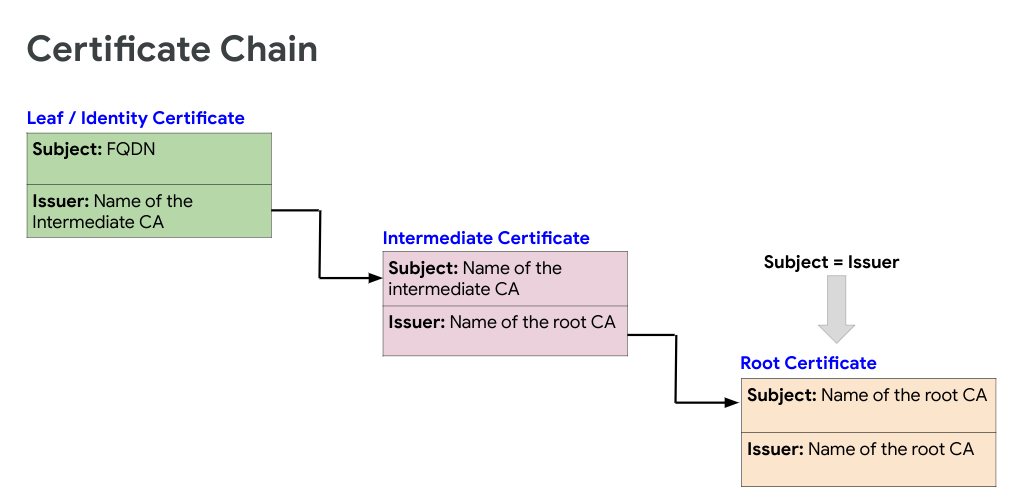
The following figure shows an example certificate chain:
### Verifying the certificate subject and issuer
This section describes how to get the subject and issuer of the certificates and verify that
you have a valid certificate chain.
1. Run the following **OpenSSL** command to get the `Subject` and `Issuer` for each certificate in the chain from `entity` to `root` and verify that they form a proper certificate chain:
```
openssl x509 -text -in certificate | grep -E '(Subject|Issuer):'
```
Where certificate is the name of the certificate.
2. Verify that the certificates in the chain adhere to the following guidelines:
- `Subject` of each certificate matches the `Issuer` of the preceding certificate in the chain (except for the `Entity` certificate).
- `Subject` and `Issuer` are the same for the root certificate.
If the certificates in the chain adhere to these guidelines, then the certificate chain is considered to be complete and valid.
**Sample certificate chain validation**
The following example is the output of the OpenSSL commands for a sample certificate chain containing three certificates:
**Entity certificate**
```
openssl x509 -text -in entity.pem | grep -E '(Subject|Issuer):'
Issuer: C = US, O = Google Trust Services, CN = GTS CA 1O1
Subject: C = US, ST = California, L = Mountain View, O = Google LLC, CN = *.enterprise.apigee.com
```
**Intermediate certificate**
```
openssl x509 -text -in intermediate.pem | grep -E '(Subject|Issuer):'
Issuer: OU = GlobalSign Root CA - R2, O = GlobalSign, CN = GlobalSign
Subject: C = US, O = Google Trust Services, CN = GTS CA 1O1
```
**Root certificate**
```
openssl x509 -text -in root.pem | grep -E '(Subject|Issuer):'
Issuer: OU = GlobalSign Root CA - R2, O = GlobalSign, CN = GlobalSign
Subject: OU = GlobalSign Root CA - R2, O = GlobalSign, CN = GlobalSign
```
In the example shown above, notice the following:
- The `Subject` of the intermediate certificate matches the `Issuer` of the entity certificate.
- The `Subject` of the root certificate matches the `Issuer` of the intermediate certificate.
- The `Subject` and `Issuer` are the same in the root certificate.
From the example above, you can confirm that the sample certificate chain is valid.
### Verifying the certificate subject and issuer hash
This section explains how to get the hash of the subject and issuer of the certificates and
verify that you have a valid certificate chain.
It is always a good practice to verify the hash sequence of certificates as it can help in
identifying issues such as the Common Name (CN) of the certificate having unwanted space or
special characters.
1. Run the following **OpenSSL** command to get the `hash` sequence for each certificate in the chain from `entity` to `root` and verify that they form a proper certificate chain.
```
openssl x509 -hash -issuer_hash -noout -in certificate
```
2. Where certificate is the name of the certificate.
3. Verify that the certificates in the chain adhere to the following guidelines:
- `Subject` of each certificate matches the `Issuer` of the preceding certificate in the chain (except for the `Entity` certificate).
- `Subject` and `Issuer` are the same for the root certificate.
4. If the certificates in the chain adhere to these guidelines, then the certificate chain is considered to be complete and valid.
5. **Sample certificate chain validation through hash sequence**
6. The following example is the output of the OpenSSL commands for a sample certificate chain containing three certificates:
```
openssl x509 -in entity.pem -hash -issuer_hash -noout
c54c66ba #this is subject hash
99bdd351 #this is issuer hash
```
```
openssl x509 -in intermediate.pem -hash -issuer_hash -noout
99bdd351
4a6481c9
```
```
openssl x509 -in root.pem -hash -issuer_hash -noout
4a6481c9
4a6481c9
```
7. In the example shown above, notice the following:
- The `subject hash` of the intermediate certificate matches the `issuer hash` of the entity certificate.
- The `subject hash` of the root certificate matches the `issuer hash` of the issuer certificate.
- The `subject` and `issuer hash` are the same in the root certificate.
8. From the example above, you can confirm that the sample certificate chain is valid.
### Verifying the certificate expiry
This section explains how to verify whether or not all the certificates in the chain are
expired using of the following methods:
- Get the start and end date of the certificate.
- Get the expiry status.
#### Start and end date
Run the following **OpenSSL** command to get the start and end date for each certificate
in the chain from `entity` to `root` and verify that all the certificates
in the chain are in force (start date is before today) and are not expired.
**Sample certificate expiry validation through start and end dates**
```
openssl x509 -startdate -enddate -noout -in entity.pem
notBefore=Feb 6 21:57:21 2020 GMT
notAfter=Feb 4 21:57:21 2021 GMT
```
```
openssl x509 -startdate -enddate -noout -in intermediate.pem
notBefore=Jun 15 00:00:42 2017 GMT
notAfter=Dec 15 00:00:42 2021 GMT
```
```
openssl x509 -startdate -enddate -noout -in root.pem
notBefore=Apr 13 10:00:00 2011 GMT
notAfter=Apr 13 10:00:00 2022 GMT
```
#### Expiry status
Run the following **OpenSSL** command to check whether the certificate has already expired or
is going to expire in next `N seconds`. This returns the expiry status of the
certificate in the context of the current system date.
```
openssl x509 -checkend -noout -in certificate
```
Where certificate is the name of the certificate.
**Sample certificate expiry validation through checkend option**
The following command uses `0 seconds` to check if the certificate is alread
expired or not:
```
openssl x509 -checkend 0 -noout -in entity.pem
Certificate will not expire
```
```
openssl x509 -checkend 0 -noout -in intermediate.pem
Certificate will not expire
```
```
openssl x509 -checkend 0 -noout -in root.pem
Certificate will not expire
```
In this example, the message `Certificate will not expire`indicates that the
certificate has not yet expired.
> [!NOTE]
> **Note:** If the certificate is found to be an invalid chain or has any expired certificates using the methods described in this document, then work with your Certificate Authority to procure a valid certificate chain and ensure the certificates in the chain are not expired.