> [!CAUTION]
> **Caution:** This documentation covers Edge for Private Cloud 4.19.01, which is no longer supported. Google does not provide security patches, bug fixes, or technical support for this version. The current supported version is 4.54.00. See the [Edge for Private Cloud documentation](https://docs.apigee.com/private-cloud/latest/overview) for the current version, or [All versions](https://docs.apigee.com/private-cloud/versions) to compare releases.
*Edge for Private Cloud v4.19.01*
The Apigee mTLS feature adds security to communications between components in your Edge for the
Private Cloud cluster.
## Architectural overview
To provide secure communications between components, Apigee mTLS uses a service mesh that
establishes secure, mutually authenticated TLS connections between components.
The following image shows connections between Apigee components that Apigee mTLS secures (in red). The ports shown in the image are examples; refer to [Port usage](https://docs.apigee.com/private-cloud/v4.19.01/mtls-intro#port-usage)
for a list of ranges that each component can use.
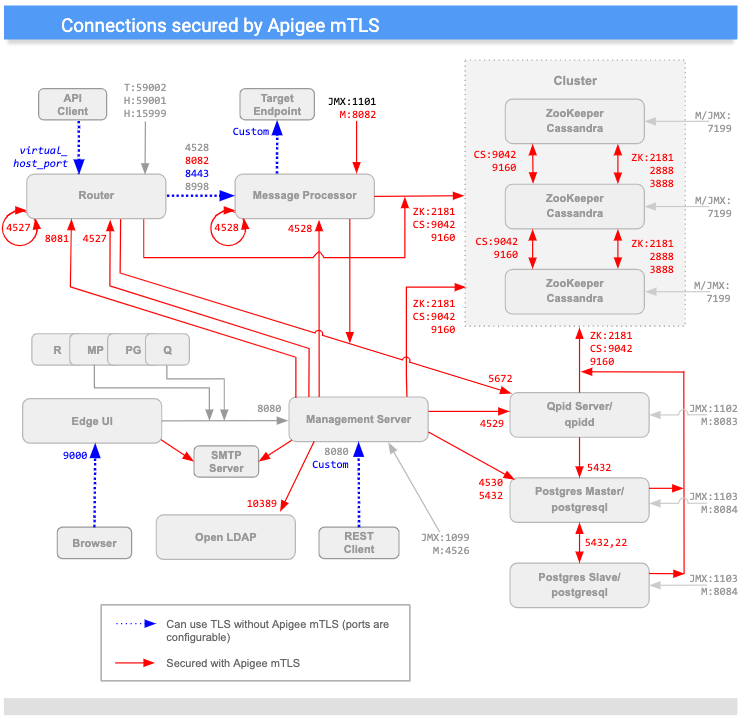
(Note that ports indicated with an "M" are used to manage the component and must be open on the
component for access by the Management Server.)
As you can see in the diagram above, Apigee mTLS adds security to connections between most
components in the cluster, including:
| Source | | Destination |
| |
| |
| |
| |
| |
| |
|---|---|---|
| Management Server | Router, MP, QPid, LDAP, Postgres, Zookeeper, and Cassandra nodes |
| Router | Loopback; Qpid, Zookeeper, and Cassandra nodes |
| Message Processor | Loopback; Qpid, Zookeeper, and Cassandra nodes |
| ZooKeeper and Cassandra | Other Zookeeper and Cassandra nodes |
| Edge UI | SMTP (for external IDP only) |
| Postgres | Other Postgres, Zookeeper, and Cassandra nodes |
## Message encryption/decryption
The Apigee mTLS service mesh consists of Consul servers that run on each ZooKeeper node in your
cluster and the following Consul services on every node in the cluster:
- An *egress proxy* that intercepts outgoing messages on the host node. This service encrypts outgoing messages before sending them to their destination.
- An *ingress proxy* that intercepts incoming messages on the host node. This service decrypts incoming messages before sending them to their final destination.
For example, when the Management Server sends a message to the Router, the egress proxy service
intercepts the outgoing message, encrypts it, and then sends it to the Router. When the
Router's node receives the message, the ingress proxy service decrypts the message
and then passes it to the Router component for processing.
This all happens transparently to the Edge components: they are unaware of the encryption and
decryption process carried out by the Consul proxy services.
In addition, Apigee mTLS uses the `iptables` utility, a Linux firewall service that
manages traffic redirection.
> [!TIP]
> **TIP:** The Consul service names use the patterns component_name-port-IP-ingress and component_name-port-IP-egress.
## Requirements
Apigee mTLS provides an industry-standard way to configure and install the service mesh. It
supports package management and configuration automation.
Because the Consul proxy services are tightly coupled as port assignments for individual processes, a
change to one node affects every other node. As a result, if your topology changes you must
reconfigure and reinitialize services on every node in the cluster.
Before you can install Apigee mTLS, your environment must meet the following requirements
described in this section.
These requirements include:
- Edge for the Private Cloud version
- A set of utilities that are installed and enabled
- A user account with the appropriate level of permissions
- An administration machine (recommended)
### Edge for the Private Cloud requirements
Apigee mTLS supports the following version of Edge for the Private Cloud (but not on all
supported platforms, as described in [OS requirements](https://docs.apigee.com/private-cloud/v4.19.01/mtls-intro#osrequirements)):
- 4.19.06
- 4.19.01
Apigee mTLS requires that your Private Cloud cluster use a topology that includes at least three
Zookeeper nodes. As a result, you can only install Apigee mTLS on topologies that use 5, 9, 12
(multi-data center), or 13 nodes. For more information, see
[Installation topologies](https://docs.apigee.com/private-cloud/v4.19.01/installation-topologies).
### OS requirements
Apigee mTLS supports the following platforms for your Private Cloud cluster (the supported OS
for mTLS depends on the version of Private Cloud):
| Operating System | Supported Private Cloud Version |||
| | **v4.19.06** | **v4.50.00** | **v4.51.00** |
|---|---|---|---|
| CentOS RedHat Enterprise Linux (RHEL) Oracle Linux | 7.5, 7.6, 7.7 | 7.5, 7.6, 7.7, 7.8, 7.9 | 7.5, 7.6, 7.7, 7.8, 7.9, 8.0 |
> [!NOTE]
> **NOTE:** Apigee mTLS does not support all OSes supported by the corresponding version of Apigee Edge for Private Cloud on which it is running.
### Utilities/packages
Apigee mTLS requires that you have the following packages installed and enabled on each machine
in your cluster, including your [administration machine](https://docs.apigee.com/private-cloud/v4.19.01/mtls-intro#admin), before you begin the
installation process:
| Utility/package | Description | OK to Remove After Installation? |
|---|---|---|
| `base64` | Verifies data within the installation scripts. | Yes |
| `gnu-bash` `gnu-sed` `gnu-grep` | Used by the installation script and other common tools. | No |
| `iptables` | Replaces the default firewall, `firewalld`. | No |
| `iptables-services` | Provides functionality to the `iptables` utility. | No |
| `lsof` | Used by the installation script. | Yes |
| `nc` | Verifies `iptables` routes. | Yes |
| `openssl` | Signs certificates locally during the initial bootstrapping process. | No |
During installation, you also install the Consul package on the administration machine so that
you can generate credentials and the encryption key.
The `apigee-mtls` package installs and configures the Consul servers including the
ingress and egress proxies on ZooKeeper nodes in the cluster.
### User account permissions
The account that executes the Apigee mTLS installation on each node in the cluster must be able
to:
- Start, stop, restart, and initialize Apigee components
- Set firewall rules
- Create a new OS/system user account
- Enable, disable, start, stop, and mask services with `systemctl`
### Administration machine (recommended)
Apigee recommends that you have a node within the cluster that you can use to perform various
tasks described in this document, including:
1. Install HashiCorp Consul 1.6.2.
2. Generate and distribute a certificate/key pair and gossip encryption key.
3. Update and distribute the configuration file.
The administration machine requires that:
- You have downloaded and installed the `apigee-service` and `apigee-setup` utilities on it, as described in [Install Edge apigee-setup utility](https://docs.apigee.com/private-cloud/v4.19.01/install-edge-apigee-setup-utility#internet-node).
- Has `scp/ssh` access to all nodes in the cluster. To distribute your configuration file and credentials, you must have `scp/ssh` access to all hosts within the cluster.
- You have root access to the administration machine.
### Port usage and assignment
This section describes port usage and port assignments to support Consul communications with
Apigee mTLS.
#### Port usage: All nodes running apigee-mtls
All nodes in the cluster that use the `apigee-mtls` service must allow connections
from services on the localhost (127.0.0.1). This allows the Consul proxies to communicate with the
other services as they process incoming and outgoing messages.
#### Port usage: Consul server nodes (nodes running ZooKeeper)
You must open most of the following ports on the Consul server nodes (the nodes running
ZooKeeper) to accept requests from all nodes in the cluster:
| Node | Consul Server Port | Description | Protocol | Allow external mtls-agents ^\*^ |
|---|---|---|---|---|
| Consul Server (ZooKeeper nodes) | `8300` | Connects all Consul servers in the cluster. | RPC | Yes |
| Consul Server (ZooKeeper nodes) | `8301` | Handles membership and broadcast messages within the cluster. | UDP/TCP | Yes |
| Consul Server (ZooKeeper nodes) | `8302` | WAN port that handles membership and broadcast messages in a multiple datacenter configuration. | UDP/TCP | Yes |
| Consul Server (ZooKeeper nodes) | `8500` | Handles HTTP connections to the Consul Server APIs from from processes on the same node. This port is not used for remote communication or coordination; it listens on localhost only. | HTTP | No |
| Consul Server (ZooKeeper nodes) | `8502` | Handles gRPC+HTTPS connections to the Consul Server APIs from other nodes in the cluster. | gRPC+HTTPS | Yes |
| Consul Server (ZooKeeper nodes) | `8503` | Handles HTTPS connections to the Consul Server APIs from other nodes in the cluster. | HTTPS | Yes |
| Consul Server (ZooKeeper nodes) | `8600` | Handles the Consul server's DNS. | UDP/TCP | No |
| ^\* Apigee recommends that you restrict inbound requests to cluster members only (including cross-datastore). You can do this with `iptables`.^ |||||
As this table shows, the nodes running the `consul-server` component (ZooKeeper nodes)
must open ports 8301, 8302, 8502, and 8503 to *all* members of the cluster that are running
the `apigee-mtls` service, even across data centers. Nodes that are not running ZooKeeper
do not need to open these ports.
#### Port assignments for all Consul nodes (*including* nodes running ZooKeeper)
To support Consul communications, nodes running the following Apigee components must allow
external connections to ports within the following ranges:
| Apigee Component | Range | Number of Ports Required Per Node |
|---|---|---|
| Apigee mTLS | 10700 to 10799 | 1 |
| Cassandra | 10100 to 10199 | 2 |
| Message Processor | 10500 to 10599 | 2 |
| OpenLDAP | 10200 to 10299 | 1 |
| Postgres | 10300 to 10399 | 3 |
| Qpid | 10400 to 10499 | 2 |
| Router | 10600 to 10699 | 2 |
| ZooKeeper | 10001 to 10099 | 3 |
Consul assigns ports in a simple linear fashion. For example, if your cluster has two Postgres
nodes, the first node uses two ports, so Consul assigns ports 10300 and 10301 to it. The second node
also uses two ports, so Consol assigns 10302 and 10303 to that node. This applies to all component
types.
As you can see, the actual number of ports depends on topology: If your cluster has two Postgres
nodes, then you'll need to open four ports (two nodes times two ports each).
Note the following:
- Consul proxies cannot listen on the same ports as Apigee services.
- Consul has only one port address space. Consul proxy port assignments must be unique across the cluster, which includes data centers. This means that if proxy A on host A listens on port 15000, then proxy B on host B cannot listen on port 15000.
- The number of ports used varies based on the topology, as described previously.
In a [multi-data center configuration](https://docs.apigee.com/private-cloud/v4.19.01/mtls-multiple), all hosts running
mTLS must also open port 8302.
You can customize the default ports that Apigee mTLS uses. For information on how to do this, see
[Proxy port range customization](https://docs.apigee.com/private-cloud/v4.19.01/mtls-ports).
## Limitations
Apigee mTLS has the following limitations:
- Does not encrypt inter-node Cassandra communications (port 7000)
- Configuration and setup is *not* idempotent. This means that if you make one change on one node, you must make the same change on all nodes; the system does not pick that change up and apply it to other nodes for you. For more information, see [Change an existing apigee-mtls configuration](https://docs.apigee.com/private-cloud/v4.19.01/mtls-configure#update).
> [!NOTE]
> **NOTE:** After installing Apigee mTLS on your Private Cloud cluster, when you start all components on a node, you must start the `apigee-mtls` component *before* any other component on the node.
## Terminology
This section uses the following terminology:
| Term | Definition |
|---|---|
| *cluster* | The group of machines that make up your Edge for the Private Cloud installation. |
| *Consul* | The service mesh used by Apigee mTLS. For information about how Consul secures your Private Cloud communications, see [Consul's Security Model](https://www.consul.io/docs/internals/security.html). |
| *mTLS* | Mutually Authenticated TLS. |
| *service mesh* | An *overlay* network (or a network within a network). |
| *TLS* | Transaction Layer Security. An industry-standard authentication protocol for secure communications. |