You're viewing **Apigee Edge** documentation.
[Go to the
**Apigee X** documentation](http://cloud.google.com/apigee/docs). info
On March 10, 2020, we released a new version of Apigee Edge for Private Cloud.
> [!NOTE]
> For more information, see the following resources:
>
> - *[Edge for Private Cloud 4.19.06
> documentation](https://docs.apigee.com/private-cloud/v4.19.06)*
> - *Questions or issues?* Contact [Apigee Edge Support](https://docs.apigee.com/api-platform/troubleshoot/support)
> - *Release notifications* : See [Get Apigee Edge release notifications](https://docs.apigee.com/release/get-release-notifications)
## Update procedure
To update your installation, perform the following procedure on the Edge nodes:
1. On all Edge nodes:
1. Clean the Yum repos:
```
sudo yum clean all
```
2. Download the latest Edge 4.19.06 `bootstrap_4.19.06.sh` file to `/tmp/bootstrap_4.19.06.sh`:
```
curl https://software.apigee.com/bootstrap_4.19.06.sh -o /tmp/bootstrap_4.19.06.sh
```
3. Install the Edge 4.19.06 `apigee-service` utility and dependencies:
```
sudo bash /tmp/bootstrap_4.19.06.sh apigeeuser=uName apigeepassword=pWord
```
Where uName:pWord are the username and password you received from Apigee.
If you omit pWord, you will be prompted to enter it.
4. Update the `apigee-setup` utility:
```
sudo /opt/apigee/apigee-service/bin/apigee-service apigee-setup update
```
5. Use the `source` command to execute the `apigee-service.sh` script:
```
source /etc/profile.d/apigee-service.sh
```
2. Update the `apigee validate` utility:
```
sudo /opt/apigee/apigee-service/bin/apigee-service apigee-validate update
```
3. Import the new SmartDocs proxy from the `smartdocs.zip` in the `/opt/apigee/apigee-validate/bundles` directory and deploy as a new revision. The new proxy should be imported into the organization where SmartDocs is currently configured. Deploying the proxy as a new revision will make a rollback easier, if needed.
**Note** : Before deploying, check to ensure that the
`` in the new proxy matches the `` configuration currently set in
your environment. If it does not, edit the proxy before deploying.
4. From the Edge UI, [create and update a KVM](https://docs.apigee.com/api-platform/reference/policies/key-value-map-operations-policy) named "smartdocs_whitelist," as shown in the figure below. The KVM should be created in the organization and environment in which the SmartDocs proxy is currently deployed.
**Note** : Make sure that the box for **encrypted** is NOT checked.
- Add a key named "is_whitelist_configured," where the value is "YES".
- Add a second key named "allowed_hosts," where the values are space separated hostnames or IP addresses called from SmartDocs. The value of "allowed_hosts" should include any hosts included in OpenAPI specs added to SmartDocs. For example, if you have an OpenAPI spec that calls `mocktarget.apigee.net`, you will need to add `mocktarget.apigee.net` to the "allowed_hosts" value. If a host is not included in the KVM, the SmartDocs response will be `400 Bad Request` with a content payload of `Bad Request-Hostname not permitted`.
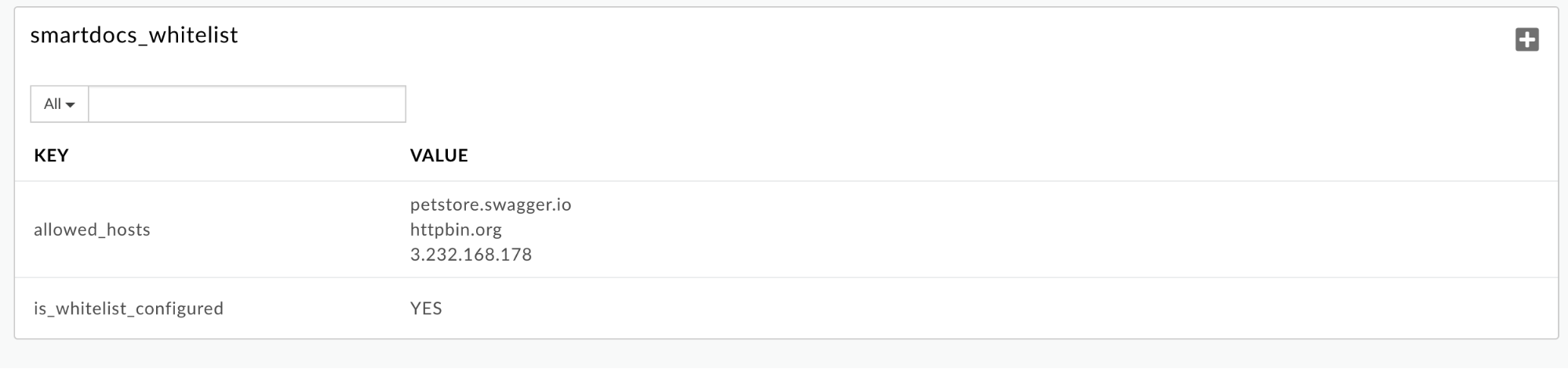 **Note**: If you do not add and configure this KVM, the proxy will not enforce whitelisting. This could result in unauthorized access to your hosts and IP addresses. Only hostnames and IP addresses of API endpoints documented with SmartDocs should be included in the "allowed_hosts" values.
## Supported software
None.
## Deprecations and retirements
None.
## Bugs fixed
The following table lists the bugs fixed in this release:
| Issue ID | Description |
|---|---|
| 145340106 | **Apigee SmartDocs API Vulnerability** Updated Apigee SmartDocs proxy to address security vulnerability. See [Update procedure](https://docs.apigee.com/release/notes/4190602-edge-private-cloud-release-notes#updateprocedure) for further information and required steps. |