 Google 會運用 AI 技術將內容翻譯成你偏好的語言,但可能會出錯。
停用 Edge UI 中的重設密碼連結
Edge for Private Cloud 4.17.05 版
根據預設,Edge UI 的登入畫面會包含連結,可讓使用者重設密碼:
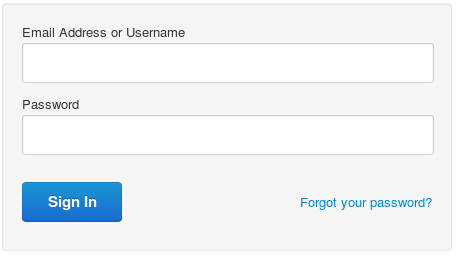
不過,這個連結並未與外部驗證伺服器整合,因此您可以按照下列程序隱藏連結:
- 在編輯器中開啟 ui.properties 檔案。如果檔案不存在,請建立檔案:
> vi
/<inst_root>/apigee/customer/application/ui.properties
- 在 ui.properties 中,將 conf_apigee_apigee.feature.disablepasswordreset 權杖設為 true:
conf_apigee_apigee.feature.disablepasswordreset="true"
- 儲存變更。
- 重新啟動 Edge UI:
>
/<inst_root>/apigee/apigee-service/bin/apigee-service edge-ui restart
如要日後重新啟用這個連結,請將 conf_apigee_apigee.feature.disablepasswordreset 權杖設為 false,然後重新啟動 Edge UI。
除非另有註明,否則本頁面中的內容是採用創用 CC 姓名標示 4.0 授權,程式碼範例則為阿帕契 2.0 授權。詳情請參閱《Google Developers 網站政策》。Java 是 Oracle 和/或其關聯企業的註冊商標。
上次更新時間:2026-10-16 (世界標準時間)。
[[["容易理解","easyToUnderstand","thumb-up"],["確實解決了我的問題","solvedMyProblem","thumb-up"],["其他","otherUp","thumb-up"]],[["缺少我需要的資訊","missingTheInformationINeed","thumb-down"],["過於複雜/步驟過多","tooComplicatedTooManySteps","thumb-down"],["過時","outOfDate","thumb-down"],["翻譯問題","translationIssue","thumb-down"],["示例/程式碼問題","samplesCodeIssue","thumb-down"],["其他","otherDown","thumb-down"]],["上次更新時間:2026-10-16 (世界標準時間)。"],[],[]]
