

安裝及設定 Apigee SSO 說明如何安裝及設定 Apigee SSO 模組,以便在通訊埠 9099 上使用 HTTP,如 Edge 設定檔中的下列屬性所指定:
SSO_TOMCAT_PROFILE=DEFAULT
或者,您也可以將 SSO_TOMCAT_PROFILE 設為下列其中一個值,啟用 HTTPS 存取權:
- SSL_PROXY:在 Proxy 模式下設定 Apigee SSO 模組
apigee-sso,也就是在apigee-sso前方安裝負載平衡器,並在負載平衡器上終止 TLS。接著,您要指定apigee-sso上用於負載平衡器要求的通訊埠。 - SSL_TERMINATION:在您選擇的通訊埠上,啟用
apigee-sso的 TLS 存取權。您必須為這個模式指定含有 CA 簽署憑證的金鑰儲存庫。您無法使用自行簽署的憑證。
您可以在初次安裝及設定 apigee-sso 時啟用 HTTPS,也可以日後再啟用。
無論使用哪種模式,只要啟用 apigee-sso 的 HTTPS 存取權,就會停用 HTTP 存取權。也就是說,您無法同時使用 HTTP 和 HTTPS 存取 apigee-sso。
啟用 SSL_PROXY 模式
在 SSL_PROXY 模式下,系統會在 Apigee SSO 模組前方使用負載平衡器,並在負載平衡器上終止 TLS。在下圖中,負載平衡器會在通訊埠 443 終止 TLS,然後將要求轉送至通訊埠 9099 上的 Apigee SSO 模組:
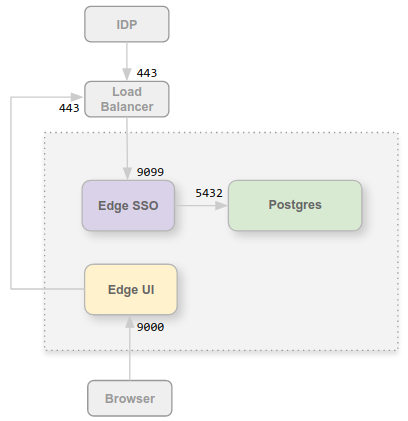
在這項設定中,您信任從負載平衡器到 Apigee SSO 模組的連線,因此不需要為該連線使用 TLS。不過,外部實體 (例如 IDP) 現在必須透過通訊埠 443 存取 Apigee SSO 模組,而非未受保護的通訊埠 9099。
之所以要以 SSL_PROXY 模式設定 Apigee SSO 模組,是因為 Apigee SSO 模組會自動生成重新導向網址,供 IDP 在驗證程序中從外部使用。因此,這些重新導向網址必須包含負載平衡器上的外部通訊埠編號 (在本例中為 443),而非 Apigee SSO 模組上的內部通訊埠 9099。
如要為 SSL_PROXY 模式設定 Apigee SSO 模組,請按照下列步驟操作:
- 在設定檔中新增下列設定:
# Enable SSL_PROXY mode.
SSO_TOMCAT_PROFILE=SSL_PROXY

# Specify the apigee-sso port, typically between 1025 and 65535.
# Typically ports 1024 and below require root access by apigee-sso.
# The default is 9099.
SSO_TOMCAT_PORT=9099

# Specify the port number on the load balancer for terminating TLS.
# This port number is necessary for apigee-sso to auto-generate redirect URLs.
SSO_TOMCAT_PROXY_PORT=443
SSO_PUBLIC_URL_PORT=443

# Set public access scheme of apigee-sso to https.
SSO_PUBLIC_URL_SCHEME=https
- 設定 Apigee SSO 模組:
/opt/apigee/apigee-service/bin/apigee-service apigee-sso setup -f configFile
- 更新 IDP 設定,現在在負載平衡器的通訊埠 443 上發出 HTTPS 要求,以存取 Apigee SSO。詳情請參閱下列任一資源:
- 在設定檔中設定下列屬性,更新 HTTPS 的 Edge UI 設定:
SSO_PUBLIC_URL_PORT=443
SSO_PUBLIC_URL_SCHEME=https
然後更新 Edge UI:
/opt/apigee/apigee-service/bin/apigee-service edge-management-ui configure-sso -f configFile
請使用傳統 UI 的
edge-ui元件。 - 如果您已安裝 Apigee Developer Services 入口網站 (或簡稱「入口網站」),請更新入口網站,使用 HTTPS 存取 Apigee SSO。詳情請參閱「將入口網站設為使用外部 IdP」
詳情請參閱「在 Edge UI 上啟用外部 IDP」。
啟用 SSL_TERMINATION 模式
如要使用 SSL_TERMINATION 模式,請務必:
- 產生 TLS 憑證和金鑰,並儲存在 KeyStore 檔案中。您無法使用自行簽署的憑證。您必須從 CA 產生憑證。
- 更新
apigee-sso.的設定
如何使用憑證和金鑰建立 KeyStore 檔案:
- 為 JKS 檔案建立目錄:
sudo mkdir -p /opt/apigee/customer/application/apigee-sso/tomcat-ssl/
- 切換至新目錄:
cd /opt/apigee/customer/application/apigee-sso/tomcat-ssl/
- 建立含有憑證和金鑰的 JKS 檔案。您必須為這個模式指定含有 CA 簽署憑證的金鑰庫。您無法使用自行簽署的憑證。如需建立 JKS 檔案的範例,請參閱「為 Edge On-Premises 設定 TLS/SSL」。
- 將 JKS 檔案設為「apigee」使用者擁有:
sudo chown -R apigee:apigee /opt/apigee/customer/application/apigee-sso/tomcat-ssl
如何設定 Apigee SSO 模組:
- 在設定檔中新增下列設定:
# Enable SSL_TERMINATION mode.
SSO_TOMCAT_PROFILE=SSL_TERMINATION

# Specify the path to the keystore file.
SSO_TOMCAT_KEYSTORE_FILEPATH=/opt/apigee/customer/application/apigee-sso/tomcat-ssl/keystore.jks

SSO_TOMCAT_KEYSTORE_ALIAS=sso

# The password specified when you created the keystore.
SSO_TOMCAT_KEYSTORE_PASSWORD=keystorePassword

# Specify the HTTPS port number between 1025 and 65535.
# Typically ports 1024 and below require root access by apigee-sso.
# The default is 9099.
SSO_TOMCAT_PORT=9443
SSO_PUBLIC_URL_PORT=9443

# Set public access scheme of apigee-sso to https.
SSO_PUBLIC_URL_SCHEME=https
- 設定 Apigee SSO 模組:
/opt/apigee/apigee-service/bin/apigee-service apigee-sso setup -f configFile
- 更新 IDP 設定,現在在負載平衡器的通訊埠 9443 上發出 HTTPS 要求,即可存取 Apigee SSO。請確認沒有其他服務使用這個通訊埠。
如要瞭解詳情,請參考下列資源:
- 設定下列屬性,更新 HTTPS 的 Edge UI 設定:
SSO_PUBLIC_URL_PORT=9443
SSO_PUBLIC_URL_SCHEME=https
- 如果您已安裝開發人員服務入口網站,請更新入口網站,使用 HTTPS 存取 Apigee SSO。詳情請參閱「將入口網站設為使用外部 IDP」。
使用 SSL_TERMINATION 模式時,請設定 SSO_TOMCAT_PROXY_PORT
Apigee SSO 模組前方可能會有負載平衡器,用於終止負載平衡器上的 TLS,但也會在負載平衡器和 Apigee SSO 之間啟用 TLS。在上圖的 SSL_PROXY 模式中,這表示從負載平衡器到 Apigee SSO 的連線會使用 TLS。
在這個情境中,您會在 Apigee SSO 上設定 TLS,就像上述 SSL_TERMINATION 模式一樣。不過,如果負載平衡器使用的 TLS 通訊埠編號與 Apigee SSO 用於 TLS 的編號不同,則您也必須在設定檔中指定 SSO_TOMCAT_PROXY_PORT 屬性。例如:
- 負載平衡器會在通訊埠 443 終止 TLS
- Apigee SSO 會終止通訊埠 9443 上的 TLS
請務必在設定檔中加入下列設定:
# Specify the port number on the load balancer for terminating TLS.
# This port number is necessary for apigee-sso to generate redirect URLs.
SSO_TOMCAT_PROXY_PORT=443
SSO_PUBLIC_URL_PORT=443
設定 IDP 和 Edge UI,透過通訊埠 443 傳送 HTTPS 要求。