
The New Edge UI (consisting of the edge-management-ui backend and
edge-management-ui-static frontend components) is the default API management user
interface for Apigee Edge for Private Cloud.
Note the following:
- The New Edge UI is installed by default with Apigee Edge for Private Cloud and supports Basic authentication out of the box. You can also configure Apigee SSO or an external IDP such as SAML or OIDC. For information, see Configure the New Edge UI and Overview of external IDP authentication.
- The New Edge UI provides full API management capabilities for your existing API proxies, shared flows, and applications with full backwards compatibility.
- Not all Public Cloud features are supported in the New Edge UI for Apigee Edge for Private Cloud. For details, see What features are supported?
What features are supported?
The following table summarizes the features supported by the New Edge UI in Private Cloud at each phase of the API proxy management lifecycle. See also Understanding API proxy management in New Edge UI.
| Feature | New Edge UI (Private Cloud) |
|---|---|
| API proxy development | |
| Analytics dashboards | |
| Organization administration | |
| Environment configuration | |
| Portal content development using Drupal | |
| Monetization | |
| Proxy creation with OpenAPI v3 | |
| Create, edit, and delete virtual hosts | |
| Basic authentication, Apigee SSO, and external IDP (SAML/OIDC) |
Understanding API proxy management in New Edge UI
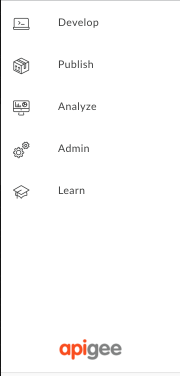
Navigate through the phases of API proxy management using the side navigation bar in the New Edge UI. Apigee Edge supports the following phases for managing API proxies: Develop, Publish, Analyze, and Admin. Each is described in more detail in the following sections.
Develop
In the Develop phase, you design, build, and secure your APIs.
| Phase | Description |
|---|---|
| Specs |
|
| API Proxies |
|
| Shared Flows | Combine policies and resources into a shared flow that you can consume from multiple API proxies, or from other shared flows. |
| Offline Trace | View and analyze trace sessions that were previously saved. |
Publish
In the Publish phase, you register the consumers of your APIs and their apps, and build a portal to showcase your APIs.
| Phase | Description |
|---|---|
| Developers | Register the consumers of your API. |
| Apps | Register and manage the developer apps that access your API. |
| API products | Bundle the APIs that you want to publish into API products. |
| Portals |
Build your developer portal to showcase and manage access to your APIs. |
Analyze
In the Analyze phase, you analyze your APIs and make adjustments based on performance.
| Phase | Description |
|---|---|
| API Proxy Performance | Observe API proxy traffic patterns and processing times. |
| Cache Performance | Evaluate the value of your Apigee Edge cache. |
| Developer Engagement | Identify which of your registered app developers are generating the most API traffic. |
| Devices | Review devices and servers that are being used to access your APIs. |
| Error Analysis | Observe error rates for API proxies and targets. |
| GeoMap | Review traffic patterns, error patterns, and quality of service across geographical locations. |
| Latency Analysis | Review latency issues that your API proxies may be experiencing. |
| Target Performance | Visualize traffic patterns and performance metrics for API proxy backend targets. |
| Traffic Composition | Evaluate the relative contribution of your top APIs, apps, developers, and products to your overall API program. |
Admin
In the Admin phase, you administer the users, roles, and certificates for your organization, and monitor user, role, and organization-related activities.
| Phase | Description |
|---|---|
| Users | Manage users in your organization. |
| Roles | Control access to your organization through role-based access controls. |
| Environment | Manage your runtime environment, including caches, key value maps, target servers, virtual hosts, and TLS/SSL. |
| Audit logs | View logs for users, roles, and organization-related activities. |
Configuring the New Edge UI
For information about configuring authentication and settings for the New Edge UI, see Configure the New Edge UI.