

เมื่อผู้ใช้ตั้งค่าหรือรีเซ็ตรหัสผ่านใน UI ของ New Edge ระบบจะแสดงหน้ารหัสผ่านที่ มีช่องสำหรับตั้งรหัสผ่านและข้อความอธิบายข้อกำหนดด้านนโยบายรหัสผ่าน
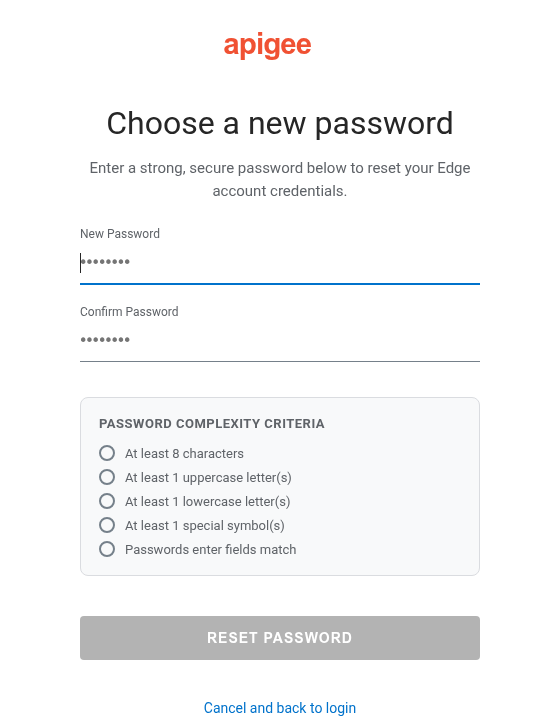
คุณสามารถกำหนดค่าข้อความคำใบ้รหัสผ่านและการตั้งค่าการตรวจสอบนโยบายรหัสผ่านใน UI ของ New
Edge ได้โดยการตั้งค่าพร็อพเพอร์ตี้ต่อไปนี้ใน
/opt/apigee/customer/application/management-ui.properties ไฟล์:
conf_uebe_passwordPolicy_pwdHint: ตั้งค่าข้อความคำใบ้รหัสผ่านที่จะแสดงแก่ ผู้ใช้conf_uebe_passwordPolicy_pwdMinLength: ตั้งค่าความยาวรหัสผ่านขั้นต่ำที่กำหนด (ค่าเริ่มต้นคือ8)conf_uebe_passwordPolicy_pwdValidationRegex: ตั้งค่านิพจน์ทั่วไปที่ใช้ ตรวจสอบรหัสผ่านใน UI ของ New Edge
วิธีตั้งค่าพร็อพเพอร์ตี้เหล่านี้
- เปิดไฟล์
management-ui.propertiesในเครื่องมือแก้ไข หากไม่มีไฟล์ ให้สร้างไฟล์โดยทำดังนี้vi /opt/apigee/customer/application/management-ui.properties
- ตั้งค่า
conf_uebe_passwordPolicy_pwdHintและเลือกตั้งค่าconf_uebe_passwordPolicy_pwdMinLengthและconf_uebe_passwordPolicy_pwdValidationRegexเช่นconf_uebe_passwordPolicy_pwdHint="Password must be at least 13 characters long and contain at least one special character." conf_uebe_passwordPolicy_pwdMinLength=13 conf_uebe_passwordPolicy_pwdValidationRegex="^(?=.*[a-z])(?=.*[A-Z])(?=.*\d)(?=.*[^\da-zA-Z]).{13,}$" - บันทึกการเปลี่ยนแปลง
- ตรวจสอบว่าไฟล์พร็อพเพอร์ตี้เป็นของเจ้าของผู้ใช้
apigeeโดยทำดังนี้chown apigee:apigee /opt/apigee/customer/application/management-ui.properties
- รีสตาร์ท UI ของ New Edge โดยทำดังนี้
/opt/apigee/apigee-service/bin/apigee-service edge-management-ui restart