This document explains how authentication and authorization work on Apigee Edge for Private
Cloud when users authenticate through the New Edge UI (edge-management-ui) or
through the Edge management APIs.
When logging in through the New Edge UI
The New Edge UI supports two authentication modes:
- Basic authentication (
AUTH_MODE=basic): The user signs in directly through the New Edge UI login page, and the New Edge UI validates the credentials against the Edge Management Server. - IDP / SSO authentication (
AUTH_MODE=sso): The New Edge UI authenticates the user against your configured SAML or LDAP IDP.
When a user logs in and interacts with the New Edge UI, the New Edge UI also performs
privileged system-level requests to the Apigee Management Server (using the stored system
administrator credentials in conf_uebe_mgmtCredential or an OAuth2 system token) to
retrieve user roles and organization metadata.
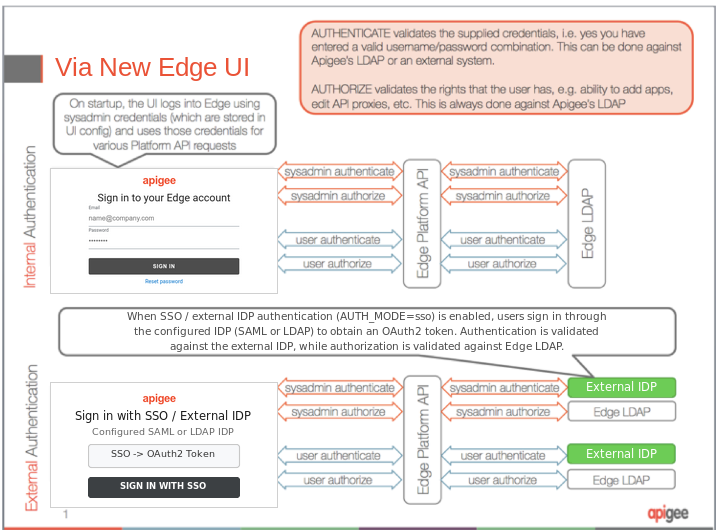
The following New Edge UI login steps are illustrated in Figure 1:
- The user enters login credentials in the New Edge UI login screen (or the configured IDP login screen when SSO is enabled).
- The New Edge UI authenticates to the Management Server using the global system administrator credentials (or system OAuth2 token) for platform-level API requests.
- The global system administrator credentials are authenticated and authorized:
- If an external IDP (such as external LDAP or SAML) is enabled, authentication is validated against the external identity provider; otherwise, the internal Edge LDAP is used.
- Authorization (role-based access control) is validated against the internal Edge LDAP.
- The credentials entered by the user are authenticated and authorized:
- If an external IDP is enabled, the user's credentials (or SSO assertion/token) are validated against the external identity provider; otherwise, the internal Edge LDAP is used.
- Authorization (the roles and permissions assigned to the user within each organization) is validated against the internal Edge LDAP.
The following image shows authorization and authentication through the New Edge UI:
When logging in through APIs
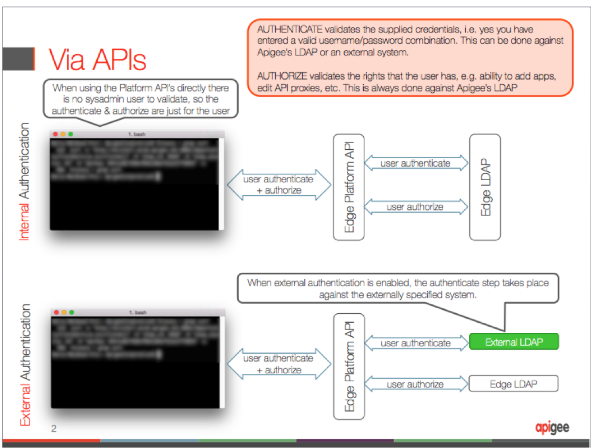
When you access Apigee Edge directly through the Edge management APIs (using Basic authentication credentials or an OAuth2 bearer token), only the credentials supplied with the API call are used. Unlike with a New Edge UI login, a separate request using system administrator credentials is not needed.
The following API login steps are illustrated in Figure 2:
- The user or client passes login credentials (or an OAuth2 bearer token) in the API request.
- The credentials provided by the user are authenticated and authorized by the Management Server.
- If external authentication is enabled, the credentials are validated against the external identity provider; otherwise, the internal Edge LDAP is used.
- Authorization is validated against the internal Edge LDAP based on the user's assigned roles.
The following image shows authorization and authentication through the Edge APIs: