

簡介
Edge for Private Cloud 的不同元件 (例如訊息處理器、管理伺服器和路由器) 預設會透過純文字管道連線至 Cassandra 節點。在這些管道中,Cassandra 的資料傳輸會以明文形式進行。Apigee mTLS 是一項以 Consul 服務網格為基礎的功能,可為 Edge for Private Cloud 叢集中元件之間的通訊新增安全性。Apigee 的這項服務也會在用戶端元件和 Cassandra 之間的通訊管道上,新增傳輸層安全標準 (TLS) 安全性。
本文將介紹 Apigee 提供的全新替代方案,說明如何使用 Cassandra 原生功能,在 Edge for Private Cloud 中透過雙向 TLS (又稱 2 向 TLS) 保護用戶端元件與 Cassandra 之間的通訊,不需使用外部服務網格。
原生 mTLS 功能
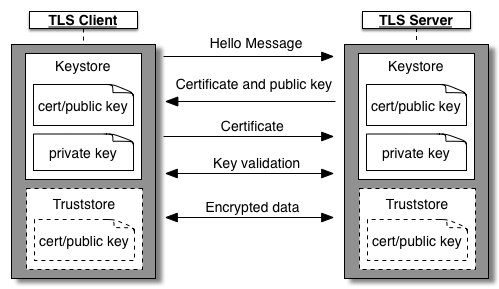
如要在本文所述的 Cassandra 和用戶端元件之間啟用 mTLS,需要使用 Apache Cassandra 原生提供的 TLS 功能。啟用後,用戶端連線至 Cassandra (在 CQL 原生傳輸通訊埠 9042) 時,會先與用戶端執行雙向 TLS 握手,再允許建立連線。為了建立雙向 TLS 連線,Cassandra 會做為伺服器,而連線至 Cassandra 的各種用戶端 (例如 edge-message-processor、cqlsh 工具等) 則會做為用戶端。
如要使用雙向 TLS (或相互 TLS 或 mTLS),Cassandra 和用戶端都必須設定自己的 KeyStore。每個 Cassandra 節點的金鑰儲存庫都應包含自己的金鑰和憑證。每個用戶端應用程式的金鑰儲存庫,都應包含該用戶端的金鑰和憑證。Cassandra 和用戶端都應新增信任儲存庫,其中包含對應方的憑證和相關聯鏈結。每個 Cassandra 節點的信任儲存庫都應包含用戶端的憑證,而每個用戶端的信任儲存庫都應包含所有 Cassandra 節點的憑證。如要進一步瞭解雙向 TLS 握手的一般運作方式,請參閱 Apigee 的雙向 TLS/SSL 文章。
憑證鏈結
一般來說,在雙向 TLS 中,伺服器憑證、用戶端憑證、憑證鏈結、金鑰儲存庫和信任儲存庫可以透過多種方式建立。Cassandra 和用戶端原生 mTLS 也是如此。考量到組織通常如何操作 Edge for Private Cloud 叢集,以及可建立的不重複用戶端與 Cassandra 連線配對數量,Apigee 建議採用下列一般方法,為這項功能設定金鑰和憑證。雖然還有其他可行方法,但以下方法在安全性和維護負擔之間取得良好平衡。
取得根憑證和由根憑證簽署的中繼金鑰/憑證組合。您可能已擁有這類金鑰和憑證。如果沒有,請按照附錄 1 的步驟,建立自行簽署的根憑證、中繼憑證和金鑰。
- 使用上述常見的中繼金鑰/憑證,簽署所有應用程式專屬 (葉節點) 的金鑰和憑證。
在 1 個叢集中使用共同的中繼金鑰/憑證,即可在每個 Cassandra 和用戶端節點上設定共同的信任存放區 (包含相同的根和中繼憑證鏈結)。每個 Cassandra 節點和用戶端應用程式都會取得專屬的葉片金鑰和憑證,並由通用中繼金鑰/憑證簽署。
- 輪替 Cassandra 節點或用戶端應用程式的分葉憑證很簡單。
- 輪替中繼或根憑證仍是相當複雜的操作,但這類輪替的頻率會遠低於分葉憑證。
請根據貴組織的安全防護做法,決定是否要在不同的私有雲叢集使用共同的根憑證和中繼憑證。如需其他憑證設定,請參閱附錄 2。
本文其餘步驟將詳細說明上述設計金鑰和憑證的方法。
限制和注意事項
這項功能有以下限制。
- 這項在用戶端元件和 Cassandra 之間提供原生 mTLS 的服務與 apigee-mtls 不相容。如果使用這項功能,就無法使用 apigee-mtls,反之亦然。
- 在用戶端元件和 Cassandra 之間啟用 mTLS,會對用戶端和 Cassandra 之間建立的連線造成一些效能影響。由於 Cassandra 和用戶端必須先協商 TLS,才能開始通訊,因此用戶端啟動或 Cassandra 連線調度資源等作業可能會變慢。影響應該不大,一般不會察覺。
- 在 Cassandra 上,您可以選擇對傳入用戶端連線強制執行 mTLS。雖然可以啟用強制執行功能,但在執行作業工作 (例如升級 Apigee 軟體、啟用/停用 TLS 功能,以及特定類型的憑證輪替) 時,必須停用這項功能。詳情請參閱「作業和設定」一節。
- 管理及維護憑證是客戶的責任。
- 輪替憑證有許多細微差異。詳情請參閱「憑證輪替」一節
啟用原生 mTLS
大致來說,啟用原生 mTLS 的程序包含下列 3 個步驟:
- 取得根憑證和中繼金鑰/憑證組合。
- 建立 1 個 Cassandra 節點的葉節點金鑰/憑證配對、簽署該配對、將其儲存在金鑰儲存區,並設定 Cassandra 選用 mTLS。請一次為一個 Cassandra 節點重複執行上述步驟。
- 為 1 個用戶端應用程式建立葉金鑰/憑證組、簽署並儲存在 KeyStore 中,然後為 mTLS 設定用戶端應用程式。請逐一為每個用戶端應用程式重複上述步驟。用戶端應用程式:
- edge-management-server
- edge-message-processor
- edge-router
詳細步驟如下:
取得根憑證和中繼憑證
取得根憑證,以及由根憑證簽署的中繼金鑰/憑證組。使用貴機構 CA 簽署的根憑證和中繼憑證,或建立自行簽署的憑證。將根憑證和中繼憑證鏈結儲存在信任存放區中。如需實用指令,請參閱附錄 1。後續指令會假設您可存取下列檔案:
intermediate.key:中繼憑證的金鑰檔案,用於簽署分葉憑證intermediate-cert.pem- 中繼憑證
設定 Cassandra 節點
- 選擇一個 Cassandra 節點
- 產生葉金鑰和憑證組合,並使用中繼憑證簽署。將金鑰和簽署憑證儲存在 KeyStore。範例如下:
# Generate Leaf key and csr
openssl req -newkey rsa:2048 -keyout cass-node1.key -out cass-node1-req.pem -sha256 -days 365 -nodes -subj "/C=yourc/ST=yourst/L=yourl/O=youro/OU=yourou/CN=yourip/emailAddress=cassnode1@yourorg.com"

# leaf cert signed by intermediate
openssl x509 -req -in cass-node1-req.pem -CAkey intermediate.key -CA intermediate-cert.pem -days 365 -CAcreateserial -out cass-node1-cert.pem

# keystore packaging leaf key and cert
openssl pkcs12 -export -clcerts -in cass-node1-cert.pem -inkey cass-node1.key -out cass-node1-keystore.pfx -name nativemtls -password pass:keystorepass
將 KeyStore 和 TrustStore 檔案放在節點上的特定位置,並確保 Apigee 使用者可以存取這些檔案
cp cass-node1-keystore.pfx /opt/apigee/customer/application/
cp truststore.pfx /opt/apigee/customer/application/

chown apigee:apigee /opt/apigee/customer/application/cass-node1-keystore.pfx
chown apigee:apigee /opt/apigee/customer/application/truststore.pfx
- 建立或編輯檔案
/opt/apigee/customer/application/cassandra.properties。在這個檔案中加入以下內容:### Enable Cassandra TLS on CQL connections conf_cassandra_client_encryption_enabled=true ### Optional TLS - true or false conf_cassandra_client_encryption_optional=true ### Keystore details conf_cassandra_client_encryption_keystore=/opt/apigee/customer/application/cass-node1-keystore.pfx conf_cassandra_client_encryption_keystore_password=keystorepass conf_cassandra_server_encryption_store_type=PKCS12 ### Whether to enable 2-way TLS (or mTLS) - true or false conf_cassandra_client_encryption_require_client_auth=true ### When 2-way TLS is enabled, client certificate details need to be provided via a truststore conf_cassandra_client_encryption_truststore=/opt/apigee/customer/application/truststore.pfx conf_cassandra_client_encryption_truststore_password=trustpass conf_cassandra_client_encryption_store_type=PKCS12
確認檔案擁有者為 apigee 使用者,且該使用者可讀取檔案:
chown apigee:apigee /opt/apigee/customer/application/cassandra.properties
- 設定並重新啟動 Cassandra 節點
apigee-service apigee-cassandra configure
apigee-service apigee-cassandra restart
- 在每個 Cassandra 節點上重複上述步驟,一次一個
設定用戶端應用程式
本節適用於連線至 Cassandra 的下列用戶端元件:
- edge-management-server
- edge-message-processor
- edge-router
- 選擇一個用戶端元件
- 產生葉金鑰和憑證組合,並使用中繼憑證簽署。將金鑰和已簽署的憑證儲存至 KeyStore。範例如下:
# Generate Leaf key and csr
openssl req -newkey rsa:2048 -keyout mgmt-node1.key -out mgmt-node1-req.pem -sha256 -days 365 -nodes -subj "/C=yourc/ST=yourst/L=yourl/O=youro/OU=yourou/CN=yourip/emailAddress=mgmtnode1@yourorg.com"

# leaf cert signed by intermediate
openssl x509 -req -in mgmt-node1-req.pem -CAkey intermediate.key -CA intermediate-cert.pem -days 365 -CAcreateserial -out mgmt-node1-cert.pem

# keystore packaging leaf key and cert
openssl pkcs12 -export -clcerts -in mgmt-node1-cert.pem -inkey mgmt-node1.key -out mgmt-node1-keystore.pfx -name nativemtls -password pass:keystorepass
將 KeyStore 和 TrustStore 檔案放在節點上的特定位置,並確保 Apigee 使用者可以存取這些檔案
cp mgmt-node1-keystore.pfx /opt/apigee/customer/application/
cp truststore.pfx /opt/apigee/customer/application/

chown apigee:apigee /opt/apigee/customer/application/mgmt-node1-keystore.pfx
chown apigee:apigee /opt/apigee/customer/application/truststore.pfx
- 根據要設定的應用程式,建立及編輯設定檔
應用程式 設定檔 管理伺服器 /opt/apigee/customer/application/management-server.properties管理處理器 /opt/apigee/customer/application/message-processor.properties路由器 /opt/apigee/customer/application/router.properties在檔案中新增下列設定:
### Enable TLS on CQL connections
conf_cassandra_sslconfig.enable.tls=true
conf_cassandra_sslconfig.enable.mtls=true

### Keystore Details
conf_cassandra_sslconfig.keystore.path=/opt/apigee/customer/application/mgmt-node1-keystore.pfx
conf_cassandra_sslconfig.keystore.password=keystorepass
conf_cassandra_sslconfig.keystore.type=PKCS12

### Truststore Details
conf_cassandra_sslconfig.truststore.path=/opt/apigee/customer/application/truststore.pfx
conf_cassandra_sslconfig.truststore.password=trustpass
conf_cassandra_sslconfig.truststore.type=PKCS12
確認設定檔由 apigee 使用者擁有且可讀取
chown apigee:apigee configuration file

### Example:
chown apigee:apigee /opt/apigee/customer/application/management-server.properties
- 重新啟動用戶端應用程式
# Configure and restart service:
apigee-service component configure
apigee-service component restart
# Example, to configure and restart message processor application
apigee-service edge-message-processor configure
apigee-service edge-message-processor restart
- 如要確認用戶端應用程式是否正確設定 SSL,請在相關應用程式的系統記錄中,尋找類似下列內容的記錄:
已在 Cassandra 連線中新增 SSL 選項
- 針對每個用戶端應用程式逐一重複上述步驟
作業和設定
強制執行 mTLS
如果 Cassandra 未強制執行 mTLS,Cassandra 會接受來自用戶端的純文字連線,或可與之成功執行雙向 TLS 握手的用戶端。如要強制執行 mTLS,必須先在 Cassandra 中設定 mTLS。如要在 Cassandra 中設定強制執行 mTLS,請按照下列步驟操作:
- 選擇一個 Cassandra 節點
- 建立或編輯檔案
/opt/apigee/customer/application/cassandra.properties。在這個檔案中新增或編輯下列屬性:### Optional TLS - true or false conf_cassandra_client_encryption_optional=false
確認檔案由 apigee 使用者擁有且可讀取
chown apigee:apigee /opt/apigee/customer/application/cassandra.properties
- 設定並重新啟動 Cassandra 節點
apigee-service apigee-cassandra configure
apigee-service apigee-cassandra restart
- 在每個 Cassandra 節點上重複上述步驟,一次一個
在 Cassandra 中強制執行 mTLS 後,標準 Cassandra 查詢工具 cqlsh 就無法直接連線至 Cassandra。如要為 SSL 設定 cqlsh,請產生新的分葉金鑰和憑證 (類似於用戶端應用程式的分葉金鑰和憑證),然後執行下列操作:
- 建立或編輯檔案
$HOME/.cassandra/cqlshrc - 在檔案中新增下列內容:
[ssl]
certfile = /home/admin-user/certs/inter-root.pem
validate = false
userkey = /home/admin-user/certs/cqlsh1.key
usercert = /home/admin-user/certs/cqlsh1-cert.pem
certfile:包含根憑證和中繼憑證鏈結的憑證檔案userkey- cqlsh 要使用的用戶端金鑰。這應是您可以使用中繼憑證產生及簽署的分葉金鑰/憑證組合。usercert:cqlsh 要使用的用戶端憑證。這應該是您可以使用中繼憑證產生及簽署的分葉金鑰/憑證。
- 照常執行
cqlsh指令,並提供--ssl引數。例如:$ /opt/apigee/apigee-cassandra/bin/cqlsh --ssl X.X.X.X Connected to Apigee at X.X.X.X:9042 [cqlsh 6.0.0 | Cassandra 4.0.13 | CQL spec 3.4.5 | Native protocol v5] Use HELP for help. cqlsh>
停用 Cassandra 的 mTLS 強制執行功能
如要在 Cassandra 中停用 mTLS 強制執行,請按照下列步驟操作:
- 挑選一個 Cassandra 節點
- 建立或編輯檔案
/opt/apigee/customer/application/cassandra.properties。在這個檔案中新增或編輯下列屬性:### Optional TLS - true or false conf_cassandra_client_encryption_optional=true
確認檔案由 apigee 使用者擁有且可讀取
chown apigee:apigee /opt/apigee/customer/application/cassandra.properties
- 設定並重新啟動 Cassandra 節點
apigee-service apigee-cassandra configure
apigee-service apigee-cassandra restart
- 針對每個 Cassandra 節點,一次重複執行上述步驟
停用原生 mTLS
停用原生 mTLS 的程序與啟用原生 mTLS 類似,同樣需要多個步驟。大致步驟如下:
- 在 Cassandra 中停用強制執行 mTLS (如已強制執行)
- 逐一停用下列用戶端應用程式所有節點的 mTLS:
- edge-management-server
- edge-message-processor
- edge-router
- 根據要設定的應用程式建立及編輯設定檔:
應用程式 設定檔 管理伺服器 /opt/apigee/customer/application/management-server.properties管理處理器 /opt/apigee/customer/application/message-processor.properties路由器 /opt/apigee/customer/application/router.properties - 在設定檔中新增或編輯下列屬性:
### TLS on CQL connections
conf_cassandra_sslconfig.enable.tls=false
conf_cassandra_sslconfig.enable.mtls=false
- 確認設定檔是由 apigee 使用者擁有且可讀取:
chown apigee:apigee configuration file

### Example:
chown apigee:apigee /opt/apigee/customer/application/management-server.properties
- 重新啟動用戶端應用程式:
# Configure and restart service:
apigee-service component configure
apigee-service component restart

# Example, to configure and restart message processor application
apigee-service edge-message-processor configure
apigee-service edge-message-processor restart
- 在每個用戶端應用程式上,逐一重複步驟 #a 到 #d。
- 逐一停用所有 Cassandra 節點的 mTLS:
- 選擇一個 Cassandra 節點。
- 建立或編輯檔案
/opt/apigee/customer/application/cassandra.properties。在這個檔案中新增或編輯下列屬性:### Cassandra TLS on CQL connections conf_cassandra_client_encryption_enabled=false
確認檔案由 apigee 使用者擁有且可讀取
chown apigee:apigee /opt/apigee/customer/application/cassandra.properties
- 設定並重新啟動 Cassandra 節點
- 在每個 Cassandra 節點上,逐一重複步驟 #a 到 #c。
apigee-service apigee-cassandra configure
apigee-service apigee-cassandra restart
憑證輪替
僅輪替葉子憑證 (保留相同的中繼和根憑證)您可以按照設定用戶端應用程式的類似步驟操作:
- 使用相同的中繼金鑰/憑證,為應用程式產生新的葉金鑰/憑證
- 在應用程式中設定新分葉金鑰/憑證的路徑,以及密碼和 KeyStore 類型
- 重新啟動應用程式
如要輪替中繼憑證或根憑證,建議您分多個步驟進行:
- 在叢集中停用 Cassandra 原生 mTLS。
- 使用新的根憑證和中繼憑證,產生分支的新分葉或應用程式憑證。
- 按照步驟使用新的金鑰和憑證組合,啟用 Cassandra 原生 mTLS。
一般 Apigee 作業
如要執行一般 Apigee 作業,例如升級 Apigee 軟體、新增或移除 Cassandra 節點、新增或移除資料中心、啟用或停用 Cassandra 驗證等,請確保 Cassandra 未強制執行 mTLS。如果您已強制執行 mTLS,請先停用強制執行,再執行這些作業。
附錄 1
您可以按照本附錄中的步驟,產生自行簽署的根金鑰/憑證組和中繼金鑰/憑證組,並將這個憑證鏈結新增至信任儲存庫。產生自行簽署的根憑證和中繼憑證
# Create self-signed root key and cert
openssl req -x509 -newkey rsa:2048 -keyout root.key -out root-cert.pem -sha256 -days 3650 -nodes -subj "/C=yourc/ST=yourst/L=yourl/O=youro/OU=yourou/CN=root.yourorg.com/emailAddress=apigeeroot@yourorg.com"

# Create intermediate key and cert (signed by root)
openssl req -newkey rsa:2048 -keyout intermediate.key -out intermediate-req.pem -sha256 -days 3650 -nodes -subj "/C=yourc/ST=yourst/L=yourl/O=youro/OU=yourou/CN=inter.yourorg.com/emailAddress=apigeeinter@yourorg.com"

openssl x509 -req -in intermediate-req.pem -CAkey root.key -CA root-cert.pem -days 3650 -CAcreateserial -out intermediate-cert.pem
產生信任存放區
# Merge root and intermediate cert into 1 file
cat intermediate-cert.pem > inter-root.pem
cat root-cert.pem >> inter-root.pem

# Create truststore to be used everywhere
keytool -keystore truststore.pfx -storetype PKCS12 -importcert -file inter-root.pem -keypass trustpass -storepass trustpass -alias nativemtls -noprompt
附錄 2:替代憑證鏈結設定
雖然本文建議採用特定的憑證鏈結設定,在安全性和操作便利性之間取得平衡,但您也可以選擇其他替代方案,詳情請參閱下文。大部分一般原則也適用於其他方法,例如:
- 為每個 Cassandra 節點或用戶端應用程式提供直接葉金鑰和憑證 (不含任何簽署根憑證或中繼憑證)。這可能會使憑證輪替作業變得複雜。
- 為不同用途準備多個根憑證和中繼憑證集。舉例來說,Cassandra 節點會使用 1 組根/中繼憑證,簽署 Cassandra 的所有分葉憑證。同樣地,所有用戶端應用程式都可能有一組獨立的根/中繼憑證,用於簽署應用程式分葉憑證。這類設定可行,但必須將根/中繼憑證鏈結新增至適當的信任儲存庫。在這個範例中,Cassandra 的信任儲存庫應包含用戶端的根/中繼憑證,而用戶端應用程式的信任儲存庫應包含 Cassandra 節點的根/中繼鏈結。
- 與上述類似,您可以為不同區域提供多組根憑證和中繼憑證,但所有區域中的所有用戶端和伺服器,都必須在設定的信任儲存庫中加入所有根憑證和中繼憑證鏈結,才能瞭解這些憑證鏈結。