

安装和配置 Apigee SSO 介绍了如何 安装和配置 Apigee SSO 以在默认端口 9099 上使用 HTTP。默认情况下,Apigee SSO 使用 HTTP。
如需启用 HTTPS 访问权限,您可以使用以下模式之一配置 Apigee SSO:
- SSL_PROXY:: 以代理模式配置 Apigee SSO,这意味着您已在 OpenLDAP 节点前面安装了负载均衡器,并在负载均衡器上终止了 TLS。Apigee SSO 会监听 HTTP,但会使用负载均衡器的 HTTPS 方案发出网址。
- SSL_TERMINATION:: 直接在 Apigee SSO 上通过您选择的 端口启用 TLS 访问权限。您必须为此模式指定标准 PEM 编码的证书和私钥。
您可以选择在首次安装和配置 Apigee SSO 时启用 HTTPS,也可以稍后启用。
以下部分介绍了要在配置文件(/opt/silent.conf
和 /opt/apigee/customer/application/openldap.properties)中更新的其他令牌
。
`setup-sso` 脚本
会自动解析这两个文件中的变量,
应用配置并启动嵌入式 Apigee SSO。
如需了解成功配置 SSO 所需的配置文件令牌,请参阅
安装和配置 Apigee SSO。
启用 SSL_PROXY 模式
在 SSL_PROXY 模式下,您的系统会在 Apigee SSO 前面使用负载均衡器,并在负载均衡器上终止 TLS。在下图中,负载均衡器在端口 443 上终止 TLS,然后将请求转发到端口 9099 上的 Apigee SSO:
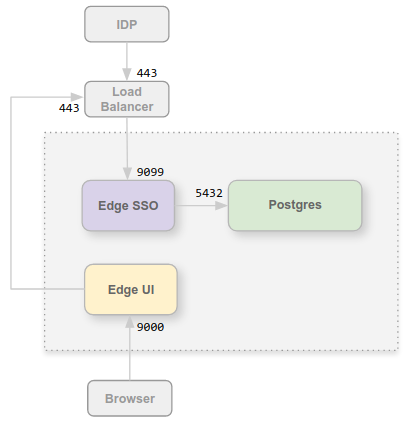
在此配置中,您信任从负载均衡器到 OpenLDAP 节点的连接,因此无需为该内部连接使用 TLS。但是,外部实体(例如 IDP)现在必须通过端口 443(而不是不受保护的端口 9099)访问 Apigee SSO。
之所以在 SSL_PROXY 模式下配置 Apigee SSO,是因为 Apigee SSO 会自动生成 IDP 在身份验证过程中在外部使用的重定向网址。因此,这些重定向网址必须包含负载均衡器上的外部端口号和 HTTPS 方案(在此示例中为端口 443),而不是 Apigee SSO 上的内部 HTTP 端口(端口 9099)。
如需为 SSL_PROXY 模式配置 Apigee SSO,请执行以下操作:
- 将以下设置添加到
/opt/apigee/customer/application/openldap.properties文件:# Update the port the Apigee SSO listens on locally. etc_sso_config_bind_port=9099 # Set the publicly accessible Issuer URL (the load balancer URL). # This prevents setup-sso from automatically appending the port. etc_sso_config_issuer_url=https://load_balancer_IP_or_DNS
- 更新 New Edge 界面配置以使用 HTTPS,方法是确保在
/opt/silent.conf文件中设置以下属性:SSO_PUBLIC_URL_SCHEME=https SSO_PUBLIC_URL_HOSTNAME=load_balancer_IP_or_DNS SSO_PUBLIC_URL_PORT=443
- 执行
setup-sso脚本以应用配置、重启 Apigee SSO 并自动更新 Edge 管理服务器:/opt/apigee/apigee-service/bin/apigee-service apigee-openldap setup-sso -f /opt/silent.conf
- 更新 IDP 配置(例如 Okta 或 ADFS),以向负载 均衡器发出 HTTPS 请求来访问 Apigee SSO。如需了解详情,请参阅配置 SAML IDP。
- 执行界面配置脚本以自动配置并重启 New Edge 界面服务器:
/opt/apigee/apigee-service/bin/apigee-service edge-management-ui configure-sso -f /opt/silent.conf
启用 SSL_TERMINATION 模式
对于 SSL_TERMINATION 模式,您必须:
- 生成标准 PEM 编码的 TLS 证书和密钥。对于生产环境,您必须生成由 CA 签名的证书。您不能使用自签名证书。
- 更新属性文件以绑定到安全端口并加载证书。
如需安装证书和密钥,请执行以下操作:
- 在 OpenLDAP 节点上为证书创建一个目录:
sudo mkdir -p /opt/apigee/customer/application/certs/
- 将 PEM 编码的证书 (
.crt) 和私钥 (.key) 复制到新目录。 - 将目录和文件的所有者更改为“apigee”用户,并保护权限:
sudo chown -R apigee:apigee /opt/apigee/customer/application/certs/
sudo chmod 600 /opt/apigee/customer/application/certs/sso.key
sudo chmod 644 /opt/apigee/customer/application/certs/sso.crt
如需为 SSL_TERMINATION 模式配置 Apigee SSO,请执行以下操作:
- 将以下设置添加到
/opt/apigee/customer/application/openldap.properties文件:# 1. Enable HTTPS listener and configure TLS cert/key lib_settings_enable_sso_https=true etc_sso_config_bind_port_ssl=9443 etc_sso_config_tls_cert_file=/opt/apigee/customer/application/certs/sso.crt etc_sso_config_tls_key_file=/opt/apigee/customer/application/certs/sso.key # 2. Update the Issuer URL to use HTTPS and the SSL port/hostname etc_sso_config_issuer_url=https://hostname_or_IP_of_openldap:9443 # 3. (Optional) Disable plain HTTP if only HTTPS is desired # lib_settings_enable_sso_http=false
- 更新 New Edge 界面配置以使用 HTTPS,方法是确保在
/opt/silent.conf文件中设置以下属性:MANAGEMENT_UI_SSO_ENABLED=y SSO_PUBLIC_URL_SCHEME=https SSO_PUBLIC_URL_HOSTNAME=hostname_or_IP_of_openldap SSO_PUBLIC_URL_PORT=9443
- 执行
setup-sso脚本以应用配置、重启 Apigee SSO 并自动更新 Edge 管理服务器:/opt/apigee/apigee-service/bin/apigee-service apigee-openldap setup-sso -f /opt/silent.conf
- 更新 IDP 配置(例如 Okta 或 ADFS),以通过端口 9443 发出 HTTPS 请求来访问 Apigee SSO。如需了解详情,请参阅配置 SAML IDP。
- 执行界面配置脚本以自动配置 New Edge 界面服务器:
/opt/apigee/apigee-service/bin/apigee-service edge-management-ui configure-sso -f /opt/silent.conf