

Anda sedang melihat dokumentasi Apigee Edge.
Buka dokumentasi
Apigee X. info
InvalidCacheResourceReference
Pesan Error
Deployment proxy API melalui UI Edge atau API pengelolaan Edge gagal dengan pesan error ini:
Error Deploying Revision revision_number to environment
Invalid cache resource reference [cache_resource] in Step definition [invalidate_cache_policy_name]. Context Revision:[revision_number];APIProxy:[apiproxy_name];Organization:[organization];Environment:[environment]
Contoh Pesan Error
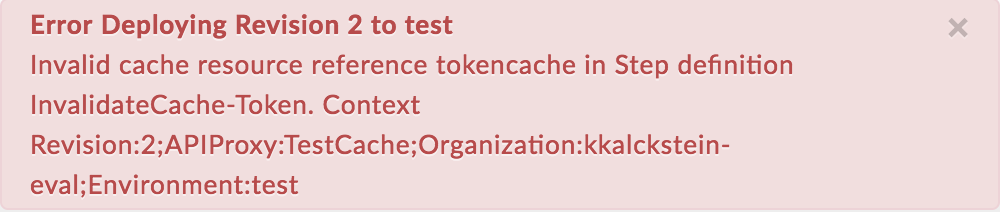
Error Deploying Revision 2 to test
Invalid cache resource reference tokencache in Step definition InvalidateCache-Token. Context Revision:2;APIProxy:TestCache;Organization:kkalckstein-eval;Environment:test
Contoh Screenshot Error
Penyebab
Error ini terjadi jika elemen <CacheResource> dalam kebijakan InvalidateCache disetel ke nama yang tidak ada di lingkungan tempat proxy API di-deploy.
Diagnosis
Identifikasi nama InvalidateCache policy, cache tidak valid yang digunakan dalam elemen
<CacheResource>kebijakan InvalidateCache, dan lingkungan tempat terjadinya error. Anda dapat menemukan semua item ini dalam pesan error. Misalnya, dalam error berikut, nama kebijakan InvalidateCache adalahInvalidateCache-Token, nama cache yang tidak valid adalahtokencache, dan nama lingkungan adalahtest.Invalid cache resource reference tokencache in Step definition InvalidateCache-Token. Context Revision:2;APIProxy:TestCache;Organization:kkalckstein-eval;Environment:testPeriksa XML kebijakan InvalidateCache yang gagal dan verifikasi apakah nama cache yang ditentukan untuk elemen
<CacheResource>cocok dengan pesan error.Dalam contoh ini, nama cache yang ditentukan dalam elemen
<CacheResource>adalahtokencache:<?xml version="1.0" encoding="UTF-8" standalone="yes"?> <InvalidateCache async="false" continueOnError="false" enabled="true" name="InvalidateCache-Token"> <DisplayName>InvalidateCache-Token</DisplayName> <Properties/> <CacheKey> <Prefix/> <KeyFragment ref=""/> </CacheKey> <CacheResource>tokencache</CacheResource> <Scope>Exclusive</Scope> <CacheContext> <APIProxyName/> <ProxyName>default</ProxyName> <TargetName>default</TargetName> </CacheContext> <PurgeChildEntries>false</PurgeChildEntries> </InvalidateCache>Verifikasi apakah cache (ditentukan di langkah #1) telah ditentukan di lingkungan tertentu (diidentifikasi di langkah #1).
Di UI Edge, buka ADMIN > Environment > test dan periksa apakah cache ada di tab Caches pada Environment Configuration. Jika cache tidak ada, maka itulah penyebab error.
Misalnya, perhatikan pada screenshot di bawah bahwa cache bernama
tokencachetidak ada.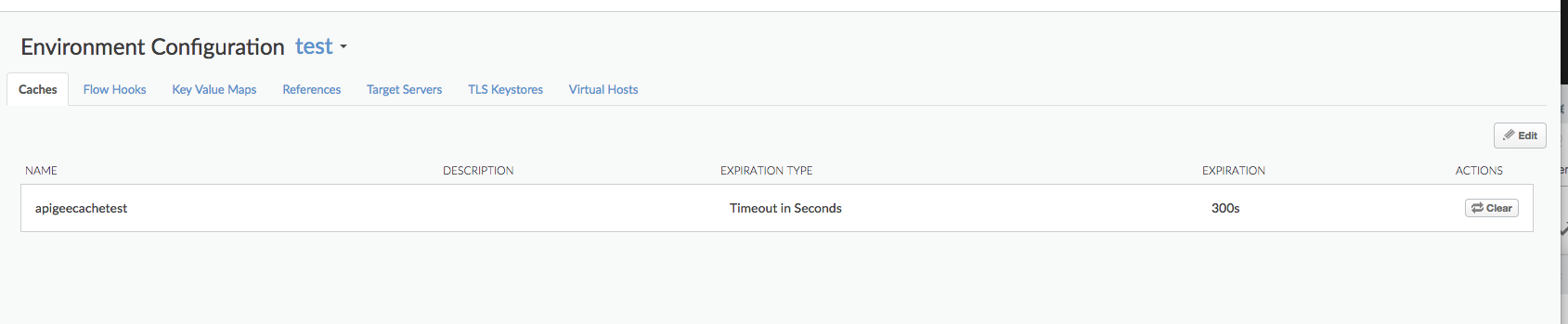
Karena cache bernama
tokencachetidak ditentukan di lingkungantest, Anda akan mendapatkan error:Invalid cache resource reference tokencache in Step definition InvalidateCache-Token. Context Revision:2;APIProxy:TestCache;Organization:kkalckstein-eval;Environment:test
Resolusi
Pastikan cache yang ditentukan dalam elemen <CacheResource> kebijakan InvalidateCache telah dibuat di lingkungan tempat Anda ingin men-deploy proxy API.
Lihat Membuat dan mengedit cache lingkungan untuk mengetahui informasi tentang cara membuat cache.
CacheNotFound
Pesan Error
Deployment proxy API melalui UI Edge atau Management API Edge akan menghasilkan pesan error seperti ini, dan status deployment Proxy API ditandai sebagai di-deploy sebagian:
Error: Cache : cache_resource, not found in organization : organization__environment.
Contoh Pesan Error
Error Cache : configCache, not found in organization : kkalckstein-eval__test
Penyebab
Error ini terjadi jika cache tertentu yang disebutkan dalam pesan error belum dibuat pada komponen Message Processor tertentu. Message Processor adalah komponen Edge internal yang memproses alur traffic API melalui Apigee Edge.
Resolusi
Jika Anda adalah pengguna Private Cloud, ikuti petunjuk di bawah:
Mencantumkan deployment proxy API dan menentukan Pemroses Pesan mana yang mengalami error
steps.cache.CacheNotFound.curl -u $USERID:$USERPASSWORD http://
:8080/v1/organizations/ /environments/ /apis/ /revisions/ /deployments Contoh Output
  {
    "aPIProxy" : "TestCache",
    "environment" : [ {
      "configuration" : {
        "basePath" : "/",
        "configVersion" : "SHA-512:45d3f39783414d3859bf2dec4135d8f5f9960ee6b2d361db2799c82693a8e3f8b95dbbb37c547eb3c0a3819d8ca51727f390502bcaefdf1f113263521a9023b6",
        "steps" : [ ]
      },
      "name" : "prod",
      "server" : [ {
        "pod" : {
          "name" : "pod1",
          "region" : "us-central1"
        },
        "status" : "deployed",
        "type" : [ "message-processor" ],
        "uUID" : "f2e5e34a-5630-43a9-8fef-48a5b9da76d1"
      }, {
        "pod" : {
          "name" : "pod1",
          "region" : "us-central1"
        },
        "status" : "deployed",
        "type" : [ "message-processor" ],
        "uUID" : "879a6538-a5e0-4503-b142-9cb2b4e0623d"
      }, {
      "error" : "Cache : configCache, not found in organization : kkalckstein-eval__test",
      "errorCode" : "steps.cache.CacheNotFound",
      "status" : "error",
      "type" : [ "message-processor" ],
       "uUID" : "a8f9ce0b-c32d-48a9-b26c-9c75d8bf467d"
  },
  ...
      "state" : "deployed"
    } ],
    "name" : "2",
    "organization" : "kkalckstein-eval"
    ...
Catat UUID Message Processor tempat Anda melihat error
steps.cache.CacheNotFound. Identifikasi nama host/alamat IP Message Processor yang sesuai dengan UUID.Login ke Message Processor tertentu dan mulai ulang menggunakan perintah berikut:
apigee-service edge-message-processor restart
Jika Anda adalah pengguna Public Cloud atau jika masalah berlanjut untuk Private Cloud, hubungi Dukungan Apigee untuk mendapatkan bantuan.