

<ph type="x-smartling-placeholder"></ph>
您正在查看 Apigee Edge 文档。
转到
Apigee X 文档。 信息
InvalidRegularExpression
错误消息
通过 Edge 界面或 Edge Management API 部署 API 代理失败,并显示以下错误消息:
Error Deploying Revision revision_number to environment
RegularExpressionProtection policy_name: Invalid Regular Expression com.apigee.steps.regexprotection.RegularExpressionProtectionBean$RegexPattern@f4ecb23, Context Revision:revision_number;APIProxy:RegexThreat;Organization:organization;Environment:environment.
错误消息示例
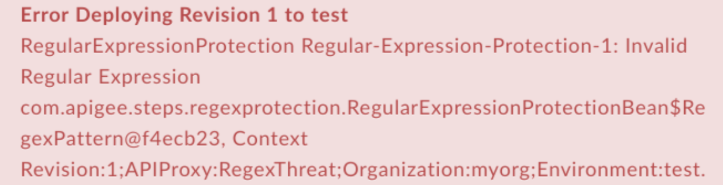
Error Deploying Revision 1 to test
RegularExpressionProtection Regular-Expression-Protection-1: Invalid Regular Expression com.apigee.steps.regexprotection.RegularExpressionProtectionBean$RegexPattern@f4ecb23, Context Revision:1;APIProxy:RegexThreat;Organization:myorg;Environment:test.
错误屏幕截图示例
原因
如果 RegularExpressionProtection 政策的 <Pattern> 元素中的正则表达式无效,则 API 代理的部署将失败。
诊断
从错误消息中找出 RegularExpressionProtection 政策的名称。例如,在以下错误中,RegularExpressionProtection 政策名称为
Regular-Expression-Protection-1:Error Deploying Revision 1 to test RegularExpressionProtection Regular-Expression-Protection-1: Invalid Regular Expression com.apigee.steps.regexprotection.RegularExpressionProtectionBean$RegexPattern@f4ecb23, Context Revision:1;APIProxy:RegexThreat;Organization:myorg;Environment:test.
检查失败的正则表达式保护政策 XML 中的所有
<Pattern>元素。检查是否有任何<Pattern>元素包含无效的正则表达式。如果任何<Pattern>元素包含无效的正则表达式,那么这就是导致错误的原因。例如,以下政策指定
foo){2}的Pattern>值,这会被视为无效的正则表达式:<?xml version="1.0" encoding="UTF-8" standalone="yes"?> <RegularExpressionProtection async="false" continueOnError="false" enabled="true" name="Regular-Expression-Protection-1"> <DisplayName>Regular Expression Protection-1</DisplayName> <Properties/> <IgnoreUnresolvedVariables>false</IgnoreUnresolvedVariables> <URIPath> <Pattern>foo){2}</Pattern> </URIPath> <Source>request</Source> </RegularExpressionProtection>在上述示例中,
<Pattern>中指定的正则表达式缺少左括号。因此,它被视为无效的正则表达式。因此,API 代理部署将失败。
解决方法
确保 RegularExpressionProtection 政策中的每个 <Pattern> 元素均包含有效的正则表达式。您可以搜索不同的在线或离线正则表达式工具来调试正则表达式。要更正上面所示的正则表达式保护政策示例,请添加缺少的括号:
<?xml version="1.0" encoding="UTF-8" standalone="yes"?>
    <RegularExpressionProtection async="false" continueOnError="false" enabled="true" name="Regular-Expression-Protection-1">
        <DisplayName>Regular Expression Protection-1</DisplayName>
        <Properties/>
        <IgnoreUnresolvedVariables>false</IgnoreUnresolvedVariables>
        <URIPath>
            <Pattern>(foo){2}</Pattern>
        </URIPath>
        <Source>request</Source>
    </RegularExpressionProtection>
XPathCompilationFailed
错误消息
通过 Edge 界面或 Edge Management API 部署 API 代理失败,并显示以下错误消息:
Error Deploying Revision revision_number to environment
RegularExpressionProtection policy_name: Failed to compile xpath xpath_expression. Context Revision:revision_number;APIProxy:RegexThreat;Organization:organization;Environment:environment.
错误消息示例
Error Deploying Revision 1 to test
RegularExpressionProtection Regular-Expression-Protection-1: Failed to compile xpath /notapigee:foo/notapigee:bar. Context Revision:1;APIProxy:RegexThreat;Organization:myorg;Environment:test.
错误屏幕截图示例

原因
如果 <XPath> 元素中使用的前缀或值不属于 RegularExpressionProtection 政策中任何声明的命名空间,则 API 代理的部署将失败。
如需详细了解命名空间、XPath 和前缀,请参阅 XML 命名空间及其如何影响 XPath 和 XSLT。
诊断
标识出错的 RegularExpressionProtection 政策的名称以及使用的 XPath 表达式。您可以在错误消息中找到这两项。
例如,在以下错误中,政策名称为
Regular-Expression-Protection-1,XPath 表达式为/notapigee:foo/notapigee:bar:Error Deploying Revision 1 to test RegularExpressionProtection Regular-Expression-Protection-1: Failed to compile xpath /notapigee:foo/notapigee:bar. Context Revision:1;APIProxy:RegexThreat;Organization:myorg;Environment:test.
在失败的正则表达式保护政策 XML 中,验证
Expression元素中设置的 XPath 是否与错误消息中标识的 XPath 相符(上文中的第 1 步)。例如,以下政策将 XPath 指定为与错误消息中的内容相匹配的
/notapigee:foo/notapigee:bar:<?xml version="1.0" encoding="UTF-8" standalone="yes"?> <RegularExpressionProtection async="false" continueOnError="false" enabled="true" name="Regular-Expression-Protection-1"> <DisplayName>Regular Expression Protection-1</DisplayName> <Properties/> <IgnoreUnresolvedVariables>false</IgnoreUnresolvedVariables> <Source>request</Source> <XMLPayload> <Namespaces> <Namespace prefix="apigee">http://www.apigee.com</Namespace> </Namespaces> <XPath> <Expression>/notapigee:foo/notapigee:bar</Expression> <Type>nodeset</Type> <Pattern>pattern</Pattern> <Pattern>pattern2</Pattern> </XPath> </XMLPayload> </RegularExpressionProtection>
- 检查 RegularExpressionProtection 政策中的
<Namespaces>和<Expression>元素。如果错误消息中指出的特定<Expression>使用的前缀或值不属于 RegularExpressionProtection 政策中声明的命名空间,就会导致此错误。请注意,特定
<XPath>在 RegularExpressionProtection 政策示例中使用前缀notapigee:<Expression>/notapigee:foo/notapigee:bar</Expression>
但是,前缀
notapigee未在任何<Namespace>元素中定义;因此,<XPath>编译失败,从而导致部署失败。
解决方法
确保在 RegularExpressionProtection 政策中声明 <XPath>元素下 <Expression> 元素中使用的所有命名空间。如需更正上述示例,您可以将 notapigee 前缀替换为 apigee(在命名空间中声明):
<?xml version="1.0" encoding="UTF-8" standalone="yes"?>
<RegularExpressionProtection async="false" continueOnError="false" enabled="true" name="Regular-Expression-Protection-1">
    <DisplayName>Regular Expression Protection-1</DisplayName>
    <Properties/>
    <IgnoreUnresolvedVariables>false</IgnoreUnresolvedVariables>
    <Source>request</Source>
     <XMLPayload>
         <Namespaces>
             <Namespace prefix="apigee">http://www.apigee.com</Namespace>
         </Namespaces>
         <XPath>
             <Expression>/apigee:foo/apigee:bar</Expression>
             <Type>nodeset</Type>
             <Pattern>pattern</Pattern>
             <Pattern>pattern2</Pattern>
         </XPath>
     </XMLPayload>
</RegularExpressionProtection>
CannotBeConvertedToNodeset
错误消息
通过 Edge 界面或 Edge Management API 部署 API 代理失败,并显示以下错误消息:
Error Deploying Revision revision_number to environment
RegularExpressionProtection policy_name: Result of xpath xpath_expression cannot be converted to nodeset. Context Revision:revision_number;APIProxy:RegexThreat;Organization:organization;Environment:environment.
错误消息示例
Error Deploying Revision 1 to test
RegularExpressionProtection Regular-Expression-Protection-1: Result of xpath count(//apigee:foo) cannot be converted to nodeset. Context Revision:1;APIProxy:RegexThreat;Organization:myorg;Environment:test.
错误屏幕截图示例

原因
如果正则表达式政策具有 <XPath> 表达式,其中 <Type> 元素定义为 nodeset,但表达式无法转换为 nodeset,则 API 代理的部署将失败。
诊断
找出出错的 RegularExpressionProtection 政策,以及无法转换为 nodeset 的 XPath 表达式。您可以在错误消息中找到这两项。
例如,在以下错误中,政策名称为
Regular-Expression-Protection-1,XPath 表达式为count(//apigee:foo):Error Deploying Revision 1 to test RegularExpressionProtection Regular-Expression-Protection-1: Result of xpath count(//apigee:foo) cannot be converted to nodeset. Context Revision:1;APIProxy:RegexThreat;Organization:myorg;Environment:test.
在失败的正则表达式保护政策 XML 中,验证
<XPath>元素的<Expression>元素中设置的 XPath 是否与错误消息中标识的 XPath 相符(上文中的第 1 步)。例如,以下政策将 指定为
count(//apigee:foo),后者与错误消息中的内容匹配:<?xml version="1.0" encoding="UTF-8" standalone="yes"?> <RegularExpressionProtection async="false" continueOnError="false" enabled="true" name="Regular-Expression-Protection-1"> <DisplayName>Regular Expression Protection-1</DisplayName> <Properties/> <IgnoreUnresolvedVariables>false</IgnoreUnresolvedVariables> <Source>request</Source> <XMLPayload> <Namespaces> <Namespace prefix="apigee">http://www.apigee.com</Namespace> </Namespaces> <XPath> <Expression>count(//apigee:foo)</Expression> <Type>nodeset</Type> <Pattern>pattern</Pattern> <Pattern>pattern2</Pattern> </XPath> </XMLPayload> </RegularExpressionProtection>
检查
<XPath>元素下的<Type>元素中设置的值。如果<Type>元素为nodeset,就会导致此错误。在此例中,XPath 表达式是 count(),它不会返回一个或多个节点。因此,API 代理部署将失败。
解决方法
如果 <Type> 元素设置为 nodeset,请确保 <XPath> 中设置的 <Expression> 元素为一个或多个节点。或者,根据您的用例将 <Type> 元素更改为较合适的值。
如需解决上述示例中的问题,您可以将 <Expression> 元素更改为其他可以返回节点的值:
<?xml version="1.0" encoding="UTF-8" standalone="yes"?>
<RegularExpressionProtection async="false" continueOnError="false" enabled="true" name="Regular-Expression-Protection-1">
    <DisplayName>Regular Expression Protection-1</DisplayName>
    <Properties/>
    <IgnoreUnresolvedVariables>false</IgnoreUnresolvedVariables>
    <Source>request</Source>
     <XMLPayload>
         <Namespaces>
             <Namespace prefix="apigee">http://www.apigee.com</Namespace>
         </Namespaces>
         <XPath>
             <Expression>/apigee:foo/apigee:bar</Expression>
             <Type>nodeset</Type>
             <Pattern>pattern</Pattern>
             <Pattern>pattern2</Pattern>
         </XPath>
     </XMLPayload>
</RegularExpressionProtection>
JSONPathCompilationFailed
错误消息
通过 Edge 界面或 Edge Management API 部署 API 代理失败,并显示以下错误消息:
Error Deploying Revision revision_number to environment
RegularExpressionProtection policy_name: Failed to compile jsonpath jsonpath_expression Context Revision:revision_number;APIProxy:RegexThreat;Organization:organization;Environment:environment.
错误消息示例
Error Deploying Revision 1 to test
RegularExpressionProtection Regular-Expression-Protection-1: Failed to compile jsonpath $.store.book[*.author. Context Revision:1;APIProxy:RegexThreat;Organization:myorg;Environment:test.
错误屏幕截图示例

原因
如果政策表达式保护政策的 <JSONPath> 元素下的 <Expression>元素设成为了无效的 JSONPath 表达式,则 API 代理的部署将失败。
诊断
找出出错的 RegularExpressionProtection 政策的名称以及使用的无效 JSONPath 表达式。您可以在错误消息中找到这两项。
例如,在以下错误中,政策名称为
Regular-Expression-Protection-1,JSONPath 表达式为$.store.book[*.author:Error Deploying Revision 1 to test RegularExpressionProtection Regular-Expression-Protection-1: Failed to compile jsonpath $.store.book[*.author. Context Revision:1;APIProxy:RegexThreat;Organization:myorg;Environment:test.
在失败的正则表达式保护政策 XML 中,验证
Expression元素中设置的 JSONPath 是否与错误消息中标识的 JSONPath 匹配(上文中的第 1 步)。例如,以下政策将
<JSONPath>元素下的Expression元素指定为与错误消息中的内容匹配的$.store.book[*.author:<?xml version="1.0" encoding="UTF-8" standalone="yes"?> <RegularExpressionProtection async="false" continueOnError="false" enabled="true" name="Regular-Expression-Protection-1"> <DisplayName>Regular Expression Protection-1</DisplayName> <Properties/> <IgnoreUnresolvedVariables>false</IgnoreUnresolvedVariables> <Source>request</Source> <JSONPayload> <JSONPath> <Expression>$.store.book[*.author</Expression> <Pattern>REGEX PATTERN</Pattern> <Pattern>REGEX PATTERN</Pattern> </JSONPath> </JSONPayload> </RegularExpressionProtection>
检查政策中
<JSONPath>元素下的<Expression>元素。如果它与 JSONPath 语法不匹配,那么这就是导致错误的原因。在上面的示例中,右方括号括缺失,这导致表达式无效。由于 JSON 路径表达式无效,因此 API 代理的部署将失败。
解决方法
请确保正则表达式保护政策中 <JSONPath> 元素内 <Expression> 元素的值是有效的 JSONPath 表达式。
如需更正上面所示的示例,您可以向 <Expression> 元素值添加缺少的右方括号:
<?xml version="1.0" encoding="UTF-8" standalone="yes"?>
<RegularExpressionProtection async="false" continueOnError="false" enabled="true" name="Regular-Expression-Protection-1">
    <DisplayName>Regular Expression Protection-1</DisplayName>
    <Properties/>
    <IgnoreUnresolvedVariables>false</IgnoreUnresolvedVariables>
    <Source>request</Source>
    <JSONPayload>
         <JSONPath>
             <Expression>$.store.book[*].author</Expression>
             <Pattern>REGEX PATTERN</Pattern>
             <Pattern>REGEX PATTERN</Pattern>
         </JSONPath>
        </JSONPayload>
</RegularExpressionProtection>
NothingToEnforce
错误消息
通过 Edge 界面或 Edge Management API 部署 API 代理失败,并显示以下错误消息:
Error Saving Revision revision_number
RegularExpressionProtection policy_name: at least one of URIPath, QueryParam, Header, FormParam, XMLPayload, JSONPayload is mandatory.
错误消息示例
Error Saving Revision 1
RegularExpressionProtection Regular-Expression-Protection-1: at least one of URIPath, QueryParam, Header, FormParam, XMLPayload, JSONPayload is mandatory.
错误屏幕截图示例

原因
如果 RegularExpressionProtection 政策没有以下任何元素:<URIPath>、<QueryParam>、<Header>、<FormParam>、<XMLPayload> 或 <JSONPayload>,API 代理的部署失败。
如错误消息中所示,RegularExpressionProtection 政策中必须至少包含以下元素之一:<URIPath>、<QueryParam>、<Header>、<FormParam>、<XMLPayload> 或 <JSONPayload>。
诊断
标识出错的 RegularExpressionProtection 政策的名称。您可以在错误消息中找到它。例如,在以下错误中,政策名称为
Regular-Expression-Protection-1:RegularExpressionProtection Regular-Expression-Protection-1: at least one of URIPath, QueryParam, Header, FormParam, XMLPayload, JSONPayload is mandatory.
检查失败的正则表达式保护政策(上述第 1 步中已标识)。如果政策没有以下元素之一:
<URIPath>、<QueryParam>、<Header>、<FormParam>、<XMLPayload>或<JSONPayload>,则会导致错误。例如,以下正则表达式保护政策不含任何上述元素:
<?xml version="1.0" encoding="UTF-8" standalone="yes"?>
    <RegularExpressionProtection async="false" continueOnError="false" enabled="true" name="Regular-Expression-Protection-1">
        <DisplayName>Regular Expression Protection-1</DisplayName>
        <Properties/>
        <IgnoreUnresolvedVariables>false</IgnoreUnresolvedVariables>
        <Source>request</Source>
    </RegularExpressionProtection>
由于提取变量政策中未包含任何必需元素,因此 API 代理部署将失败。
解决方法
请确保 RegularExpressionProtection 政策具有以下必需的元素中至少一个:<URIPath>、<QueryParam>、<Header>、<FormParam>、<XMLPayload> 或 <JSONPayload>。例如:
<?xml version="1.0" encoding="UTF-8" standalone="yes"?>
<RegularExpressionProtection async="false" continueOnError="false" enabled="true" name="Regular-Expression-Protection-1">
    <DisplayName>Regular Expression Protection-1</DisplayName>
    <Properties/>
    <IgnoreUnresolvedVariables>false</IgnoreUnresolvedVariables>
    <Source>request</Source>
    <JSONPayload>
        <JSONPath>
            <Expression>$.store.book[*].author</Expression>
            <Pattern>REGEX PATTERN</Pattern>
            <Pattern>REGEX PATTERN</Pattern>
        </JSONPath>
    </JSONPayload>
</RegularExpressionProtection>
NoPatternsToEnforce
错误消息
通过 Edge 界面或 Edge Management API 部署 API 代理失败,并显示以下错误消息:
Error Saving Revision revision_number
RegularExpressionProtection policy_name: No patterns to enforce in payload_name.
错误消息示例
Error Saving Revision 1
RegularExpressionProtection Regular-Expression-Protection-1: No patterns to enforce in XPath.
错误屏幕截图示例

原因
如果任何顶级元素(<URIPath>、<QueryParam>、<Header>、<FormParam>、<XMLPayload> 或 <JSONPayload>)未在 Regular 表达式 Protection 政策中定义 <Pattern> 元素,API 代理的部署就会失败。
诊断
标识出错的 RegularExpressionProtection 政策的名称以及不包含
<Pattern>元素的子元素。您可以在错误消息中找到这两项。例如,在以下错误中,政策名称为
Regular-Expression-Protection-1,子元素为XPath:RegularExpressionProtection Regular-Expression-Protection-1: No patterns to enforce in XPath.
- 检查失败的正则表达式保护政策,并验证第 1 步中标识的子元素没有
<Pattern>元素。如果其中不存在<Pattern>元素,这就是导致错误的原因。例如,以下政策在
<XPath>内没有<Pattern>元素:<?xml version="1.0" encoding="UTF-8" standalone="yes"?> <RegularExpressionProtection async="false" continueOnError="false" enabled="true" name="Regular-Expression-Protection-1"> <DisplayName>Regular Expression Protection-1</DisplayName> <Properties/> <IgnoreUnresolvedVariables>false</IgnoreUnresolvedVariables> <Source>request</Source> <XMLPayload> <Namespaces> <Namespace prefix="apigee">http://www.apigee.com</Namespace> </Namespaces> <XPath> <Expression>/apigee:Greeting/apigee:User</Expression> <Type>string</Type> </XPath> </XMLPayload> </RegularExpressionProtection>
由于
<XPath>元素不含<Pattern>元素,因此 API 代理的部署将失败。
解决方法
确保 <URIPath>、<QueryParam>、<Header>、<FormParam>、<XMLPayload> 或 <JSONPayload> 元素中都至少指定了一个 <Pattern>。如需了解如何正确指定元素,请参阅 RegularExpressionProtection 政策。
如需更正上面的示例,我们只需将 <Pattern> 元素添加到 <XMLPayload> 下的 <XPath> 元素中:
<?xml version="1.0" encoding="UTF-8" standalone="yes"?>
<RegularExpressionProtection async="false" continueOnError="false" enabled="true" name="Regular-Expression-Protection-1">
  <DisplayName>Regular Expression Protection-1</DisplayName>
  <Properties/>
  <IgnoreUnresolvedVariables>false</IgnoreUnresolvedVariables>
  <Source>request</Source>
  <XMLPayload>
    <Namespaces>
      <Namespace prefix="apigee">http://www.apigee.com</Namespace>
    </Namespaces>
    <XPath>
      <Expression>/apigee:Greeting/apigee:User</Expression>
      <Type>string</Type>
      <Pattern>REGEX PATTERN</Pattern>
    </XPath>
  </XMLPayload>
</RegularExpressionProtection>
NONEmptyPrefixMappedToEmptyURI
错误消息
通过 Edge 界面或 Edge Management API 部署 API 代理失败,并显示以下错误消息:
Error Saving Revision revision_number
RegularExpressionProtection policy_name: Non-empty prefix prefix_name cannot be mapped to empty uri.
错误消息示例
Error Saving Revision 1
RegularExpressionProtection Regular-Expression-Protection-1: Non-empty prefix apigee cannot be mapped to empty uri.
错误屏幕截图示例

原因
如果 RegularExpressionProtection 政策在 <XMLPayload> 元素下的 <Namespace> 元素中定义了前缀,但未定义 URI,就会出现此错误。
诊断
标识出错的 RegularExpressionProtection 政策以及未映射到 URI 的前缀的名称。您可以在错误消息中找到这两项。
例如,在以下错误中,政策名称是 Regular Expression Protection-1,而前缀为 apigee:
RegularExpressionProtection Regular-Expression-Protection-1: Non-empty prefix apigee cannot be mapped to empty uri.
在失败的正则表达式保护政策 XML 中,验证在
<XMLPayload>元素下<Namespace>元素内设置的前缀名称是否与错误消息中标识的前缀名称相匹配(上文中的第 1 步)。例如,以下政策会在
<Namespace>元素中指定一个名为 apigee 的前缀,该前缀与错误消息中的内容相匹配:<?xml version="1.0" encoding="UTF-8" standalone="yes"?> <RegularExpressionProtection async="false" continueOnError="false" enabled="true" name="Regular-Expression-Protection-1"> <DisplayName>Regular Expression Protection-1</DisplayName> <Properties/> <IgnoreUnresolvedVariables>false</IgnoreUnresolvedVariables> <Source>request</Source> <XMLPayload> <Namespaces> <Namespace prefix="apigee"/> <Namespace prefix="gmail">http://mail.google.com</Namespace> </Namespaces> <XPath> <Expression>/apigee:Greeting/apigee:User</Expression> <Type>string</Type> <Pattern>REGEX PATTERN</Pattern> </XPath> </XMLPayload> </RegularExpressionProtection>
验证在第 2 步中确定了特定前缀的
<Namespace>元素是否具有有效 URI。 如果缺少 URI,则会导致错误。在以上所示的正则表达式保护政策示例中,请注意没有与前缀为 apigee 的
<Namespace>元素对应的 URI;因此,您会收到以下错误:Non-empty prefix apigee cannot be mapped to empty uri.
解决方法
确保定义有前缀的所有 <Namespace> 元素在提取变量政策中都具有对应的 URI。例如:
<?xml version="1.0" encoding="UTF-8" standalone="yes"?>
<RegularExpressionProtection async="false" continueOnError="false" enabled="true" name="Regular-Expression-Protection-1">
  <DisplayName>Regular Expression Protection-1</DisplayName>
  <Properties/>
  <IgnoreUnresolvedVariables>false</IgnoreUnresolvedVariables>
  <Source>request</Source>
  <XMLPayload>
    <Namespaces>
      <Namespace prefix="apigee">http://www.apigee.com</Namespace>
      <Namespace prefix="gmail">http://mail.google.com</Namespace>
    </Namespaces>
    <XPath>
      <Expression>/apigee:Greeting/apigee:User</Expression>
      <Type>string</Type>
      <Pattern>REGEX PATTERN</Pattern>
    </XPath>
  </XMLPayload>
</RegularExpressionProtection>
DuplicatePrefix
错误消息
通过 Edge 界面或 Edge Management API 部署 API 代理失败,并显示以下错误消息:
Error Saving Revision revision_number
RegularExpressionProtection policy_name: Duplicate prefix prefix_name.
错误消息示例
Error Saving Revision 1
RegularExpressionProtection Regular-Expression-Protection-1: Duplicate prefix apigee.
错误屏幕截图示例

原因
如果 RegularExpressionProtection 政策在 <XMLPayload> 元素下 <Namespace> 元素中多次定义了同一前缀,就会出现此错误。
例如,出现此错误是因为前缀 apigee 定义了两次,如下所示:
<Namespace prefix="apigee">http://www.apigee.com</Namespace>
<Namespace prefix="apigee">http://www.apigee.com</Namespace>
诊断
标识出错的 RegularExpressionProtection 政策以及前缀的名称。您可以在错误消息中找到这两项。
例如,在以下错误中,政策名称是 Regular Expression Protection-1,而前缀为 apigee:
RegularExpressionProtection Regular-Expression-Protection-1: Duplicate prefix apigee.
在失败的正则表达式保护政策 XML 中,验证在
<XMLPayload>元素下<Namespace>元素内设置的前缀名称是否与错误消息中标识的前缀名称相匹配(上文中的第 1 步)。例如,以下政策会在
<Namespace>元素中指定一个名为 apigee 的前缀,该前缀与错误消息中的内容相匹配:<?xml version="1.0" encoding="UTF-8" standalone="yes"?> <RegularExpressionProtection async="false" continueOnError="false" enabled="true" name="Regular-Expression-Protection-1"> <DisplayName>Regular Expression Protection-1</DisplayName> <Properties/> <IgnoreUnresolvedVariables>false</IgnoreUnresolvedVariables> <Source>request</Source> <XMLPayload> <Namespaces> <Namespace prefix="apigee">http://www.apigee.com</Namespace> <Namespace prefix="apigee">http://www.apigee.com</Namespace> </Namespaces> <XPath> <Expression>/apigee:Greeting/apigee:User</Expression> <Type>string</Type> <Pattern>REGEX PATTERN</Pattern> </XPath> </XMLPayload> </RegularExpressionProtection>
确定在第 2 步中确定了特定前缀的
<Namespace>元素是否定义了多次。 如果定义多次,则会导致错误。在上面所示的正则表达式保护政策示例中,请注意前缀为 apigee 的
<Namespace>元素已定义了两次;因此,您会收到以下错误:Duplicate prefix apigee.
解决方法
确保在 RegularExpressionProtection 政策的 <Namespace> 元素中,每个前缀只有一个定义。例如:
<?xml version="1.0" encoding="UTF-8" standalone="yes"?>
    <RegularExpressionProtection async="false" continueOnError="false" enabled="true" name="Regular-Expression-Protection-1">
      <DisplayName>Regular Expression Protection-1</DisplayName>
      <Properties/>
      <IgnoreUnresolvedVariables>false</IgnoreUnresolvedVariables>
      <Source>request</Source>
      <XMLPayload>
        <Namespaces>
          <Namespace prefix="apigee">http://www.apigee.com</Namespace>
        </Namespaces>
        <XPath>
          <Expression>/apigee:Greeting/apigee:User</Expression>
          <Type>string</Type>
          <Pattern>REGEX PATTERN</Pattern>
        </XPath>
      </XMLPayload>
    </RegularExpressionProtection>
EmptyXPathExpression
错误消息
通过 Edge 界面或 Edge Management API 部署 API 代理失败,并显示以下错误消息:
Error Saving Revision revision_number
RegularExpressionProtection policy_name: Empty XPath expression.
错误消息示例
Error Saving Revision 1
RegularExpressionProtection Regular-Expression-Protection-1: Empty XPath expression.
错误屏幕截图示例

原因
如果 RegularExpressionProtection 政策未在 <XPath> 元素中设置 <Expression> 元素,则 API 代理的部署将失败。
诊断
从错误消息中找出失败的正则表达式保护政策。例如,在以下错误中,政策名称为 Regular-Expression-Protection-1:
RegularExpressionProtection Regular-Expression-Protection-1: Empty XPath expression.
在失败的正则表达式政策 XML 中,确定是否存在
<XMLPayload>元素中不包含其中定义了<Expression>元素的<XPath>子元素,或<Expression>元素未设置为任何值。如果是,就会导致错误。例如,以下是包含
<XMLPayload>元素的正则表达式保护政策:<?xml version="1.0" encoding="UTF-8" standalone="yes"?> <RegularExpressionProtection async="false" continueOnError="false" enabled="true" name="Regular-Expression-Protection-1"> <DisplayName>Regular Expression Protection-1</DisplayName> <Properties/> <IgnoreUnresolvedVariables>false</IgnoreUnresolvedVariables> <Source>request</Source> <XMLPayload> <Namespaces> <Namespace prefix="apigee">http://www.apigee.com</Namespace> </Namespaces> <XPath> <Expression></Expression> <Type>string</Type> <Pattern>REGEX PATTERN</Pattern> </XPath> </XMLPayload> </RegularExpressionProtection>
由于
<XPath>元素中有一个空<Expression>元素,因此 API 代理的部署将失败。
解决方法
确保 RegularExpressionProtection 政策在 <XPath> 元素下定义了一个非空且有效的 <Expression> 元素。例如:
<?xml version="1.0" encoding="UTF-8" standalone="yes"?>
<RegularExpressionProtection async="false" continueOnError="false" enabled="true" name="Regular-Expression-Protection-1">
  <DisplayName>Regular Expression Protection-1</DisplayName>
  <Properties/>
  <IgnoreUnresolvedVariables>false</IgnoreUnresolvedVariables>
  <Source>request</Source>
  <XMLPayload>
    <Namespaces>
      <Namespace prefix="apigee">http://www.apigee.com</Namespace>
    </Namespaces>
    <XPath>
      <Expression>/apigee:Greeting/apigee:User</Expression>
      <Type>string</Type>
      <Pattern>REGEX PATTERN</Pattern>
    </XPath>
  </XMLPayload>
</RegularExpressionProtection>
EmptyJSONPathExpression
错误消息
通过 Edge 界面或 Edge Management API 部署 API 代理失败,并显示以下错误消息:
Error Saving Revision revision_number
RegularExpressionProtection policy_name: Empty JSONPath expression.
错误消息示例
Error Saving Revision 1
RegularExpressionProtection Regular-Expression-Protection-1: Empty JSONPath expression.
错误屏幕截图示例

原因
如果 RegularExpressionProtection 政策未在 <JSONPath> 元素中设置 <Expression> 元素,则 API 代理的部署将失败。
诊断
从错误消息中找出失败的正则表达式保护政策。例如,在以下错误中,政策名称为 Regular-Expression-Protection-1:
Error Saving Revision 1
RegularExpressionProtection Regular-Expression-Protection-1: Empty JSONPath expression.
在失败的正则表达式政策 XML 中,确定是否存在
<JSONPayload>元素中不包含其中定义了<Expression>元素的<JSONPath>子元素,或<Expression>元素未设置为任何值。如果是,就会导致错误。例如,以下是包含
<JSONPayload>元素的正则表达式保护政策:<?xml version="1.0" encoding="UTF-8" standalone="yes"?> <RegularExpressionProtection async="false" continueOnError="false" enabled="true" name="Regular-Expression-Protection-1"> <DisplayName>Regular Expression Protection-1</DisplayName> <Properties/> <IgnoreUnresolvedVariables>false</IgnoreUnresolvedVariables> <Source>request</Source> <JSONPayload> <JSONPath> <Expression></Expression> <Pattern>REGEX PATTERN</Pattern> <Pattern>REGEX PATTERN</Pattern> </JSONPath> </JSONPayload> </RegularExpressionProtection>
由于
<JSONPath>元素中有一个空<Expression>元素,因此 API 代理的部署将失败。
解决方法
确保 RegularExpressionProtection 政策在 <JSONPath> 元素下定义了一个非空且有效的 <Expression> 元素。例如:
<?xml version="1.0" encoding="UTF-8" standalone="yes"?>
<RegularExpressionProtection async="false" continueOnError="false" enabled="true" name="Regular-Expression-Protection-1">
  <DisplayName>Regular Expression Protection-1</DisplayName>
  <Properties/>
  <IgnoreUnresolvedVariables>false</IgnoreUnresolvedVariables>
  <Source>request</Source>
  <JSONPayload>
    <JSONPath>
      <Expression>$.store.book[*].author</Expression>
      <Pattern>REGEX PATTERN</Pattern>
      <Pattern>REGEX PATTERN</Pattern>
    </JSONPath>
  </JSONPayload>
</RegularExpressionProtection>