

คุณกำลังดูเอกสารประกอบ Apigee Edge
ไปที่
เอกสารประกอบเกี่ยวกับ Apigee X. ข้อมูล
InvalidTimeout
ข้อความแสดงข้อผิดพลาด
การทำให้พร็อกซี API ใช้งานได้ผ่าน Edge UI หรือ Edge Management API จะล้มเหลวโดยมีข้อความแสดงข้อผิดพลาดต่อไปนี้
Error Saving Revision revision_number
CacheLookupTimeoutInSeconds value value should be greater than zero.
ตัวอย่างข้อความแสดงข้อผิดพลาด
Error Saving Revision 2
CacheLookupTimeoutInSeconds -1 value should be greater than zero.
ตัวอย่างภาพหน้าจอแสดงข้อผิดพลาด

สาเหตุ
หากตั้งค่าองค์ประกอบ <CacheLookupTimeoutInSeconds> ของนโยบาย ResponseCache เป็นจำนวนลบ การทำให้พร็อกซี API ใช้งานได้จะล้มเหลว
ตัวอย่างเช่น หาก <CacheLookupTimeoutInSeconds> คือ -1 การทำให้พร็อกซี API ใช้งานได้จะล้มเหลว
การวินิจฉัย
ระบุค่าที่ไม่ถูกต้องที่ใช้กับองค์ประกอบ
<CacheLookupTimeoutInSeconds>ในนโยบาย ResponseCache ซึ่งคุณจะเห็นข้อมูลนี้ในข้อความแสดงข้อผิดพลาด ตัวอย่างเช่น ในข้อผิดพลาดต่อไปนี้ ค่าที่ไม่ถูกต้องที่ใช้กับองค์ประกอบ<CacheLookupTimeoutInSeconds>คือ-1CacheLookupTimeoutInSeconds -1 value should be greater than zero.ตรวจสอบนโยบาย ResponseCache ทั้งหมดในพร็อกซี API ที่เกิดความล้มเหลวขึ้น อาจมีนโยบาย ResponseCache อย่างน้อย 1 รายการที่ระบุองค์ประกอบ
<CacheLookupTimeoutInSeconds>ตัวอย่างเช่น การกำหนดค่านโยบายต่อไปนี้ตั้งค่า
<CacheLookupTimeoutInSeconds>เป็น-1ซึ่งตรงกับข้อความแสดงข้อผิดพลาด<?xml version="1.0" encoding="UTF-8&quo>t<; standalone="yes"? ResponseCache async="false" continueOnError=">false<" enab>led="true&q<uot; name=&q>uot;R<esponse-Cac>he-1&<quot; > Display<NameRes>ponse Cac<he-1/DisplayName Properties/ CacheKe>y < Pref>ix/ < > KeyFrag<ment r>ef=&q<uot;request.ur>i" t<ype="s>tring&quo<t;/ /C>acheKey < ScopeExclusive/S>cope< ExpirySe>tting<s Expir>yDate</ TimeOfDay/ > <TimeoutInSec ref="">;<3600/TimeoutIn>Sec /ExpirySettings CacheLookupTimeoutInSeconds-1/CacheLookupTimeoutInSeconds /ResponseCacheหากระบุ
<CacheLookupTimeoutInSeconds>เป็นจำนวนเต็มลบ ค่าที่ได้คือสาเหตุของข้อผิดพลาด
ความละเอียด
ตรวจสอบว่าระบุค่าสำหรับองค์ประกอบ <CacheLookupTimeoutInSeconds> ของนโยบาย ResponseCache เป็นจำนวนเต็มที่ไม่เป็นลบเสมอ
หากต้องการแก้ไขตัวอย่างนโยบาย ResponseCache ที่แสดงด้านบน ให้แก้ไข <CacheLookupTimeoutInSeconds> element เป็น 30
<?xml version="1.0" encoding="UTF-8&quo>t<; standalone="yes"?
ResponseCache async="false" continueOnError=">false<" enab>led="true&q<uot; name=&q>uot;R<esponse-Cac>he-1&<quot;
  >  Display<NameRes>ponse Cac<he-1/DisplayName
    Properties/
    CacheKe>y
   <     Pref>ix/
 <     >  KeyFrag<ment r>ef=&q<uot;request.ur>i" t<ype="s>tring&quo<t;/
    /C>acheKey
 <   ScopeExclusive/S>cope<
    ExpirySe>tting<s
        Expir>yDate</
        TimeOfDay/
      >  <TimeoutInSec ref="">;<3600/TimeoutIn>Sec
    /ExpirySettings
    CacheLookupTimeoutInSeconds30/CacheLookupTimeoutInSeconds
/ResponseCache
InvalidCacheResourceReference
ข้อความแสดงข้อผิดพลาด
การทำให้พร็อกซี API ใช้งานได้ผ่าน Edge UI หรือ Edge Management API จะล้มเหลวโดยมีข้อความแสดงข้อผิดพลาดต่อไปนี้
Error Deploying Revision revision_number to environment
Invalid cache resource reference cache_resource in Step definition response_cache_policy_name. Context Revision:revision_number;APIProxy:ResponseCache;Organization:organization;Environment:environment
ตัวอย่างข้อความแสดงข้อผิดพลาด
Error Deploying Revision 2 to prod
Invalid cache resource reference itemscache in Step definition ItemsResponseCache. Context Revision:2;APIProxy:StoresInventory;Organization:kkalckstein-eval;Environment:prod
ตัวอย่างภาพหน้าจอแสดงข้อผิดพลาด

สาเหตุ
ข้อผิดพลาดนี้เกิดขึ้นหากมีการตั้งค่าองค์ประกอบ <CacheResource> ในนโยบาย ResponseCache เป็นชื่อที่ไม่มีอยู่ในสภาพแวดล้อมที่ใช้งานพร็อกซี API
การวินิจฉัย
ระบุแคชที่ไม่ถูกต้องที่ใช้ในองค์ประกอบ
<CacheResource>ของนโยบายแคชการตอบกลับและสภาพแวดล้อมที่เกิดข้อผิดพลาด ซึ่งคุณจะเห็นทั้ง 2 รายการนี้ในข้อความแสดงข้อผิดพลาด ตัวอย่างเช่น ในข้อผิดพลาดต่อไปนี้ ชื่อของแคชที่ไม่ถูกต้องคือitemscacheและชื่อสภาพแวดล้อมคือprodInvalid cache resource reference itemscache in Step definition ItemsResponseCache. Context Revision:2;APIProxy:StoresInventory;Organization:kkalckstein-eval;Environment:prodตรวจสอบนโยบาย ResponseCache ทั้งหมดในพร็อกซี API ที่ล้มเหลว เกิดขึ้น ระบุนโยบาย ResponseCache เฉพาะที่มีแคชที่ไม่ถูกต้อง (ระบุในขั้นตอนที่ 1) ระบุไว้ในองค์ประกอบ
<CacheResource>ตัวอย่างเช่น นโยบายต่อไปนี้ระบุค่า
<CacheResource>เป็นitemscacheซึ่งตรงกับข้อความแสดงข้อผิดพลาด<?xml version="1.0" encoding="UTF-8&quo>t<; standalone="yes"? ResponseCache async="false" continueOnError="fa>lse<" enab>led="true&quo<t; name=&quo>t;I<temsRespons>eCa<che">; Dis<playNam>eItemsR<esponseCache/DisplayName Properties/ Cac>heK<ey >Pre<fix/ Ke>yFragment <ref="requ>est<.uri&>quot; typ<e=&quo>t;s<tring"/ > /Cache<Key Cache>Resourc<eitemscach>e/Cache<Resource ScopeExc>lusi<ve/Scope Ex>pir<ySettings > Ex<piryDate/ >Tim<eOfDay/ Timeou>t<InSec ref=&quo>t;"3600/TimeoutInSec /ExpirySettings SkipCacheLookup/ SkipCachePopulation/ /ResponseCacheตรวจสอบว่าแคช (ระบุในขั้นตอนที่ 2) ได้รับการกำหนดในสภาพแวดล้อมที่เฉพาะเจาะจงหรือไม่ (ระบุในขั้นตอนที่ 1)
ใน Edge UI ให้ไปที่ API > การกำหนดค่าสภาพแวดล้อมและตรวจสอบว่ามีแคชอยู่ในแท็บแคชในสภาพแวดล้อมที่ระบุหรือไม่ หากไม่มีแคชอยู่ แสดงว่าเกิดข้อผิดพลาด
เช่น โปรดสังเกตในภาพหน้าจอด้านล่างว่าไม่มีแคชชื่อ
itemscacheอยู่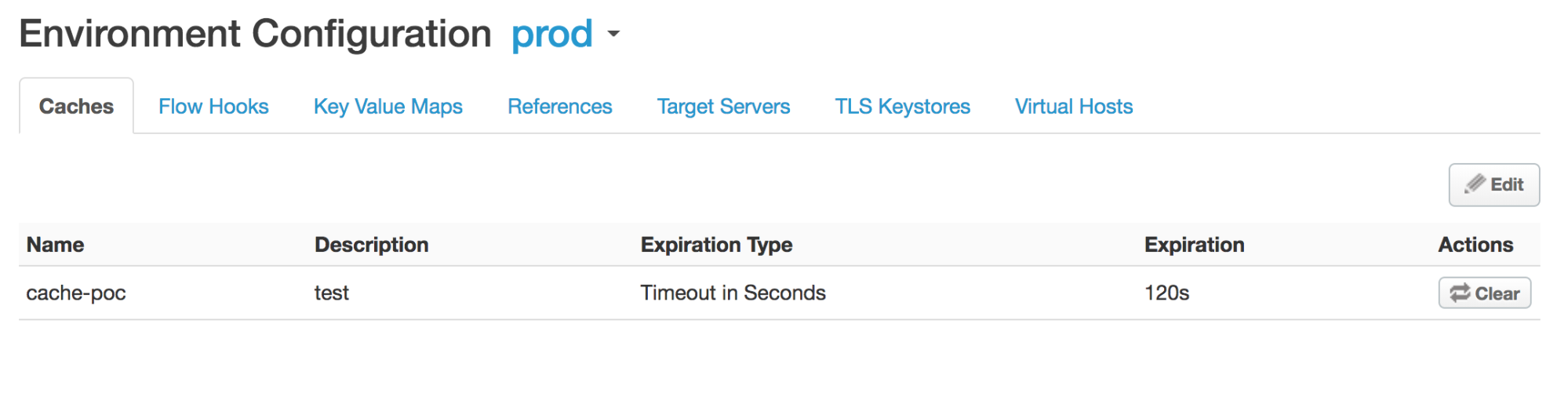
เนื่องจากไม่มีการระบุแคชชื่อ
itemscacheไว้ในสภาพแวดล้อมprodคุณจึงได้รับข้อผิดพลาดInvalid cache resource reference does_not_exist in Step definition Response-Cache-1. Context Revision:2;APIProxy:ResponseCache;Organization:kkalckstein-eval;Environment:prod
ความละเอียด
ตรวจสอบว่าชื่อแคชที่ระบุในองค์ประกอบ <CacheResource> ได้รับการสร้างขึ้นในสภาพแวดล้อมที่คุณต้องการทำให้พร็อกซี API ใช้งานได้
โปรดดูข้อมูลเกี่ยวกับวิธีสร้างแคชในการสร้างและแก้ไขแคชของสภาพแวดล้อม
ResponseCacheStepAttachmentNotAllowedReq
ข้อความแสดงข้อผิดพลาด
การทำให้พร็อกซี API ใช้งานได้ผ่าน Edge UI หรือ Edge Management API จะล้มเหลวโดยมีข้อความแสดงข้อผิดพลาดต่อไปนี้
Error Deploying Revision revision_number to environment
Response cache step definition response_cache_policy_name can not be attached more than once in the request path.
ตัวอย่างข้อความแสดงข้อผิดพลาด
Error Deploying Revision 2 to test
Response cache step definition Response-Cache-1 can not be attached more than once in the request path.
ตัวอย่างภาพหน้าจอแสดงข้อผิดพลาด

สาเหตุ
ข้อผิดพลาดนี้เกิดขึ้นหากมีนโยบาย ResponseCache เดียวกันแนบอยู่กับเส้นทางคำขอหลายรายการภายในขั้นตอนใดก็ตามของพร็อกซี API
เช่น ถ้าคุณแนบนโยบาย ResponseCache เดียวกันไว้ในคำขอโฟลว์ล่วงหน้าของทั้งพร็อกซีและปลายทางเป้าหมาย ข้อผิดพลาดนี้จะเกิดขึ้น
การวินิจฉัย
ระบุชื่อนโยบาย ResponseCache ที่แนบมากกว่า 1 ครั้ง ซึ่งคุณจะเห็นข้อมูลนี้ในข้อความแสดงข้อผิดพลาด ตัวอย่างเช่น ในข้อผิดพลาดต่อไปนี้ ชื่อของนโยบาย ResponseCache คือ Response‐Cache‐1
Error Deploying Revision 2 to test
Response cache step definition Response-Cache-1 can not be attached more than once in the request path.
ตรวจสอบโฟลว์คำขอทั้งหมดในพร็อกซีและปลายทางเป้าหมายของพร็อกซี API ที่เกิดข้อผิดพลาด หากมีการแนบนโยบาย ResponseCache เดียวกันในขั้นตอนคำขอ 2 ขั้นตอนขึ้นไป ข้อผิดพลาดดังกล่าวจึงเกิดขึ้น
ในตัวอย่างต่อไปนี้ จะมีการกำหนดค่านโยบาย ResponseCache
Response-Cache-1เดียวกันในเส้นทางคำขอของ PreFlow เริ่มต้นของพร็อกซีและ PreFlow ของปลายทางที่เป็นค่าเริ่มต้น<?xml version="1.0" encoding="UTF-8&quo>t<; standalone="yes">? Pro<xyEndpoint n>ame=&<quot;defaul>t&quo<t; Description/ > FaultRu<les/ > PreFlow nam<e=&q>uot;PreFlow"< > Request < > Step < > Na<meRespon>se-Cache-<1/Name /Step /Request ... ?xm>l< version="1.0" enco>ding=<"UTF-8&>quot;< standalone>=&quo<t;yes"? TargetEnd>point nam<e=">default&q<uot; >Descr<iption/ > F<aultRules/ PreFlow n>ame="<;PreFlo>w" < R>equest/ R<espo>nse/ /PreFlo<w > PostFlow nam<e=&qu>ot;PostFl<ow">Request Step NameResponse-Cache-1/Name /Step /Request ...
ความละเอียด
ตรวจสอบว่าได้แนบนโยบาย ResponseCache กับเส้นทางคำขอเพียงเส้นทางเดียวในทุกขั้นตอนของพร็อกซี API
หากต้องการแก้ไขตัวอย่างที่แสดงด้านบน ให้นำนโยบาย ResponseCache Response-Cache-1 ออกจากขั้นตอนคำขอแบบใดแบบหนึ่งจาก 2 ขั้นตอน
ResponseCacheStepAttachmentNotAllowedResp
ข้อความแสดงข้อผิดพลาด
การทำให้พร็อกซี API ใช้งานได้ผ่าน Edge UI หรือ Edge Management API จะล้มเหลวโดยมีข้อความแสดงข้อผิดพลาดต่อไปนี้
Error Deploying Revision revision_number to environment
Response cache step definition response_cache_policy_name can not be attached more than once in the response path.
ตัวอย่างข้อความแสดงข้อผิดพลาด
Error Deploying Revision 2 to test
Response cache step definition Response-Cache-1 can not be attached more than once in the response path.
ตัวอย่างภาพหน้าจอแสดงข้อผิดพลาด

สาเหตุ
ข้อผิดพลาดนี้เกิดขึ้นหากมีนโยบาย ResponseCache เดียวกันแนบอยู่กับเส้นทางการตอบกลับหลายเส้นทางภายในโฟลว์ต่างๆ ของพร็อกซี API
เช่น ถ้าคุณแนบนโยบาย ResponseCache เดียวกันไว้ในการส่งล่วงหน้าการตอบกลับของทั้งพร็อกซีและปลายทางเป้าหมาย ข้อผิดพลาดนี้จะเกิดขึ้น
การวินิจฉัย
ระบุชื่อนโยบาย ResponseCache ที่แนบมากกว่า 1 ครั้ง ซึ่งคุณจะเห็นข้อมูลนี้ในข้อความแสดงข้อผิดพลาด ตัวอย่างเช่น ในข้อผิดพลาดต่อไปนี้ ชื่อของนโยบาย ResponseCache คือ
Response-Cache-1Error Deploying Revision 2 to test Response cache step definition Response-Cache-1 can not be attached more than once in the response path.ตรวจสอบโฟลว์คำขอทั้งหมดในพร็อกซีและปลายทางเป้าหมายของพร็อกซี API ที่เกิดข้อผิดพลาด หากมีการแนบนโยบาย ResponseCache เดียวกันในขั้นตอนการตอบกลับตั้งแต่ 2 ขั้นตอนขึ้นไป ข้อผิดพลาดดังกล่าวจึงเกิดขึ้น
ในตัวอย่างต่อไปนี้ จะมีการกำหนดค่านโยบาย ResponseCache
Response-Cache-1เดียวกันในเส้นทางการตอบสนองของ PreFlow เริ่มต้นของพร็อกซีและ PreFlow ของปลายทางที่เป็นค่าเริ่มต้น<?xml version="1.0" encoding="UTF-8&quo>t<; standalone="yes">? Pro<xyEndpoint n>ame=&<quot;defaul>t&quo<t; Description/ > FaultRu<les/ > PreFlow nam<e=&q>uot;PreFlow"< > Request < > Step < > <NameResp>onse-Cach<e/Name > /S<tep > /Request < > Response < > Step < > Na<meRespons>e-Cac<he-1/Nam>e < /Step /Response /PreFlow ... ?xm>l< version="1.0" enco>ding=<"UTF-8&>quot;< standalone>=&quo<t;yes"? TargetEnd>point nam<e=">default&q<uot; >Descr<iption/ > F<aultRules/ PreFlow n>ame="<;PreFlow>" < Re>quest/ < Re>sponse/ /PreF<low > PostFlow nam<e=&qu>ot;PostFlow&q<uot; > R<equest/ > < Respons>eStep NameResponse-Cache-1/Name /Step /Response /PostFlow ...
ความละเอียด
ตรวจสอบว่าได้แนบนโยบาย ResponseCache กับเส้นทางการตอบกลับเพียงเส้นทางเดียวในทุกขั้นตอนของพร็อกซี API
หากต้องการแก้ไขตัวอย่างที่แสดงด้านบน ให้นำนโยบาย ResponseCache Response-Cache-1 ออกจากเส้นทางการตอบกลับหนึ่งใน 2 เส้นทาง
InvalidMessagePatternForErrorCode
ข้อความแสดงข้อผิดพลาด
การทำให้พร็อกซี API ใช้งานได้ผ่าน Edge UI หรือ Edge Management API จะล้มเหลวโดยมีข้อความแสดงข้อผิดพลาดอย่างใดอย่างหนึ่งต่อไปนี้
Error Deploying Revision revision_number to environment
Invalid message pattern found for error code steps.cache.InvalidSkipCacheLookUpCondition.
หรือ
Error Deploying Revision revision_number to environment
Invalid message pattern found for error code steps.cache.InvalidSkipCachePopulationCondition.
ตัวอย่างข้อความแสดงข้อผิดพลาด
Error Deploying Revision 2 to prod
Invalid message pattern found for error code steps.cache.InvalidSkipCacheLookUpCondition.
หรือ
Error Deploying Revision 2 to prod
Invalid message pattern found for error code steps.cache.InvalidSkipCachePopulationCondition.
ตัวอย่างภาพหน้าจอแสดงข้อผิดพลาด

หรือ

สาเหตุ
ข้อผิดพลาดนี้เกิดขึ้นหากองค์ประกอบ <SkipCacheLookup> หรือ <SkipCachePopulation> ในนโยบาย ResponseCache มีเงื่อนไขที่ไม่ถูกต้อง
การวินิจฉัย
ตรวจสอบนโยบาย ResponseCache ทั้งหมดในพร็อกซี API ที่เกิดข้อผิดพลาดขึ้น แล้วดูว่ามีนโยบายที่ระบุเงื่อนไขสำหรับองค์ประกอบ
<SkipCacheLookup>และ/หรือ<SkipCachePopulation>หรือไม่ตรวจสอบว่าเงื่อนไขที่ระบุสำหรับองค์ประกอบ
<SkipCacheLookup>และ/หรือ<SkipCachePopulation>ไม่ถูกต้องหรือไม่ หากใช่ นั่นคือสาเหตุของข้อผิดพลาดในตัวอย่างต่อไปนี้ องค์ประกอบ
<SkipCachePopulation>ใช้โอเปอเรเตอร์ JavaScript === เพื่อตรวจหาค่าที่เท่ากันและประเภทที่เท่ากันซึ่งไม่ถูกต้อง<?xml version="1.0" encoding="UTF-8&quo>t<; standalone="yes"? ResponseCache async="false" continueOnError=">false<" enab>led="true&q<uot; name=&q>uot;R<esponse-Cac>he-1&<quot; > Display<NameRes>ponse Cac<he-1/DisplayName Properties/ CacheKe>y < Pref>ix/ < > KeyFrag<ment r>ef=&q<uot;request.ur>i" t<ype="s>tring&quo<t;/ /C>acheKey < ScopeExclusive/S>cope< ExpirySe>tting<s Expir>yDate</ TimeOfDay/ > < TimeoutInSec ref="&quo>t;360<0/TimeoutInSec > /ExpirySettings CacheLookupTim<eoutInSeconds2/C>a<cheLookupTimeo>utInSeconds SkipCacheLookuprequest.header.bypass-cache === "true"/SkipCacheLookup /ResponseCacheเนื่องจากโอเปอเรเตอร์
===ไม่ถูกต้อง คุณจึงได้รับข้อผิดพลาด:Invalid message pattern found for error code steps.cache.InvalidSkipCacheLookUpCondition.
ความละเอียด
ตรวจสอบว่าเงื่อนไขที่ระบุสำหรับองค์ประกอบ <SkipCacheLookup> และ/หรือ <SkipCachePopulation> ถูกต้องเสมอ
หากต้องการแก้ไขตัวอย่าง นโยบาย ResponseCache ที่แสดงด้านบน ให้แก้ไข <SkipCacheLookup> ให้ใช้โอเปอเรเตอร์ = ดังนี้
<?xml version="1.0" encoding="UTF-8&quo>t<; standalone="yes"?
ResponseCache async="false" continueOnError=">false<" enab>led="true&q<uot; name=&q>uot;R<esponse-Cac>he-1&<quot;
  >  Display<NameRes>ponse Cac<he-1/DisplayName
    Properties/
    CacheKe>y
   <     Pref>ix/
 <     >  KeyFrag<ment r>ef=&q<uot;request.ur>i" t<ype="s>tring&quo<t;/
    /C>acheKey
 <   ScopeExclusive/S>cope<
    ExpirySe>tting<s
        Expir>yDate</
        TimeOfDay/
      > < TimeoutInSec ref="&quo>t;360<0/TimeoutInSec
>    /ExpirySettings
    CacheLookupT<imeoutInSeconds2>/<CacheLookupTim>eoutInSeconds
    SkipCacheLookuprequest.header.bypass-cache = "true"/SkipCacheLookup
/ResponseCache
CacheNotFound
ข้อความแสดงข้อผิดพลาด
การทำให้พร็อกซี API ใช้งานได้ผ่าน Edge UI หรือ Edge Management API จะแสดงข้อความแสดงข้อผิดพลาดดังนี้ และสถานะการติดตั้งใช้งานของพร็อกซี API จะมีสถานะเป็นทำให้ใช้งานได้บางส่วน ดังนี้
Error: Cache : cache_resource, not found in organization : organization__environment.
ตัวอย่างข้อความแสดงข้อผิดพลาด
Error Cache : Response-Cache-1, not found in organization : kkalckstein-eval__prod
สาเหตุ
ข้อผิดพลาดนี้เกิดขึ้นหากไม่ได้สร้างแคชเฉพาะที่ระบุไว้ในข้อความแสดงข้อผิดพลาดบนคอมโพเนนต์ตัวประมวลผลข้อความที่เฉพาะเจาะจง
ความละเอียด
หากคุณเป็นผู้ใช้ Private Cloud ให้ทำตามวิธีการด้านล่าง
แสดงรายการการทำให้พร็อกซี API ใช้งานได้และระบุว่าเครื่องมือประมวลผลข้อความใดมีข้อผิดพลาด
steps.cache.CacheNotFoundตัวอย่างเอาต์พุต
curl -u $USERID:$USERPASSWORD http://<management-server-host>:8080/v1/organizations/<org-name>/environments/<env-name>/apis/<apiproxy-name>/revisions/<revision-number>/deployments
{
  "aPIProxy" : "ResponseCache",
  "environment" : [ {
    "configuration" : {
      "basePath" : "/",
      "configVersion" : "SHA-512:45d3f39783414d3859bf2dec4135d8f5f9960ee6b2d361db2799c82693a8e3f8b95dbbb37c547eb3c0a3819d8ca51727f390502bcaefdf1f113263521a9023b6",
      "steps" : [ ]
    },
    "name" : "prod",
    "server" : [ {
      "pod" : {
        "name" : "pod1",
        "region" : "us-central1"
      },
      "status" : "deployed",
      "type" : [ "message-processor" ],
      "uUID" : "f2e5e34a-5630-43a9-8fef-48a5b9da76d1"
    }, {
      "pod" : {
        "name" : "pod1",
        "region" : "us-central1"
      },
      "status" : "deployed",
      "type" : [ "message-processor" ],
      "uUID" : "879a6538-a5e0-4503-b142-9cb2b4e0623d"
    }, {
    ";error" : "Cache : Response-Cache-1, not found in organization : kkalckstein-eval__prod",
    "errorCode" : "steps.cache.CacheNotFound",
    "status" : "error",
    "type" : [ "message-processor" ],
     "uUID" : "a8f9ce0b-c32d-48a9-b26c-9c75d8bf467d"
},
...
    "state" : "deployed"
  } ],
  "name" : "2",
  "organization" : "kkalckstein-eval"
จดบันทึก UUID ของโปรแกรมประมวลผลข้อความที่คุณเห็นข้อผิดพลาด
steps.cache.CacheNotFoundระบุชื่อโฮสต์/ที่อยู่ IP ของเครื่องมือประมวลผลข้อความจาก UUIDเข้าสู่ระบบ Message Processor ที่ต้องการ และรีสตาร์ทโดยใช้คำสั่งต่อไปนี้:
apigee-service edge-message-processor restart
หากคุณเป็นผู้ใช้ Public Cloud หรือหากยังคงพบปัญหาเกี่ยวกับ Private Cloud โปรดติดต่อทีมสนับสนุนของ Apigee เพื่อขอความช่วยเหลือ