

Apigee Edge का दस्तावेज़ देखा जा रहा है.
Apigee X के दस्तावेज़ पर जाएं. info
InvalidTimeout
गड़बड़ी का मैसेज
Edge यूज़र इंटरफ़ेस (यूआई) या Edge Management API के ज़रिए एपीआई प्रॉक्सी को डिप्लॉय करने पर, यह गड़बड़ी का मैसेज दिखता है:
Error Saving Revision revision_number
CacheLookupTimeoutInSeconds value value should be greater than zero.
गड़बड़ी के मैसेज का उदाहरण
Error Saving Revision 2
CacheLookupTimeoutInSeconds -1 value should be greater than zero.
गड़बड़ी के उदाहरण का स्क्रीनशॉट

वजह
अगर ResponseCache नीति के <CacheLookupTimeoutInSeconds> एलिमेंट को नेगेटिव नंबर पर सेट किया जाता है, तो एपीआई प्रॉक्सी को डिप्लॉय नहीं किया जा सकता.
उदाहरण के लिए, अगर <CacheLookupTimeoutInSeconds> की वैल्यू -1 है, तो एपीआई प्रॉक्सी को डिप्लॉय नहीं किया जा सकता.
संक्रमण की जांच
ResponseCache नीति में,
<CacheLookupTimeoutInSeconds>एलिमेंट के लिए इस्तेमाल की गई अमान्य वैल्यू की पहचान करें. यह जानकारी, गड़बड़ी के मैसेज में देखी जा सकती है. उदाहरण के लिए, यहां दी गई गड़बड़ी में<CacheLookupTimeoutInSeconds>एलिमेंट के लिए इस्तेमाल की गई अमान्य वैल्यू-1है:CacheLookupTimeoutInSeconds -1 value should be greater than zero.उस एपीआई प्रॉक्सी में मौजूद सभी ResponseCache नीतियों की जांच करें जहां गड़बड़ी हुई है. एक या उससे ज़्यादा ResponseCache नीतियां हो सकती हैं, जिनमें
<CacheLookupTimeoutInSeconds>एलिमेंट के बारे में बताया गया हो.उदाहरण के लिए, यहां दिए गए नीति कॉन्फ़िगरेशन में
<CacheLookupTimeoutInSeconds>को-1पर सेट किया गया है. यह गड़बड़ी के मैसेज में मौजूद जानकारी से मेल खाता है:<?xml version="1.0" encoding="UTF-8" standalone="yes"?> <ResponseCache async="false" continueOnError="false" enabled="true" name="Response-Cache-1"> <DisplayName>Response Cache-1</DisplayName> <Properties/> <CacheKey> <Prefix/> <KeyFragment ref="request.uri" type="string"/> </CacheKey> <Scope>Exclusive</Scope> <ExpirySettings> <ExpiryDate/> <TimeOfDay/> <TimeoutInSec ref="">3600</TimeoutInSec> </ExpirySettings> <CacheLookupTimeoutInSeconds>-1</CacheLookupTimeoutInSeconds> </ResponseCache>अगर
<CacheLookupTimeoutInSeconds>को नेगेटिव पूर्णांक के तौर पर तय किया गया है, तो यह गड़बड़ी की वजह है.
रिज़ॉल्यूशन
पक्का करें कि ResponseCache नीति के <CacheLookupTimeoutInSeconds> एलिमेंट की वैल्यू हमेशा एक धनात्मक पूर्णांक के तौर पर दी गई हो.
ऊपर दिखाई गई ResponseCache नीति के उदाहरण को ठीक करने के लिए, <CacheLookupTimeoutInSeconds> element को 30 में बदला जा सकता है.
<?xml version="1.0" encoding="UTF-8" standalone="yes"?>
<ResponseCache async="false" continueOnError="false" enabled="true" name="Response-Cache-1">
    <DisplayName>Response Cache-1</DisplayName>
    <Properties/>
    <CacheKey>
        <Prefix/>
        <KeyFragment ref="request.uri" type="string"/>
    </CacheKey>
    <Scope>Exclusive</Scope>
    <ExpirySettings>
        <ExpiryDate/>
        <TimeOfDay/>
        <TimeoutInSec ref="">3600</TimeoutInSec>
    </ExpirySettings>
    <CacheLookupTimeoutInSeconds>30</CacheLookupTimeoutInSeconds>
</ResponseCache>
InvalidCacheResourceReference
गड़बड़ी का मैसेज
Edge यूज़र इंटरफ़ेस (यूआई) या Edge Management API के ज़रिए एपीआई प्रॉक्सी को डिप्लॉय करने पर, यह गड़बड़ी का मैसेज दिखता है:
Error Deploying Revision revision_number to environment
Invalid cache resource reference cache_resource in Step definition response_cache_policy_name. Context Revision:revision_number;APIProxy:ResponseCache;Organization:organization;Environment:environment
गड़बड़ी के मैसेज का उदाहरण
Error Deploying Revision 2 to prod
Invalid cache resource reference itemscache in Step definition ItemsResponseCache. Context Revision:2;APIProxy:StoresInventory;Organization:kkalckstein-eval;Environment:prod
गड़बड़ी के उदाहरण का स्क्रीनशॉट

वजह
यह गड़बड़ी तब होती है, जब ResponseCache नीति में मौजूद <CacheResource> एलिमेंट को ऐसे नाम पर सेट किया जाता है जो उस एनवायरमेंट में मौजूद नहीं है जहां एपीआई प्रॉक्सी को डिप्लॉय किया जा रहा है.
संक्रमण की जांच
रिस्पॉन्स कैश मेमोरी की नीति के
<CacheResource>एलिमेंट में इस्तेमाल की गई अमान्य कैश मेमोरी और उस एनवायरमेंट की पहचान करें जहां गड़बड़ी हुई. आपको ये दोनों आइटम, गड़बड़ी के मैसेज में मिल सकते हैं. उदाहरण के लिए, इस गड़बड़ी में अमान्य कैश मेमोरी का नामitemscacheहै और एनवायरमेंट का नामprodहै.Invalid cache resource reference itemscache in Step definition ItemsResponseCache. Context Revision:2;APIProxy:StoresInventory;Organization:kkalckstein-eval;Environment:prodउस एपीआई प्रॉक्सी में मौजूद सभी ResponseCache नीतियों की जांच करें जहां गड़बड़ी हुई है. उस ResponseCache नीति का पता लगाएं जिसमें अमान्य कैश मेमोरी (पहले चरण में पहचान की गई) को
<CacheResource>एलिमेंट में बताया गया है.उदाहरण के लिए, यहां दी गई नीति में
<CacheResource>की वैल्यूitemscacheके तौर पर बताई गई है. यह वैल्यू, गड़बड़ी के मैसेज में दी गई वैल्यू से मेल खाती है:<?xml version="1.0" encoding="UTF-8" standalone="yes"?> <ResponseCache async="false" continueOnError="false" enabled="true" name="ItemsResponseCache"> <DisplayName>ItemsResponseCache</DisplayName> <Properties/> <CacheKey> <Prefix/> <KeyFragment ref="request.uri" type="string"/> </CacheKey> <CacheResource>itemscache</CacheResource> <Scope>Exclusive</Scope> <ExpirySettings> <ExpiryDate/> <TimeOfDay/> <TimeoutInSec ref="">3600</TimeoutInSec> </ExpirySettings> <SkipCacheLookup/> <SkipCachePopulation/> </ResponseCache>पुष्टि करें कि कैश मेमोरी (दूसरे चरण में तय की गई) को किसी खास एनवायरमेंट (पहले चरण में पहचाना गया) में तय किया गया है या नहीं.
Edge यूज़र इंटरफ़ेस (यूआई) में, एपीआई > एनवायरमेंट कॉन्फ़िगरेशन पर जाएं. इसके बाद, देखें कि किसी खास एनवायरमेंट में कैश मेमोरी टैब में कैश मेमोरी मौजूद है या नहीं. अगर कैश मेमोरी मौजूद नहीं है, तो गड़बड़ी की वजह यही है.
उदाहरण के लिए, नीचे दिए गए स्क्रीनशॉट में देखें कि
itemscacheनाम की कैश मौजूद नहीं है.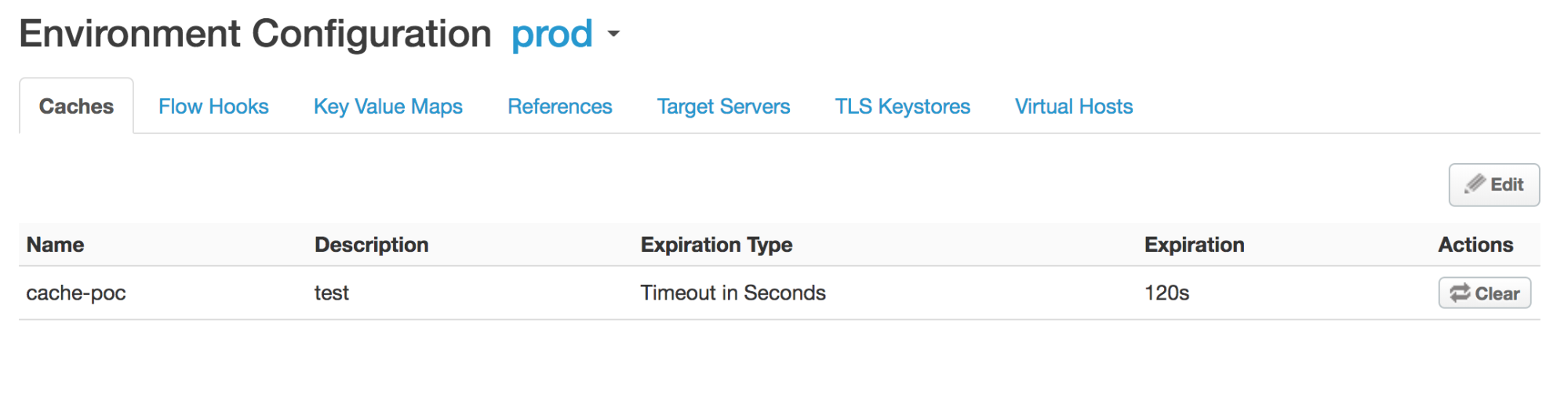
itemscacheएनवायरमेंट मेंprodनाम की कैश मेमोरी तय नहीं की गई है. इसलिए, आपको यह गड़बड़ी दिखेगी:Invalid cache resource reference does_not_exist in Step definition Response-Cache-1. Context Revision:2;APIProxy:ResponseCache;Organization:kkalckstein-eval;Environment:prod
रिज़ॉल्यूशन
पक्का करें कि <CacheResource> एलिमेंट में दिया गया कैश मेमोरी का नाम, उस एनवायरमेंट में बनाया गया हो जहां आपको एपीआई प्रॉक्सी को डिप्लॉय करना है.
कैश बनाने के तरीके के बारे में जानने के लिए, एनवायरमेंट कैश बनाना और उसमें बदलाव करना लेख पढ़ें.
ResponseCacheStepAttachmentNotAllowedReq
गड़बड़ी का मैसेज
Edge यूज़र इंटरफ़ेस (यूआई) या Edge Management API के ज़रिए एपीआई प्रॉक्सी को डिप्लॉय करने पर, यह गड़बड़ी का मैसेज दिखता है:
Error Deploying Revision revision_number to environment
Response cache step definition response_cache_policy_name can not be attached more than once in the request path.
गड़बड़ी के मैसेज का उदाहरण
Error Deploying Revision 2 to test
Response cache step definition Response-Cache-1 can not be attached more than once in the request path.
गड़बड़ी के उदाहरण का स्क्रीनशॉट

वजह
यह गड़बड़ी तब होती है, जब किसी एपीआई प्रॉक्सी के किसी फ़्लो में, एक ही ResponseCache नीति को कई अनुरोध पाथ से जोड़ा जाता है.
उदाहरण के लिए, अगर आपने Proxy और Target एंडपॉइंट, दोनों के अनुरोध प्रीफ़्लो में एक ही ResponseCache नीति अटैच की है, तो यह गड़बड़ी होती है.
संक्रमण की जांच
उस ResponseCache नीति का नाम पता करें जिसे एक से ज़्यादा बार अटैच किया गया है. यह जानकारी, गड़बड़ी के मैसेज में देखी जा सकती है. उदाहरण के लिए, यहां दी गई गड़बड़ी में ResponseCache नीति का नाम Response‑Cache‑1 है.
Error Deploying Revision 2 to test
Response cache step definition Response-Cache-1 can not be attached more than once in the request path.
एपीआई प्रॉक्सी के प्रॉक्सी और टारगेट एंडपॉइंट में, गड़बड़ी वाले सभी अनुरोध फ़्लो की जांच करें. अगर एक ही ResponseCache नीति को दो या उससे ज़्यादा अनुरोध फ़्लो में अटैच किया जाता है, तो यह गड़बड़ी की वजह है.
यहां दिए गए उदाहरण में, एक ही ResponseCache नीति
Response-Cache-1को डिफ़ॉल्ट प्रॉक्सी एंडपॉइंट के PreFlow और डिफ़ॉल्ट टारगेट एंडपॉइंट के PreFlow के अनुरोध पाथ में कॉन्फ़िगर किया गया है:<?xml version="1.0" encoding="UTF-8" standalone="yes"?> <ProxyEndpoint name="default"> <Description/> <FaultRules/> <PreFlow name="PreFlow"> <Request> <Step> <Name>Response-Cache-1</Name> </Step> </Request> ... <?xml version="1.0" encoding="UTF-8" standalone="yes"?> <TargetEndpoint name="default"> <Description/> <FaultRules/> <PreFlow name="PreFlow"> <Request/> <Response/> </PreFlow> <PostFlow name="PostFlow"> <Request> <Step> <Name>Response-Cache-1</Name> </Step> </Request> ...
रिज़ॉल्यूशन
पक्का करें कि ResponseCache नीति, एपीआई प्रॉक्सी के सभी फ़्लो में सिर्फ़ एक अनुरोध पाथ से जुड़ी हो.
ऊपर दिखाए गए उदाहरण को ठीक करने के लिए, दोनों अनुरोध फ़्लो में से किसी एक से ResponseCache नीति Response-Cache-1 हटाएं.
ResponseCacheStepAttachmentNotAllowedResp
गड़बड़ी का मैसेज
Edge यूज़र इंटरफ़ेस (यूआई) या Edge Management API के ज़रिए एपीआई प्रॉक्सी को डिप्लॉय करने पर, यह गड़बड़ी का मैसेज दिखता है:
Error Deploying Revision revision_number to environment
Response cache step definition response_cache_policy_name can not be attached more than once in the response path.
गड़बड़ी के मैसेज का उदाहरण
Error Deploying Revision 2 to test
Response cache step definition Response-Cache-1 can not be attached more than once in the response path.
गड़बड़ी के उदाहरण का स्क्रीनशॉट

वजह
यह गड़बड़ी तब होती है, जब किसी एपीआई प्रॉक्सी के किसी भी फ़्लो में, एक ही ResponseCache नीति को कई रिस्पॉन्स पाथ से जोड़ा जाता है.
उदाहरण के लिए, अगर आपने Proxy और Target Endpoint, दोनों के रिस्पॉन्स प्रीफ़्लो में एक ही ResponseCache नीति अटैच की है, तो यह गड़बड़ी होती है.
संक्रमण की जांच
उस ResponseCache नीति का नाम पता करें जिसे एक से ज़्यादा बार अटैच किया गया है. यह जानकारी, गड़बड़ी के मैसेज में देखी जा सकती है. उदाहरण के लिए, यहां दी गई गड़बड़ी में ResponseCache नीति का नाम
Response-Cache-1है.Error Deploying Revision 2 to test Response cache step definition Response-Cache-1 can not be attached more than once in the response path.एपीआई प्रॉक्सी के प्रॉक्सी और टारगेट एंडपॉइंट में, गड़बड़ी वाली सभी अनुरोध प्रोसेस की जांच करें. अगर एक ही ResponseCache नीति को दो या उससे ज़्यादा रिस्पॉन्स फ़्लो में अटैच किया जाता है, तो यह गड़बड़ी की वजह है.
यहां दिए गए उदाहरण में, एक ही ResponseCache नीति
Response-Cache-1को डिफ़ॉल्ट प्रॉक्सी एंडपॉइंट PreFlow और डिफ़ॉल्ट टारगेट एंडपॉइंट PreFlow के रिस्पॉन्स पाथ में कॉन्फ़िगर किया गया है:<?xml version="1.0" encoding="UTF-8" standalone="yes"?> <ProxyEndpoint name="default"> <Description/> <FaultRules/> <PreFlow name="PreFlow"> <Request> <Step> <Name>Response-Cache</Name> </Step> </Request> <Response> <Step> <Name>Response-Cache-1</Name> </Step> </Response> </PreFlow> ... <?xml version="1.0" encoding="UTF-8" standalone="yes"?> <TargetEndpoint name="default"> <Description/> <FaultRules/> <PreFlow name="PreFlow"> <Request/> <Response/> </PreFlow> <PostFlow name="PostFlow"> <Request/> <Response> <Step> <Name>Response-Cache-1</Name> </Step> </Response> </PostFlow> ...
रिज़ॉल्यूशन
पक्का करें कि ResponseCache नीति, एपीआई प्रॉक्सी के सभी फ़्लो में सिर्फ़ एक रिस्पॉन्स पाथ से जुड़ी हो.
ऊपर दिखाए गए उदाहरण को ठीक करने के लिए, दोनों जवाबों में से किसी एक से ResponseCache नीति Response-Cache-1 हटाएं.
InvalidMessagePatternForErrorCode
गड़बड़ी का मैसेज
Edge यूज़र इंटरफ़ेस (यूआई) या Edge Management API के ज़रिए एपीआई प्रॉक्सी को डिप्लॉय करने पर, गड़बड़ी के इनमें से कोई एक मैसेज दिखता है:
Error Deploying Revision revision_number to environment
Invalid message pattern found for error code steps.cache.InvalidSkipCacheLookUpCondition.
या
Error Deploying Revision revision_number to environment
Invalid message pattern found for error code steps.cache.InvalidSkipCachePopulationCondition.
गड़बड़ी के मैसेज का उदाहरण
Error Deploying Revision 2 to prod
Invalid message pattern found for error code steps.cache.InvalidSkipCacheLookUpCondition.
या
Error Deploying Revision 2 to prod
Invalid message pattern found for error code steps.cache.InvalidSkipCachePopulationCondition.
गड़बड़ी के उदाहरण का स्क्रीनशॉट

या

वजह
यह गड़बड़ी तब होती है, जब ResponseCache नीति में मौजूद <SkipCacheLookup> या <SkipCachePopulation> एलिमेंट में कोई अमान्य शर्त शामिल हो.
संक्रमण की जांच
एपीआई प्रॉक्सी में मौजूद सभी ResponseCache नीतियों की जांच करें. साथ ही, यह देखें कि क्या ऐसी कोई नीति है जिसमें
<SkipCacheLookup>और/या<SkipCachePopulation>एलिमेंट के लिए शर्तें तय की गई हैं.देखें कि
<SkipCacheLookup>और/या<SkipCachePopulation>एलिमेंट के लिए बताई गई स्थिति अमान्य है या नहीं. अगर हां, तो गड़बड़ी की वजह यही है.यहां दिए गए उदाहरण में,
<SkipCachePopulation>एलिमेंट, JavaScript ऑपरेटर === का इस्तेमाल करके, वैल्यू और टाइप की जांच करता है. यह अमान्य है.<?xml version="1.0" encoding="UTF-8" standalone="yes"?> <ResponseCache async="false" continueOnError="false" enabled="true" name="Response-Cache-1"> <DisplayName>Response Cache-1</DisplayName> <Properties/> <CacheKey> <Prefix/> <KeyFragment ref="request.uri" type="string"/> </CacheKey> <Scope>Exclusive</Scope> <ExpirySettings> <ExpiryDate/> <TimeOfDay/> <TimeoutInSec ref="">3600</TimeoutInSec> </ExpirySettings> <CacheLookupTimeoutInSeconds>2</CacheLookupTimeoutInSeconds> <SkipCacheLookup>request.header.bypass-cache === "true"</SkipCacheLookup> </ResponseCache>ऑपरेटर
===अमान्य है. इसलिए, आपको यह गड़बड़ी दिखेगी:Invalid message pattern found for error code steps.cache.InvalidSkipCacheLookUpCondition.
रिज़ॉल्यूशन
पक्का करें कि <SkipCacheLookup> और/या <SkipCachePopulation> एलिमेंट के लिए बताई गई शर्त हमेशा मान्य हो.
ऊपर दिखाई गई ResponseCache नीति के उदाहरण को ठीक करने के लिए, <SkipCacheLookup> में बदलाव करके = ऑपरेटर का इस्तेमाल किया जा सकता है:
<?xml version="1.0" encoding="UTF-8" standalone="yes"?>
<ResponseCache async="false" continueOnError="false" enabled="true" name="Response-Cache-1">
    <DisplayName>Response Cache-1</DisplayName>
    <Properties/>
    <CacheKey>
        <Prefix/>
        <KeyFragment ref="request.uri" type="string"/>
    </CacheKey>
    <Scope>Exclusive</Scope>
    <ExpirySettings>
        <ExpiryDate/>
        <TimeOfDay/>
        <TimeoutInSec ref="">3600</TimeoutInSec>
    </ExpirySettings>
    <CacheLookupTimeoutInSeconds>2</CacheLookupTimeoutInSeconds>
    <SkipCacheLookup>request.header.bypass-cache = "true"</SkipCacheLookup>
</ResponseCache>
CacheNotFound
गड़बड़ी का मैसेज
Edge के यूज़र इंटरफ़ेस (यूआई) या Edge Management API के ज़रिए एपीआई प्रॉक्सी को डिप्लॉय करने पर, इस तरह का गड़बड़ी का मैसेज दिखता है. साथ ही, एपीआई प्रॉक्सी के डिप्लॉयमेंट की स्थिति को 'आंशिक रूप से डिप्लॉय किया गया' के तौर पर मार्क किया जाता है:
Error: Cache : cache_resource, not found in organization : organization__environment.
गड़बड़ी के मैसेज का उदाहरण
Error Cache : Response-Cache-1, not found in organization : kkalckstein-eval__prod
वजह
यह गड़बड़ी तब होती है, जब गड़बड़ी के मैसेज में बताई गई कैश मेमोरी को किसी Message Processor कॉम्पोनेंट पर नहीं बनाया गया हो.
रिज़ॉल्यूशन
अगर आप Private Cloud के उपयोगकर्ता हैं, तो यहां दिए गए निर्देशों का पालन करें:
एपीआई प्रॉक्सी डिप्लॉयमेंट की सूची बनाएं और पता लगाएं कि किन मैसेज प्रोसेसर में गड़बड़ी
steps.cache.CacheNotFoundहै.आउटपुट का सैंपल
curl -u $USERID:$USERPASSWORD http://<management-server-host>:8080/v1/organizations/<org-name>/environments/<env-name>/apis/<apiproxy-name>/revisions/<revision-number>/deployments
{
  "aPIProxy" : "ResponseCache",
  "environment" : [ {
    "configuration" : {
      "basePath" : "/",
      "configVersion" : "SHA-512:45d3f39783414d3859bf2dec4135d8f5f9960ee6b2d361db2799c82693a8e3f8b95dbbb37c547eb3c0a3819d8ca51727f390502bcaefdf1f113263521a9023b6",
      "steps" : [ ]
    },
    "name" : "prod",
    "server" : [ {
      "pod" : {
        "name" : "pod1",
        "region" : "us-central1"
      },
      "status" : "deployed",
      "type" : [ "message-processor" ],
      "uUID" : "f2e5e34a-5630-43a9-8fef-48a5b9da76d1"
    }, {
      "pod" : {
        "name" : "pod1",
        "region" : "us-central1"
      },
      "status" : "deployed",
      "type" : [ "message-processor" ],
      "uUID" : "879a6538-a5e0-4503-b142-9cb2b4e0623d"
    }, {
    "error" : "Cache : Response-Cache-1, not found in organization : kkalckstein-eval__prod",
    "errorCode" : "steps.cache.CacheNotFound",
    "status" : "error",
    "type" : [ "message-processor" ],
     "uUID" : "a8f9ce0b-c32d-48a9-b26c-9c75d8bf467d"
},
...
    "state" : "deployed"
  } ],
  "name" : "2",
  "organization" : "kkalckstein-eval"
उस मैसेज प्रोसेसर के यूयूआईडी नोट करें जिसमें आपको गड़बड़ी
steps.cache.CacheNotFoundदिख रही है. यूयूआईडी से मैसेज प्रोसेसर के होस्टनेम/आईपी पते की पहचान करें.किसी मैसेज प्रोसेसर में लॉग इन करें और इस कमांड का इस्तेमाल करके उसे फिर से चालू करें:
apigee-service edge-message-processor restart
अगर आप पब्लिक क्लाउड के उपयोगकर्ता हैं या प्राइवेट क्लाउड में समस्या बनी रहती है, तो मदद पाने के लिए Apigee की सहायता टीम से संपर्क करें.