

คุณกำลังดูเอกสารประกอบของ Apigee Edge
ไปที่เอกสารประกอบของ
Apigee X info
InvalidTimeout
ข้อความแสดงข้อผิดพลาด
การติดตั้งใช้งานพร็อกซี API ผ่าน UI ของ Edge หรือ Edge Management API ล้มเหลวโดยมีข้อความแสดงข้อผิดพลาดนี้
Error Saving Revision revision_number
CacheLookupTimeoutInSeconds value value should be greater than zero.
ตัวอย่างข้อความแสดงข้อผิดพลาด
Error Saving Revision 2
CacheLookupTimeoutInSeconds -1 value should be greater than zero.
ตัวอย่างภาพหน้าจอแสดงข้อผิดพลาด

สาเหตุ
หากตั้งค่าองค์ประกอบ <CacheLookupTimeoutInSeconds> ของนโยบาย ResponseCache เป็นจำนวนลบ การติดตั้งใช้งานพร็อกซี API จะล้มเหลว
เช่น หาก <CacheLookupTimeoutInSeconds> เป็น -1 การติดตั้งใช้งานพร็อกซี API จะล้มเหลว
การวินิจฉัย
ระบุค่าที่ไม่ถูกต้องที่ใช้สำหรับองค์ประกอบ
<CacheLookupTimeoutInSeconds>ในนโยบาย ResponseCache คุณดูข้อมูลนี้ได้ในข้อความแสดงข้อผิดพลาด ตัวอย่างเช่น ในข้อผิดพลาดต่อไปนี้ ค่าที่ไม่ถูกต้องที่ใช้สำหรับองค์ประกอบ<CacheLookupTimeoutInSeconds>คือ-1CacheLookupTimeoutInSeconds -1 value should be greater than zero.ตรวจสอบนโยบาย ResponseCache ทั้งหมดในพร็อกซี API ที่เฉพาะเจาะจงซึ่งเกิดข้อผิดพลาด อาจมีนโยบาย ResponseCache อย่างน้อย 1 รายการที่ระบุองค์ประกอบ
<CacheLookupTimeoutInSeconds>ตัวอย่างเช่น การกำหนดค่านโยบายต่อไปนี้จะตั้งค่า
<CacheLookupTimeoutInSeconds>เป็น-1ซึ่งตรงกับสิ่งที่อยู่ในข้อความแสดงข้อผิดพลาด<?xml version="1.0" encoding="UTF-8" standalone="yes"?> <ResponseCache async="false" continueOnError="false" enabled="true" name="Response-Cache-1"> <DisplayName>Response Cache-1</DisplayName> <Properties/> <CacheKey> <Prefix/> <KeyFragment ref="request.uri" type="string"/> </CacheKey> <Scope>Exclusive</Scope> <ExpirySettings> <ExpiryDate/> <TimeOfDay/> <TimeoutInSec ref="">3600</TimeoutInSec> </ExpirySettings> <CacheLookupTimeoutInSeconds>-1</CacheLookupTimeoutInSeconds> </ResponseCache>หากระบุ
<CacheLookupTimeoutInSeconds>เป็นจำนวนเต็มลบ นั่นคือสาเหตุของข้อผิดพลาด
ความละเอียด
ตรวจสอบว่าค่าขององค์ประกอบ <CacheLookupTimeoutInSeconds> ของนโยบาย ResponseCache ระบุเป็นจำนวนเต็มที่ไม่ติดลบเสมอ
หากต้องการแก้ไขนโยบาย ResponseCache ตัวอย่างที่แสดงด้านบน คุณสามารถแก้ไข <CacheLookupTimeoutInSeconds> element เป็น 30
<?xml version="1.0" encoding="UTF-8" standalone="yes"?>
<ResponseCache async="false" continueOnError="false" enabled="true" name="Response-Cache-1">
    <DisplayName>Response Cache-1</DisplayName>
    <Properties/>
    <CacheKey>
        <Prefix/>
        <KeyFragment ref="request.uri" type="string"/>
    </CacheKey>
    <Scope>Exclusive</Scope>
    <ExpirySettings>
        <ExpiryDate/>
        <TimeOfDay/>
        <TimeoutInSec ref="">3600</TimeoutInSec>
    </ExpirySettings>
    <CacheLookupTimeoutInSeconds>30</CacheLookupTimeoutInSeconds>
</ResponseCache>
InvalidCacheResourceReference
ข้อความแสดงข้อผิดพลาด
การติดตั้งใช้งานพร็อกซี API ผ่าน UI ของ Edge หรือ Edge Management API ล้มเหลวโดยมีข้อความแสดงข้อผิดพลาดนี้
Error Deploying Revision revision_number to environment
Invalid cache resource reference cache_resource in Step definition response_cache_policy_name. Context Revision:revision_number;APIProxy:ResponseCache;Organization:organization;Environment:environment
ตัวอย่างข้อความแสดงข้อผิดพลาด
Error Deploying Revision 2 to prod
Invalid cache resource reference itemscache in Step definition ItemsResponseCache. Context Revision:2;APIProxy:StoresInventory;Organization:kkalckstein-eval;Environment:prod
ตัวอย่างภาพหน้าจอแสดงข้อผิดพลาด

สาเหตุ
ข้อผิดพลาดนี้จะเกิดขึ้นหากตั้งค่าองค์ประกอบ <CacheResource> ในนโยบาย ResponseCache เป็นชื่อที่ไม่มีอยู่ในสภาพแวดล้อมที่กำลังติดตั้งใช้งานพร็อกซี API
การวินิจฉัย
ระบุแคชที่ไม่ถูกต้องที่ใช้ในองค์ประกอบ
<CacheResource>ของนโยบายแคชการตอบกลับและสภาพแวดล้อมที่เกิดข้อผิดพลาด คุณจะเห็นทั้ง 2 รายการนี้ในข้อความแสดงข้อผิดพลาด เช่น ในข้อผิดพลาดต่อไปนี้ ชื่อของแคชที่ไม่ถูกต้องคือitemscacheและชื่อสภาพแวดล้อมคือprodInvalid cache resource reference itemscache in Step definition ItemsResponseCache. Context Revision:2;APIProxy:StoresInventory;Organization:kkalckstein-eval;Environment:prodตรวจสอบนโยบาย ResponseCache ทั้งหมดในพร็อกซี API ที่เฉพาะเจาะจงซึ่งเกิดข้อผิดพลาด ระบุนโยบาย ResponseCache ที่เฉพาะเจาะจงซึ่งมีการระบุแคชที่ไม่ถูกต้อง (ระบุในขั้นตอนที่ 1) ในองค์ประกอบ
<CacheResource>ตัวอย่างเช่น นโยบายต่อไปนี้ระบุค่าของ
<CacheResource>เป็นitemscacheซึ่งตรงกับค่าในข้อความแสดงข้อผิดพลาด<?xml version="1.0" encoding="UTF-8" standalone="yes"?> <ResponseCache async="false" continueOnError="false" enabled="true" name="ItemsResponseCache"> <DisplayName>ItemsResponseCache</DisplayName> <Properties/> <CacheKey> <Prefix/> <KeyFragment ref="request.uri" type="string"/> </CacheKey> <CacheResource>itemscache</CacheResource> <Scope>Exclusive</Scope> <ExpirySettings> <ExpiryDate/> <TimeOfDay/> <TimeoutInSec ref="">3600</TimeoutInSec> </ExpirySettings> <SkipCacheLookup/> <SkipCachePopulation/> </ResponseCache>ตรวจสอบว่าได้กำหนดแคช (กำหนดในขั้นตอนที่ 2) ในสภาพแวดล้อมที่เฉพาะเจาะจง (ระบุในขั้นตอนที่ 1) แล้ว
ใน UI ของ Edge ให้ไปที่ APIs > Environment Configuration แล้วตรวจสอบว่าแคชมีอยู่ในแท็บแคชในสภาพแวดล้อมที่เฉพาะเจาะจงหรือไม่ หากไม่มีแคช แสดงว่าแคชเป็นสาเหตุของข้อผิดพลาด
ตัวอย่างเช่น ในภาพหน้าจอด้านล่าง คุณจะเห็นว่าแคชชื่อ
itemscacheไม่มีอยู่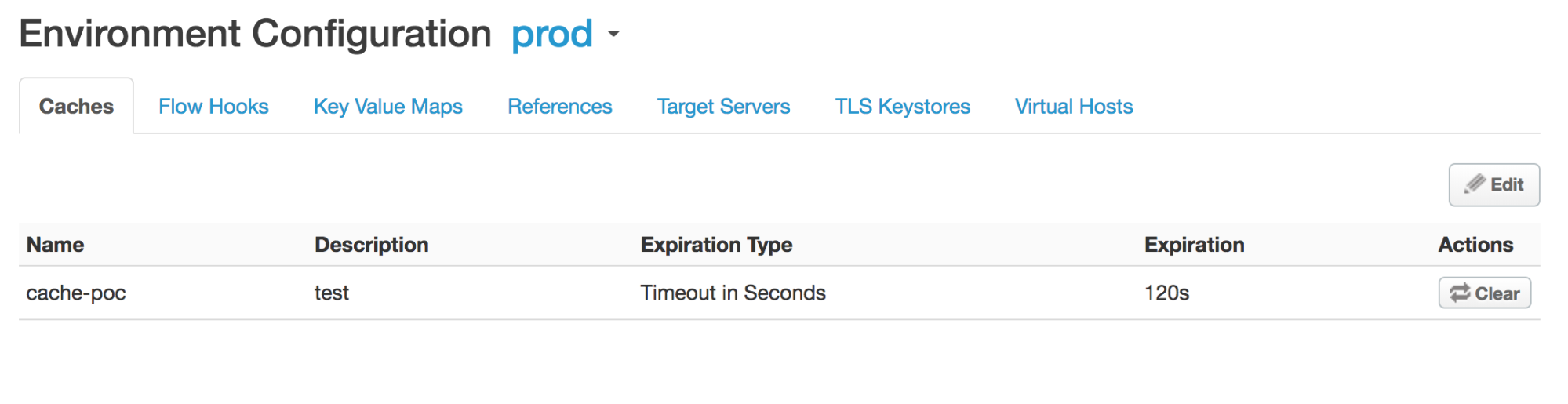
เนื่องจากไม่ได้กำหนดแคชชื่อ
itemscacheไว้ในสภาพแวดล้อมprodคุณจึงได้รับข้อผิดพลาดต่อไปนี้Invalid cache resource reference does_not_exist in Step definition Response-Cache-1. Context Revision:2;APIProxy:ResponseCache;Organization:kkalckstein-eval;Environment:prod
ความละเอียด
ตรวจสอบว่าได้สร้างชื่อแคชที่ระบุในองค์ประกอบ <CacheResource> ในสภาพแวดล้อมที่คุณต้องการติดตั้งใช้งานพร็อกซี API
ดูข้อมูลเกี่ยวกับวิธีสร้างแคชได้ที่การสร้างและแก้ไขแคชสภาพแวดล้อม
ResponseCacheStepAttachmentNotAllowedReq
ข้อความแสดงข้อผิดพลาด
การติดตั้งใช้งานพร็อกซี API ผ่าน UI ของ Edge หรือ Edge Management API ล้มเหลวโดยมีข้อความแสดงข้อผิดพลาดนี้
Error Deploying Revision revision_number to environment
Response cache step definition response_cache_policy_name can not be attached more than once in the request path.
ตัวอย่างข้อความแสดงข้อผิดพลาด
Error Deploying Revision 2 to test
Response cache step definition Response-Cache-1 can not be attached more than once in the request path.
ตัวอย่างภาพหน้าจอแสดงข้อผิดพลาด

สาเหตุ
ข้อผิดพลาดนี้เกิดขึ้นหากมีการแนบนโยบาย ResponseCache เดียวกันกับเส้นทางการขอหลายเส้นทางภายในโฟลว์ของพร็อกซี API
เช่น หากคุณมีนโยบาย ResponseCache เดียวกันที่แนบใน Preflow ของคำขอของทั้ง Proxy และ Target Endpoint ข้อผิดพลาดนี้จะเกิดขึ้น
การวินิจฉัย
ระบุชื่อของนโยบาย ResponseCache ที่แนบมากกว่า 1 ครั้ง คุณดูข้อมูลนี้ได้ในข้อความแสดงข้อผิดพลาด เช่น ในข้อผิดพลาดต่อไปนี้ ชื่อของนโยบาย ResponseCache คือ Response‑Cache‑1
Error Deploying Revision 2 to test
Response cache step definition Response-Cache-1 can not be attached more than once in the request path.
ตรวจสอบโฟลว์คำขอทั้งหมดในพร็อกซีและปลายทางเป้าหมายของ API Proxy ที่เกิดข้อผิดพลาด หากมีการแนบนโยบาย ResponseCache เดียวกันในโฟลว์คำขอตั้งแต่ 2 รายการขึ้นไป นั่นคือสาเหตุของข้อผิดพลาด
ในตัวอย่างต่อไปนี้ มีการกำหนดค่านโยบาย ResponseCache เดียวกัน
Response-Cache-1ในเส้นทางการขอของ PreFlow ของพร็อกซีปลายทางเริ่มต้น และ PreFlow ของปลายทางเป้าหมายเริ่มต้น<?xml version="1.0" encoding="UTF-8" standalone="yes"?> <ProxyEndpoint name="default"> <Description/> <FaultRules/> <PreFlow name="PreFlow"> <Request> <Step> <Name>Response-Cache-1</Name> </Step> </Request> ... <?xml version="1.0" encoding="UTF-8" standalone="yes"?> <TargetEndpoint name="default"> <Description/> <FaultRules/> <PreFlow name="PreFlow"> <Request/> <Response/> </PreFlow> <PostFlow name="PostFlow"> <Request> <Step> <Name>Response-Cache-1</Name> </Step> </Request> ...
ความละเอียด
ตรวจสอบว่าได้แนบนโยบาย ResponseCache ไว้กับเส้นทางการส่งคำขอเพียงเส้นทางเดียวในทุกโฟลว์ของพร็อกซี API
หากต้องการแก้ไขตัวอย่างที่แสดงด้านบน ให้นำนโยบาย ResponseCache Response-Cache-1 ออกจากโฟลว์คำขอใดคำขอหนึ่งใน 2 โฟลว์
ResponseCacheStepAttachmentNotAllowedResp
ข้อความแสดงข้อผิดพลาด
การติดตั้งใช้งานพร็อกซี API ผ่าน UI ของ Edge หรือ Edge Management API ล้มเหลวโดยมีข้อความแสดงข้อผิดพลาดนี้
Error Deploying Revision revision_number to environment
Response cache step definition response_cache_policy_name can not be attached more than once in the response path.
ตัวอย่างข้อความแสดงข้อผิดพลาด
Error Deploying Revision 2 to test
Response cache step definition Response-Cache-1 can not be attached more than once in the response path.
ตัวอย่างภาพหน้าจอแสดงข้อผิดพลาด

สาเหตุ
ข้อผิดพลาดนี้เกิดขึ้นหากมีการแนบนโยบาย ResponseCache เดียวกันกับเส้นทางการตอบกลับหลายเส้นทางภายในโฟลว์ของพร็อกซี API
เช่น หากคุณมีนโยบาย ResponseCache เดียวกันที่แนบไว้ใน Preflow ของการตอบกลับของทั้ง Proxy และ Target Endpoint ข้อผิดพลาดนี้จะเกิดขึ้น
การวินิจฉัย
ระบุชื่อของนโยบาย ResponseCache ที่แนบมากกว่า 1 ครั้ง คุณดูข้อมูลนี้ได้ในข้อความแสดงข้อผิดพลาด ตัวอย่างเช่น ในข้อผิดพลาดต่อไปนี้ ชื่อของนโยบาย ResponseCache คือ
Response-Cache-1Error Deploying Revision 2 to test Response cache step definition Response-Cache-1 can not be attached more than once in the response path.ตรวจสอบโฟลว์คำขอทั้งหมดในพร็อกซีและปลายทางเป้าหมายของ API Proxy ที่เกิดข้อผิดพลาด หากมีการแนบนโยบาย ResponseCache เดียวกันในโฟลว์การตอบกลับอย่างน้อย 2 รายการ แสดงว่านั่นคือสาเหตุของข้อผิดพลาด
ในตัวอย่างต่อไปนี้ มีการกำหนดค่านโยบาย ResponseCache เดียวกัน
Response-Cache-1ในเส้นทางการตอบกลับของ PreFlow ของพร็อกซีปลายทางเริ่มต้น และ PreFlow ของปลายทางเป้าหมายเริ่มต้น<?xml version="1.0" encoding="UTF-8" standalone="yes"?> <ProxyEndpoint name="default"> <Description/> <FaultRules/> <PreFlow name="PreFlow"> <Request> <Step> <Name>Response-Cache</Name> </Step> </Request> <Response> <Step> <Name>Response-Cache-1</Name> </Step> </Response> </PreFlow> ... <?xml version="1.0" encoding="UTF-8" standalone="yes"?> <TargetEndpoint name="default"> <Description/> <FaultRules/> <PreFlow name="PreFlow"> <Request/> <Response/> </PreFlow> <PostFlow name="PostFlow"> <Request/> <Response> <Step> <Name>Response-Cache-1</Name> </Step> </Response> </PostFlow> ...
ความละเอียด
ตรวจสอบว่าได้แนบนโยบาย ResponseCache ไว้กับเส้นทางการตอบกลับเพียงเส้นทางเดียวในทุกโฟลว์ของ API Proxy
หากต้องการแก้ไขตัวอย่างที่แสดงด้านบน ให้นำนโยบาย ResponseCache Response-Cache-1 ออกจากเส้นทางการตอบกลับ 2 เส้นทาง
InvalidMessagePatternForErrorCode
ข้อความแสดงข้อผิดพลาด
การติดตั้งใช้งานพร็อกซี API ผ่าน UI ของ Edge หรือ Edge Management API จะล้มเหลวพร้อมข้อความแสดงข้อผิดพลาดอย่างใดอย่างหนึ่งต่อไปนี้
Error Deploying Revision revision_number to environment
Invalid message pattern found for error code steps.cache.InvalidSkipCacheLookUpCondition.
หรือ
Error Deploying Revision revision_number to environment
Invalid message pattern found for error code steps.cache.InvalidSkipCachePopulationCondition.
ตัวอย่างข้อความแสดงข้อผิดพลาด
Error Deploying Revision 2 to prod
Invalid message pattern found for error code steps.cache.InvalidSkipCacheLookUpCondition.
หรือ
Error Deploying Revision 2 to prod
Invalid message pattern found for error code steps.cache.InvalidSkipCachePopulationCondition.
ตัวอย่างภาพหน้าจอแสดงข้อผิดพลาด

หรือ

สาเหตุ
ข้อผิดพลาดนี้เกิดขึ้นหากองค์ประกอบ <SkipCacheLookup> หรือ <SkipCachePopulation> ในนโยบาย ResponseCache มีเงื่อนไขที่ไม่ถูกต้อง
การวินิจฉัย
ตรวจสอบนโยบาย ResponseCache ทั้งหมดใน API Proxy ที่เกิดข้อผิดพลาด และดูว่ามีนโยบายใดบ้างที่มีการระบุเงื่อนไขสำหรับองค์ประกอบ
<SkipCacheLookup>และ/หรือ<SkipCachePopulation>ตรวจสอบว่าเงื่อนไขที่ระบุสำหรับองค์ประกอบ
<SkipCacheLookup>และ/หรือ<SkipCachePopulation>ไม่ถูกต้อง หากใช่ แสดงว่านั่นคือสาเหตุของข้อผิดพลาดในตัวอย่างต่อไปนี้
<SkipCachePopulation>element ใช้ตัวดำเนินการ JavaScript === เพื่อตรวจสอบค่าและประเภทที่เท่ากัน ซึ่งไม่ถูกต้อง<?xml version="1.0" encoding="UTF-8" standalone="yes"?> <ResponseCache async="false" continueOnError="false" enabled="true" name="Response-Cache-1"> <DisplayName>Response Cache-1</DisplayName> <Properties/> <CacheKey> <Prefix/> <KeyFragment ref="request.uri" type="string"/> </CacheKey> <Scope>Exclusive</Scope> <ExpirySettings> <ExpiryDate/> <TimeOfDay/> <TimeoutInSec ref="">3600</TimeoutInSec> </ExpirySettings> <CacheLookupTimeoutInSeconds>2</CacheLookupTimeoutInSeconds> <SkipCacheLookup>request.header.bypass-cache === "true"</SkipCacheLookup> </ResponseCache>เนื่องจากตัวดำเนินการ
===ไม่ถูกต้อง คุณจึงได้รับข้อผิดพลาดต่อไปนี้Invalid message pattern found for error code steps.cache.InvalidSkipCacheLookUpCondition.
ความละเอียด
ตรวจสอบว่าสภาพสินค้าที่ระบุสำหรับองค์ประกอบ <SkipCacheLookup> และ/หรือ <SkipCachePopulation> ถูกต้องเสมอ
หากต้องการแก้ไขนโยบาย ResponseCache ตัวอย่างที่แสดงด้านบน คุณสามารถแก้ไข <SkipCacheLookup> เพื่อใช้โอเปอเรเตอร์ = ได้ดังนี้
<?xml version="1.0" encoding="UTF-8" standalone="yes"?>
<ResponseCache async="false" continueOnError="false" enabled="true" name="Response-Cache-1">
    <DisplayName>Response Cache-1</DisplayName>
    <Properties/>
    <CacheKey>
        <Prefix/>
        <KeyFragment ref="request.uri" type="string"/>
    </CacheKey>
    <Scope>Exclusive</Scope>
    <ExpirySettings>
        <ExpiryDate/>
        <TimeOfDay/>
        <TimeoutInSec ref="">3600</TimeoutInSec>
    </ExpirySettings>
    <CacheLookupTimeoutInSeconds>2</CacheLookupTimeoutInSeconds>
    <SkipCacheLookup>request.header.bypass-cache = "true"</SkipCacheLookup>
</ResponseCache>
CacheNotFound
ข้อความแสดงข้อผิดพลาด
การติดตั้งใช้งานพร็อกซี API ผ่าน UI ของ Edge หรือ Edge Management API จะส่งผลให้เกิดข้อความแสดงข้อผิดพลาดเช่นนี้ และระบบจะทำเครื่องหมายสถานะการติดตั้งใช้งานพร็อกซี API ว่าติดตั้งใช้งานบางส่วน
Error: Cache : cache_resource, not found in organization : organization__environment.
ตัวอย่างข้อความแสดงข้อผิดพลาด
Error Cache : Response-Cache-1, not found in organization : kkalckstein-eval__prod
สาเหตุ
ข้อผิดพลาดนี้จะเกิดขึ้นหากไม่ได้สร้างแคชที่เฉพาะเจาะจงซึ่งระบุไว้ในข้อความแสดงข้อผิดพลาดในคอมโพเนนต์ Message Processor ที่เฉพาะเจาะจง
ความละเอียด
หากคุณเป็นผู้ใช้ Private Cloud ให้ทำตามวิธีการด้านล่าง
แสดงการติดตั้งใช้งานพร็อกซี API และระบุ Message Processor ที่มีข้อผิดพลาด
steps.cache.CacheNotFoundตัวอย่างเอาต์พุต
curl -u $USERID:$USERPASSWORD http://<management-server-host>:8080/v1/organizations/<org-name>/environments/<env-name>/apis/<apiproxy-name>/revisions/<revision-number>/deployments
{
  "aPIProxy" : "ResponseCache",
  "environment" : [ {
    "configuration" : {
      "basePath" : "/",
      "configVersion" : "SHA-512:45d3f39783414d3859bf2dec4135d8f5f9960ee6b2d361db2799c82693a8e3f8b95dbbb37c547eb3c0a3819d8ca51727f390502bcaefdf1f113263521a9023b6",
      "steps" : [ ]
    },
    "name" : "prod",
    "server" : [ {
      "pod" : {
        "name" : "pod1",
        "region" : "us-central1"
      },
      "status" : "deployed",
      "type" : [ "message-processor" ],
      "uUID" : "f2e5e34a-5630-43a9-8fef-48a5b9da76d1"
    }, {
      "pod" : {
        "name" : "pod1",
        "region" : "us-central1"
      },
      "status" : "deployed",
      "type" : [ "message-processor" ],
      "uUID" : "879a6538-a5e0-4503-b142-9cb2b4e0623d"
    }, {
    "error" : "Cache : Response-Cache-1, not found in organization : kkalckstein-eval__prod",
    "errorCode" : "steps.cache.CacheNotFound",
    "status" : "error",
    "type" : [ "message-processor" ],
     "uUID" : "a8f9ce0b-c32d-48a9-b26c-9c75d8bf467d"
},
...
    "state" : "deployed"
  } ],
  "name" : "2",
  "organization" : "kkalckstein-eval"
จด UUID ของ Message Processor ที่คุณพบข้อผิดพลาด
steps.cache.CacheNotFoundระบุชื่อโฮสต์/ที่อยู่ IP ของ Message Processor จาก UUIDเข้าสู่ระบบ Message Processor ที่เฉพาะเจาะจงแล้วรีสตาร์ทโดยใช้คำสั่งต่อไปนี้
apigee-service edge-message-processor restart
หากคุณเป็นผู้ใช้ Public Cloud หรือหากยังพบปัญหาใน Private Cloud โปรดติดต่อทีมสนับสนุนของ Apigee เพื่อขอรับความช่วยเหลือ