

Apigee Edge belgelerini görüntülüyorsunuz.
Apigee X belgelerine gidin. bilgi
InvalidTimeout
Hata Mesajı
API proxy'sinin Edge kullanıcı arayüzü veya Edge Management API aracılığıyla dağıtımı şu hata mesajıyla başarısız oluyor:
Error Saving Revision revision_number
CacheLookupTimeoutInSeconds value value should be greater than zero.
Örnek hata mesajı
Error Saving Revision 2
CacheLookupTimeoutInSeconds -1 value should be greater than zero.
Örnek hata ekran görüntüsü

Neden
ResponseCache politikasının <CacheLookupTimeoutInSeconds> öğesi negatif bir sayıya ayarlanırsa API proxy'sinin dağıtımı başarısız olur.
Örneğin, <CacheLookupTimeoutInSeconds> -1 ise API proxy'sinin dağıtımı başarısız olur.
Teşhis
ResponseCache politikasında
<CacheLookupTimeoutInSeconds>öğesi için kullanılan geçersiz değeri belirleyin. Bu bilgileri hata mesajında bulabilirsiniz. Örneğin, aşağıdaki hatada<CacheLookupTimeoutInSeconds>öğesi için kullanılan geçersiz değer-1'dir:CacheLookupTimeoutInSeconds -1 value should be greater than zero.Hatayı içeren API proxy'sindeki tüm ResponseCache politikalarını inceleyin.
<CacheLookupTimeoutInSeconds>öğesinin belirtildiği bir veya daha fazla ResponseCache politikası olabilir.Örneğin, aşağıdaki politika yapılandırması
<CacheLookupTimeoutInSeconds>değerini-1olarak ayarlar. Bu değer, hata mesajındaki değerle eşleşir:<?xml version="1.0" encoding="UTF-8" standalone="yes"?> <ResponseCache async="false" continueOnError="false" enabled="true" name="Response-Cache-1"> <DisplayName>Response Cache-1</DisplayName> <Properties/> <CacheKey> <Prefix/> <KeyFragment ref="request.uri" type="string"/> </CacheKey> <Scope>Exclusive</Scope> <ExpirySettings> <ExpiryDate/> <TimeOfDay/> <TimeoutInSec ref="">3600</TimeoutInSec> </ExpirySettings> <CacheLookupTimeoutInSeconds>-1</CacheLookupTimeoutInSeconds> </ResponseCache><CacheLookupTimeoutInSeconds>negatif bir tam sayı olarak belirtilmişse hatanın nedeni budur.
Çözünürlük
ResponseCache politikasının <CacheLookupTimeoutInSeconds> öğesinin değerinin her zaman sıfırdan büyük bir tam sayı olarak belirtildiğinden emin olun.
Yukarıda gösterilen ResponseCache politikasını düzeltmek için <CacheLookupTimeoutInSeconds> element değerini 30 olarak değiştirebilirsiniz.
<?xml version="1.0" encoding="UTF-8" standalone="yes"?>
<ResponseCache async="false" continueOnError="false" enabled="true" name="Response-Cache-1">
    <DisplayName>Response Cache-1</DisplayName>
    <Properties/>
    <CacheKey>
        <Prefix/>
        <KeyFragment ref="request.uri" type="string"/>
    </CacheKey>
    <Scope>Exclusive</Scope>
    <ExpirySettings>
        <ExpiryDate/>
        <TimeOfDay/>
        <TimeoutInSec ref="">3600</TimeoutInSec>
    </ExpirySettings>
    <CacheLookupTimeoutInSeconds>30</CacheLookupTimeoutInSeconds>
</ResponseCache>
InvalidCacheResourceReference
Hata Mesajı
API proxy'sinin Edge kullanıcı arayüzü veya Edge Management API aracılığıyla dağıtımı şu hata mesajıyla başarısız oluyor:
Error Deploying Revision revision_number to environment
Invalid cache resource reference cache_resource in Step definition response_cache_policy_name. Context Revision:revision_number;APIProxy:ResponseCache;Organization:organization;Environment:environment
Örnek hata mesajı
Error Deploying Revision 2 to prod
Invalid cache resource reference itemscache in Step definition ItemsResponseCache. Context Revision:2;APIProxy:StoresInventory;Organization:kkalckstein-eval;Environment:prod
Örnek hata ekran görüntüsü

Neden
Bu hata, ResponseCache politikasındaki <CacheResource> öğesi, API proxy'sinin dağıtıldığı ortamda bulunmayan bir ada ayarlanırsa oluşur.
Teşhis
Yanıt önbelleği politikasının
<CacheResource>öğesinde kullanılan geçersiz önbelleği ve hatanın oluştuğu ortamı belirleyin. Bu öğelerin ikisini de hata mesajında bulabilirsiniz. Örneğin, aşağıdaki hatada geçersiz önbelleğin adıitemscache, ortamın adı iseprod'dir.Invalid cache resource reference itemscache in Step definition ItemsResponseCache. Context Revision:2;APIProxy:StoresInventory;Organization:kkalckstein-eval;Environment:prodHatayı içeren API proxy'sindeki tüm ResponseCache politikalarını inceleyin. Geçersiz önbelleğin (1. adımda tanımlanan)
<CacheResource>öğesinde belirtildiği ResponseCache politikasını belirleyin.Örneğin, aşağıdaki politika
<CacheResource>değeriniitemscacheolarak belirtir. Bu değer, hata mesajındaki değerle eşleşir:<?xml version="1.0" encoding="UTF-8" standalone="yes"?> <ResponseCache async="false" continueOnError="false" enabled="true" name="ItemsResponseCache"> <DisplayName>ItemsResponseCache</DisplayName> <Properties/> <CacheKey> <Prefix/> <KeyFragment ref="request.uri" type="string"/> </CacheKey> <CacheResource>itemscache</CacheResource> <Scope>Exclusive</Scope> <ExpirySettings> <ExpiryDate/> <TimeOfDay/> <TimeoutInSec ref="">3600</TimeoutInSec> </ExpirySettings> <SkipCacheLookup/> <SkipCachePopulation/> </ResponseCache>Önbelleğin (2. adımda belirlenir) belirli bir ortamda (1. adımda tanımlanır) tanımlanıp tanımlanmadığını doğrulayın.
Edge kullanıcı arayüzünde APIs > Environment Configuration'a (API'ler > Ortam Yapılandırması) gidin ve belirli ortamdaki Caches (Önbellekler) sekmesinde önbelleğin olup olmadığını kontrol edin. Önbellek yoksa hatanın nedeni budur.
Örneğin, aşağıdaki ekran görüntüsünde
itemscacheadlı önbelleğin mevcut olmadığını görebilirsiniz.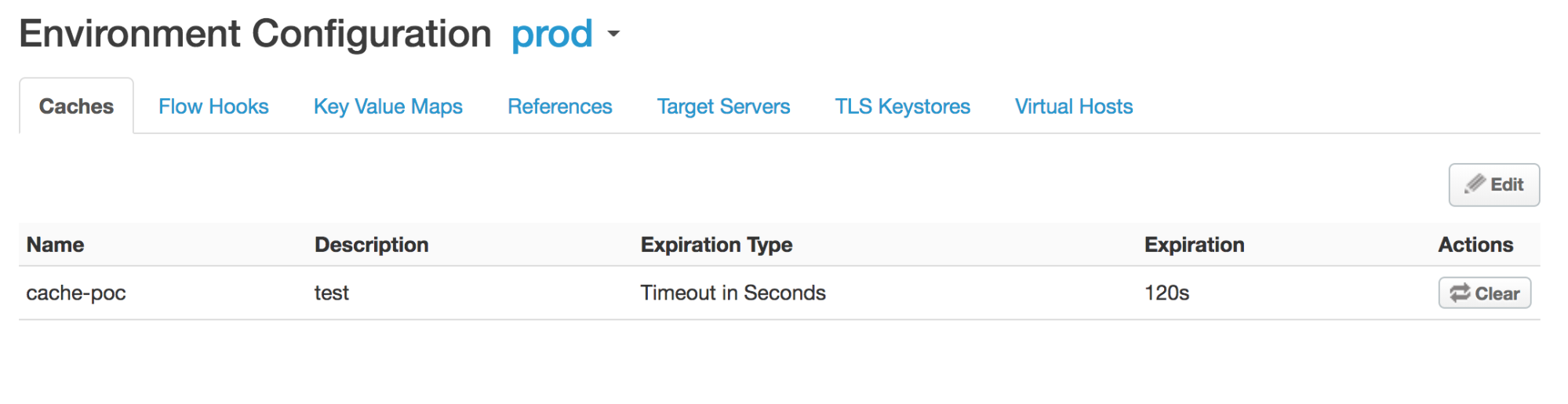
itemscacheadlı önbellek,prodortamında tanımlanmadığı için şu hatayı alırsınız:Invalid cache resource reference does_not_exist in Step definition Response-Cache-1. Context Revision:2;APIProxy:ResponseCache;Organization:kkalckstein-eval;Environment:prod
Çözünürlük
<CacheResource> öğesinde belirtilen önbellek adının, API proxy'sini dağıtmak istediğiniz ortamda oluşturulduğundan emin olun.
Önbelleği oluşturma hakkında bilgi için Ortam önbelleği oluşturma ve düzenleme başlıklı makaleyi inceleyin.
ResponseCacheStepAttachmentNotAllowedReq
Hata Mesajı
API proxy'sinin Edge kullanıcı arayüzü veya Edge Management API aracılığıyla dağıtımı şu hata mesajıyla başarısız oluyor:
Error Deploying Revision revision_number to environment
Response cache step definition response_cache_policy_name can not be attached more than once in the request path.
Örnek hata mesajı
Error Deploying Revision 2 to test
Response cache step definition Response-Cache-1 can not be attached more than once in the request path.
Örnek hata ekran görüntüsü

Neden
Bu hata, bir API proxy'sinin herhangi bir akışındaki birden fazla istek yoluna aynı ResponseCache politikası eklenirse oluşur.
Örneğin, hem proxy hem de hedef uç noktaların istek öncesi akışında aynı ResponseCache politikası eklenmişse bu hata oluşur.
Teşhis
Birden fazla kez eklenen ResponseCache politikasının adını belirleyin. Bu bilgileri hata mesajında bulabilirsiniz. Örneğin, aşağıdaki hatada ResponseCache politikasının adı Response‑Cache‑1'dir.
Error Deploying Revision 2 to test
Response cache step definition Response-Cache-1 can not be attached more than once in the request path.
Hatanın oluştuğu API proxy'sinin Proxy ve Hedef Uç Noktaları'ndaki tüm istek akışlarını inceleyin. Aynı ResponseCache politikası iki veya daha fazla istek akışına eklenmişse hatanın nedeni budur.
Aşağıdaki örnekte, aynı ResponseCache politikası
Response-Cache-1, varsayılan proxy uç noktası PreFlow'unun istek yolunda ve varsayılan hedef uç noktası PreFlow'unda yapılandırılıyor:<?xml version="1.0" encoding="UTF-8" standalone="yes"?> <ProxyEndpoint name="default"> <Description/> <FaultRules/> <PreFlow name="PreFlow"> <Request> <Step> <Name>Response-Cache-1</Name> </Step> </Request> ... <?xml version="1.0" encoding="UTF-8" standalone="yes"?> <TargetEndpoint name="default"> <Description/> <FaultRules/> <PreFlow name="PreFlow"> <Request/> <Response/> </PreFlow> <PostFlow name="PostFlow"> <Request> <Step> <Name>Response-Cache-1</Name> </Step> </Request> ...
Çözünürlük
ResponseCache politikasının, API proxy'sinin tüm akışlarında yalnızca bir istek yoluna eklendiğinden emin olun.
Yukarıda gösterilen örneği düzeltmek için iki istek akışından birinden ResponseCache politikasını Response-Cache-1 kaldırın.
ResponseCacheStepAttachmentNotAllowedResp
Hata Mesajı
API proxy'sinin Edge kullanıcı arayüzü veya Edge Management API aracılığıyla dağıtımı şu hata mesajıyla başarısız oluyor:
Error Deploying Revision revision_number to environment
Response cache step definition response_cache_policy_name can not be attached more than once in the response path.
Örnek hata mesajı
Error Deploying Revision 2 to test
Response cache step definition Response-Cache-1 can not be attached more than once in the response path.
Örnek hata ekran görüntüsü

Neden
Bu hata, bir API proxy'sinin akışlarındaki birden fazla yanıt yoluna aynı ResponseCache politikası eklenirse oluşur.
Örneğin, hem proxy hem de hedef uç noktaların yanıt Preflow'unda aynı ResponseCache politikası eklenmişse bu hata oluşur.
Teşhis
Birden fazla kez eklenen ResponseCache politikasının adını belirleyin. Bu bilgileri hata mesajında bulabilirsiniz. Örneğin, aşağıdaki hatada ResponseCache politikasının adı
Response-Cache-1'dır.Error Deploying Revision 2 to test Response cache step definition Response-Cache-1 can not be attached more than once in the response path.Hatanın oluştuğu API proxy'sinin Proxy ve Hedef Uç Noktaları'ndaki tüm istek akışlarını inceleyin. Aynı ResponseCache politikası iki veya daha fazla yanıt akışına eklenmişse hatanın nedeni budur.
Aşağıdaki örnekte, aynı ResponseCache politikası
Response-Cache-1, varsayılan proxy uç noktası PreFlow'unun ve varsayılan hedef uç noktası PreFlow'unun yanıt yolunda yapılandırılmıştır:<?xml version="1.0" encoding="UTF-8" standalone="yes"?> <ProxyEndpoint name="default"> <Description/> <FaultRules/> <PreFlow name="PreFlow"> <Request> <Step> <Name>Response-Cache</Name> </Step> </Request> <Response> <Step> <Name>Response-Cache-1</Name> </Step> </Response> </PreFlow> ... <?xml version="1.0" encoding="UTF-8" standalone="yes"?> <TargetEndpoint name="default"> <Description/> <FaultRules/> <PreFlow name="PreFlow"> <Request/> <Response/> </PreFlow> <PostFlow name="PostFlow"> <Request/> <Response> <Step> <Name>Response-Cache-1</Name> </Step> </Response> </PostFlow> ...
Çözünürlük
API proxy'sinin tüm akışlarında ResponseCache politikasının yalnızca bir yanıt yoluna eklendiğinden emin olun.
Yukarıda gösterilen örneği düzeltmek için iki yanıt yolundan birinden ResponseCache politikasını Response-Cache-1 kaldırın.
InvalidMessagePatternForErrorCode
Hata Mesajı
API proxy'sinin Edge kullanıcı arayüzü veya Edge Management API aracılığıyla dağıtımı aşağıdaki hata mesajlarından biriyle başarısız oluyor:
Error Deploying Revision revision_number to environment
Invalid message pattern found for error code steps.cache.InvalidSkipCacheLookUpCondition.
VEYA
Error Deploying Revision revision_number to environment
Invalid message pattern found for error code steps.cache.InvalidSkipCachePopulationCondition.
Örnek hata mesajı
Error Deploying Revision 2 to prod
Invalid message pattern found for error code steps.cache.InvalidSkipCacheLookUpCondition.
VEYA
Error Deploying Revision 2 to prod
Invalid message pattern found for error code steps.cache.InvalidSkipCachePopulationCondition.
Örnek hata ekran görüntüsü

VEYA

Neden
Bu hata, ResponseCache politikasındaki <SkipCacheLookup> veya <SkipCachePopulation> öğesi geçersiz bir koşul içeriyorsa oluşur.
Teşhis
Hatanın oluştuğu API proxy'sindeki tüm ResponseCache politikalarını inceleyin ve
<SkipCacheLookup>ve/veya<SkipCachePopulation>öğeleri için koşullar belirtilmiş politikalar olup olmadığını kontrol edin.<SkipCacheLookup>ve/veya<SkipCachePopulation>öğesi için belirtilen durumun geçersiz olup olmadığını kontrol edin. Evetse hatanın nedeni budur.Aşağıdaki örnekte,
<SkipCachePopulation>öğesi eşit değer ve eşit türü kontrol etmek için === JavaScript operatörünü kullanıyor. Bu geçersizdir.<?xml version="1.0" encoding="UTF-8" standalone="yes"?> <ResponseCache async="false" continueOnError="false" enabled="true" name="Response-Cache-1"> <DisplayName>Response Cache-1</DisplayName> <Properties/> <CacheKey> <Prefix/> <KeyFragment ref="request.uri" type="string"/> </CacheKey> <Scope>Exclusive</Scope> <ExpirySettings> <ExpiryDate/> <TimeOfDay/> <TimeoutInSec ref="">3600</TimeoutInSec> </ExpirySettings> <CacheLookupTimeoutInSeconds>2</CacheLookupTimeoutInSeconds> <SkipCacheLookup>request.header.bypass-cache === "true"</SkipCacheLookup> </ResponseCache>===operatörü geçersiz olduğundan şu hatayı alırsınız:Invalid message pattern found for error code steps.cache.InvalidSkipCacheLookUpCondition.
Çözünürlük
<SkipCacheLookup> ve/veya <SkipCachePopulation> öğeleri için belirtilen durumun her zaman geçerli olduğundan emin olun.
Yukarıda gösterilen örnek ResponseCache politikasını düzeltmek için <SkipCacheLookup> öğesini = operatörünü kullanacak şekilde değiştirebilirsiniz:
<?xml version="1.0" encoding="UTF-8" standalone="yes"?>
<ResponseCache async="false" continueOnError="false" enabled="true" name="Response-Cache-1">
    <DisplayName>Response Cache-1</DisplayName>
    <Properties/>
    <CacheKey>
        <Prefix/>
        <KeyFragment ref="request.uri" type="string"/>
    </CacheKey>
    <Scope>Exclusive</Scope>
    <ExpirySettings>
        <ExpiryDate/>
        <TimeOfDay/>
        <TimeoutInSec ref="">3600</TimeoutInSec>
    </ExpirySettings>
    <CacheLookupTimeoutInSeconds>2</CacheLookupTimeoutInSeconds>
    <SkipCacheLookup>request.header.bypass-cache = "true"</SkipCacheLookup>
</ResponseCache>
CacheNotFound
Hata Mesajı
API proxy'sinin Edge kullanıcı arayüzü veya Edge yönetim API'si aracılığıyla dağıtılması, aşağıdaki gibi bir hata mesajına neden olur ve API proxy'sinin dağıtım durumu kısmen dağıtılmış olarak işaretlenir:
Error: Cache : cache_resource, not found in organization : organization__environment.
Örnek hata mesajı
Error Cache : Response-Cache-1, not found in organization : kkalckstein-eval__prod
Neden
Bu hata, hata mesajında belirtilen belirli önbellek, belirli bir Mesaj İşleyici bileşeninde oluşturulmamışsa oluşur.
Çözünürlük
Özel bulut kullanıcısıysanız aşağıdaki talimatları uygulayın:
API proxy dağıtımlarını listeleyin ve hangi mesaj işlemcilerde hata olduğunu belirleyin
steps.cache.CacheNotFound.Örnek Çıkış
curl -u $USERID:$USERPASSWORD http://<management-server-host>:8080/v1/organizations/<org-name>/environments/<env-name>/apis/<apiproxy-name>/revisions/<revision-number>/deployments
{
  "aPIProxy" : "ResponseCache",
  "environment" : [ {
    "configuration" : {
      "basePath" : "/",
      "configVersion" : "SHA-512:45d3f39783414d3859bf2dec4135d8f5f9960ee6b2d361db2799c82693a8e3f8b95dbbb37c547eb3c0a3819d8ca51727f390502bcaefdf1f113263521a9023b6",
      "steps" : [ ]
    },
    "name" : "prod",
    "server" : [ {
      "pod" : {
        "name" : "pod1",
        "region" : "us-central1"
      },
      "status" : "deployed",
      "type" : [ "message-processor" ],
      "uUID" : "f2e5e34a-5630-43a9-8fef-48a5b9da76d1"
    }, {
      "pod" : {
        "name" : "pod1",
        "region" : "us-central1"
      },
      "status" : "deployed",
      "type" : [ "message-processor" ],
      "uUID" : "879a6538-a5e0-4503-b142-9cb2b4e0623d"
    }, {
    "error" : "Cache : Response-Cache-1, not found in organization : kkalckstein-eval__prod",
    "errorCode" : "steps.cache.CacheNotFound",
    "status" : "error",
    "type" : [ "message-processor" ],
     "uUID" : "a8f9ce0b-c32d-48a9-b26c-9c75d8bf467d"
},
...
    "state" : "deployed"
  } ],
  "name" : "2",
  "organization" : "kkalckstein-eval"
Hatayı gözlemlediğiniz mesaj işlemcisinin UUID'lerini not edin
steps.cache.CacheNotFound. UUID'den Mesaj İşleyici'nin ana makine adını/IP adresini belirleyin.İlgili Mesaj İşleyici'ye giriş yapın ve aşağıdaki komutu kullanarak yeniden başlatın:
apigee-service edge-message-processor restart
Public Cloud kullanıcısıysanız veya sorun Private Cloud'da devam ediyorsa yardım için Apigee Destek Ekibi ile iletişime geçin.