

Apigee Edge 문서입니다.
Apigee X 문서로 이동 info
증상
apigee-provision 스크립트를 사용하여 새 조직을 만들 때 스크립트가 오류 메시지와 함께 종료되는 경우가 있습니다. 이 오류가 발생한 후 Edge UI 대시보드 또는 분석 대시보드를 보려고 하면 새로 만든 조직에 대해 보고서가 시간 초과되었습니다라는 오류 메시지가 표시됩니다.
오류 메시지
apigee-provision 스크립트를 실행하여 새 조직을 만들 때 다음 오류 메시지가 표시될 수 있습니다.
!!!! Error !!!!
HTTP STATUS CODE: 400
{
"code" : "dataapi.service.PGFoundInMultipleGroups",
"message" : "dataapi.service.PGFoundInMultipleGroups",
"contexts" : [ ]
}
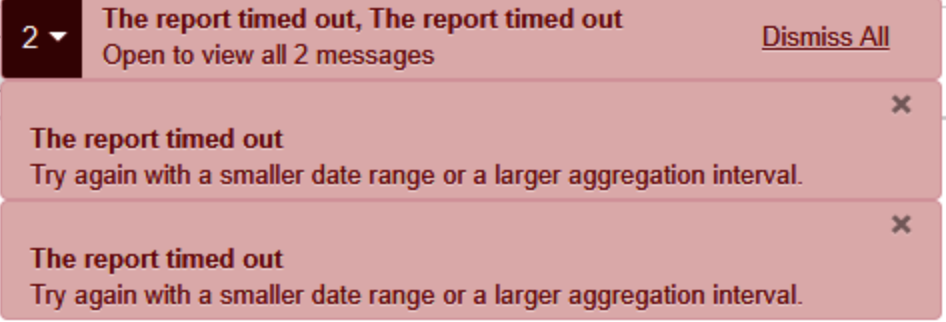
이 오류가 발생하더라도 프로비저닝 스크립트가 종료된 후 새로 생성된 조직에서 작업을 수행할 수 있습니다. 하지만 Edge UI 대시보드를 보려고 하면 새로 만든 조직에 대해 아래 오류 메시지가 표시됩니다.
The report timed out
Try again with a smaller date range or a larger aggregation interval.
다음은 오류를 보여주는 스크린샷입니다.
가능한 원인
| 원인 | 설명 | 다음에 관한 문제 해결 안내 |
| 다중 AX 그룹 설정 | Postgres 서버가 동일한 분석 그룹이 여러 개 생성되었습니다. | Edge Private Cloud 사용자 |
원인: 여러 AX 그룹 설정
진단
다음 분석 그룹 관리 API를 실행하고 출력에 정의된 분석 그룹이 두 개 이상 표시되는지 확인합니다. 예를 들면 다음과 같습니다.
curl -u adminEmail:adminPwd http://<ms_ip>:8080/v1/analytics/groups/ax분석 그룹 2개를 보여주는 샘플 출력
{
 "name":"axgroup-001",
 "properties":{
 },
 "scopes":[
 ],
 "uuids":{
    "qpid-server":[
       "5c1e9690-7b58-499a-a4bb-d54454474b8f",
       "7794c428-e553-4ed2-843d-69f93bbec8a3"
    ],
    "postgres-server":[
       "3b28b790-ec4e-45c5-a8d0-6d6f2088da65:750cd8ba-1799-4dfb-8c74-548010e95e5e"
    ]
 },
 "consumer-groups":[
    {
       "name":"consumer-group-001",
       "consumers":[
          "5c1e9690-7b58-499a-a4bb-d54454474b8f",
          "7794c428-e553-4ed2-843d-69f93bbec8a3"
       ],
       "datastores":[
          "3b28b790-ec4e-45c5-a8d0-6d6f2088da65:750cd8ba-1799-4dfb-8c74-548010e95e5e"
       ],
       "properties":{
       }
    }
 ],
 "data-processors":{
 }
},
{
 "name":"axgroup001",
 "properties":{
    "consumer-type":"ax"
 },
 "scopes":[
    "017pdspoint~dev",
    "010test~dev",
    "019charmo~dev",
    "009gcisearch1~dev",
    "000fj~trial-fjwan",
    "009dekura~dev",
    "008pisa~dev",
    "004fjadrms~dev",
    "018k5billing~dev",
    "004study14~dev",
    "001teama~dev",
    "005specdb~dev",
    "test~dev",
    "000fj~prod-fjwan",
    "012pjweb~dev",
    "020workflow~dev",
    "007ikou~prod-fjwan",
    "003asano~dev",
    "013mims~dev",
    "006studyhas~dev",
    "006efocus~dev",
    "002wfproto~dev",
    "008murahata~dev",
    "016mediaapi~dev",
    "015skillnet~dev",
    "014aclmanager~dev",
    "010fjppei~dev",
    "000fj~trial",
    "003esupport~dev",
    "000fj~prod",
    "005ooi~dev",
    "test~elb1",
    "007fjauth~dev",
    "011osp~dev",
    "002study~dev",
    "999test~dev"
 ],
 "uuids":{
    "qpid-server":[
       "5c1e9690-7b58-499a-a4bb-d54454474b8f",
       "7794c428-e553-4ed2-843d-69f93bbec8a3"
    ],
    "aries-datastore":[
    ],
    "postgres-server":[
       "3b28b790-ec4e-45c5-a8d0-6d6f2088da65:750cd8ba-1799-4dfb-8c74-548010e95e5e"
    ],
    "dw-server":[
    ]
 },
 "consumer-groups":[
    {
       "name":"consumer-group-001",
       "consumers":[
          "5c1e9690-7b58-499a-a4bb-d54454474b8f",
          "7794c428-e553-4ed2-843d-69f93bbec8a3"
       ],
       "datastores":[
          "3b28b790-ec4e-45c5-a8d0-6d6f2088da65:750cd8ba-1799-4dfb-8c74-548010e95e5e"
       ],
       "properties":{
       }
    }
 ],
 "data-processors":{
 }
}
이 출력은 axgroup-001 및 axgroup001이라는 두 개의 분석 그룹이 있음을 보여줍니다.
모든 분석 그룹에 범위가 정의되어 있는지 확인합니다.
위의 샘플 분석 그룹 출력에서 분석 그룹 axgroup-001에는 정의된 범위가 없지만 Postgres 서버가 데이터 저장소로 정의되어 있습니다.
Qpid 서버에서 아래 Qpid 대기열 통계 명령어를 실행하고 2단계에서 식별된 특정 분석 그룹에 대한 메시지가 없는지 확인합니다.
qpid-stat -qQpid 대기열 통계 샘플
다음 Qpid 대기열 통계는 위에 인용된 예 (axgroup-001)의 특정 분석 그룹 대기열에 수신되는 메시지가 없음을 나타냅니다.
queue dur autoDel excl msg msgIn msgOut bytes bytesIn bytesOut 단점 bind 140995fe-71a7-4000-a1f4-71b7a951da7f:0.0 Y Y 0 0 0 0 0 0 1 2 ax-q-axgroup-001-consumer-group-001 Y 0 0 0 0 0 0 12 2 ax-q-axgroup-001-consumer-group-001-dl Y 0 0 0 0 0 0 0 2 ax-q-axgroup001-consumer-group-001 Y 0 241,000 241,000 0 21.7g 21.7g 12 2 ax-q-axgroup001-consumer-group-001-dl Y 323 323 0 5,240만 5,240만 0 0 2 특정 분석 그룹 axgroup-001에 대한 메시지/트래픽이 없으므로 Edge UI 대시보드 또는 분석 대시보드에 '보고서 시간이 초과됨' 오류가 표시됩니다.
해상도
이 문제를 해결하려면 범위가 없고 트래픽이 발생하지 않는 axgroup를 삭제하세요.
아래 절차에 따라 axgroup를 삭제합니다.
1단계: 특정 axgroup의 소비자를 삭제합니다.
다음 관리 API를 사용하여
axgroup에서 각 소비자를 삭제합니다.curl -v -u admin@email.com:password -X DELETE -H 'Accept:application/json' -H 'Content-Type:application/json' 'http://{mgmt-server-host}:8080/v1/analytics/groups/ax/{axgroup-name}/consumer-groups/{consumer-group-name}/consumers/{uuid-of the consumer}'소비자가 여러 명인 경우 위의 API 호출을 반복하여 별도의 API 호출에서 각 소비자의 UUID를 언급합니다.
위의 예시에서 다음 API는 UUID가
5c1e9690-7b58-499a-a4bb-d54454474b8f:인 소비자를 삭제합니다.curl -v -X DELETE -H 'Accept:application/json' -H 'Content-Type:application/json' 'http://localhost:8080/v1/analytics/groups/ax/axgroup-001/consumer-groups/consumer-group-001/consumers/5c1e9690-7b58-499a-a4bb-d54454474b8f' { "name" : "axgroup-001", "properties" : { }, "scopes" : [ ], "uuids" : { "qpid-server" : [ "5c1e9690-7b58-499a-a4bb-d54454474b8f", "7794c428-e553-4ed2-843d-69f93bbec8a3" ], "postgres-server" : [ "3b28b790-ec4e-45c5-a8d0-6d6f2088da65:750cd8ba-1799-4dfb-8c74-548010e95e5e" ] }, "consumer-groups" : [ { "name" : "consumer-group-001", "consumers" : [ "7794c428-e553-4ed2-843d-69f93bbec8a3" ], "datastores" : [ "3b28b790-ec4e-45c5-a8d0-6d6f2088da65:750cd8ba-1799-4dfb-8c74-548010e95e5e" ], "properties" : { } } ], "data-processors" : { } * Connection #0 to host localhost left intact * Closing connection #0 }동일한 API를 다시 실행하여 현재 예에서 UUID가 7794c428-e553-4ed2-843d-69f93bbec8a3인 다른 소비자를 삭제합니다.
2단계 : 소비자 그룹 삭제하기
다음 관리 API를 사용하여 특정
axgroup에서 소비자 그룹을 삭제합니다.curl -v -u admin@email.com:password -X DELETE 'http://{mgmt-server-host}:8080/v1/analytics/groups/ax/{axgroup-name}/consumer-groups/{consumer-group-name}'예:
다음 API는 소비자 그룹 이름 consumer-group-001:을 삭제합니다.
curl -v -X DELETE 'http://localhost:8080/v1/analytics/groups/ax/axgroup-001/consumer-groups/consumer-group-001'
{
  "name" : "axgroup-001",
  "properties" : {
  },
  "scopes" : [ ],
  "uuids" : {
    "qpid-server" : [ "5c1e9690-7b58-499a-a4bb-d54454474b8f", "7794c428-e553-4ed2-843d-69f93bbec8a3" ],
    "postgres-server" : [ "3b28b790-ec4e-45c5-a8d0-6d6f2088da65:750cd8ba-1799-4dfb-8c74-548010e95e5e" ]
  },
  "consumer-groups" : [ {
    "name" : "consumer-group-001",
    "consumers" : [ ],
    "datastores" : [ "3b28b790-ec4e-45c5-a8d0-6d6f2088da65:750cd8ba-1799-4dfb-8c74-548010e95e5e" ],
    "properties" : {
    }
  } ],
  "data-processors" : {
  }
* Connection #0 to host localhost left intact
* Closing connection #0
}
3단계: axgroup에서 qpid-servers 삭제
다음 관리 API를 사용하여 특정
axgroup에서qpid-servers를 삭제합니다.curl -X DELETE -u admin@email.com "http://localhost:8080/v1/analytics/groups/ax/{axgroup-name}/servers?uuid={qpid-server-uuid}type=qpid-server" -H "Content-type: application/json"Qpid 서버가 여러 개 있는 경우 동일한 API 호출을 다시 실행합니다.
예:
다음 API를 사용하여 현재 예시에서 UUID가 7794c428-e553-4ed2-843d-69f93bbec8a3인 Qpid 서버를 삭제합니다.
curl -X DELETE "http://localhost:8080/v1/analytics/groups/ax/axgroup-001/servers?uuid=7794c428-e553-4ed2-843d-69f93bbec8a3&type=qpid-server" -H "Content-type: application/json"

{
  "name" : "axgroup-001",
  "properties" : {
  },
  "scopes" : [ ],
  "uuids" : {
    "qpid-server" : [ "5c1e9690-7b58-499a-a4bb-d54454474b8f" ],
    "postgres-server" : [ "3b28b790-ec4e-45c5-a8d0-6d6f2088da65:750cd8ba-1799-4dfb-8c74-548010e95e5e" ]
  },
  "consumer-groups" : [ {
    "name" : "consumer-group-001",
    "consumers" : [ ],
    "datastores" : [ "3b28b790-ec4e-45c5-a8d0-6d6f2088da65:750cd8ba-1799-4dfb-8c74-548010e95e5e" ],
    "properties" : {
    }
  } ],
  "data-processors" : {
  }
}
4단계: axgroup에서 postgres 서버 삭제하기
Postgres 서버가 하나인 경우 다음 관리 API를 사용하여 Postgres 서버를 삭제합니다.
curl -v -X DELETE -H 'Accept:application/json' "http://{mgmt-server-host}:8080/v1/analytics/groups/ax/{axgroup-name}/servers?uuid={postgres-server-uuid}&type=postgres-server&force=true"마스터 및 Postgres 슬레이브 설정이 있는 경우 다음 관리 API를 사용하여 Postgres 서버를 삭제합니다.
curl -v -X DELETE -H 'Accept:application/json' "http://{mgmt-server-host}:8080/v1/analytics/groups/ax/{axgroup-name}/servers?uuid={postgres-master-uuid,postgres-slave-uuid}&type=postgres-server&force=true"예:
위의 예에는 마스터 및 슬레이브 Postgres 서버가 있으므로 다음 API를 사용하여 Postgres 서버를 삭제할 수 있습니다.
curl -v -X DELETE -H 'Accept:application/json'  "http://localhost:8080/v1/analytics/groups/ax/axgroup-001/servers?uuid=3b28b790-ec4e-45c5-a8d0-6d6f2088da65,750cd8ba-1799-4dfb-8c74-548010e95e5e&type=postgres-server&force=true"

{
"name" : "axgroup-001",
"properties" : {
},
"scopes" : [ ],
"uuids" : {
"qpid-server" : [ ],
"postgres-server" : [ ]
},
"consumer-groups" : [ ],
"data-processors" : {
}
* Connection #0 to host localhost left intact
* Closing connection #0
}
5단계: 분석 그룹 삭제하기
다음 관리 API를 사용하여 분석 그룹을 삭제합니다.
curl -v -X DELETE "http://{mgmt-server-host}:8080/v1/analytics/groups/ax/{axgroup-name}"예:
curl -v -X DELETE "http://localhost:8080/v1/analytics/groups/ax/axgroup-001"
{
  "properties" : {
  },
  "scopes" : [ ],
  "uuids" : {
  },
  "consumer-groups" : [ ],
  "data-processors" : {
  }
* Connection #0 to host localhost left intact
* Closing connection #0
}
6단계: 그룹이 완전히 삭제되었는지 확인하기
다음 관리 API를 사용하여 특정 분석 그룹이 완전히 삭제되었는지 확인합니다.
curl -v -u admin@email.com -X GET "http://{mgmt-server-host}:8080/v1/analytics/groups/ax예:
curl localhost:8080/v1/analytics/groups/ax
[ {
  "name" : "axgroup001",
  "properties" : {
    "consumer-type" : "ax"
  },
  "scopes" : [ "017pdspoint~dev", "010test~dev", "019charmo~dev", "009gcisearch1~dev", "000fj~trial-fjwan", "009dekura~dev", "008pisa~dev", "004fjadrms~dev", "018k5billing~dev", "004study14~dev", "001teama~dev", "005specdb~dev", "test~dev", "000fj~prod-fjwan", "012pjweb~dev", "020workflow~dev", "007ikou~prod-fjwan", "003asano~dev", "013mims~dev", "006studyhas~dev", "006efocus~dev", "002wfproto~dev", "016mediaapi~dev", "015skillnet~dev", "014aclmanager~dev", "010fjppei~dev", "000fj~trial", "003esupport~dev", "000fj~prod", "005ooi~dev", "test~elb1", "007fjauth~dev", "011osp~dev", "002study~dev" ],
  "uuids" : {
    "qpid-server" : [ "5c1e9690-7b58-499a-a4bb-d54454474b8f", "7794c428-e553-4ed2-843d-69f93bbec8a3" ],
    "aries-datastore" : [ ],
    "postgres-server" : [ "3b28b790-ec4e-45c5-a8d0-6d6f2088da65:750cd8ba-1799-4dfb-8c74-548010e95e5e" ],
    "dw-server" : [ ]
  },
  "consumer-groups" : [ {
    "name" : "consumer-group-001",
    "consumers" : [ "5c1e9690-7b58-499a-a4bb-d54454474b8f", "7794c428-e553-4ed2-843d-69f93bbec8a3" ],
    "datastores" : [ "3b28b790-ec4e-45c5-a8d0-6d6f2088da65:750cd8ba-1799-4dfb-8c74-548010e95e5e" ],
    "properties" : {
    }
  } ],
  "data-processors" : {
  }
} ]
위 출력에는 특정 분석 그룹 axgroup-001과 관련된 정보가 없습니다. axgroup-001이 완전히 삭제되었음을 확인할 수 있습니다.
7단계: 프로세스 다시 시작하기
Qpid 및 Postgres 머신에서 다음 프로세스가 실행됩니다.
- apigee-qpidd를 다시 시작합니다.
- edge-qpid-server를 다시 시작합니다.
- edge-postgres-server를 다시 시작합니다.
- apigee-postgresql을 다시 시작합니다.
8단계: 확인
데이터가 분석 대시보드에 표시되는지 확인합니다.
문제가 계속되면 진단 정보를 수집해야 함으로 이동합니다.
진단 정보 수집 필요
위 안내를 따른 후에도 문제가 지속되면 다음 진단 정보를 수집하세요. Apigee Edge 지원팀에 문의하여 수집한 정보를 공유합니다.
- 프라이빗 클라우드 설치의 아키텍처 설정 (설정된 호스트 수, 각 구성요소의 수)
다음 명령어의 출력:
분석 그룹
curl -u sysadminEmail:sysadminPwd http://{mgmt-server-host}:8080/v1/analytics/groups/ax각 Qpid 머신의 Qpid 대기열 통계
qpid-stat -q애널리틱스 상태
curl -u sysadminEmail:sysadminPwd http://{mgmt-server-host}:8080/v1/organizations/{org-name}/environments/{environment-name}/provisioning/axstatus