Google 會運用 AI 技術將內容翻譯成你偏好的語言,但可能會出錯。
提供意見
Apigee 的已知問題
您目前查看的是 Apigee Edge 說明文件。前往 Apigee X 說明文件 。 info
以下各節說明 Apigee Edge 和 Edge for Private Cloud 的已知問題。在大多數情況下,我們會在日後推出的版本中修正所列問題。
Edge 其他已知問題
以下各節說明 Edge 的各種已知問題。
區域/摘要
已知問題
cachehit 值不正確
當 cachehit 資料流變數在 LookupCache 政策後使用時,由於偵錯點會以非同步行為方式調度,LookupPolicy 會在執行回呼之前填入 DebugInfo 物件,導致發生錯誤。
解決方法: 在第一次呼叫後,立即重複該程序 (進行第二次呼叫)。
PurgeChildEntries 設為 true 無法正常運作
在 InvalidateCache 政策中設定 PurgeChildEntries 應只清除 KeyFragment 元素值,但會清除整個快取。
解決方法: 使用 KeyValueMapOperations 政策 執行快取版本化作業,並略過快取失效的必要性。
針對 SharedFlow 或 API proxy 提出的並行部署要求,可能會導致管理伺服器中的狀態不一致,顯示多個已部署的修訂版本。
舉例來說,如果 CI/CD 部署管道同時執行不同修訂版本,就可能發生這種情況。為避免這個問題,請勿在目前部署作業完成前,部署 API Proxy 或 SharedFlow。
解決方法: 避免同時部署 API Proxy 或 SharedFlow。
Edge API Analytics 中顯示的 API 呼叫次數可能包含重複資料。
Edge API Analytics 有時會包含 API 呼叫的重複資料。在這種情況下,Edge API Analytics 中顯示的 API 呼叫計數會高於第三方分析工具中顯示的類似值。
解決方法: 匯出 Analytics 資料 ,然後使用 gateway_flow_id 欄位來移除資料重複項目。
Edge UI 的已知問題
以下各節說明 Edge UI 的已知問題。
領域/摘要
已知問題
將機構連結至身分識別區域 後,您就無法再透過選取「管理」>「SSO」,從左側導覽列存取 Edge SSO 區域管理頁面。
解決方法: 使用下列網址直接前往該頁面:
https://apigee.com/sso
Edge UI TLS 設定
「TLS_DISABLED_ALGO」和「TLS_ENABLED_CIPHERS」選項無法正常運作。
解決方法: 請按照下列步驟,為 Edge UI 啟用特定密碼:
開啟 /opt/apigee/etc/edge-ui.d/SSL.sh 設定檔。
在 UI_OPTIONS 中新增 -Djdk.tls.server.cipherSuites 屬性,並以半形逗號分隔 IANA 標記中的密碼編譯套件清單。例如:
UI_OPTIONS=" -Dhttp.port=disabled -Dhttps.port=9433 -Dhttps.keyStoreType=JKS -Dhttps.keyStore=/opt/apigee/customer/conf/keystore.jks -Dplay.http.sslengineprovider=services.CustomSSLEngineProvider -Dhttps.keyStorePasswordEncrypted=mypass -Djdk.tls.server.cipherSuites=TLS_RSA_WITH_AES_256_CBC_SHA256,TLS_RSA_WITH_AES_256_GCM_SHA384"
儲存對設定檔所做的變更。
重新啟動 Edge UI:
/opt/apigee/apigee-service/bin/apigee-service edge-ui restart
整合式入口網站的已知問題
以下各節說明整合式入口網站的已知問題。
區
已知問題
在您使用規格編輯器建立規格 ,以及在入口網站上發布 API 時,Apigee Edge 支援 OpenAPI 規範 3.0,但部分功能尚未支援。舉例來說,OpenAPI 規格 3.0 的下列功能尚未支援:
allOf 屬性,用於合併和擴充結構定義遠端參照
如果 OpenAPI 規格中參照了未支援的功能,在某些情況下,工具會忽略該功能,但仍會轉譯 API 參考資料文件。在其他情況下,不支援的功能會導致錯誤,導致無法順利轉譯 API 參考文件。無論是哪種情況,您都必須修改 OpenAPI 規格,避免使用不支援的功能,直到日後的版本支援為止。
注意 :規格編輯器在轉譯 API 參考說明文件時,限制較 SmartDocs 少,因此您可能會發現兩者產生的結果不同。
在入口網站中使用「Try this API」時,無論 OpenAPI 規格中 consumes 的值為何,Accept 標頭都會設為 application/json。
138438484:系統不支援
多個伺服器 。
SAML 識別資訊提供者
自訂網域不支援使用 SAML 識別資訊提供者的單一登出 (SLO) 功能。如要啟用 SAML 識別資訊提供者的自訂網域,請在設定 SAML 設定 時,將「Sign-out URL」
入口網站管理員
目前不支援多位使用者同時更新入口網站 (例如網頁、主題、CSS 或指令碼編輯)。
如果從入口網站刪除 API 參考說明文件頁面,就無法重新建立該頁面;您必須刪除並重新新增 API 產品,然後重新產生 API 參考說明文件。
設定內容安全性政策 時,變更可能需要最多 15 分鐘才會完全生效。自訂入口網站主題 時,變更內容最多可能需要 5 分鐘才能完全套用。
入口網站功能
我們會在日後的版本中將搜尋功能整合至整合式入口網站。
Edge for Private Cloud 的已知問題
以下各節說明 Edge for Private Cloud 的已知問題。
區
已知問題
Edge for Private Cloud 4.53.01
NGINX 安全漏洞評估 (CVE-2026-42945)
我們發現一項影響 NGINX 中 ngx_http_rewrite_module 的安全漏洞 (CVE-2026-42945 )。由於這個模組會靜態編譯到 NGINX 中,因此安全掃描工具可能會標記 Apigee Edge for Private Cloud 隨附的 NGINX 二進位檔。
對 Apigee Edge Private Cloud 的影響:
在預設出貨設定中,Apigee Edge for Private Cloud「不會」rewrite 指令。任何標準的 Apigee Edge for Private Cloud NGINX 設定中,都不會出現這些模式。
敬請採取行動:
緩解措施 (如有漏洞): 如果自訂設定的任何部分符合上述所有條件,請採取下列緩解措施:
從取代字串中移除問號 (?)。
使用具名 PCRE 擷取群組,而非未命名的群組。
重新評估是否需要鏈結指令。
Edge for Private Cloud 4.53.00
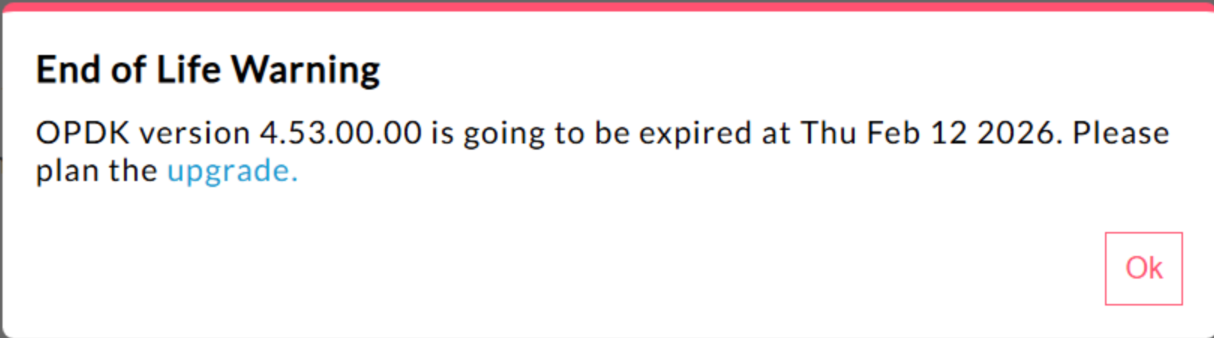
440148595:過度顯示終止支援彈出式警告
在 Edge for Private Cloud 4.53.00 以上版本中,使用者介面會顯示「系統不再支援」(EOL) 警告彈出式視窗
目前使用者無法停用或降低這類終止支援警告的顯示頻率。
Edge for Private Cloud 4.53.01
Java 標註
如果客戶 Java 呼叫嘗試使用「BC」名稱載入 Bouncy Castle 密碼編譯供應商,可能會失敗,因為預設供應商已變更為 Bouncy Castle FIPS,以支援 FIPS。請使用新的供應商名稱「BCFIPS」
Edge for Private Cloud 4.53.00
Java 標註
如果客戶 Java 呼叫嘗試使用「BC」名稱載入 Bouncy Castle 密碼編譯供應商,可能會失敗,因為預設供應商已變更為 Bouncy Castle FIPS,以支援 FIPS。請使用新的供應商名稱「BCFIPS」
Edge for Private Cloud 4.52.01 Mint 更新
只有在 Edge for Private Cloud 安裝作業中使用 MINT 或啟用 MINT 的使用者,才會受到這個問題影響。
受影響的元件: edge-message-processor
問題: 如果已啟用營利功能,並安裝 4.52.01 版 (全新安裝) 或從先前的私有雲版本升級,您會遇到訊息處理器問題。開放執行緒數量會逐漸增加,導致資源耗盡。edge-message-processor system.log 中會出現下列例外狀況:
Error injecting constructor , java . lang . OutOfMemoryError : unable to create new native thread 升級注意事項: 這個已知問題已在 4.52.01.01 修補程式版本中修正。建議在 Edge for Private Cloud 中使用 MINT 的客戶升級至 4.52.01.01 版,以免發生這個問題。
Apigee HTTP/2 漏洞
最近在多個 HTTP/2 通訊協定實作項目中發現阻斷服務 (DoS) 安全漏洞 (CVE-2023-44487),包括 Apigee Edge for Private Cloud。這項安全漏洞可能會導致 Apigee API 管理平台功能發生 DoS 攻擊。詳情請參閱 Apigee 安全性公告 GCP-2023-032 。
Edge for Private Cloud 路由器 和管理伺服器 元件會公開至網際網路,因此可能存在安全漏洞。雖然在 Edge for Private Cloud 的其他 Edge 專屬元件管理連接埠上已啟用 HTTP/2,但這些元件都不會公開至網際網路。在 Cassandra、Zookeeper 等非 Edge 元件上,系統不會啟用 HTTP/2。建議您採取下列步驟,解決 Edge for Private Cloud 安全漏洞:
如果您使用 Edge Private Cloud 4.51.00.11 以上版本,請按照下列步驟操作:
更新管理伺服器:
在每個管理伺服器節點上,開啟 /opt/apigee/customer/application/management-server.properties
在屬性檔案中新增下列這行程式碼:
conf_webserver_http2.enabled=false
重新啟動管理伺服器元件:
apigee-service edge-management-server restart
更新訊息處理器:
在每個訊息處理器節點上,開啟 /opt/apigee/customer/application/message-processor.properties
在屬性檔案中新增下列這行程式碼:
conf_webserver_http2.enabled=false
重新啟動訊息處理器元件:
apigee-service edge-message-processor restart
更新路由器:
在每個路由器節點上,開啟 /opt/apigee/customer/application/router.properties
在屬性檔案中新增下列這行程式碼:
conf_webserver_http2.enabled=false
重新啟動訊息處理器元件:
apigee-service edge-router restart
更新 QPID:
在每個 QPID 節點上,開啟 /opt/apigee/customer/application/qpid-server.properties
在屬性檔案中新增下列這行程式碼:
conf_webserver_http2.enabled=false
重新啟動訊息處理器元件:
apigee-service edge-qpid-server restart
更新 Postgres:
在每個 Postgres 節點上,開啟 /opt/apigee/customer/application/postgres-server.properties
在屬性檔案中新增下列這行程式碼:
conf_webserver_http2.enabled=false
重新啟動訊息處理器元件:
apigee-service edge-postgres-server restart
如果使用的 Edge for Private Cloud 版本舊於 4.51.00.11,請按照下列步驟操作:
更新管理伺服器:
在每個管理伺服器節點上,開啟 /opt/apigee/customer/application/management-server.properties
在屬性檔案中新增下列兩行:
conf_webserver_http2.enabled=false
conf/webserver.properties+http2.enabled=false
重新啟動管理伺服器元件:
apigee-service edge-management-server restart
更新訊息處理器:
在每個訊息處理器節點上,開啟 /opt/apigee/customer/application/message-processor.properties
在屬性檔案中新增下列兩行:
conf_webserver_http2.enabled=false
conf/webserver.properties+http2.enabled=false
重新啟動訊息處理器元件:
apigee-service edge-message-processor restart
更新路由器:
在每個路由器節點上,開啟 /opt/apigee/customer/application/router.properties
在屬性檔案中新增下列兩行:
conf_webserver_http2.enabled=false
conf/webserver.properties+http2.enabled=false
重新啟動訊息處理器元件:
apigee-service edge-router restart
更新 QPID:
在每個 QPID 節點上,開啟 /opt/apigee/customer/application/qpid-server.properties
在屬性檔案中新增下列兩行:
conf_webserver_http2.enabled=false
conf/webserver.properties+http2.enabled=false
重新啟動訊息處理器元件:
apigee-service edge-qpid-server restart
更新 Postgres:
在每個 Postgres 節點上,開啟 /opt/apigee/customer/application/postgres-server.properties
在屬性檔案中新增下列兩行:
conf_webserver_http2.enabled=false
conf/webserver.properties+http2.enabled=false
重新啟動訊息處理器元件:
apigee-service edge-postgres-server restart
升級注意事項: 將舊版 Private Cloud 升級至 4.51.00.11 以上版本後,您可以從上述每個檔案中移除第二行「conf/webserver.properties+http2.enabled=false」,然後重新啟動對應的元件。
更新至 4.52 版時升級 Postgresql
Apigee-postgresql 無法從 Edge for Private Cloud 4.50 或 4.51 版升級至 4.52 版。如果資料表數量超過 500 個,就可能發生問題。
您可以執行下列 SQL 查詢,查看 Postgres 中的資料表總數:
select count(*) from information_schema.tables 解決方法:
將 Apigee Edge 4.50.00 或 4.51.00 更新至 4.52.00 時,
請務必先執行
初步步驟 ,再升級 Apigee-postgresql。
注意: 如果未採用這項解決方法,Postgres 升級作業可能會失敗。如果發生這種情況,請使用 PG 待命或還原 PG 或 VM 備份,回溯至可運作的版本,然後按照因應措施中的步驟再次執行升級。
149245401:透過 LDAP 資源 設定的 JNDI LDAP 連線集區設定不會反映,且 JNDI 預設值每次都會造成單次使用的連線。因此,每次都會開啟及關閉連線以供單次使用,每小時會建立大量連線至 LDAP 伺服器。
解決方法:
如要變更 LDAP 連線集區屬性,請按照下列步驟,為所有 LDAP 政策設定全域變更。
如果設定屬性檔案不存在,請建立一個:
/opt/apigee/customer/application/message-processor.properties
將下列內容加入檔案 (根據 LDAP 資源設定需求,取代 Java Naming and Directory Interface (JNDI) 屬性的值)。
bin_setenv_ext_jvm_opts="-Dcom.sun.jndi.ldap.connect.pool.maxsize=20
-Dcom.sun.jndi.ldap.connect.pool.prefsize=2
-Dcom.sun.jndi.ldap.connect.pool.initsize=2
-Dcom.sun.jndi.ldap.connect.pool.timeout=120000
-Dcom.sun.jndi.ldap.connect.pool.protocol=ssl"
請確認檔案 /opt/apigee/customer/application/message-processor.properties 的擁有者是 apigee:apigee。
重新啟動每個訊息處理器。
如要確認連線集區 JNDI 屬性是否生效,可以執行 tcpdump,觀察 LDAP 連線集區的行為。
附註:
上述程序指定的連線集區屬性是全域屬性,因此適用於 Edge 訊息處理器建立的所有啟用連線集區的 LDAP 連線。
139051927:訊息處理器中發現高代理伺服器處理延遲,影響所有 API Proxy。症狀包括處理時間比正常 API 回應時間延遲 200 到 300 毫秒,即使 TPS 較低,也可能隨機發生。如果訊息處理器建立連線的目標伺服器超過 50 個,就可能發生這種情況。
根本原因:
訊息處理器會保留快取,將目標伺服器網址對應至 HTTPClient 物件,以連線至目標伺服器。這項設定的預設值為 50,對大多數部署作業來說可能過低。如果部署作業在設定中有多個機構/環境組合,且目標伺服器總數超過 50 個,目標伺服器網址就會持續從快取中逐出,導致延遲。
驗證:
如要判斷目標伺服器網址逐出是否導致延遲問題,請在訊息處理器系統記錄中搜尋關鍵字「onEvict」或「Eviction」。如果記錄中出現這些關鍵字,表示目標伺服器網址因快取大小過小,而遭到 HTTPClient 快取逐出。
解決方法:
如果是 Edge for Private Cloud 19.01 和 19.06 版,您可以編輯及設定 HTTPClient 快取,/opt/apigee/customer/application/message-processor.properties:
conf/http.properties+HTTPClient.dynamic.cache.elements.size=500 然後重新啟動訊息處理工具。對所有訊息處理器進行相同變更。
值 500 僅為範例。設定的最佳值應大於訊息處理器連線的目標伺服器數量。將這個屬性設得更高不會產生副作用,只會改善訊息處理器 Proxy 要求處理時間。
注意: Edge for Private Cloud 50.00 版的預設設定為 500。
157933959:如果同時插入及更新相同鍵/值對應 (KVM),且範圍限定在機構或環境層級,就會導致資料不一致,並遺失更新。
注意: 這項限制僅適用於私有雲專用的 Edge。公有雲和混合式專用的 Edge 沒有這項限制。
如要解決 Edge for Private Cloud 的問題,請在 apiproxy 範圍
提供意見
除非另有註明,否則本頁面中的內容是採用創用 CC 姓名標示 4.0 授權 ,程式碼範例則為阿帕契 2.0 授權 。詳情請參閱《Google Developers 網站政策 》。Java 是 Oracle 和/或其關聯企業的註冊商標。
上次更新時間:2026-07-09 (世界標準時間)。
想進一步說明嗎?
[[["容易理解","easyToUnderstand","thumb-up"],["確實解決了我的問題","solvedMyProblem","thumb-up"],["其他","otherUp","thumb-up"]],[["缺少我需要的資訊","missingTheInformationINeed","thumb-down"],["過於複雜/步驟過多","tooComplicatedTooManySteps","thumb-down"],["過時","outOfDate","thumb-down"],["翻譯問題","translationIssue","thumb-down"],["示例/程式碼問題","samplesCodeIssue","thumb-down"],["其他","otherDown","thumb-down"]],["上次更新時間:2026-07-09 (世界標準時間)。"],[],[]]