Apigee 的已知问题

您正在查看 Apigee Edge 文档。
转到 Apigee X 文档
info

以下各部分介绍了 Apigee Edge 和 Edge for Private Cloud 的已知问题。在大多数情况下,列出的问题会在未来的版本中更正。

Miscellaneous Edge known issues

The following sections describe miscellaneous known issues with Edge.

Area/Summary Known issues
Cache expire results in incorrect cachehit value

When the cachehit flow variable is used after the LookupCache policy, due to the way debug points are dispatched for asynchronous behavior, the LookupPolicy populates the DebugInfo object before the call back has executed, resulting in an error.

Workaround: Repeat the process (make second call) again right after the first call.

Setting InvalidateCache Policy PurgeChildEntries to true does not work correctly

Setting PurgeChildEntries in the InvalidateCache policy should purge the KeyFragment element values only but clears the entire cache.

Workaround: Use the KeyValueMapOperations policy to iterate cache versioning and bypass the need for cache invalidation.

Concurrent deployment requests for a SharedFlow or API proxy can result in an inconsistent state in the Management Server where multiple revisions are shown as deployed.

This can happen, for example, when concurrent runs of a CI/CD deployment pipeline occur using different revisions. To avoid this problem, avoid deploying API proxies or SharedFlows before the current deployment is complete.

Workaround: Avoid concurrent API proxy or SharedFlow deployments.

API call counts shown in Edge API Analytics might contain duplicate data.

Edge API Analytics can sometimes contain duplicate data for API calls. In that case the counts shown for API calls in Edge API Analytics are higher than the comparable values shown in third-party analytics tools.

Workaround: Export the analytics data and use the gateway_flow_id field to de-duplicate the data.

Known issues with the Edge UI

The following sections describe the known issues with the Edge UI.

Area/Summary Known issues
Can't access Edge SSO Zone Administration page from navigation bar after organization is mapped to an identity zone

When you connect an organization to an identity zone, you can no longer access the Edge SSO Zone Administration page from the left navigation bar by selecting Admin > SSO.

Workaround: Navigate to the page directly using the following URL: https://apigee.com/sso

Edge UI TLS Configuration

The options TLS_DISABLED_ALGO and TLS_ENABLED_CIPHERS do not function correctly.

Workaround: Follow the steps below to enable specific ciphers for the Edge UI:

  1. Open the /opt/apigee/etc/edge-ui.d/SSL.sh config file.
  2. Add the property -Djdk.tls.server.cipherSuites with a comma-separated list of cipher suites in IANA notation inside the UI_OPTIONS. For example:
    UI_OPTIONS=" -Dhttp.port=disabled -Dhttps.port=9433 -Dhttps.keyStoreType=JKS -Dhttps.keyStore=/opt/apigee/customer/conf/keystore.jks -Dplay.http.sslengineprovider=services.CustomSSLEngineProvider -Dhttps.keyStorePasswordEncrypted=mypass -Djdk.tls.server.cipherSuites=TLS_RSA_WITH_AES_256_CBC_SHA256,TLS_RSA_WITH_AES_256_GCM_SHA384"
  3. Save your changes to the config file.
  4. Restart the Edge UI:
    /opt/apigee/apigee-service/bin/apigee-service edge-ui restart

Known issues with the integrated portal

The following sections describe the known issues with the integrated portal.

Area Known issues
SmartDocs
  • Apigee Edge supports OpenAPI Specification 3.0 when you create specifications using the spec editor and publish APIs using SmartDocs on your portal, though a subset of features are not yet supported.

    For example, the following features from the OpenAPI Specification 3.0 are not yet supported:

    • allOf properties for combining and extending schemas
    • Remote references

    If an unsupported feature is referenced in your OpenAPI Specification, in some cases the tools will ignore the feature but still render the API reference documentation. In other cases, an unsupported feature will cause errors that prevent the successful rendering of the API reference documentation. In either case, you will need to modify your OpenAPI Specification to avoid use of the unsupported feature until it is supported in a future release.

    Note: Because the spec editor is less restrictive than SmartDocs when rendering API reference documentation, you may experience different results between the tools.

  • When using Try this API in the portal, the Accept header is set to application/json regardless of the value set for consumes in the OpenAPI Specification.
  • 138438484: Multiple servers are not supported.
SAML identity provider Single logout (SLO) with the SAML identity provider is not supported for custom domains. To enable a custom domain with a SAML identity provider, leave the Sign-out URL field blank when you configure SAML settings.
Portal admin
  • Simultaneous portal updates (such as page, theme, CSS, or script edits) by multiple users is not supported at this time.
  • If you delete an API reference documentation page from the portal, there is no way to recreate it; you'll need to delete and re-add the API product, and regenerate the API reference documentation.
  • When configuring the content security policy, it may take up to 15 minutes for changes to fully apply.
  • When customizing your portal theme, it may take up to 5 minutes for changes to fully apply.
Portal features
  • Search will be integrated into the integrated portal in a future release.

Edge for Private Cloud 的已知问题

以下几个部分介绍了 Edge for Private Cloud 的已知问题。

领域 已知问题
Edge for Private Cloud 4.53.01 NGINX 漏洞评估 (CVE-2026-42945)

披露了一个影响 NGINX 中 ngx_http_rewrite_module 的漏洞 (CVE-2026-42945)。安全扫描工具可能会标记 Apigee Edge for Private Cloud 中包含的 NGINX 二进制文件,因为此模块是静态编译到 NGINX 中的。

对 Apigee Edge for Private Cloud 的影响

Apigee Edge for Private Cloud 在其默认的随附配置中不受 此漏洞的影响。CVE-2026-42945 的可利用性取决于特定的 NGINX 配置模式,尤其是以特定顺序使用 rewrite 指令。这些模式不存在于任何标准 Apigee Edge for Private Cloud NGINX 配置中。

建议采取的行动

  • 对于默认的 Apigee Edge for Private Cloud 配置: 无需补丁程序、升级或运营变更。对于默认安装,扫描器关于 CVE-2026-42945 的发现可以视为误报。您可以使用以下文本在漏洞管理系统中记录此例外情况:

    CVE-2026-42945 — Accepted exception (false positive for Apigee Edge for Private Cloud). Apigee Edge for Private Cloud does not use the rewrite directive in any shipped NGINX configuration. The vulnerable code path in ngx_http_rewrite_module is configuration-gated and is not reachable in the default Apigee Edge for Private Cloud deployment.

  • 对于自定义 NGINX 配置: 如果您已手动修改 Apigee Edge for Private Cloud 安装中的 NGINX 配置文件(例如,在 /opt/nginx 下),则应执行以下自检,以确保您的自定义设置没有无意中引入易受攻击的模式:
    1. 检查 rewrite 指令: 在每个 NGINX 节点上,运行以下命令:
      sudo grep -rnI '^\s*rewrite\b' /opt/nginx
    2. 分析结果
      • 如果该命令未返回任何输出,则您的系统不受影响
      • 如果找到匹配项,请检查每个实例。只有 在给定块满足所有 以下条件时,才会出现此漏洞:
        • 使用了 rewrite 指令。
        • 它紧随其后的是同一配置块中的另一个 rewriteifset 指令。
        • 指令中使用了未命名的 PCRE 捕获组(例如 $1$2 等)。
        • 指令中的替换字符串包含问号 (?)。
    3. 缓解措施(如果易受攻击): 如果自定义配置的任何部分满足上述所有条件,请通过以下方式缓解:
      • 从替换字符串中移除问号 (?)。
      • 使用命名的 PCRE 捕获组,而不是未命名的 PCRE 捕获组。
      • 重新评估链接指令的需求。
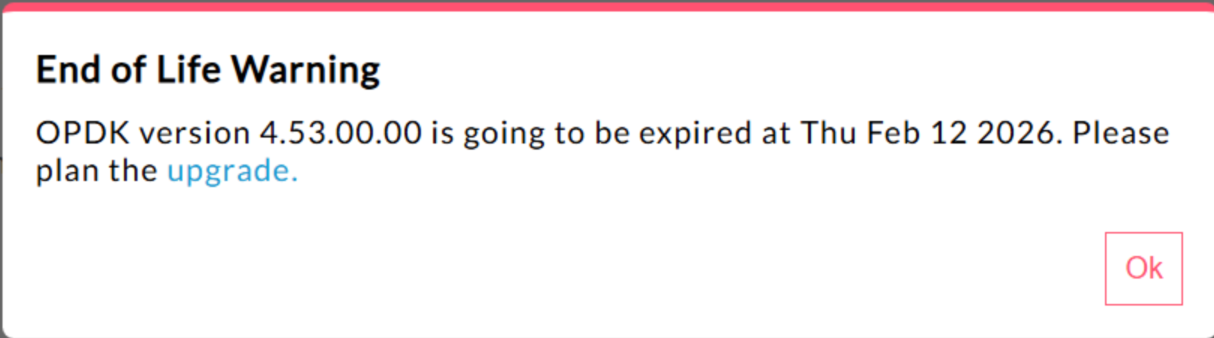
Edge for Private Cloud 4.53.00 440148595:生命周期结束弹出式警告显示过多

在 Edge for Private Cloud 4.53.00 及更高版本中,界面会显示 “生命周期结束”(EOL) 警告弹出式窗口。此警告 会重复出现
,并且无法阻止或降低其出现频率。

目前,用户无法停用或降低此 EOL 警告的出现频率 。

Edge for Private Cloud 4.53.01 Java 调用

尝试使用名称“BC”加载 Bouncy Castle 加密提供程序的客户 Java 调用可能会失败,因为默认提供程序已更改为 Bouncy Castle FIPS 以支持 FIPS。要使用的新提供程序名称为 “BCFIPS”

Edge for Private Cloud 4.53.00 Java 调用

尝试使用名称“BC”加载 Bouncy Castle 加密提供程序的客户 Java 调用可能会失败,因为默认提供程序已更改为 Bouncy Castle FIPS 以支持 FIPS。要使用的新提供程序名称为 “BCFIPS”

Edge for Private Cloud 4.52.01 Mint 更新

此问题仅影响在 Edge for Private Cloud 安装中使用 MINT 或启用了 MINT 的用户。

受影响的组件: edge-message-processor

问题: 如果您启用了创收功能,并且要全新安装 4.52.01 或从之前的 Private Cloud 版本升级,则会遇到消息处理器问题。打开的线程数会逐渐增加,导致资源耗尽。在 edge-message-processor system.log 中会看到以下异常:

Error injecting constructor, java.lang.OutOfMemoryError: unable to create new native thread
Apigee HTTP/2 漏洞

最近在 HTTP/2 协议的多个 实现中发现了拒绝服务 (DoS) 漏洞 (CVE-2023-44487),包括在 Apigee Edge for Private Cloud 中。该漏洞可能会导致 Apigee API 管理功能遭受 DoS 攻击。 如需了解详情,请参阅 Apigee 安全公告 GCP-2023-032

Edge for Private Cloud 路由器管理服务器 组件会向 互联网公开,因此可能容易受到攻击。虽然 Edge for Private Cloud 的其他 Edge 专用组件的管理 端口上启用了 HTTP/2,但这些组件都不会向互联网 公开。在非 Edge 组件(如 Cassandra、Zookeeper 等)上, 未启用 HTTP/2。我们建议您按照以下步骤解决 Edge for Private Cloud 漏洞:

如果您使用的是 Edge Private Cloud 4.51.00.11 或更高版本,请按照以下步骤操作:

  1. 更新管理服务器

    1. 在每个管理服务器节点上,打开 /opt/apigee/customer/application/management-server.properties
    2. 将以下代码行添加到属性文件中:
      conf_webserver_http2.enabled=false
    3. 重启管理服务器组件:
      apigee-service edge-management-server restart
  2. 更新消息处理器

    1. 在每个消息处理器节点上,打开 /opt/apigee/customer/application/message-processor.properties
    2. 将以下代码行添加到属性文件中:
      conf_webserver_http2.enabled=false
    3. 重启消息处理器组件:
      apigee-service edge-message-processor restart
  3. 更新路由器

    1. 在每个路由器节点上,打开 /opt/apigee/customer/application/router.properties
    2. 将以下代码行添加到属性文件中:
      conf_webserver_http2.enabled=false
    3. 重启消息处理器组件:
      apigee-service edge-router restart
  4. 更新 QPID

    1. 在每个 QPID 节点上,打开 /opt/apigee/customer/application/qpid-server.properties
    2. 将以下代码行添加到属性文件中:
      conf_webserver_http2.enabled=false
    3. 重启消息处理器组件:
      apigee-service edge-qpid-server restart
  5. 更新 Postgres

    1. 在每个 Postgres 节点上,打开 /opt/apigee/customer/application/postgres-server.properties
    2. 将以下代码行添加到属性文件中:
      conf_webserver_http2.enabled=false
    3. 重启消息处理器组件:
      apigee-service edge-postgres-server restart

如果您使用的是 Edge for Private Cloud 4.51.00.11 之前的版本,请按照以下步骤操作:

  1. 更新管理服务器

    1. 在每个管理服务器节点上,打开 /opt/apigee/customer/application/management-server.properties
    2. 将以下两行代码添加到属性文件中:
      conf_webserver_http2.enabled=false
      conf/webserver.properties+http2.enabled=false
    3. 重启管理服务器组件:
      apigee-service edge-management-server restart
  2. 更新消息处理器

    1. 在每个消息处理器节点上,打开 /opt/apigee/customer/application/message-processor.properties
    2. 将以下两行代码添加到属性文件中:
      conf_webserver_http2.enabled=false
      conf/webserver.properties+http2.enabled=false
    3. 重启消息处理器组件:
      apigee-service edge-message-processor restart
  3. 更新路由器

    1. 在每个路由器节点上,打开 /opt/apigee/customer/application/router.properties
    2. 将以下两行代码添加到属性文件中:
      conf_webserver_http2.enabled=false
      conf/webserver.properties+http2.enabled=false
    3. 重启消息处理器组件:
      apigee-service edge-router restart
  4. 更新 QPID

    1. 在每个 QPID 节点上,打开 /opt/apigee/customer/application/qpid-server.properties
    2. 将以下两行代码添加到属性文件中:
      conf_webserver_http2.enabled=false
      conf/webserver.properties+http2.enabled=false
    3. 重启消息处理器组件:
      apigee-service edge-qpid-server restart
  5. 更新 Postgres

    1. 在每个 Postgres 节点上,打开 /opt/apigee/customer/application/postgres-server.properties
    2. 将以下两行代码添加到属性文件中:
      conf_webserver_http2.enabled=false
      conf/webserver.properties+http2.enabled=false
    3. 重启消息处理器组件:
      apigee-service edge-postgres-server restart
更新到版本 4.52 时的 Postgresql 升级

Apigee-postgresql 在从 Edge for Private Cloud 版本 4.50 或 4.51 升级到版本 4.52 时遇到问题。这些问题主要发生在表数量大于 500 时。

您可以通过运行以下 SQL 查询来检查 Postgres 中的表总数:

select count(*) from information_schema.tables

临时解决方法: 将 Apigee Edge 4.50.00 或 4.51.00 更新到 4.52.00 时, 请务必在升级 Apigee-postgresql 之前执行 初步步骤

LDAP 政策

149245401:通过 LDAP 资源 配置的 JNDI 的 LDAP 连接池设置未反映出来,并且 JNDI 默认值每次都会导致单次使用的连接。 因此,每次都会打开 和关闭连接以供单次使用,从而每小时向 LDAP 服务器创建大量 连接。

临时解决方法

如需更改 LDAP 连接池属性,请按照以下步骤为所有 LDAP 政策设置全局更改。

  1. 创建配置属性文件(如果该文件尚不存在):
    /opt/apigee/customer/application/message-processor.properties
  2. 将以下内容添加到文件中(根据您的 LDAP 资源配置要求替换 Java 命名和目录接口 (JNDI) 属性 的值)。
    bin_setenv_ext_jvm_opts="-Dcom.sun.jndi.ldap.connect.pool.maxsize=20
    -Dcom.sun.jndi.ldap.connect.pool.prefsize=2
    -Dcom.sun.jndi.ldap.connect.pool.initsize=2
    -Dcom.sun.jndi.ldap.connect.pool.timeout=120000
    -Dcom.sun.jndi.ldap.connect.pool.protocol=ssl"
  3. 确保文件 /opt/apigee/customer/application/message-processor.properties 归 apigee:apigee 所有。
  4. 重启每个消息处理器。

如需验证连接池 JNDI 属性是否生效,您可以 执行 tcpdump 以观察 LDAP 连接池 随时间变化的行为。

请求处理延迟时间过长

139051927:消息处理器中发现的代理处理延迟时间过长 会影响 所有 API 代理。症状包括处理时间比正常 API 响应 时间延迟 200-300 毫秒,并且即使 TPS 较低,也可能会随机发生。当消息处理器建立连接的目标服务器超过 50 个时,可能会发生这种情况。

根本原因: 消息处理器会保留一个缓存,该缓存将目标服务器网址映射到 HTTPClient 对象,以用于与目标服务器的出站连接。默认情况下,此设置设置为 50,对于大多数部署来说可能 太低了。当部署在设置中包含多个组织/环境组合, 并且目标服务器总数超过 50 个时,目标服务器网址 会不断从缓存中逐出,从而导致延迟。

验证: 如需确定目标服务器网址逐出是否导致延迟问题,请在 消息处理器 system.logs 中搜索关键字“onEvict”或“Eviction”。如果日志中存在这些关键字,则表示目标服务器网址 正从 HTTPClient 缓存中逐出,因为缓存大小太小。

临时解决方法: 对于 Edge for Private Cloud 版本 19.01 和 19.06,您可以修改和配置 HTTPClient 缓存 /opt/apigee/customer/application/message-processor.properties

conf/http.properties+HTTPClient.dynamic.cache.elements.size=500

然后重启消息处理器。对所有消息处理器进行相同的更改。

值 500 是一个示例。对于您的设置,最佳值应大于 消息处理器将连接到的目标服务器数量。将此属性设置为更高的值不会产生任何副作用,唯一的影响是消息处理器 代理请求处理时间会缩短。

注意: Edge for Private Cloud 版本 50.00 的默认设置为 500。

键值对映射的多个条目

157933959:同时插入和更新范围限定为 组织或环境级别的同一键值对映射 (KVM) 会导致数据不一致和更新丢失。

注意: 此限制仅适用于 Edge for Private Cloud。Edge for Public Cloud 和 Hybrid 没有此限制。

如需在 Edge for Private Cloud 中找到临时解决方法,请在 apiproxy 范围内创建 KVM。