
Stai visualizzando la documentazione di Apigee Edge.
Consulta la
documentazione di Apigee X. info
Le sezioni seguenti descrivono i problemi noti di Apigee Edge e Edge for Private Cloud. Nella maggior parte dei casi, i problemi elencati verranno risolti in una release futura.
Problemi noti vari di Edge
Le sezioni seguenti descrivono vari problemi noti di Edge.
| Area/Riepilogo | Problemi noti |
|---|---|
La scadenza della cache genera un valore cachehit errato |
Quando la variabile di flusso Soluzione:ripeti la procedura (effettua la seconda chiamata) subito dopo la prima chiamata. |
L'impostazione del criterio InvalidateCache
PurgeChildEntries su true non funziona correttamente |
L'impostazione di Soluzione alternativa: utilizza il criterio KeyValueMapOperations per eseguire l'iterazione del versionamento della cache e aggirare la necessità di annullare la convalida della cache. |
| Le richieste di deployment contemporanee per un proxy API o SharedFlow possono comportare uno stato incoerente nel server di gestione in cui vengono mostrate più revisioni come di cui è stato eseguito il deployment. |
Questo può accadere, ad esempio, quando vengono eseguite in modo simultaneo pipeline di deployment CI/CD utilizzando revisioni diverse. Per evitare questo problema, evita di eseguire il deployment di proxy API o SharedFlow prima del completamento dell'attuale deployment. Soluzione alternativa:evita i deployment simultanei di proxy API o SharedFlow. |
| I conteggi delle chiamate API mostrati in Edge API Analytics potrebbero contenere dati duplicati. |
A volte Edge API Analytics può contenere dati duplicati per le chiamate API. In questo caso, i conteggi mostrati per le chiamate API in Edge API Analytics sono superiori ai valori paragonabili mostrati negli strumenti di analisi di terze parti. Soluzione alternativa: esporta i dati di analisi e utilizza il campo gateway_flow_id per deduplicare i dati. |
Problemi noti con l'UI di Edge
Le seguenti sezioni descrivono i problemi noti con l'UI di Edge.
| Area/Riepilogo | Problemi noti |
|---|---|
| Non è possibile accedere alla pagina di amministrazione della zona SSO di Edge dalla barra di navigazione dopo che l'organizzazione è stata mappata a una zona di identità |
Quando colleghi un'organizzazione a una zona di identità, non puoi più accedere alla pagina di amministrazione della zona SSO di Edge dalla barra di navigazione a sinistra selezionando Amministratore > SSO. Soluzione alternativa: vai direttamente alla pagina utilizzando il seguente URL: https://apigee.com/sso |
| Configurazione TLS dell'UI di Edge |
Le opzioni Soluzione alternativa: segui i passaggi riportati di seguito per attivare cifrari specifici per l'UI di Edge:
|
Problemi noti relativi al portale integrato
Le sezioni seguenti descrivono i problemi noti del portale integrato.
| Area | Problemi noti |
|---|---|
| SmartDocs |
|
| Provider di identità SAML | La disconnessione singola (SLO) con il provider di identità SAML non è supportata per i domini personalizzati. Per attivare un dominio personalizzato con un provider di identità SAML, lascia vuoto il campo URL di disconnessione quando configuri le impostazioni SAML. |
| Amministratore del portale |
|
| Funzionalità del portale |
|
Problemi noti relativi a Edge for Private Cloud
Le sezioni seguenti descrivono i problemi noti relativi a Edge for Private Cloud.
| Area | Problemi noti |
|---|---|
| Edge for Private Cloud 4.53.01 |
Valutazione di vulnerabilità di NGINX (CVE-2026-42945)
È stata rilevata una vulnerabilità (CVE-2026-42945) che interessa Impatto su Apigee Edge for Private Cloud: Apigee Edge for Private Cloud non è interessato da questa vulnerabilità nella sua configurazione predefinita. La possibilità di sfruttare CVE-2026-42945 dipende da pattern di configurazione NGINX specifici, in particolare dall'utilizzo della direttiva Azione richiesta:
|
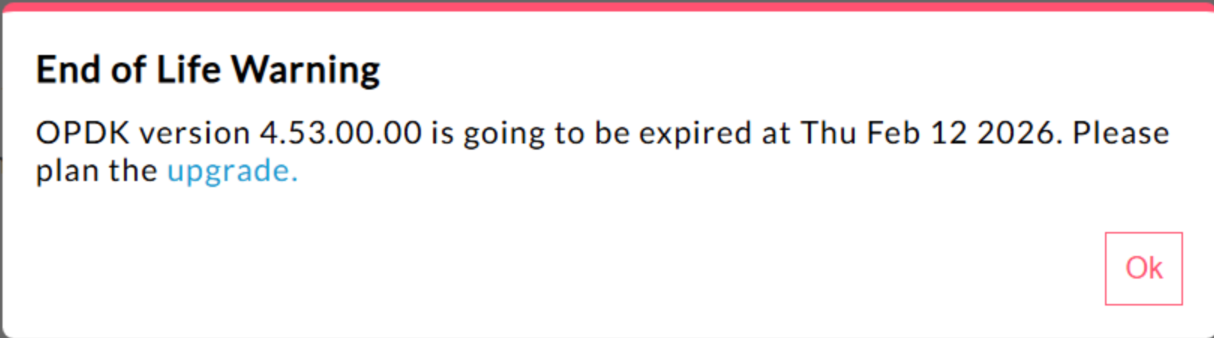
| Edge for Private Cloud 4.53.00 | 440148595: il popup di avviso di fine del ciclo di vita viene visualizzato in modo eccessivo
In Edge for Private Cloud 4.53.00 e versioni successive, l'UI mostra un
"End of Life" (EOL) warning pop-up. Questo avviso
viene visualizzato Al momento non è disponibile alcun metodo per disattivare o ridurre la frequenza di questo avviso di fine del ciclo di vita. |
| Edge for Private Cloud 4.53.01 |
Callout Java
I callout Java dei clienti che tentano di caricare il provider di crittografia Bouncy Castle utilizzando il nome "BC" potrebbero non riuscire perché il provider predefinito è stato modificato in Bouncy Castle FIPS per supportare FIPS. Il nuovo nome del provider da utilizzare è "BCFIPS". |
| Edge for Private Cloud 4.53.00 |
Callout Java
I callout Java dei clienti che tentano di caricare il provider di crittografia Bouncy Castle utilizzando il nome "BC" potrebbero non riuscire perché il provider predefinito è stato modificato in Bouncy Castle FIPS per supportare FIPS. Il nuovo nome del provider da utilizzare è "BCFIPS". |
| Aggiornamento di Mint per Edge for Private Cloud 4.52.01 |
Questo problema riguarda solo gli utenti che utilizzano MINT o che hanno attivato MINT nelle installazioni di Edge for Private Cloud. Componente interessato: edge-message-processor Problema: se hai attivato la monetizzazione e stai installando la versione 4.52.01 come installazione pulita o stai eseguendo l'upgrade dalle versioni precedenti di Private Cloud, si verificherà un problema con i processori di messaggi. Si verificherà un aumento graduale del numero di thread aperti, con conseguente esaurimento delle risorse. Nel file system.log di edge-message-processor viene visualizzata la seguente eccezione: Error injecting constructor, java.lang.OutOfMemoryError: unable to create new native thread |
| Vulnerabilità HTTP/2 di Apigee | Di recente è stata scoperta una vulnerabilità di Denial of Service (DoS) in più implementazioni del protocollo HTTP/2 (CVE-2023-44487), inclusa Apigee Edge for Private Cloud. La vulnerabilità potrebbe causare un attacco DoS alla funzionalità di gestione delle API di Apigee. Per ulteriori dettagli, consulta il Bollettino sulla sicurezza di Apigee GCP-2023-032. I componenti router e server di gestione di Edge for Private Cloud sono esposti a internet e potrebbero essere vulnerabili. Sebbene HTTP/2 sia abilitato sulla porta di gestione di altri componenti specifici di Edge for Private Cloud, nessuno di questi componenti è esposto a internet. Sui componenti non Edge, come Cassandra, Zookeeper e altri, HTTP/2 non è abilitato. Ti consigliamo di seguire questi passaggi per risolvere la vulnerabilità di Edge for Private Cloud:
Segui questi passaggi se utilizzi le versioni di Edge Private Cloud 4.51.00.11 o successive:
Segui questi passaggi se utilizzi versioni di Edge for Private Cloud precedenti alla 4.51.00.11:
|
| Upgrade di Postgresql durante l'aggiornamento alla versione 4.52 | Apigee-postgresql ha problemi con l'upgrade da Edge for Private Cloud versione 4.50 o 4.51 alla versione 4.52. I problemi si verificano principalmente quando il numero di tabelle è superiore a 500. Puoi controllare il numero totale di tabelle in Postgres eseguendo la seguente query SQL: select count(*) from information_schema.tables Soluzione temporanea: quando esegui l'aggiornamento di Apigee Edge 4.50.00 o 4.51.00 alla versione 4.52.00, assicurati di eseguire il passaggio preliminare prima di eseguire l'upgrade di Apigee-postgresql. |
| Criterio LDAP | 149245401: le impostazioni del pool di connessioni LDAP per JNDI configurate tramite la risorsa LDAP non vengono applicate e le impostazioni predefinite di JNDI causano connessioni monouso ogni volta. Di conseguenza, le connessioni vengono aperte e chiuse ogni volta per un singolo utilizzo, creando un numero elevato di connessioni all'ora al server LDAP. Soluzione temporanea: Per modificare le proprietà del pool di connessioni LDAP, segui questi passaggi per impostare una modifica globale per tutti i criteri LDAP.
Per verificare che le proprietà JNDI siano effettive, puoi eseguire un tcpdump per osservare il comportamento del pool di connessioni LDAP nel tempo. |
| Latenza elevata del trattamento delle richieste | 139051927: le latenze elevate del trattamento dei proxy rilevate nel processore di messaggi interessano tutti i proxy API. I sintomi includono ritardi di 200-300 ms nei tempi di trattamento rispetto ai tempi di risposta API normali e possono verificarsi in modo casuale anche con un TPS basso. Questo può verificarsi quando il processore di messaggi effettua connessioni a più di 50 server di destinazione. Causa principale: i processori di messaggi mantengono una cache che mappa l'URL del server di destinazione all'oggetto HTTPClient per le connessioni in uscita ai server di destinazione. Per impostazione predefinita, questa impostazione è impostata su 50, un valore che potrebbe essere troppo basso per la maggior parte dei deployment. Quando un deployment ha più combinazioni di organizzazione/ambiente in una configurazione, e un numero elevato di server di destinazione che superano complessivamente 50, gli URL dei server di destinazione continuano a essere rimossi dalla cache, causando latenze. Convalida: per determinare se la rimozione dell'URL del server di destinazione sta causando il problema di latenza, cerca le parole chiave "onEvict" o "Eviction" nei file system.log del processore di messaggi. La loro presenza nei log indica che gli URL dei server di destinazione vengono rimossi dalla cache HTTPClient perché la dimensione della cache è troppo piccola. Soluzione temporanea:
Per le versioni 19.01 e 19.06 di Edge for Private Cloud, puoi modificare e configurare la cache HTTPClient, conf/http.properties+HTTPClient.dynamic.cache.elements.size=500 Quindi riavvia il processore di messaggi. Apporta le stesse modifiche a tutti i processori di messaggi. Il valore 500 è un esempio. Il valore ottimale per la tua configurazione deve essere maggiore di il numero di server di destinazione a cui il processore di messaggi si connetterà. Non ci sono effetti collaterali dall'impostazione di questa proprietà su un valore più alto e l'unico effetto sarebbe un miglioramento dei tempi di trattamento delle richieste proxy del processore di messaggi.
Nota: la versione 50.00 di Edge for Private Cloud ha l'impostazione predefinita di 500. |
| Più voci per le mappe chiave-valore | 157933959: gli inserimenti e gli aggiornamenti simultanei alla stessa mappa chiave-valore (KVM) con ambito a livello di organizzazione o ambiente causano dati incoerenti e aggiornamenti persi. Nota: questa limitazione si applica solo a Edge for Private Cloud. Edge for Public Cloud e Hybrid non hanno questa limitazione. Per una soluzione temporanea in Edge for Private Cloud, crea la KVM nell'ambito
|