
Você está lendo a documentação do Apigee Edge.
Acesse a
documentação da Apigee X. info
As seções a seguir descrevem os problemas conhecidos do Apigee Edge e do Edge para nuvem privada. Na maioria dos casos, os problemas listados serão corrigidos em uma versão futura.
Outros problemas conhecidos do Edge
As seções a seguir descrevem vários problemas conhecidos do Edge.
| Área/Resumo | Problemas conhecidos |
|---|---|
A expiração do cache resulta em um valor cachehit incorreto |
Quando a variável de fluxo Solução alternativa:repita o processo (faça a segunda chamada) logo após a primeira. |
Definir a política InvalidateCache
PurgeChildEntries como "true" não funciona corretamente. |
A configuração de Solução alternativa:use a política KeyValueMapOperations para iterar o versionamento do cache e contornar a necessidade de invalidação do cache. |
| Solicitações de implantação simultânea para um proxy de API ou SharedFlow podem resultar em um estado inconsistente no servidor de gerenciamento, em que várias revisões são mostradas como implantadas. |
Isso pode acontecer, por exemplo, quando execuções simultâneas de um pipeline de implantação de CI/CD ocorrem usando revisões diferentes. Para evitar esse problema, evite implantar proxies de API ou SharedFlows antes da conclusão da implantação atual. Solução:evite implantações simultâneas de proxy de API ou SharedFlow. |
| Os números de chamadas de API mostrados nas Análises da API do Edge podem conter dados duplicados. |
Às vezes, as análises da API Edge podem conter dados duplicados para chamadas de API. Nesse caso, as contagens mostradas para chamadas de API no Edge API Analytics são maiores do que os valores comparáveis mostrados em ferramentas de análise de terceiros. Solução alternativa:exporte os dados de análise e use o campo gateway_flow_id para remover a duplicação dos dados. |
Problemas conhecidos com a IU do Edge
As seções a seguir descrevem os problemas conhecidos com a IU do Edge.
| Área/Resumo | Problemas conhecidos |
|---|---|
| Não é possível acessar a página de administração da zona de SSO do Edge na barra de navegação após a organização ser mapeada para uma zona de identidade |
Quando você conectar uma organização a uma zona de identidade, não poderá mais acessar a página de administração da zona SSO do Edge na barra de navegação à esquerda selecionando Administrador > SSO. Solução alternativa: acesse a página diretamente usando o seguinte URL: https://apigee.com/sso |
| Configuração de TLS da IU do Edge |
As opções Solução alternativa:siga as etapas abaixo para ativar cifras específicas para a IU do Edge:
|
Problemas conhecidos com o portal integrado
Nas seções a seguir, descrevemos os problemas conhecidos do portal integrado.
| Área | Problemas conhecidos |
|---|---|
| SmartDocs |
|
| Provedor de identidade SAML | O logout único (SLO) com o provedor de identidade SAML não é compatível com domínios personalizados. Para ativar um domínio personalizado com um provedor de identidade SAML, deixe o campo URL de saída em branco ao configurar as configurações de SAML. |
| Administrador do portal |
|
| Recursos do portal |
|
Problemas conhecidos com o Edge para nuvem privada
As seções a seguir descrevem os problemas conhecidos com o Edge para nuvem privada.
| Área | Problemas conhecidos |
|---|---|
| Edge para nuvem privada 4.53.01 |
Avaliação de vulnerabilidade do NGINX (CVE-2026-42945)
Uma vulnerabilidade (CVE-2026-42945) foi divulgada e afeta o Impacto no Apigee Edge para nuvem privada: O Apigee Edge para nuvem privada não é afetado por essa vulnerabilidade na configuração padrão enviada. A capacidade de exploração da CVE-2026-42945 depende de padrões de configuração específicos do NGINX, principalmente o uso da diretiva Ação necessária:
|
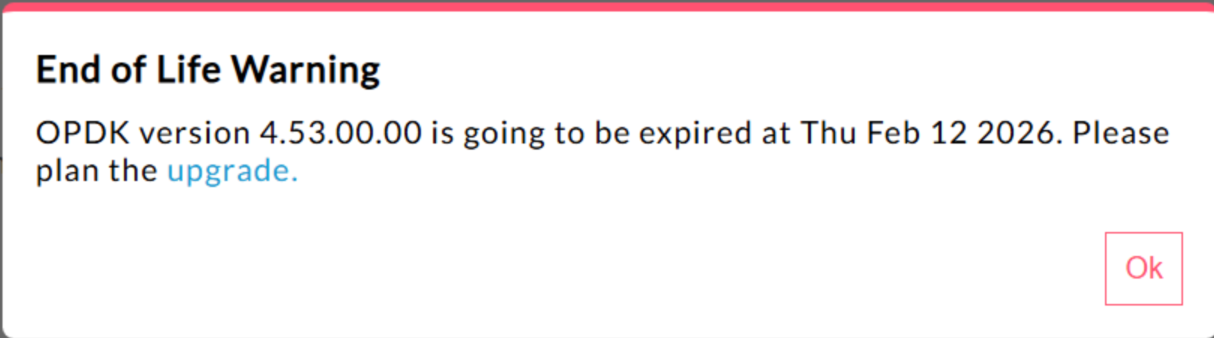
| Edge para nuvem privada 4.53.00 | 440148595: End of Life Popup Warning Displayed Excessively
No Edge para nuvem privada 4.53.00 e versões mais recentes, a interface mostra um
pop-up de aviso de fim da vida útil (EOL). Esse aviso
aparece No momento, não há um método disponível para os usuários desativarem ou reduzirem a frequência desse aviso de fim da vida útil. |
| Edge para nuvem privada 4.53.01 |
Callouts do Java
As chamadas Java do cliente que tentam carregar o provedor de criptografia Bouncy Castle usando o nome "BC" podem falhar porque o provedor padrão foi alterado para Bouncy Castle FIPS para oferecer suporte ao FIPS. O novo nome do provedor a ser usado é "BCFIPS". |
| Edge para nuvem privada 4.53.00 |
Callouts do Java
As chamadas Java do cliente que tentam carregar o provedor de criptografia Bouncy Castle usando o nome "BC" podem falhar porque o provedor padrão foi alterado para Bouncy Castle FIPS para oferecer suporte ao FIPS. O novo nome do provedor a ser usado é "BCFIPS". |
| Atualização do Mint do Edge para nuvem privada 4.52.01 |
Esse problema afeta apenas quem usa o MINT ou tem o MINT ativado nas instalações do Edge para nuvem privada. Componente afetado:edge-message-processor Problema:se você tiver a monetização ativada e estiver instalando a versão 4.52.01 como uma nova instalação ou fazendo upgrade de versões anteriores da nuvem privada, vai encontrar um problema com os processadores de mensagens. Haverá um aumento gradual na contagem de linhas de execução abertas, o que vai levar ao esgotamento de recursos. A seguinte exceção é encontrada em edge-message-processor system.log: Error injecting constructor, java.lang.OutOfMemoryError: unable to create new native thread |
| Vulnerabilidade HTTP/2 da Apigee | Uma vulnerabilidade de negação de serviço (DoS) foi descoberta recentemente em várias implementações do protocolo HTTP/2 (CVE-2023-44487), incluindo o Apigee Edge para nuvem privada. A vulnerabilidade pode levar a um DoS da funcionalidade de gerenciamento da API Apigee. Para mais detalhes, consulte o boletim de segurança da Apigee GCP-2023-032. Os componentes do roteador e do servidor de gerenciamento do Edge para nuvem privada estão expostos à Internet e podem estar vulneráveis. Embora o HTTP/2 esteja ativado na porta de gerenciamento de outros componentes específicos do Edge relativos ao Edge para nuvem privada, nenhum deles está exposto à Internet. Em componentes que não são do Edge, como Cassandra, Zookeeper e outros, o HTTP/2 não está ativado. Recomendamos que você siga as etapas abaixo para resolver a vulnerabilidade do Edge para nuvem privada:
Siga estas etapas se estiver usando o Edge Private Cloud nas versões 4.51.00.11 ou mais recentes:
Siga estas etapas se estiver usando versões do Edge para nuvem privada anteriores à 4.51.00.11:
|
| Upgrade do PostgreSQL ao atualizar para a versão 4.52 | O Apigee-postgresql está com problemas ao fazer upgrade do Edge para nuvem privada versão 4.50 ou 4.51 para a versão 4.52. Os problemas ocorrem principalmente quando o número de tabelas é maior que 500. Para verificar o número total de tabelas no Postgres, execute a consulta SQL abaixo: select count(*) from information_schema.tables Solução alternativa:ao atualizar o Apigee Edge 4.50.00 ou 4.51.00 para 4.52.00, execute a etapa preliminar antes de fazer upgrade do Apigee-postgresql. |
| Política LDAP | 149245401: as configurações do pool de conexões LDAP para JNDI configuradas pelo recurso LDAP não são refletidas, e os padrões do JNDI causam conexões de uso único a cada vez. Como resultado, as conexões são abertas e fechadas a cada vez para uso único, criando um grande número de conexões por hora com o servidor LDAP. Alternativa: Para mudar as propriedades do pool de conexões LDAP, siga estas etapas e defina uma mudança global em todas as políticas do LDAP.
Para verificar se as propriedades JNDI do pool de conexões estão funcionando, faça um tcpdump para observar o comportamento do pool de conexões LDAP ao longo do tempo. |
| Alta latência de processamento da solicitação | 139051927: altas latências de processamento de proxy encontradas no processador de mensagens estão afetando todos os proxies de API. Os sintomas incluem atrasos de 200 a 300 ms nos tempos de processamento em relação aos tempos normais de resposta da API e podem ocorrer aleatoriamente, mesmo com baixa TPS. Isso pode acontecer quando há mais de 50 servidores de destino em que um processador de mensagens faz conexões. Causa raiz:os processadores de mensagens mantêm um cache que mapeia o URL do servidor de destino para o objeto HTTPClient para conexões de saída com servidores de destino. Por padrão, essa configuração é definida como 50, o que pode ser muito baixo para a maioria das implantações. Quando uma implantação tem várias combinações de organização/ambiente em uma configuração e um grande número de servidores de destino que excedem 50 no total, os URLs do servidor de destino são removidos do cache, causando latências. Validação:Para determinar se a remoção do URL do servidor de destino está causando o problema de latência, pesquise nos system.logs do processador de mensagens a palavra-chave "onEvict" ou "Eviction". A presença deles nos registros indica que os URLs do servidor de destino estão sendo removidos do cache HTTPClient porque o tamanho do cache é muito pequeno. Solução alternativa:Para as versões 19.01 e 19.06 do Edge para nuvem privada, é possível editar e configurar o cache
HTTPClient, conf/http.properties+HTTPClient.dynamic.cache.elements.size=500 Em seguida, reinicie o processador de mensagens. Faça as mesmas mudanças em todos os processadores de mensagens. O valor 500 é um exemplo. O valor ideal para sua configuração precisa ser maior que o número de servidores de destino a que o processador de mensagens se conectaria. Não há efeitos colaterais de definir essa propriedade como mais alta, e o único efeito seria a melhoria dos tempos de processamento de solicitações de proxy do processador de mensagens.
Observação:o Edge para nuvem privada versão 50.00 tem a configuração padrão de 500. |
| Várias entradas para mapas de chave-valor | 157933959: inserções e atualizações simultâneas no mesmo mapa de chave-valor (KVM) no escopo da organização ou do ambiente causam dados inconsistentes e perda de atualizações. Observação:essa limitação se aplica apenas ao Edge para nuvem privada. O Edge para nuvem pública e híbrida não têm essa limitação. Para uma solução alternativa no Edge para nuvem privada, crie o KVM no
escopo |