Вы просматриваете документацию по Apigee Edge.
Перейдите к документации по Apigee X. Информация
В следующих разделах описаны известные проблемы с Apigee Edge и Edge для частного облака. В большинстве случаев перечисленные проблемы будут устранены в будущих версиях.
Разные известные проблемы с Edge
В следующих разделах описаны различные известные проблемы с Edge.
| Область/сводка | Известные проблемы |
|---|---|
Срок действия кеша истек, поэтому значение cachehit указано неверно |
Если переменная потока Решение. Повторите процесс (совершите второй звонок) сразу после первого. |
Некорректная работа правила InvalidateCache Policy
PurgeChildEntries при значении true |
Если в правиле InvalidateCache задать значение Решение. Используйте правило KeyValueMapOperations, чтобы итерировать управление версиями кеша и избежать необходимости его аннулирования. |
| Одновременные запросы на развертывание для SharedFlow или прокси-сервера API могут привести к несогласованному состоянию на сервере управления, при котором несколько версий будут показаны как развернутые. |
Это может произойти, например, при одновременном выполнении конвейера развертывания CI/CD с использованием разных версий. Чтобы избежать этой проблемы, не развертывайте прокси API или SharedFlows до завершения текущего развертывания. Обходное решение. Избегайте одновременного развертывания прокси-серверов API или SharedFlow. |
| Количество вызовов API, показанное в Edge API Analytics, может содержать дублирующиеся данные. |
Иногда в Edge API Analytics могут быть дублирующиеся данные о вызовах API. В этом случае количество вызовов API, показанное в Edge API Analytics, будет выше, чем в сторонних инструментах аналитики. Обходное решение. Экспортируйте данные Аналитики и используйте поле gateway_flow_id, чтобы удалить дубликаты. |
Известные проблемы с интерфейсом Edge
В следующих разделах описаны известные проблемы с интерфейсом Edge.
| Область/сводка | Известные проблемы |
|---|---|
| Не удается перейти на страницу администрирования зоны SSO Edge с панели навигации после сопоставления организации с зоной идентификации |
После того как вы подключите организацию к зоне идентификации, вы больше не сможете перейти на страницу администрирования зоны SSO Edge с помощью панели навигации слева, выбрав "Администратор > SSO". Временное решение. Перейдите на страницу напрямую, используя следующий URL: https://apigee.com/sso |
| Конфигурация TLS в интерфейсе Edge |
Варианты Временное решение. Чтобы включить определенные шифры для интерфейса Edge, выполните следующие действия:
|
Известные проблемы со встроенным порталом
В следующих разделах описаны известные проблемы со встроенным порталом.
| Область | Известные проблемы |
|---|---|
| SmartDocs |
|
| Поставщик идентификационной информации SAML | Единый выход (SLO) с поставщиком идентификационной информации SAML не поддерживается для пользовательских доменов. Чтобы включить собственный домен с поставщиком идентификационной информации SAML, оставьте поле URL для выхода пустым, когда будете настраивать параметры SAML. |
| Администратор портала |
|
| Функции портала |
|
Known issues with Edge for Private Cloud
The following sections describe the known issues with Edge for Private Cloud.
| Area | Known issues |
|---|---|
| Edge for Private Cloud 4.53.01 |
NGINX Vulnerability Assessment (CVE-2026-42945)
A vulnerability (CVE-2026-42945) was disclosed affecting the Impact on Apigee Edge for Private Cloud: Apigee Edge for Private Cloud is not affected by this vulnerability in its default, shipped configuration. The exploitability of CVE-2026-42945 is dependent on specific NGINX configuration patterns, notably the use of the Action Required:
|
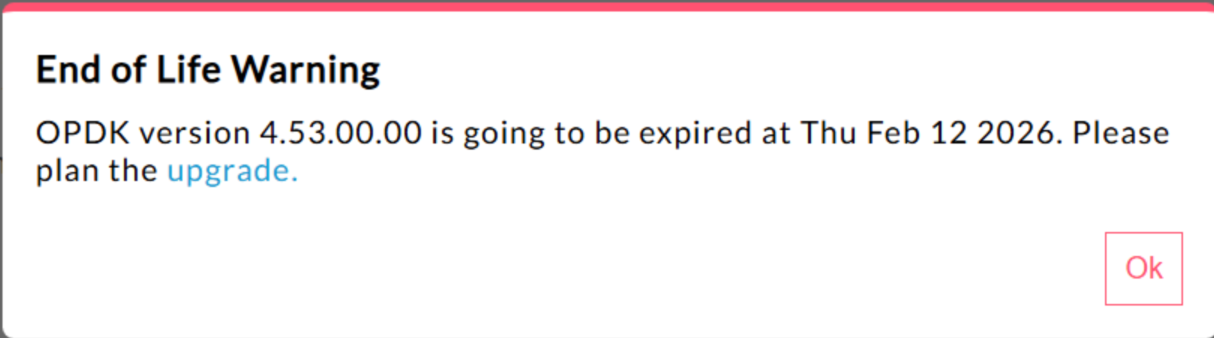
| Edge for Private Cloud 4.53.00 | 440148595: End of Life Popup Warning Displayed Excessively
In Edge for Private Cloud 4.53.00 and later, the UI displays an
"End of Life" (EOL) warning pop-up. This warning
appears There is currently no method available for users to disable or reduce the frequency of this EOL warning. |
| Edge for Private Cloud 4.53.01 |
Java Callouts
Customer Java callouts that attempt to load the Bouncy Castle cryptography provider using the name "BC" might fail because the default provider has been changed to Bouncy Castle FIPS to support FIPS. The new provider name to use is "BCFIPS". |
| Edge for Private Cloud 4.53.00 |
Java Callouts
Customer Java callouts that attempt to load the Bouncy Castle cryptography provider using the name "BC" might fail because the default provider has been changed to Bouncy Castle FIPS to support FIPS. The new provider name to use is "BCFIPS". |
| Edge for Private Cloud 4.52.01 Mint update |
This issue affects only those who are using MINT or have MINT enabled in Edge for Private Cloud installations. Component affected: edge-message-processor Issue: If you have monetization enabled and are installing 4.52.01 as a fresh install or upgrading from previous Private Cloud versions, you will encounter an issue with message processors. There will be a gradual increase in open thread count leading to resource exhaustion. The following exception is seen in edge-message-processor system.log: Error injecting constructor, java.lang.OutOfMemoryError: unable to create new native thread |
| Apigee HTTP/2 vulnerability | A Denial-of-Service (DoS) vulnerability was recently discovered in multiple implementations of the HTTP/2 protocol (CVE-2023-44487), including in Apigee Edge for Private Cloud. The vulnerability could lead to a DoS of Apigee API management functionality. For more details, see Apigee Security Bulletin GCP-2023-032. The Edge for Private Cloud router and management server components are exposed to the internet and can potentially be vulnerable. Although HTTP/2 is enabled on the management port of other Edge-specific components of Edge for Private Cloud, none of those components are exposed to the internet. On non-Edge components, like Cassandra, Zookeeper and others, HTTP/2 is not enabled. We recommend that you take the following steps to address the Edge for Private Cloud vulnerability:
Follow these steps if you are using Edge Private Cloud versions 4.51.00.11 or newer:
Follow these steps if you are using Edge for Private Cloud versions older than 4.51.00.11:
|
| Postgresql upgrade when updating to version 4.52 | Apigee-postgresql is having issues with upgrading from Edge for Private Cloud version 4.50 or 4.51 to version 4.52. The issues mainly occur when the number of tables is greater than 500. You can check the total number of tables in Postgres by running the SQL query below: select count(*) from information_schema.tables Workaround: When Updating Apigee Edge 4.50.00 or 4.51.00 to 4.52.00, be sure to perform the preliminary step before upgrading Apigee-postgresql. |
| LDAP policy | 149245401: LDAP connection pool settings for JNDI configured through the LDAP resource are not reflected, and JNDI defaults cause single-use connections each time. As a result, connections are being opened and closed each time for single use, creating a large number of connections per hour to the LDAP server. Workaround: In order to change the LDAP connection pool properties, do the following steps to set a global change across all LDAP policies.
To verify that your connection pool JNDI properties are taking effect, you can perform a tcpdump to observe the behavior of the LDAP connection pool over time. |
| High Request Processing Latency | 139051927: High proxy processing latencies found in the Message Processor are affecting all API Proxies. Symptoms include 200-300ms delays in processing times over normal API response times and can occur randomly even with low TPS. This can occur when than more than 50 target servers in which a message processor makes connections. Root cause: Message processors keep a cache that maps target server URL to HTTPClient object for outgoing connections to target servers. By default this setting is set to 50 which may be too low for most deployments. When a deployment has multiple org/env combinations in a setup, and have a large number of target servers that exceed 50 altogether, the target server URLs keep getting evicted from cache, causing latencies. Validation: To determine if target server URL eviction is causing the latency problem, search the Message Processor system.logs for keyword "onEvict" or "Eviction". Their presence in the logs indicate that target server URLs are getting evicted from the HTTPClient cache because the cache size is too small. Workaround:
For Edge for Private Cloud versions 19.01 and 19.06, you can edit and configure the HTTPClient
cache, conf/http.properties+HTTPClient.dynamic.cache.elements.size=500 Then restart the message processor. Make the same changes for all message processors. The value 500 is an example. The optimal value for your setup should be greater than the number of target servers that the message processor would connect to. There are no side effects from setting this property higher, and the only affect would be an improved message processor proxy request processing times.
Note: Edge for Private Cloud version 50.00 has the default setting of 500. |
| Multiple entries for key value maps | 157933959: Concurrent inserts and updates to the same key value map (KVM) scoped to the organization or environment level causes inconsistent data and lost updates. Note: This limitation only applies to Edge for Private Cloud. Edge for Public Cloud and Hybrid do not have this limitation. For a workaround in Edge for Private Cloud, create the KVM at the
|