Apigee Edge 문서입니다.
Go to the
Apigee X 문서로 이동합니다. info
다음 섹션에서는 Apigee Edge 및 Private Cloud용 Edge의 알려진 문제를 설명합니다. 대부분의 경우 나열된 문제는 향후 출시 버전에서 해결될 예정입니다.
기타 Edge 알려진 문제
다음 섹션에서는 Edge의 알려진 기타 문제를 설명합니다.
| 지역/요약 | 알려진 문제 |
|---|---|
캐시 만료로 인해 잘못된 cachehit 값이 발생함 |
해결 방법: 첫 번째 호출 직후 프로세스를 다시 반복합니다 (두 번째 호출). |
InvalidateCache 정책 PurgeChildEntries를 true로 설정해도 제대로 작동하지 않음 |
InvalidateCache 정책에서 해결 방법: KeyValueMapOperations 정책을 사용하여 캐시 버전 관리를 반복하고 캐시 무효화 필요성을 우회합니다. |
| SharedFlow 또는 API 프록시에 대한 동시 배포 요청은 관리 서버에서 여러 버전이 배포된 것으로 표시되는 일관되지 않은 상태가 발생할 수 있습니다. |
예를 들어 다른 버전을 사용하여 CI/CD 배포 파이프라인의 동시 실행이 실행되는 경우 이런 문제가 발생할 수 있습니다. 이 문제를 방지하려면 현재 배포가 완료되기 전에 API 프록시 또는 SharedFlow를 배포하지 마세요. 해결 방법: 동시 API 프록시 또는 SharedFlow 배포를 피합니다. |
| Edge API 분석에 표시되는 API 호출 횟수에 중복 데이터가 포함될 수 있습니다. |
Edge API 애널리틱스에는 API 호출에 대한 중복 데이터가 포함될 수 있습니다. 이 경우 Edge API 애널리틱스에서 API 호출에 표시되는 개수가 서드 파티 분석 도구에 표시되는 유사한 값보다 높습니다. 해결 방법: 애널리틱스 데이터를 내보내고 gateway_flow_id 필드를 사용하여 데이터 중복을 삭제합니다. |
Edge UI의 알려진 문제
다음 섹션에서는 Edge UI의 알려진 문제를 설명합니다.
| 영역 | 알려진 문제 |
|---|---|
| 조직이 ID 영역에 매핑되면 탐색 메뉴에서 Edge SSO 영역 관리 페이지에 액세스할 수 없습니다. | 조직을 ID 영역에 연결하면 더 이상 왼쪽 탐색 메뉴에서 Admin > SSO를 선택하여 Edge SSO 영역 관리 페이지에 액세스할 수 없습니다. 이 문제를 해결하려면 다음 URL을 사용하여 페이지로 바로 이동합니다.(https://apigee.com/sso). |
통합 포털의 알려진 문제
다음 섹션에서는 통합 포털에 대해 알려진 문제를 설명합니다.
| 영역 | 알려진 문제 |
|---|---|
| SmartDocs |
|
| SAML ID 공급업체 | SAML ID 공급업체를 사용한 단일 로그아웃 (SLO)은 커스텀 도메인에 대해 지원되지 않습니다. SAML ID 공급업체를 사용하여 커스텀 도메인을 사용 설정하려면 SAML 설정을 구성할 때 로그아웃 URL 필드를 비워둡니다. |
| 포털 관리자 |
|
| 포털 기능 |
|
프라이빗 클라우드용 Edge의 알려진 문제
다음 섹션에서는 프라이빗 클라우드용 Edge의 알려진 문제를 설명합니다.
| 지역 | 알려진 문제 |
|---|---|
| 프라이빗 클라우드용 Edge 4.53.01 |
NGINX 취약점 평가 (CVE-2026-42945)
NGINX의 프라이빗 클라우드용 Apigee Edge에 미치는 영향: 프라이빗 클라우드용 Apigee Edge는 기본 제공 구성에서 이 취약점의 영향을 받지 않습니다. CVE-2026-42945의 악용 가능성은 특정 NGINX 구성 패턴, 특히 특정 시퀀스에서 필요한 조치:
|
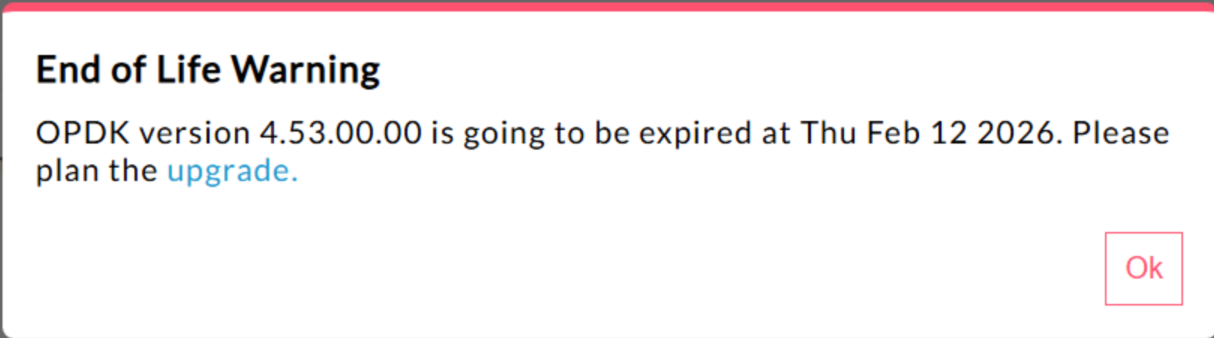
| 프라이빗 클라우드용 Edge 4.53.00 | 440148595: 지원 종료 팝업 경고가 과도하게 표시됨
프라이빗 클라우드용 Edge 4.53.00 이상에서 UI에
"지원 종료" (EOL) 경고 팝업이 표시됩니다. 이 경고는
반복적으로 표시되며 빈도를 방지하거나 줄일 수 없습니다. 현재 사용자가 이 EOL 경고를 사용 중지하거나 빈도를 줄일 수 있는 방법은 없습니다. |
| 프라이빗 클라우드용 Edge 4.53.01 |
Java 호출
이름 'BC'를 사용하여 Bouncy Castle 암호화 프로바이더를 로드하려는 고객 Java 콜아웃은 FIPS를 지원하기 위해 기본 프로바이더가 Bouncy Castle FIPS로 변경되었으므로 실패할 수 있습니다. 사용할 새 프로바이더 이름은 "BCFIPS"입니다. |
| 프라이빗 클라우드용 Edge 4.53.00 |
Java 호출
이름 'BC'를 사용하여 Bouncy Castle 암호화 프로바이더를 로드하려는 고객 Java 콜아웃은 FIPS를 지원하기 위해 기본 프로바이더가 Bouncy Castle FIPS로 변경되었으므로 실패할 수 있습니다. 사용할 새 프로바이더 이름은 "BCFIPS"입니다. |
| 프라이빗 클라우드용 Edge 4.52.01 Mint 업데이트 |
이 문제는 MINT를 사용하거나 프라이빗 클라우드용 Edge 설치에서 MINT를 사용 설정한 사용자에게만 영향을 미칩니다. 영향을 받는 구성요소: edge-message-processor 문제: 수익 창출을 사용 설정하고 4.52.01을 새로 설치하거나 이전 프라이빗 클라우드 버전에서 업그레이드하는 경우 메시지 프로세서에 문제가 발생합니다. 열린 스레드 수가 점진적으로 증가하여 리소스가 소진됩니다. edge-message-processor system.log에 다음 예외가 표시됩니다. Error injecting constructor, java.lang.OutOfMemoryError: unable to create new native thread |
| Apigee HTTP/2 취약점 | 최근 프라이빗 클라우드용 Apigee Edge를 포함하여 HTTP/2 프로토콜 (CVE-2023-44487)의 여러 구현에서 서비스 거부 (DoS) 취약점이 발견되었습니다. 이 취약점으로 인해 Apigee API 관리 기능에 대한 DoS가 발생할 수 있습니다. 자세한 내용은 Apigee 보안 게시판 GCP-2023-032를 참고하세요. 프라이빗 클라우드용 Edge 라우터 및 관리 서버 구성요소는 인터넷에 노출되며 잠재적으로 취약할 수 있습니다. HTTP/2가 프라이빗 클라우드용 Edge의 다른 Edge 관련 구성요소의 관리 포트에서 사용 설정되더라도 이러한 구성요소는 인터넷에 노출되지 않습니다. Cassandra, Zookeeper 등과 같은 에지가 아닌 구성요소에서 HTTP/2는 사용 설정되지 않습니다. 프라이빗 클라우드용 Edge 취약점을 해결하려면 다음 단계를 따르는 것이 좋습니다. 프라이빗 클라우드용 Edge 버전 4.51.00.11 이상을 사용하는 경우 다음 단계를 따르세요.
프라이빗 클라우드용 Edge 버전 4.51.00.11 이전 버전을 사용하는 경우 다음 단계를 따르세요.
|
| 버전 4.52로 업데이트할 때 Postgresql 업그레이드 | Apigee-postgresql은 프라이빗 클라우드용 Edge 버전 4.50 또는 4.51에서 버전 4.52로 업그레이드하는 데 문제가 있습니다. 이 문제는 주로 테이블 수가 500개를 초과할 때 발생합니다. 아래의 SQL 쿼리를 실행하여 Postgres의 총 테이블 수를 확인할 수 있습니다. select count(*) from information_schema.tables 해결 방법: Apigee Edge 4.50.00 또는 4.51.00을 4.52.00으로 업데이트할 때 Apigee-postgresql을 업그레이드하기 전에 사전 단계를 수행해야 합니다. |
| LDAP 정책 | 149245401: LDAP 리소스 를 통해 구성된 JNDI의 LDAP 연결 풀 설정이 반영되지 않으며 JNDI 기본값으로 인해 매번 일회용 연결이 발생합니다. 따라서 연결이 일회용으로 매번 열리고 닫히므로 LDAP 서버에 시간당 많은 연결이 생성됩니다. 해결 방법: LDAP 연결 풀 속성을 변경하려면 다음 단계에 따라 모든 LDAP 정책에 전역 변경사항을 설정합니다.
연결 풀 JNDI 속성이 적용되는지 확인하려면 tcpdump를 실행하여 시간 경과에 따른 LDAP 연결 풀의 동작을 관찰하면 됩니다. |
| 높은 요청 처리 지연 시간 | 139051927: 메시지 프로세서에서 발견된 높은 프록시 처리 지연 시간이 모든 API 프록시에 영향을 미칩니다. 증상으로는 일반 API 응답 시간보다 200~300ms 지연되는 처리 시간이 있으며 TPS가 낮은 경우에도 무작위로 발생할 수 있습니다. 메시지 프로세서가 연결하는 대상 서버가 50개를 초과할 때 발생할 수 있습니다. 근본 원인: 메시지 프로세서는 대상 서버 URL을 대상 서버로의 아웃바운드 연결을 위한 HTTPClient 객체에 매핑하는 캐시를 유지합니다. 기본적으로 이 설정은 50으로 설정되어 있으며 대부분의 배포에 너무 낮을 수 있습니다. 배포에 설정에 여러 조직/환경 조합이 있고 총 50개를 초과하는 많은 대상 서버가 있는 경우 대상 서버 URL이 캐시에서 계속 삭제되어 지연 시간이 발생합니다. 유효성 검사: 대상 서버 URL 삭제로 인해 지연 시간 문제가 발생하는지 확인하려면 메시지 프로세서 system.logs에서 키워드 "onEvict" 또는 "Eviction"을 검색합니다. 로그에 이러한 키워드가 있으면 캐시 크기가 너무 작기 때문에 대상 서버 URL 이 HTTPClient 캐시에서 삭제되고 있음을 나타냅니다. 해결 방법:
프라이빗 클라우드용 Edge 버전 19.01 및 19.06의 경우 HTTPClient
캐시 conf/http.properties+HTTPClient.dynamic.cache.elements.size=500 그런 다음 메시지 프로세서를 다시 시작합니다. 모든 메시지 프로세서에 동일한 변경사항을 적용합니다. 값 500은 예시입니다. 설정의 최적 값은 메시지 프로세서가 연결할 대상 서버 수보다 커야 합니다. 이 속성을 더 높게 설정해도 부작용은 없으며 메시지 프로세서 프록시 요청 처리 시간이 개선되는 효과만 있습니다.
참고: 프라이빗 클라우드용 Edge 버전 50.00의 기본 설정은 500입니다. |
| 키-값 맵의 여러 항목 | 157933959: 조직 또는 환경 수준으로 범위가 지정된 동일한 키-값 맵 (KVM)에 대한 동시 삽입 및 업데이트로 인해 데이터가 일관되지 않고 업데이트가 손실됩니다. 참고: 이 제한사항은 프라이빗 클라우드용 Edge에만 적용됩니다. 퍼블릭 클라우드용 Edge 및 Hybrid에는 이 제한사항이 없습니다. 프라이빗 클라우드용 Edge의 해결 방법은
|