Apigee Edge belgelerini görüntülüyorsunuz.
Apigee X belgelerine gidin. bilgi
Aşağıdaki bölümlerde Apigee Edge ve Edge for Private Cloud ile ilgili bilinen sorunlar açıklanmaktadır. Listelenen sorunların çoğu gelecekteki bir sürümde düzeltilecektir.
Miscellaneous Edge known issues
The following sections describe miscellaneous known issues with Edge.
| Area/Summary | Known issues |
|---|---|
Cache expire results in incorrect cachehit value |
When the Workaround: Repeat the process (make second call) again right after the first call. |
Setting InvalidateCache Policy
PurgeChildEntries to true does not work correctly |
Setting Workaround: Use the KeyValueMapOperations policy to iterate cache versioning and bypass the need for cache invalidation. |
| Concurrent deployment requests for a SharedFlow or API proxy can result in an inconsistent state in the Management Server where multiple revisions are shown as deployed. |
This can happen, for example, when concurrent runs of a CI/CD deployment pipeline occur using different revisions. To avoid this problem, avoid deploying API proxies or SharedFlows before the current deployment is complete. Workaround: Avoid concurrent API proxy or SharedFlow deployments. |
| API call counts shown in Edge API Analytics might contain duplicate data. |
Edge API Analytics can sometimes contain duplicate data for API calls. In that case the counts shown for API calls in Edge API Analytics are higher than the comparable values shown in third-party analytics tools. Workaround: Export the analytics data and use the gateway_flow_id field to de-duplicate the data. |
Edge kullanıcı arayüzüyle ilgili bilinen sorunlar
Aşağıdaki bölümlerde Edge kullanıcı arayüzüyle ilgili bilinen sorunlar açıklanmaktadır.
| Alan/Özet | Bilinen sorunlar |
|---|---|
| Kuruluş bir kimlik bölgesine eşlendikten sonra gezinme çubuğundan Edge TOA Bölgesi Yönetimi sayfasına erişilemiyor |
Bir kuruluşu kimlik bölgesine bağladığınızda, artık sol gezinme çubuğundan Yönetici > TOA'yı seçerek Edge TOA Bölgesi Yönetimi sayfasına erişemezsiniz. Geçici çözüm: Aşağıdaki URL'yi kullanarak doğrudan sayfaya gidin: https://apigee.com/sso |
| Edge kullanıcı arayüzü TLS yapılandırması |
Geçici çözüm: Edge kullanıcı arayüzü için belirli şifreleri etkinleştirmek üzere aşağıdaki adımları uygulayın:
|
Known issues with the integrated portal
The following sections describe the known issues with the integrated portal.
| Area | Known issues |
|---|---|
| SmartDocs |
|
| SAML identity provider | Single logout (SLO) with the SAML identity provider is not supported for custom domains. To enable a custom domain with a SAML identity provider, leave the Sign-out URL field blank when you configure SAML settings. |
| Portal admin |
|
| Portal features |
|
Edge for Private Cloud ile ilgili bilinen sorunlar
Aşağıdaki bölümlerde Edge for Private Cloud ile ilgili bilinen sorunlar açıklanmaktadır.
| Bölge | Bilinen sorunlar |
|---|---|
| Edge for Private Cloud 4.53.01 |
NGINX Güvenlik Açığı Değerlendirmesi (CVE-2026-42945)
NGINX'teki Apigee Edge Private Cloud üzerindeki etkisi: Apigee Edge for Private Cloud, varsayılan ve gönderilen yapılandırmasında bu güvenlik açığından etkilenmez. CVE-2026-42945'in kullanılabilirliği, belirli NGINX yapılandırma kalıplarına (özellikle İşlem Gerekli:
|
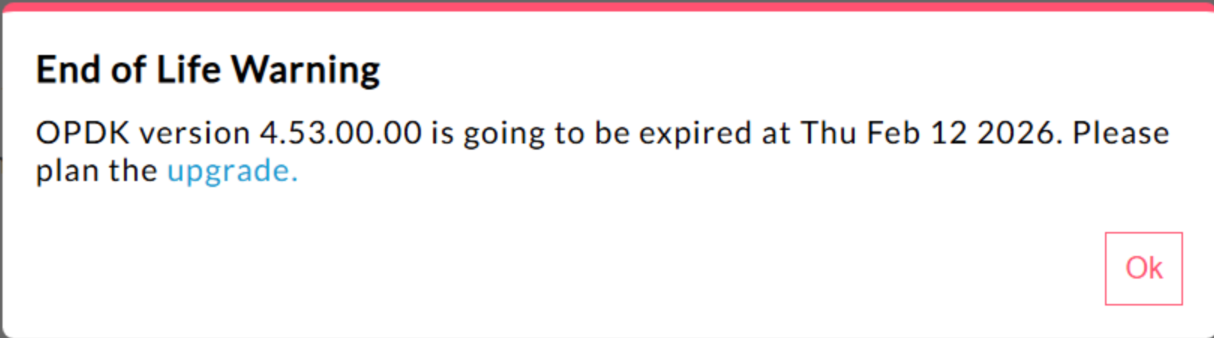
| Edge for Private Cloud 4.53.00 | 440148595: Kullanım Ömrü Sonu Pop-up Uyarısı Aşırı Sıklıkta Gösteriliyor
Edge for Private Cloud 4.53.00 ve sonraki sürümlerde kullanıcı arayüzünde "Kullanım Ömrü Sonu" (EOL) uyarı pop-up'ı gösterilir. Bu uyarı Kullanıcıların bu desteğin sonlandırılması uyarısını devre dışı bırakması veya sıklığını azaltması şu anda mümkün değildir. |
| Edge for Private Cloud 4.53.01 |
Java Açıklama Metinleri
Varsayılan sağlayıcı, FIPS'yi desteklemek için Bouncy Castle FIPS olarak değiştirildiğinden "BC" adını kullanarak Bouncy Castle kriptografi sağlayıcısını yüklemeye çalışan müşteri Java çağrıları başarısız olabilir. Kullanılacak yeni sağlayıcı adı "BCFIPS"'dir. |
| Edge for Private Cloud 4.53.00 |
Java Açıklama Metinleri
Varsayılan sağlayıcı, FIPS'yi desteklemek için Bouncy Castle FIPS olarak değiştirildiğinden "BC" adını kullanarak Bouncy Castle kriptografi sağlayıcısını yüklemeye çalışan müşteri Java çağrıları başarısız olabilir. Kullanılacak yeni sağlayıcı adı "BCFIPS"'dir. |
| Edge for Private Cloud 4.52.01 Mint güncellemesi |
Bu sorun yalnızca MINT kullanan veya Edge for Private Cloud yüklemelerinde MINT'i etkinleştirmiş olan kullanıcıları etkiler. Etkilenen bileşen: edge-message-processor Sorun: Para kazanmayı etkinleştirdiyseniz ve 4.52.01 sürümünü yeni yükleme olarak yüklüyorsanız veya önceki Özel Bulut sürümlerinden yükseltme yapıyorsanız ileti işlemcilerle ilgili bir sorunla karşılaşırsınız. Açık iş parçacığı sayısı kademeli olarak artar ve kaynak tükenmesine yol açar. Aşağıdaki istisna, edge-message-processor system.log dosyasında görülür: Error injecting constructor, java.lang.OutOfMemoryError: unable to create new native thread |
| Apigee HTTP/2 güvenlik açığı | Yakın zamanda, özel bulut için Apigee Edge de dahil olmak üzere HTTP/2 protokolünün birden fazla uygulamasında bir hizmet reddi (DoS) güvenlik açığı (CVE-2023-44487) keşfedildi. Bu güvenlik açığı, Apigee API yönetimi işlevinin hizmet reddine (DoS) yol açabilir. Daha fazla bilgi için Apigee Security Bulletin GCP-2023-032 başlıklı makaleyi inceleyin. Private Cloud için Edge yönlendirici ve yönetim sunucusu bileşenleri internete açık olduğundan güvenlik açığına karşı savunmasız olabilir. HTTP/2, Private Cloud için Edge'in Edge'e özgü diğer bileşenlerinin yönetim bağlantı noktasında etkinleştirilmiş olsa da bu bileşenlerin hiçbiri internete açık değildir. Cassandra, Zookeeper ve diğerleri gibi Edge dışı bileşenlerde HTTP/2 etkinleştirilmez. Edge for Private Cloud güvenlik açığını gidermek için aşağıdaki adımları uygulamanızı öneririz:
Edge Private Cloud 4.51.00.11 veya daha yeni sürümlerini kullanıyorsanız aşağıdaki adımları uygulayın:
Edge for Private Cloud'un 4.51.00.11'den eski sürümlerini kullanıyorsanız aşağıdaki adımları uygulayın:
|
| 4.52 sürümüne güncellerken Postgresql yükseltmesi | Apigee-postgresql, Edge for Private Cloud'un 4.50 veya 4.51 sürümünden 4.52 sürümüne yükseltmeyle ilgili sorunlar yaşıyor. Sorunlar genellikle tablo sayısı 500'den fazla olduğunda ortaya çıkar. Aşağıdaki SQL sorgusunu çalıştırarak Postgres'teki toplam tablo sayısını kontrol edebilirsiniz: select count(*) from information_schema.tables Geçici çözüm: Apigee Edge 4.50.00 veya 4.51.00'ı 4.52.00'a güncellerken, Apigee-postgresql'i yükseltmeden önce ön adımı uyguladığınızdan emin olun. |
| LDAP politikası | 149245401: LDAP kaynağı aracılığıyla yapılandırılan JNDI için LDAP bağlantı havuzu ayarları yansıtılmıyor ve JNDI varsayılanları her seferinde tek kullanımlık bağlantılara neden oluyor. Sonuç olarak, bağlantılar tek kullanımlık olarak her seferinde açılıp kapatılıyor ve LDAP sunucusuna saatte çok sayıda bağlantı oluşturuluyor. Geçici çözüm: LDAP bağlantı havuzu özelliklerini değiştirmek için tüm LDAP politikalarında genel bir değişiklik ayarlamak üzere aşağıdaki adımları uygulayın.
Bağlantı havuzu JNDI özelliklerinizin geçerli olduğunu doğrulamak için zaman içinde LDAP bağlantı havuzunun davranışını gözlemlemek üzere bir tcpdump gerçekleştirebilirsiniz. |
| Yüksek İstek İşleme Gecikmesi | 139051927: Mesaj İşleyici'de bulunan yüksek proxy işleme gecikmeleri tüm API proxy'lerini etkiliyor. Belirtiler arasında normal API yanıt sürelerine kıyasla 200-300 ms'lik işlem süresi gecikmeleri yer alır ve düşük TPS ile bile rastgele olarak ortaya çıkabilir. Bu durum, bir ileti işlemcisinin bağlantı kurduğu 50'den fazla hedef sunucu olduğunda ortaya çıkabilir. Temel neden: İleti işlemciler, hedef sunucu URL'sini hedef sunuculara giden bağlantılar için HTTPClient nesnesiyle eşleyen bir önbellek tutar. Bu ayar varsayılan olarak 50'ye ayarlanır. Bu değer çoğu dağıtım için çok düşük olabilir. Bir dağıtımda kurulumda birden fazla kuruluş/ortam kombinasyonu varsa ve toplamda 50'yi aşan sayıda hedef sunucu varsa hedef sunucu URL'leri önbellekten sürekli olarak çıkarılır ve bu da gecikmelere neden olur. Doğrulama: Hedef sunucu URL'sinin çıkarılmasının gecikme sorununa neden olup olmadığını belirlemek için Mesaj İşleyici'nin system.logs dosyasında "onEvict" veya "Eviction" anahtar kelimesini arayın. Bu anahtar kelimelerin günlüklerde bulunması, hedef sunucu URL'lerinin HTTPClient önbelleğinden çıkarıldığını gösterir. Bunun nedeni, önbellek boyutunun çok küçük olmasıdır. Geçici çözüm:
Edge for Private Cloud'un 19.01 ve 19.06 sürümlerinde HTTPClient önbelleğini düzenleyip yapılandırabilirsiniz. conf/http.properties+HTTPClient.dynamic.cache.elements.size=500 Ardından, ileti işlemcisini yeniden başlatın. Tüm ileti işlemcilerinde aynı değişiklikleri yapın. 500 değeri bir örnektir. Kurulumunuz için optimum değer, ileti işlemcisinin bağlanacağı hedef sunucu sayısından büyük olmalıdır. Bu özelliği daha yüksek bir değere ayarlamanın yan etkisi yoktur. Tek etkisi, mesaj işlemcisi proxy isteklerinin işlenme sürelerinin iyileşmesidir.
Not: Private Cloud için Edge 50.00 sürümünde varsayılan ayar 500'dür. |
| Anahtar/değer çifti eşlemeleri için birden fazla giriş | 157933959: Kuruluş veya ortam düzeyinde aynı anahtar/değer eşlemesine (KVM) eşzamanlı ekleme ve güncelleme işlemleri, verilerin tutarsız olmasına ve güncellemelerin kaybolmasına neden olur. Not: Bu sınırlama yalnızca Özel Bulut için Edge'de geçerlidir. Herkese açık bulut ve hibrit için Edge'de bu sınırlama yoktur. Edge for Private Cloud'da geçici çözüm olarak KVM'yi |