
Vous consultez la documentation Apigee Edge.
Accédez à la documentation Apigee X.
Les sections suivantes décrivent les problèmes connus liés à Apigee Edge et Edge for Private Cloud. Dans la plupart des cas, les problèmes répertoriés seront résolus dans une prochaine version.
Divers problèmes connus avec Edge
Les sections suivantes décrivent divers problèmes connus liés à Edge.
| Zone/Récapitulatif | Problèmes connus |
|---|---|
L'expiration du cache entraîne une valeur cachehit incorrecte |
Lorsque la variable de flux Solution:répétez la procédure (passez un deuxième appel) juste après le premier appel. |
Définir la règle InvalidateCache PurgeChildEntries sur "true" ne fonctionne pas correctement |
Définir Solution de contournement:utilisez la règle KeyValueMapOperations pour itérer la gestion des versions du cache et éviter d'avoir à invalider le cache. |
| Les requêtes de déploiement simultanés pour un flux SharedFlow ou un proxy d'API peuvent entraîner un état incohérent sur le serveur de gestion, où plusieurs révisions sont affichées comme étant déployées. |
Cela peut se produire, par exemple, en cas d'exécutions simultanées d'un pipeline de déploiement CI/CD qui exploitent des révisions différentes. Pour éviter ce problème, évitez de déployer des proxys d'API ou des flux SharedFlow avant la fin du déploiement actuel. Solution:Évitez les déploiements simultanés de proxys d'API ou de flux SharedFlow. |
| Les nombres d'appels d'API affichés dans Edge API Analytics peuvent contenir des données en double. |
L'API Analytics Edge peut parfois contenir des données en double pour les appels d'API. Dans ce cas, les totaux affichés pour les appels d'API dans Edge API Analytics sont supérieurs aux valeurs comparables affichées dans les outils d'analyse tiers. Solution:Exportez les données d'analyse et utilisez le champ gateway_flow_id pour dédupliquer les données. |
Problèmes connus avec l'interface utilisateur Edge
Les sections suivantes décrivent les problèmes connus liés à l'interface utilisateur Edge.
| Zone/Résumé | Problèmes connus |
|---|---|
| Impossible d'accéder à la page d'administration de la zone d'authentification unique Edge à partir de la barre de navigation une fois l'organisation associée à une zone d'identité |
Lorsque vous connectez une organisation à une zone d'identité, vous ne pouvez plus accéder à la page Administration des zones d'authentification unique d'Edge dans la barre de navigation de gauche en sélectionnant Administrateur > Authentification unique. Solution : accédez directement à la page à l'aide de l'URL suivante : https://apigee.com/sso |
| Configuration TLS de l'interface utilisateur Edge |
Les options Solution : suivez les étapes ci-dessous pour activer des algorithmes de chiffrement spécifiques pour l'interface utilisateur Edge :
|
Problèmes connus liés au portail intégré
Les sections suivantes décrivent les problèmes connus liés au portail intégré.
| Zone | Problèmes connus |
|---|---|
| SmartDocs |
|
| Fournisseur d'identité SAML | La déconnexion unique (SLO) avec le fournisseur d'identité SAML n'est pas disponible pour les domaines personnalisés. Pour activer un domaine personnalisé avec un fournisseur d'identité SAML, laissez le champ Sign-out URL (URL de déconnexion) vide lorsque vous configurez les paramètres SAML. |
| Administrateur de portail |
|
| Fonctionnalités du portail |
|
Problèmes connus avec Edge pour le cloud privé
Les sections suivantes décrivent les problèmes connus avec Edge pour le cloud privé.
| Quartier | Problèmes connus |
|---|---|
| Edge pour le cloud privé 4.53.01 |
Évaluation de la vulnérabilité NGINX (CVE-2026-42945)
Une vulnérabilité (CVE-2026-42945) a été divulguée et affecte le Impact sur Apigee Edge pour le cloud privé : Apigee Edge pour le cloud privé n'est pas affecté par cette vulnérabilité dans sa configuration par défaut. L'exploitabilité de CVE-2026-42945 dépend de modèles de configuration NGINX spécifiques, notamment de l'utilisation de la directive Action requise :
|
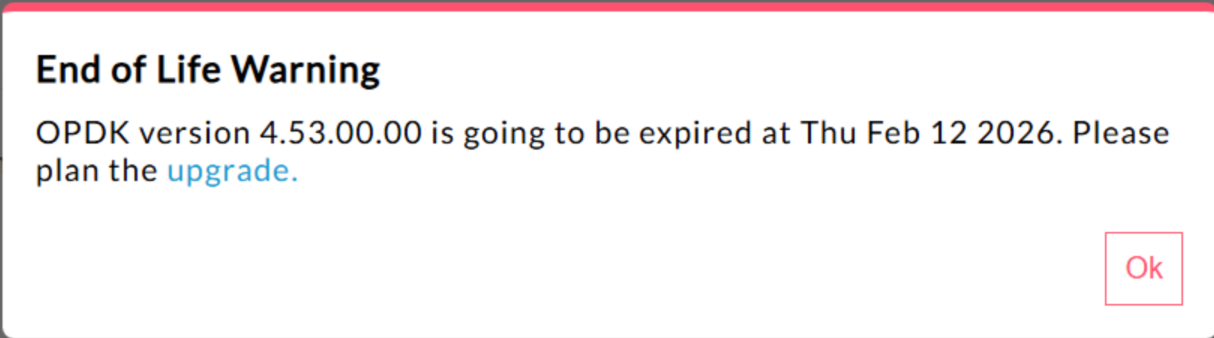
| Edge pour le cloud privé 4.53.00 | 440148595 : l'avertissement pop-up de fin de vie s'affiche de manière excessive
Dans Edge pour le cloud privé 4.53.00 et versions ultérieures, l'interface utilisateur affiche un
"pop-up d'avertissement de fin de vie" (EOL). Cet avertissement
s'affiche Aucune méthode n'est actuellement disponible pour que les utilisateurs désactivent ou réduisent la fréquence de cet avertissement de fin de vie. |
| Edge pour le cloud privé 4.53.01 |
Appels Java
Les appels Java client qui tentent de charger le fournisseur de chiffrement Bouncy Castle à l'aide du nom "BC" peuvent échouer, car le fournisseur par défaut a été remplacé par Bouncy Castle FIPS pour prendre en charge FIPS. Le nouveau nom de fournisseur à utiliser est "BCFIPS". |
| Edge pour le cloud privé 4.53.00 |
Appels Java
Les appels Java client qui tentent de charger le fournisseur de chiffrement Bouncy Castle à l'aide du nom "BC" peuvent échouer, car le fournisseur par défaut a été remplacé par Bouncy Castle FIPS pour prendre en charge FIPS. Le nouveau nom de fournisseur à utiliser est "BCFIPS". |
| Mise à jour Mint d'Edge pour le cloud privé 4.52.01 |
Ce problème ne concerne que les utilisateurs de MINT ou ceux qui ont activé MINT dans les installations Edge pour le cloud privé. Composant concerné : edge-message-processor Problème : si vous avez activé la monétisation et que vous installez la version 4.52.01 en tant que nouvelle installation ou que vous effectuez une mise à niveau à partir de versions antérieures du cloud privé, vous rencontrerez un problème avec les processeurs de messages. Le nombre de threads ouverts augmentera progressivement, ce qui entraînera une saturation des ressources. L'exception suivante s'affiche dans edge-message-processor system.log : Error injecting constructor, java.lang.OutOfMemoryError: unable to create new native thread |
| Vulnérabilité HTTP/2 d'Apigee | Une vulnérabilité par déni de service (DoS) a récemment été détectée dans plusieurs implémentations du protocole HTTP/2 (CVE-2023-44487), y compris dans Apigee Edge pour le cloud privé. La vulnérabilité pourrait entraîner un déni de service de la fonctionnalité de gestion d'API Apigee. Pour en savoir plus, consultez le bulletin de sécurité Apigee GCP-2023-032. Les composants du routeur et du serveur de gestion Edge for Private Cloud sont exposés sur Internet et peuvent être vulnérables. Bien que HTTP/2 soit activé sur le port de gestion d'autres composants propres à Edge de Edge pour Private Cloud, aucun de ces composants n'est exposé à Internet. Sur les composants autres que Edge, tels que Cassandra, Zookeeper et d'autres, HTTP/2 n'est pas activé. Nous vous recommandons de suivre les étapes ci-dessous pour résoudre la faille Edge pour le cloud privé :
Suivez ces étapes si vous utilisez les versions 4.51.00.11 ou ultérieures d'Edge pour le cloud privé :
Suivez ces étapes si vous utilisez des versions d'Edge pour le cloud privé antérieures à la version 4.51.00.11 :
|
| Mise à niveau de Postgresql lors du passage à la version 4.52 | Apigee-postgresql rencontre des problèmes lors de la mise à niveau d'Edge pour le cloud privé version 4.50 ou 4.51 vers la version 4.52. Les problèmes se produisent principalement lorsque le nombre de tables est supérieur à 500. Vous pouvez vérifier le nombre total de tables dans Postgres en exécutant la requête SQL ci-dessous : select count(*) from information_schema.tables Solution : lorsque vous mettez à jour Apigee Edge 4.50.00 ou 4.51.00 vers la version 4.52.00, veillez à effectuer l'étape préliminaire avant de mettre à niveau Apigee-postgresql. |
| Règle LDAP | 149245401 : les paramètres du pool de connexions LDAP pour JNDI configurés via la ressource LDAP ne sont pas reflétés, et les valeurs par défaut de JNDI entraînent des connexions à usage unique à chaque fois. Par conséquent, les connexions sont ouvertes et fermées à chaque fois pour un usage unique, ce qui crée un grand nombre de connexions par heure au serveur LDAP. Solution : Pour modifier les propriétés du pool de connexions LDAP, procédez comme suit pour définir une modification globale dans toutes les règles LDAP.
Pour vérifier que les propriétés JNDI de votre pool de connexions prennent effet, vous pouvez effectuer un tcpdump pour observer le comportement du pool de connexions LDAP au fil du temps. |
| Latence élevée du traitement des requêtes | 139051927 : les latences élevées du traitement des proxys détectées dans le processeur de messages affectent tous les proxys d'API. Les symptômes incluent des délais de 200 à 300 ms dans les temps de traitement par rapport aux temps de réponse normaux de l'API et peuvent se produire de manière aléatoire, même avec un faible nombre de TPS. Cela peut se produire lorsque le nombre de serveurs cibles auxquels un processeur de messages se connecte est supérieur à 50. Cause principale les processeurs de messages conservent un cache qui mappe l'URL du serveur cible à l'objet HTTPClient pour les connexions sortantes aux serveurs cibles. Par défaut, ce paramètre est défini sur 50, ce qui peut être trop faible pour la plupart des déploiements. Lorsqu'un déploiement comporte plusieurs combinaisons d'organisations/d'environnements dans une configuration, et qu'il comporte un grand nombre de serveurs cibles qui dépassent 50 au total, les URL des serveurs cibles sont constamment supprimées du cache, ce qui entraîne des latences. Validation : pour déterminer si la suppression de l'URL du serveur cible est à l'origine du problème de latence, recherchez le mot clé "onEvict" ou "Eviction" dans les journaux système du processeur de messages. Leur présence dans les journaux indique que les URL des serveurs cibles sont supprimées du cache HTTPClient, car la taille du cache est trop petite. Solution
: pour les versions 19.01 et 19.06 d'Edge pour le cloud privé, vous pouvez modifier et configurer le cache HTTPClient
: conf/http.properties+HTTPClient.dynamic.cache.elements.size=500 Redémarrez ensuite le processeur de messages. Effectuez les mêmes modifications pour tous les processeurs de messages. La valeur 500 est un exemple. La valeur optimale pour votre configuration doit être supérieure à le nombre de serveurs cibles auxquels le processeur de messages se connecte. La définition d'une valeur plus élevée pour cette propriété n'a aucun effet secondaire, et le seul effet serait une amélioration des temps de traitement des requêtes de proxy du processeur de messages.
Remarque : La version 50.00 d'Edge pour le cloud privé a le paramètre par défaut de 500. |
| Plusieurs entrées pour les mappages de clés-valeurs | 157933959 : les insertions et mises à jour simultanées dans le même mappage de clés-valeurs (KVM) limité au niveau de l'organisation ou de l'environnement entraînent des données incohérentes et des mises à jour perdues. Remarque : Cette limitation ne s'applique qu'à Edge pour le cloud privé. Edge pour le cloud public et Hybrid ne présentent pas cette limitation. Pour contourner ce problème dans Edge pour le cloud privé, créez le KVM au niveau du champ d'application
|