Anda melihat dokumentasi Apigee Edge.
Buka
dokumentasi Apigee X. info
Bagian berikut menjelaskan masalah umum yang diketahui terkait Apigee Edge dan Edge untuk Private Cloud. Pada umumnya, masalah yang tercantum akan diperbaiki pada rilis mendatang.
Masalah umum Edge lainnya
Bagian berikut menjelaskan berbagai masalah umum pada Edge.
| Area/Ringkasan | Masalah umum |
|---|---|
Masa berlaku cache berakhir sehingga menghasilkan nilai cachehit yang salah |
Saat variabel alur Solusi: Ulangi prosesnya (lakukan panggilan kedua) lagi tepat setelah panggilan pertama. |
Menetapkan Kebijakan InvalidateCache
PurgeChildEntries ke benar (true) tidak berfungsi dengan benar |
Menetapkan Solusi: Gunakan kebijakan KeyValueMapOperations untuk melakukan iterasi pembuatan versi cache dan mengabaikan kebutuhan untuk membatalkan validasi cache. |
| Permintaan deployment serentak untuk proxy SharedFlow atau API dapat mengakibatkan status yang tidak konsisten di Server Pengelolaan tempat beberapa revisi ditampilkan sebagai di-deploy. |
Hal ini dapat terjadi, misalnya, saat pipeline deployment CI/CD dijalankan secara serentak menggunakan revisi yang berbeda. Untuk menghindari masalah ini, jangan deploy proxy API atau SharedFlow sebelum deployment saat ini selesai. Solusi: Hindari deployment proxy API atau SharedFlow serentak. |
| Jumlah panggilan API yang ditampilkan di Edge API Analytics mungkin berisi data duplikat. |
Edge API Analytics terkadang dapat berisi data duplikat untuk panggilan API. Dalam hal ini, jumlah yang ditampilkan untuk panggilan API di Edge API Analytics lebih tinggi daripada nilai yang sebanding yang ditampilkan di alat analisis pihak ketiga. Solusi: Ekspor data analisis dan gunakan kolom gateway_flow_id untuk menghapus duplikat data. |
Masalah umum pada UI Edge
Bagian berikut menjelaskan masalah umum pada UI Edge.
| Area/Ringkasan | Masalah umum |
|---|---|
| Tidak dapat mengakses halaman Administrasi Zona SSO Edge dari menu navigasi setelah organisasi dipetakan ke zona identitas |
Saat Anda menghubungkan organisasi ke zona identitas, Anda tidak lagi dapat mengakses halaman Administrasi Zona SSO Edge dari menu navigasi kiri dengan memilih Admin > SSO. Solusi: Buka halaman secara langsung menggunakan URL berikut: https://apigee.com/sso |
| Konfigurasi TLS Edge UI |
Opsi Solusi: Ikuti langkah-langkah di bawah untuk mengaktifkan sandi tertentu untuk UI Edge:
|
Masalah umum pada portal terintegrasi
Bagian berikut menjelaskan masalah umum pada portal terintegrasi.
| Area | Masalah umum |
|---|---|
| SmartDocs |
|
| Penyedia identitas SAML | Single logout (SLO) dengan penyedia identitas SAML tidak didukung untuk domain kustom. Untuk mengaktifkan domain kustom dengan penyedia identitas SAML, biarkan kolom URL Logout kosong saat Anda mengonfigurasi setelan SAML. |
| Admin portal |
|
| Fitur portal |
|
Masalah umum terkait Edge untuk Private Cloud
Bagian berikut menjelaskan masalah umum pada Edge untuk Private Cloud.
| Area | Masalah umum |
|---|---|
| Edge untuk Private Cloud 4.53.01 |
Penilaian Kerentanan NGINX (CVE-2026-42945)
Kerentanan (CVE-2026-42945) telah diungkapkan yang memengaruhi Dampak pada Apigee Edge untuk Private Cloud: Apigee Edge untuk Private Cloud tidak terpengaruh oleh kerentanan ini dalam konfigurasi default yang dikirimkannya. Kemungkinan eksploitasi CVE-2026-42945 bergantung pada pola konfigurasi NGINX tertentu, terutama penggunaan direktif Tindakan Diperlukan:
|
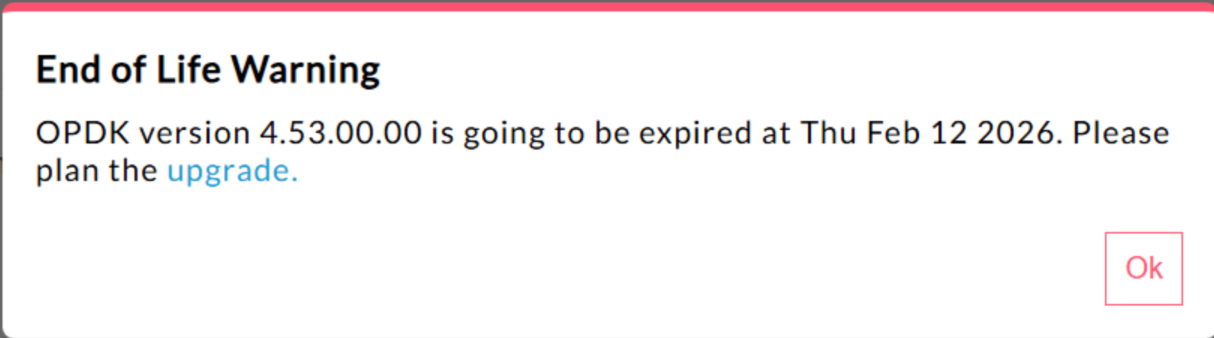
| Edge untuk Private Cloud 4.53.00 | 440148595: Peringatan Pop-up Akhir Masa Pakai Ditampilkan Secara Berlebihan
Di Edge untuk Private Cloud 4.53.00 dan yang lebih baru, UI menampilkan
pop-up peringatan"Akhir Siklus Proses" (EOL). Peringatan ini
muncul Saat ini tidak ada metode yang tersedia bagi pengguna untuk menonaktifkan atau mengurangi frekuensi peringatan EOL ini. |
| Edge untuk Private Cloud 4.53.01 |
Panggilan Java
Panggilan Java pelanggan yang mencoba memuat penyedia kriptografi Bouncy Castle menggunakan nama "BC" mungkin gagal karena penyedia default telah diubah menjadi Bouncy Castle FIPS untuk mendukung FIPS. Nama penyedia baru yang akan digunakan adalah "BCFIPS". |
| Edge untuk Private Cloud 4.53.00 |
Panggilan Java
Panggilan Java pelanggan yang mencoba memuat penyedia kriptografi Bouncy Castle menggunakan nama "BC" mungkin gagal karena penyedia default telah diubah menjadi Bouncy Castle FIPS untuk mendukung FIPS. Nama penyedia baru yang akan digunakan adalah "BCFIPS". |
| Update Mint Edge for Private Cloud 4.52.01 |
Masalah ini hanya memengaruhi pengguna yang menggunakan MINT atau telah mengaktifkan MINT di penginstalan Edge untuk Private Cloud. Komponen yang terpengaruh: edge-message-processor Masalah: Jika Anda mengaktifkan monetisasi dan menginstal 4.52.01 sebagai penginstalan baru atau mengupgrade dari versi Private Cloud sebelumnya, Anda akan mengalami masalah pada pemroses pesan. Jumlah thread terbuka akan meningkat secara bertahap yang menyebabkan kelelahan resource. Pengecualian berikut terlihat di system.log edge-message-processor: Error injecting constructor, java.lang.OutOfMemoryError: unable to create new native thread |
| Kerentanan HTTP/2 Apigee | Kerentanan Penolakan Layanan (DoS) baru-baru ini ditemukan di beberapa penerapan protokol HTTP/2 (CVE-2023-44487), termasuk di Apigee Edge untuk Private Cloud. Kerentanan ini dapat menyebabkan DoS pada fungsi pengelolaan API Apigee. Untuk mengetahui detail selengkapnya, lihat Buletin Keamanan Apigee GCP-2023-032. Komponen router dan server pengelolaan Edge untuk Private Cloud diekspos ke internet dan berpotensi rentan. Meskipun HTTP/2 diaktifkan di port pengelolaan komponen khusus Edge lainnya dari Edge untuk Private Cloud, tidak ada komponen tersebut yang diekspos ke internet. Di komponen non-Edge, seperti Cassandra, Zookeeper, dan lainnya, HTTP/2 tidak diaktifkan. Sebaiknya lakukan langkah-langkah berikut untuk mengatasi kerentanan Edge untuk Private Cloud:
Ikuti langkah-langkah berikut jika Anda menggunakan Edge Private Cloud versi 4.51.00.11 atau yang lebih baru:
Ikuti langkah-langkah berikut jika Anda menggunakan Edge for Private Cloud versi yang lebih lama dari 4.51.00.11:
|
| Upgrade Postgresql saat mengupdate ke versi 4.52 | Apigee-postgresql mengalami masalah saat mengupgrade dari Edge untuk Private Cloud versi 4.50 atau 4.51 ke versi 4.52. Masalah ini terutama terjadi jika jumlah tabel lebih dari 500. Anda dapat memeriksa jumlah total tabel di Postgres dengan menjalankan kueri SQL di bawah: select count(*) from information_schema.tables Solusi: Saat Mengupdate Apigee Edge 4.50.00 atau 4.51.00 ke 4.52.00, pastikan untuk melakukan langkah awal sebelum mengupgrade Apigee-postgresql. |
| Kebijakan LDAP | 149245401: Setelan kumpulan koneksi LDAP untuk JNDI yang dikonfigurasi melalui resource LDAP tidak tercermin, dan default JNDI menyebabkan koneksi sekali pakai setiap kali. Akibatnya, koneksi dibuka dan ditutup setiap kali untuk penggunaan tunggal, sehingga membuat banyak koneksi per jam ke server LDAP. Solusi: Untuk mengubah properti pool koneksi LDAP, lakukan langkah-langkah berikut untuk menetapkan perubahan global di semua kebijakan LDAP.
Untuk memverifikasi bahwa properti JNDI pool koneksi Anda diterapkan, Anda dapat melakukan tcpdump untuk mengamati perilaku pool koneksi LDAP dari waktu ke waktu. |
| Latensi Pemrosesan Permintaan Tinggi | 139051927: Latensi pemrosesan proxy yang tinggi ditemukan di Message Processor memengaruhi semua Proxy API. Gejalanya mencakup penundaan 200-300 md dalam waktu pemrosesan dibandingkan waktu respons API normal dan dapat terjadi secara acak meskipun dengan TPS rendah. Hal ini dapat terjadi jika ada lebih dari 50 server target yang terhubung ke pemroses pesan. Penyebab utama: Pemroses pesan menyimpan cache yang memetakan URL server target ke objek HTTPClient untuk koneksi keluar ke server target. Secara default, setelan ini ditetapkan ke 50 yang mungkin terlalu rendah untuk sebagian besar deployment. Jika deployment memiliki beberapa kombinasi org/env dalam penyiapan, dan memiliki sejumlah besar server target yang secara keseluruhan melebihi 50, URL server target akan terus dikeluarkan dari cache, sehingga menyebabkan latensi. Validasi: Untuk menentukan apakah pengusiran URL server target menyebabkan masalah latensi, telusuri Message Processor system.logs untuk kata kunci "onEvict" atau "Eviction". Keberadaannya dalam log menunjukkan bahwa URL server target dikeluarkan dari cache HTTPClient karena ukuran cache terlalu kecil. Solusi:
Untuk Edge for Private Cloud versi 19.01 dan 19.06, Anda dapat mengedit dan mengonfigurasi cache HTTPClient, conf/http.properties+HTTPClient.dynamic.cache.elements.size=500 Kemudian, mulai ulang pemroses pesan. Lakukan perubahan yang sama untuk semua pemroses pesan. Nilai 500 adalah contoh. Nilai optimal untuk penyiapan Anda harus lebih besar daripada jumlah server target yang akan dihubungkan oleh pemroses pesan. Tidak ada efek samping dari menyetel properti ini lebih tinggi, dan satu-satunya efeknya adalah peningkatan waktu pemrosesan permintaan proxy pemroses pesan.
Catatan: Edge untuk Private Cloud versi 50.00 memiliki setelan default 500. |
| Beberapa entri untuk peta nilai kunci | 157933959: Penyisipan dan update serentak ke peta nilai kunci (KVM) yang sama yang dicakup ke tingkat organisasi atau lingkungan menyebabkan data tidak konsisten dan update hilang. Catatan: Batasan ini hanya berlaku untuk Edge for Private Cloud. Edge for Public Cloud dan Hybrid tidak memiliki batasan ini. Untuk solusi sementara di Edge untuk Private Cloud, buat KVM di cakupan
|