شما در حال مشاهده مستندات Apigee Edge هستید.
به مستندات Apigee X مراجعه کنید . اطلاعات
بخشهای زیر مشکلات شناختهشدهی Apigee Edge و Edge for Private Cloud را شرح میدهند. در بیشتر موارد، مشکلات ذکر شده در نسخههای آینده برطرف خواهند شد.
مسائل مختلف Edge شناخته شده است
بخشهای زیر مشکلات متفرقه شناخته شده با Edge را توضیح میدهند.
| منطقه/خلاصه | مسائل شناخته شده |
|---|---|
انقضای کش منجر به مقدار cachehit نادرست می شود | هنگامی که متغیر جریان راه حل: بلافاصله پس از اولین تماس، فرآیند را تکرار کنید (تماس دوم را برقرار کنید). |
تنظیم InvalidateCache Policy PurgeChildEntries روی true به درستی کار نمی کند | تنظیم راه حل: از خط مشی KeyValueMapOperations برای تکرار نسخه کش و دور زدن نیاز به باطل کردن حافظه پنهان استفاده کنید. |
| درخواستهای استقرار همزمان برای یک پراکسی SharedFlow یا API میتواند منجر به یک وضعیت ناسازگار در سرور مدیریت شود که در آن چندین ویرایش بهعنوان مستقر نشان داده میشوند. | برای مثال، زمانی که اجرای همزمان یک خط لوله استقرار CI/CD با استفاده از تجدید نظرهای مختلف انجام می شود، ممکن است اتفاق بیفتد. برای جلوگیری از این مشکل، از استقرار پراکسی های API یا SharedFlows قبل از تکمیل استقرار فعلی خودداری کنید. راه حل: از استقرار پروکسی API یا SharedFlow همزمان خودداری کنید. |
| تعداد تماس های API نشان داده شده در Edge API Analytics ممکن است حاوی داده های تکراری باشد. | Edge API Analytics گاهی اوقات میتواند حاوی دادههای تکراری برای تماسهای API باشد. در آن صورت، تعداد نشان داده شده برای تماس های API در Edge API Analytics بیشتر از مقادیر قابل مقایسه نشان داده شده در ابزارهای تجزیه و تحلیل شخص ثالث است. راه حل: داده های تجزیه و تحلیل را صادر کنید و از فیلد gateway_flow_id برای حذف داده ها استفاده کنید. |
مشکلات شناختهشده با رابط کاربری اج
بخشهای زیر مشکلات شناختهشدهی رابط کاربری اج را شرح میدهند.
| منطقه/خلاصه | مشکلات شناخته شده |
|---|---|
| بعد از اینکه سازمان به یک منطقه هویتی نگاشت شد، نمیتوان از نوار ناوبری به صفحه مدیریت منطقه Edge SSO دسترسی پیدا کرد. | وقتی سازمانی را به یک منطقه شناسایی متصل میکنید ، دیگر نمیتوانید با انتخاب Admin > SSO از نوار ناوبری سمت چپ به صفحه مدیریت منطقه Edge SSO دسترسی پیدا کنید. راه حل: مستقیماً با استفاده از آدرس اینترنتی زیر به صفحه مورد نظر بروید: https://apigee.com/sso |
| پیکربندی TLS رابط کاربری Edge | گزینههای راه حل: برای فعال کردن رمزهای خاص برای رابط کاربری Edge، مراحل زیر را دنبال کنید:
|
مشکلات شناخته شده با پورتال یکپارچه
بخش های زیر مشکلات شناخته شده پورتال یکپارچه را شرح می دهد.
| منطقه | مسائل شناخته شده |
|---|---|
| SmartDocs |
|
| ارائه دهنده هویت SAML | خروج واحد (SLO) با ارائه دهنده هویت SAML برای دامنه های سفارشی پشتیبانی نمی شود. برای فعال کردن دامنه سفارشی با ارائهدهنده هویت SAML، هنگام پیکربندی تنظیمات SAML، فیلد URL خروج از سیستم را خالی بگذارید. |
| ادمین پورتال |
|
| ویژگی های پورتال |
|
مشکلات شناختهشده با Edge برای فضای ابری خصوصی
بخشهای زیر مشکلات شناختهشدهی Edge برای Private Cloud را شرح میدهند.
| مساحت | مشکلات شناخته شده |
|---|---|
| اج برای فضای ابری خصوصی ۴.۵۳.۰۱ | ارزیابی آسیبپذیری NGINX (CVE-2026-42945) یک آسیبپذیری ( CVE-2026-42945 ) که ماژول تأثیر بر Apigee Edge برای ابر خصوصی: Apigee Edge برای Private Cloud در پیکربندی پیشفرض و آمادهی خود تحت تأثیر این آسیبپذیری قرار نمیگیرد . قابلیت بهرهبرداری از CVE-2026-42945 به الگوهای خاص پیکربندی NGINX، بهویژه استفاده از دستورالعمل اقدام مورد نیاز:
|
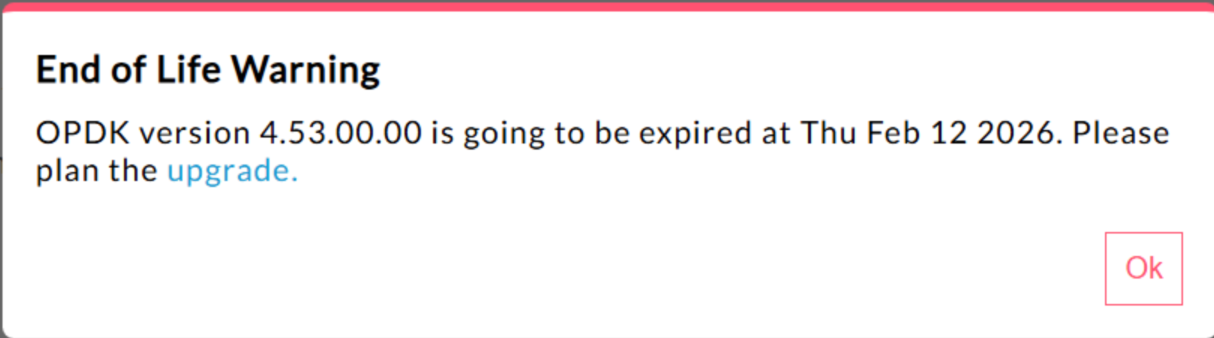
| لبه برای ابر خصوصی ۴.۵۳.۰۰ | ۴۴۰۱۴۸۵۹۵: هشدار پایان عمر بیش از حد نمایش داده میشود در Edge برای Private Cloud نسخه ۴.۵۳.۰۰ و بالاتر، رابط کاربری یک پنجره هشدار «پایان عمر» (EOL) نمایش میدهد. این هشدار ظاهر میشود. در حال حاضر هیچ روشی برای غیرفعال کردن یا کاهش دفعات نمایش این هشدار EOL برای کاربران وجود ندارد. |
| اج برای فضای ابری خصوصی ۴.۵۳.۰۱ | فراخوانیهای جاوا فراخوانیهای جاوای مشتری که سعی در بارگذاری ارائهدهنده رمزنگاری Bouncy Castle با استفاده از نام "BC" دارند، ممکن است با شکست مواجه شوند، زیرا ارائهدهنده پیشفرض برای پشتیبانی از FIPS به Bouncy Castle FIPS تغییر یافته است. نام ارائهدهنده جدید مورد استفاده "BCFIPS" است. |
| لبه برای ابر خصوصی ۴.۵۳.۰۰ | فراخوانیهای جاوا فراخوانیهای جاوای مشتری که سعی در بارگذاری ارائهدهنده رمزنگاری Bouncy Castle با استفاده از نام "BC" دارند، ممکن است با شکست مواجه شوند، زیرا ارائهدهنده پیشفرض برای پشتیبانی از FIPS به Bouncy Castle FIPS تغییر یافته است. نام ارائهدهنده جدید مورد استفاده "BCFIPS" است. |
| بهروزرسانی نسخه مینت برای Edge برای فضای ابری خصوصی ۴.۵۲.۰۱ | این مشکل فقط کسانی را تحت تأثیر قرار میدهد که از MINT استفاده میکنند یا MINT را در نصبهای Edge برای Private Cloud فعال کردهاند. مؤلفه آسیبدیده: پردازنده پیام لبه مشکل: اگر قابلیت کسب درآمد را فعال کردهاید و نسخه ۴.۵۲.۰۱ را به عنوان یک نصب جدید یا ارتقا از نسخههای قبلی Private Cloud نصب میکنید، با مشکلی در پردازندههای پیام مواجه خواهید شد. افزایش تدریجی تعداد رشتههای باز منجر به اتمام منابع میشود. استثنای زیر در edge-message-processor system.log مشاهده میشود: Error injecting constructor, java.lang.OutOfMemoryError: unable to create new native thread |
| آسیبپذیری HTTP/2 در Apigee | اخیراً یک آسیبپذیری انکار سرویس (DoS) در چندین پیادهسازی پروتکل HTTP/2 (CVE-2023-44487)، از جمله در Apigee Edge برای Private Cloud، کشف شده است. این آسیبپذیری میتواند منجر به DoS در عملکرد مدیریت API Apigee شود. برای جزئیات بیشتر، به بولتن امنیتی Apigee GCP-2023-032 مراجعه کنید. روتر و اجزای سرور مدیریت Edge for Private Cloud در معرض اینترنت هستند و میتوانند به طور بالقوه آسیبپذیر باشند. اگرچه HTTP/2 در پورت مدیریت سایر اجزای مخصوص Edge در Edge for Private Cloud فعال است، اما هیچ یک از این اجزا در معرض اینترنت نیستند. در اجزای غیر Edge، مانند Cassandra، Zookeeper و سایر موارد، HTTP/2 فعال نیست. توصیه میکنیم برای رفع آسیبپذیری Edge for Private Cloud مراحل زیر را انجام دهید:
اگر از نسخههای ۴.۵۱.۰۰.۱۱ یا جدیدتر Edge Private Cloud استفاده میکنید، این مراحل را دنبال کنید:
اگر از نسخههای قدیمیتر از ۴.۵۱.۰۰.۱۱ مرورگر اج برای فضای ابری خصوصی استفاده میکنید، این مراحل را دنبال کنید:
|
| ارتقاء Postgresql هنگام بهروزرسانی به نسخه ۴.۵۲ | Apigee-postgresql در ارتقاء از نسخه ۴.۵۰ یا ۴.۵۱ مرورگر Edge برای فضای ابری خصوصی به نسخه ۴.۵۲ با مشکل مواجه شده است. این مشکلات عمدتاً زمانی رخ میدهند که تعداد جداول بیشتر از ۵۰۰ باشد. شما میتوانید با اجرای کوئری SQL زیر، تعداد کل جداول موجود در Postgres را بررسی کنید: select count(*) from information_schema.tables راه حل: هنگام بهروزرسانی Apigee Edge از نسخههای ۴.۵۰.۰۰ یا ۴.۵۱.۰۰ به ۴.۵۲.۰۰ ، حتماً مرحله مقدماتی را قبل از بهروزرسانی Apigee-postgresql انجام دهید. |
| سیاست LDAP | ۱۴۹۲۴۵۴۰۱: تنظیمات مجموعه اتصال LDAP برای JNDI که از طریق منبع LDAP پیکربندی شده است، منعکس نمیشود و پیشفرضهای JNDI هر بار باعث ایجاد اتصالات تککاربره میشوند. در نتیجه، اتصالات هر بار برای یک بار استفاده باز و بسته میشوند و تعداد زیادی اتصال در ساعت به سرور LDAP ایجاد میکنند. راه حل: برای تغییر ویژگیهای مجموعه اتصال LDAP، مراحل زیر را برای اعمال یک تغییر سراسری در تمام سیاستهای LDAP انجام دهید.
برای تأیید اینکه ویژگیهای JNDI مربوط به connection pool شما فعال هستند، میتوانید یک tcpdump اجرا کنید تا رفتار connection pool LDAP را در طول زمان مشاهده کنید. |
| تأخیر بالای پردازش درخواستها | ۱۳۹۰۵۱۹۲۷: تأخیر بالای پردازش پروکسی که در پردازشگر پیام یافت میشود، بر همه پروکسیهای API تأثیر میگذارد. علائم شامل تأخیر ۲۰۰ تا ۳۰۰ میلیثانیهای در زمان پردازش نسبت به زمان پاسخگویی معمول API است و میتواند به طور تصادفی حتی با TPS پایین نیز رخ دهد. این میتواند زمانی رخ دهد که بیش از ۵۰ سرور هدف وجود داشته باشد که پردازشگر پیام در آنها ارتباط برقرار میکند. علت ریشهای: پردازندههای پیام، یک حافظه پنهان (cache) را نگه میدارند که URL سرور هدف را برای اتصالات خروجی به سرورهای هدف، به شیء HTTPClient نگاشت میکند. به طور پیشفرض، این تنظیم روی ۵۰ تنظیم شده است که ممکن است برای اکثر پیادهسازیها خیلی کم باشد. هنگامی که یک پیادهسازی دارای چندین ترکیب org/env در یک راهاندازی است و تعداد زیادی سرور هدف دارد که در مجموع از ۵۰ تجاوز میکنند، URLهای سرور هدف مرتباً از حافظه پنهان (cache) حذف میشوند و باعث تأخیر میشوند. اعتبارسنجی: برای تعیین اینکه آیا حذف URL سرور هدف باعث مشکل تأخیر میشود یا خیر، در سیستم پردازشگر پیام system.logs کلمات کلیدی "onEvict" یا "Eviction" را جستجو کنید. وجود آنها در گزارشها نشان میدهد که URL های سرور هدف از حافظه پنهان HTTPClient حذف میشوند زیرا اندازه حافظه پنهان بسیار کوچک است. راه حل: برای نسخههای ۱۹.۰۱ و ۱۹.۰۶ مرورگر اج برای فضای ابری خصوصی، میتوانید کش HTTPClient را ویرایش و پیکربندی کنید، conf/http.properties+HTTPClient.dynamic.cache.elements.size=500 سپس پردازشگر پیام را مجدداً راهاندازی کنید. همین تغییرات را برای همه پردازشگرهای پیام اعمال کنید. مقدار ۵۰۰ یک مثال است. مقدار بهینه برای تنظیمات شما باید بیشتر از تعداد سرورهای هدفی باشد که پردازنده پیام به آنها متصل میشود. هیچ عارضه جانبی از تنظیم این ویژگی بالاتر وجود ندارد و تنها تأثیر آن بهبود زمان پردازش درخواست پروکسی پردازنده پیام خواهد بود. توجه: نسخه ۵۰.۰۰ مرورگر اج برای فضای ابری خصوصی، تنظیمات پیشفرض ۵۰۰ را دارد. |
| ورودیهای چندگانه برای نقشههای ارزش کلیدی | ۱۵۷۹۳۳۹۵۹: درج و بهروزرسانی همزمان در یک نقشه ارزش کلیدی (KVM) که در سطح سازمان یا محیط قرار دارد، باعث دادههای متناقض و از دست رفتن بهروزرسانیها میشود. توجه: این محدودیت فقط برای Edge برای Private Cloud اعمال میشود. Edge برای Public Cloud و Hybrid این محدودیت را ندارند. برای یک راه حل موقت در Edge برای Private Cloud، KVM را در محدوده |